How to Integrate a Payment Gateway in WordPress (Complete Guide + Troubleshooting)

Modern eCommerce platforms treat payments as core infrastructure. For any online business, how customers complete transactions directly impacts revenue, trust, and long-term growth. A poorly configured checkout can cause abandoned carts, failed transactions, and frustrated buyers.

That’s why WordPress payment gateway integration is not just a technical task. It’s a strategic decision that affects conversion rates, security, and scalability, often requiring WooCommerce development services to build a stable and scalable checkout system.

Businesses today can choose between hosted processors, on-site integrations, or even custom payment gateway development, depending on their operational needs. Each approach influences compliance requirements, customer experience, and system complexity. If you’re building a broader ecommerce system, this omnichannel ecommerce strategy guide explains how payment systems fit into a unified customer experience.

When payment systems fail, whether due to timeouts, false declines, or WordPress checkout issues, revenue loss compounds quickly. This guide explains how payment gateways work in WordPress, how to implement them correctly, and how to troubleshoot common problems before they impact your business.

Types of Payment Gateways Supported by WordPress

Selecting the proper integration method is the first step before you look at specific providers. You must decide whether to keep data off-site to improve compliance or to keep users on-site for a better brand experience.

This fundamental choice shapes your security posture and conversion rates just as it does for major eCommerce platforms. Understanding these architectures is essential when you plan your WP payment gateway strategy.

1. Hosted Payment Gateways

Hosted payment gateways manage the transaction process by directing the customer away from your WP payment gateway interface to a secure processor page. You simply redirect the user to a trusted environment where they enter their details, then return to your success page.

Major platforms initially relied on external processors to build consumer confidence during the early internet era. You can use the same strategy to reassure cautious buyers who prefer entering their data on a familiar URL, such as PayPal, rather than an unknown store. This method reduces your security burden since the processor handles sensitive data.

Trust plays a decisive role in checkout completion. Around 17% of online shoppers abandon purchases because they don’t trust the site with their payment information, making recognizable payment brands an important confidence signal.

Benefits:

  • Lower security responsibility
  • Faster setup
  • Trusted external payment pages
  • Reduced PCI compliance scope

2. On-Site Direct Payment Gateways

On-site gateways allow customers to enter credit card information directly on your WordPress payment module without leaving the checkout page. You create a seamless experience that generally leads to higher conversion rates and a more professional feel for your brand.

Seamless checkout experiences are especially important on mobile devices, which now account for more than 60% of global eCommerce traffic. Optimized on-site payments help prevent abandonment during mobile transactions.

Replicate the friction-free checkout of modern apps. Leading tech companies use invisible payments to remove barriers between users and services. You can implement similar direct integrations using APIs that serve as digital bridges, often powered by custom API integration services to ensure secure and seamless communication between systems. This gives you complete control over the authorization flow while modern tokenization ensures raw data never touches your server.

Benefits:

  • Higher conversion rates
  • Better user experience
  • Full control over checkout design
  • Support for subscriptions and advanced billing

Best Payment Gateways for WordPress in 2026

Here are some of the popular payment gateways that you can leverage for a WordPress website.

1. WooPayments WooCommerce Payments

This native solution lets you manage payments and disputes directly from your dashboard without requiring external logins. You get support for multicurrency transactions and digital wallets like Apple Pay, which simplifies the buying process.

2. Stripe

Stripe is a developer-friendly platform known for its flexibility and extensive ecosystem for businesses that prioritize analytics. You can use its optimized checkout suite to dynamically display local payment methods based on the user’s location.

3. PayPal

PayPal remains essential for building buyer trust as one of the most recognized payment brands globally. You can now use modern integrations that offer bright buttons to keep customers on your site rather than relying on older redirect methods.

4. Square

Square is an ideal choice if you are an omnichannel retailer selling both online and in physical locations. You can synchronize inventory and payments between your online store and your physical point-of-sale systems in real time.

5. Authorize.Net

Operated by Visa, this gateway is favored by established businesses requiring enterprise-grade infrastructure. You get an advanced fraud detection suite and robust support for recurring billing, which is vital for subscription models.

Offering multiple payment methods is increasingly critical. Digital wallets alone now account for over over 50% of global eCommerce transactions, reflecting changing consumer preferences toward faster and more secure payment options.

Prerequisites Before Integrating a Payment Gateway

A successful payment integration often requires adjustments to themes, checkout flows, and server configurations. Businesses without technical expertise frequently rely on professional WordPress development services to ensure gateways are implemented securely, perform reliably under load, and remain compatible with future platform updates.

1. WordPress and Hosting Requirements

You must ensure your server environment meets specific security standards before installing any plugins. This prevents technical conflicts and ensures your WordPress payment module functions correctly.

SSL Certificate HTTPS

An active SSL certificate is mandatory to encrypt sensitive data, as most gateways refuse unsecured connections. Banks use encryption to signal safety immediately. You prevent browsers from flagging your site as Not Secure, which destroys customer confidence and increases abandonment.
Server and Caching Configuration

Your environment must run on recent PHP versions and explicitly exclude dynamic pages, such as the Cart, from caching to ensure session integrity. High-traffic retailers use strict session management to ensure cart accuracy. You must apply similar rules to your WooCommerce payment gateway troubleshooting checklist to prevent errors that cause customers to see empty carts.

2. Payment Gateway Account Setup

API Credentials and Webhooks

You need distinct API keys for testing and live environments, while configuring webhooks ensures your site receives automated payment updates. Fintech platforms rely on real-time synchronization. You can use webhooks to ensure your dashboard reflects fund status immediately without manual intervention.

3. Legal and Compliance Essentials

PCI Compliance and Tokenization

You must never store raw credit card data in your database. Instead, you should rely on tokenization to replace sensitive details with secure tokens. Modern providers keep data off your servers entirely. You can adopt this architecture to reduce your security scope while offering a seamless checkout experience.

Methods to Integrate Payment Gateway in WordPress

Choosing the correct integration method depends heavily on your scale. eCommerce stores generally require robust carts while service providers benefit from lightweight forms to reduce technical overhead.

Using WooCommerce (Recommended for Online Stores)

Integrating via WooCommerce remains the industry standard because it provides a structured framework for handling orders. This approach offers a stable foundation that scales from a single product to thousands without requiring custom code

1. Plugin-Based Integration

This method involves installing pre-built extensions to connect stores to processors instantly. It serves as an ideal entry point for startups processing moderate volumes due to the low technical barrier.

Businesses use plugin marketplaces to add complex features without development time. Using pre-built extensions allows early-stage companies to launch rapidly and focus resources on marketing rather than infrastructure.

Advantages:

  • Minimal technical expertise required
  • Fast deployment
  • Reliable updates
  • Compatibility with WooCommerce

2. WooPayments Native Integration

The official all-in-one solution is built directly into the dashboard to streamline operations. This architecture eliminates the need to toggle between third-party dashboards by keeping payments and disputes within the WordPress interface.

Major platforms centralize tools to reduce friction. Adopting native integration mirrors this efficiency by centralizing financial operations in a single view, reducing administrative time and potential errors.

3. Checkout Blocks Modern Architecture

Newer implementations use React-based Checkout Blocks to deliver a conversion-optimized experience. Integrating payment methods here ensures full compatibility with mobile-responsive themes.

Social apps refine interfaces for mobile fluidity. Leveraging React-based blocks brings the same level of seamless interaction to the checkout process, providing mobile users with a zero-friction experience.

Using Payment Plugins Without WooCommerce

1. WP Simple Pay

Designed for direct payments, this plugin allows site owners to embed Stripe forms anywhere on their site. It supports recurring payments without the overhead of a complete platform, making deployment faster.

2. WPForms Payments

This solution combines form building with payment collection to create seamless lead-to-payment flows. It proves highly effective for collecting application fees or donations directly within a contact form.

Custom Integration Using APIs

1. Direct API Communication

A custom API integration allows businesses to connect directly with gateways to access cost-plus pricing, often supported by custom API integration services for better control and flexibility. This connection grants access to data optimization, which can save thousands in interchange fees.

2. Control vs. Maintenance

While APIs offer unlimited customization,n they place the burden of security updates entirely on the development team. Organizations must weigh the benefits of total control against the ongoing cost of compliance management.

Step-by-Step Guide to Integrate Payment Gateway in WordPress

Integrating a payment gateway involves selecting the provider, installing the plugin, and configuring API credentials. You must ensure that security standards, such as PCI compliance, are met to process financial data safely.
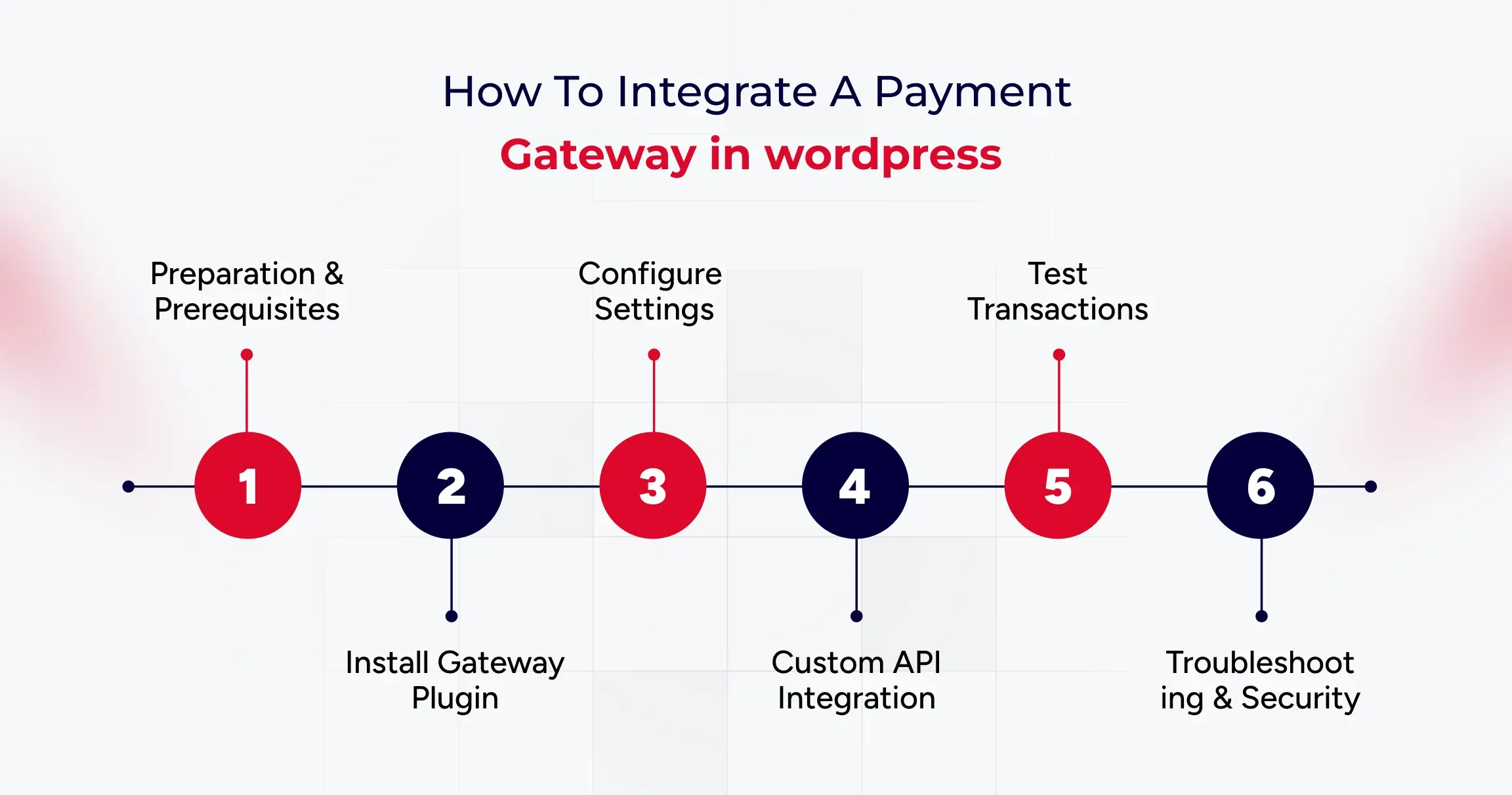
Step 1: Preparation and Prerequisites

Before installing software, you must ensure your host is secure. An active SSL certificate is mandatory, as browsers flag non-HTTPS sites as Not Secure, which undermines user trust immediately. You also need a server running PHP 7.4 or higher to support secure communication with gateway APIs.

Step 2: Installing the Gateway Plugin

WooCommerce manages payments through extensions. You navigate to Plugins in your dashboard to search for your provider,r such as WooPayments or Stripe. Installing the official plugin ensures stability and compatibility with the core platform.

Step 3: Configuring Standard Plugins

Native solutions connect your store directly to the processor within the dashboard. You simply click Connect to link your account, or paste API keys for developer-friendly options like Stripe. You must also configure webhooks to ensure your store receivesreal-timee updates for events like refunds.

Step 4: Implementing Custom APIs

High-volume merchants often build custom integrations by extending the WC Payment Gateway class. This allows you to implement bespoke logic and access cost-plus pricing, which is not available in standard plugins.

Step 5: Testing the Integration

You must switch your plugin to Sandbox mode and use dummy card numbers provided by the gateway to verify that orders transition from Pending to Processing correctly.

Step 6: Troubleshooting and Security

If orders remain Pending after payment, your firewall might be blocking webhooks. You must allow gateway endpoints to ensure communication. Additionally, you should use tokenization to keep raw card data off your server to meet SAQ A compliance, along with quality assurance testing services to identify and resolve transaction-related issues early.

Common Payment Gateway Errors in WordPress and How to Fix Them

Here are some common payment gateway errors you can fix to ensure a seamless user experience.

1. Payment Declined or Failed Transactions

Transactions often fail due to mismatched API credentials or server communication timeouts, which are usually indicated by cURL Error 28. Verifying Live versus Test keys and upgrading server libraries ensures seamless connectivity between the store and the processor.

Cloud providers such as AWS utilize automated health checks to detect connection failures instantly. Adopting similar monitoring for API responses helps prevent revenue loss from silent authentication errors or server timeouts.

2. SSL or HTTPS Errors

Gateways reject connections from sites that lack valid SSL certificates or support modern TLS protocols. Ensuring the site is served over HTTPS with TLS 1.2 ensures that sensitive data remains encrypted during the handshake.

Financial institutions automatically terminate connections that do not meet encryption standards. Implementing strict SSL protocols mirrors this security posture, protecting customer data from interception.

3. Webhook Errors

Orders remaining in Pending status typically indicate that a firewall is blocking webhook callbacks. Allowing gateway IP addresses enables external services to communicate payment success statuses back to the WordPress database.

Apps like Slack rely on open channels to deliver messages instantly. Configuring firewalls to accept gateway signals ensures that order dashboards reflect actual payment statuses without manual refreshes.

4. Checkout Page Not Loading

Aggressive caching of dynamic pages often leads to broken checkout experiences or empty carts. Excluding specific endpoints, such as Cart and My Account, from the caching rules ensures that every session remains unique and functional.

Retail giants like Amazon dynamically render shopping carts to ensure inventory accuracy. Disabling cache for transactional pages prevents users from seeing outdated content and reduces cart abandonment.
Tips to Secure Your WordPress Payment Gateway

Payment systems are not a one-time setup. Plugins, APIs, and security protocols evolve continuously, making regular updates essential. Many businesses use ongoing website maintenance services to monitor performance, apply patches, and prevent disruptions that could affect transactions or customer trust.

Here are some valuable tips to help you secure WordPress payment gateway integrations.

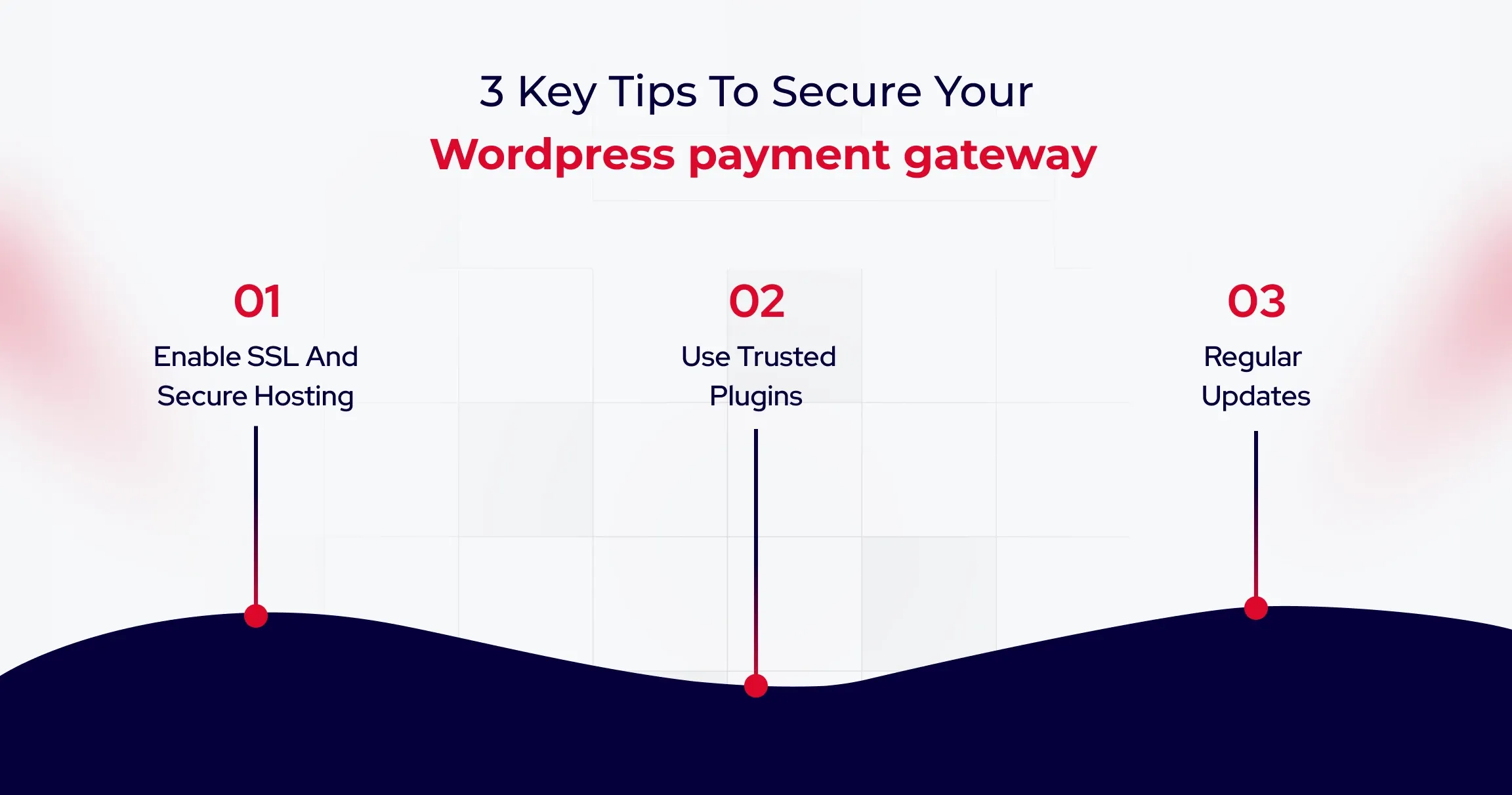
1. Enable SSL and Secure Hosting

An active SSL certificate is mandatory for any website handling payments. It encrypts data, ensuring that malicious actors cannot intercept sensitive information like credit card numbers.

Banks use encryption to signal safety immediately upon user arrival. You must prevent browsers from flagging your site as Not Secure, which destroys customer trust and prevents gateways from functioning.

Because payment processing involves sensitive financial data, advanced protections such as firewalls, malware scanning, and intrusion detection are critical. Companies handling significant transaction volumes often implement dedicated WordPress security services to reduce vulnerabilities and maintain compliance standards.

2. Use Trusted Plugins and Tokenization

You should only install plugins from verified sources and ensure they utilize tokenization. This process replaces sensitive data with a secure token, ensuring raw credit card details never touch your database. Modern SaaS providers keep data offsite to reduce compliance burdens. You can significantly lower your risk profile by adopting this architecture and avoiding SAQ D-level scrutiny.

3. Regular Updates and Two Factor Authentication

Outdated software is a common entry point for attackers. You must enforce strong passwords and implement Two Factor Authentication to protect administrative accounts from compromise. Corporate IT departments enforce strict access protocols to prevent unauthorized logins. You should restrict administrative access to only essential team members to reduce your attack surface.
Best Practices for Optimizing Payment Experience

Here are the best practices you can use to optimize eCommerce payment experience.

1. Reduce Checkout Steps

A complicated process is the primary cause of abandonment. To improve conversions further, you can explore AI A/B testing tools for WordPress to optimize checkout performance using real user data. To maximize conversions, you must minimize the number of form fields and implement Guest Checkout to reduce friction. Major retailers removed the requirement to create an account to speed up transactions. You can capture more revenue by allowing users to purchase without the hassle of registration.

2. Offer that lacks Payment Options.

Customer support expects to be paid using their preferred method, including digital wallets, which helps customers significantly increase their order value. International platforms optimize payment methods based on user location. You can increase conversion rates by offering local payment options such as UPI or iDEAL alongside standard credit cards.

3. Mobile Friendly Design

Your checkout experience must be fully responsive. Elements should automatically adapt to smaller screens, ensuring that input fields are large enough to tap easily. Mobile-first platforms prioritize touch-friendly interfaces to keep users engaged. You should use express payment buttons to enable one-tap purchases without entering card numbers.

As eCommerce continues to evolve, payment systems are no longer just technical components but critical business infrastructure that directly influences trust, conversion rates, and long-term customer retention.

Wrapping Up

Integrating a payment gateway in WordPress isn’t a technical checkbox. It’s a revenue decision that compounds with every transaction. The difference between payment systems that enable growth and those that constrain it isn’t the gateway you choose, but how you architect the integration. Businesses that scale efficiently often rely on white-label WordPress development services to build and manage complex payment systems without increasing internal workload.

Successful implementations treat payments as core infrastructure: prioritize SSL encryption, enforce tokenization, configure webhooks for real-time updates, and test rigorously before going live. Every day your payment architecture introduces friction is a day where competitors with seamless checkouts capture customers who started their journey on your site.

Start by auditing your current integration against the security and performance benchmarks outlined in this guide, then optimize systematically to transform checkout from a necessary evil into a competitive advantage.
Omnichannel eCommerce: Syncing Web, Mobile & Email for B2B

Customers nowadays don’t shop in straight lines. They jump between devices, platforms, and touchpoints. A product might be discovered on social media, researched on a laptop, compared in a mobile app, and finally purchased in-store or through a website. For modern brands, this behaviour isn’t the exception anymore.

That’s exactly why omnichannel eCommerce has moved from being a competitive advantage to a business necessity.

Most businesses already operate across multiple channels that include websites, marketplaces, mobile apps, email campaigns, social platforms, and even have a physical presence. But being present everywhere isn’t the same as being connected everywhere. When these channels operate in silos, customers feel the friction and businesses feel the gap.

Omnichannel eCommerce changes that dynamic by unifying every interaction into one continuous experience. Instead of treating each channel as a standalone sales point, omnichannel creates a single, connected journey where customer data, inventory visibility, pricing, and engagement move seamlessly together. Whether a buyer starts browsing on Instagram or checks availability in-store before completing a purchase on their phone, every step feels intentional, personalized, and consistent.

This shift is especially critical for organizations building a modern B2B eCommerce strategy. Today’s B2B buyers behave more like B2C consumers; they expect instant access to product information, flexible purchasing options, and personalized experiences across digital touchpoints.

At its core, omnichannel eCommerce isn’t just about selling on more platforms. It’s about creating meaningful connections between systems, teams, and customers. It empowers brands to deliver relevance at scale, reduce operational friction, and respond faster to changing buyer behaviour. More importantly, it turns scattered interactions into a cohesive brand experience.

What Is Omnichannel eCommerce?

Omnichannel eCommerce is about creating one connected shopping journey across every customer touchpoint. Instead of treating your website, social media, mobile apps, marketplaces, and physical stores as separate channels, omnichannel eCommerce solutions unify them into a single experience where data, interactions, and transactions flow seamlessly.

This means a customer can discover a product on social media, check availability on your website, visit a store, and complete the purchase later on their phone without losing context along the way. Every interaction builds on the previous one, supported by shared customer data, consistent pricing, and personalized engagement.

Unlike multichannel selling, omnichannel ensures continuity rather than fragmentation. For businesses, this connectivity unlocks real operational value. The benefits of B2B eCommerce become clearer through improved buyer visibility, faster ordering, personalized pricing, and streamlined procurement workflows.

Ultimately, omnichannel eCommerce aligns your systems with modern buying behaviour, reducing friction, improving engagement, and turning disconnected touchpoints into a cohesive growth engine.

A seamless omnichannel experience begins with a scalable digital foundation. Businesses often invest in custom wordpress website development to build platforms capable of handling real-time integrations, personalized pricing, and complex B2B workflows across devices and touchpoints.

What Is The Difference Between Omnichannel and Multichannel?

At first glance, omnichannel and multichannel eCommerce appear similar. Both involve selling across multiple platforms. But the similarity ends there.

Multichannel simply means your business operates on more than one channel, which includes your website, marketplaces, social media, or mobile apps. Each channel functions independently. Pricing may vary. Customer data lives in silos. Messaging can feel inconsistent. From the buyer’s perspective, every interaction feels separate, often forcing them to restart their journey each time they switch platforms.

Omnichannel takes a fundamentally different approach.

With omnichannel eCommerce solutions, every channel is connected through shared data and unified systems. Customer preferences follow them from platform to platform. Product availability updates in real time. Branding, pricing, and communication remain consistent. The result is one continuous experience rather than a collection of disconnected touchpoints.

This distinction becomes especially important when shaping a modern B2B eCommerce strategy. Business buyers expect continuity across research, ordering, and post-purchase support. Omnichannel enables that flow, while multichannel merely provides options.

Multichannel uses multiple independent sales channels, while omnichannel integrates all channels into a single connected system with shared data and consistent customer experiences.

 Multichannel eCommerce Vs Omnichannel eCommerce

Aspect Multichannel eCommerce Omnichannel eCommerce
Core Approach Uses multiple sales channels independently Connects all channels into one unified experience
Customer Journey Fragmented; customers restart when switching platforms Seamless; every interaction builds on the previous one
Data Management Information stored in silos across platforms Centralized customer, product, and order data
Branding & Messaging Often inconsistent across channels Consistent branding, pricing, and communication everywhere
Inventory Visibility Limited or channel-specific Real-time inventory across all touchpoints
Personalisation Basic or isolated to individual channels Advanced personalization powered by shared customer insights
Operational Efficiency Requires manual coordination between systems Automated workflows reduce admin effort
Support Experience Separate service records per channel Single customer view for faster, better support
Suitability for B2B Limited scalability for complex buying journeys Ideal foundation for a modern B2B eCommerce strategy
Business Impact Increases reach but adds complexity Improves engagement, loyalty, and long-term growth

Key Benefits of Omnichannel eCommerce for B2B Businesses

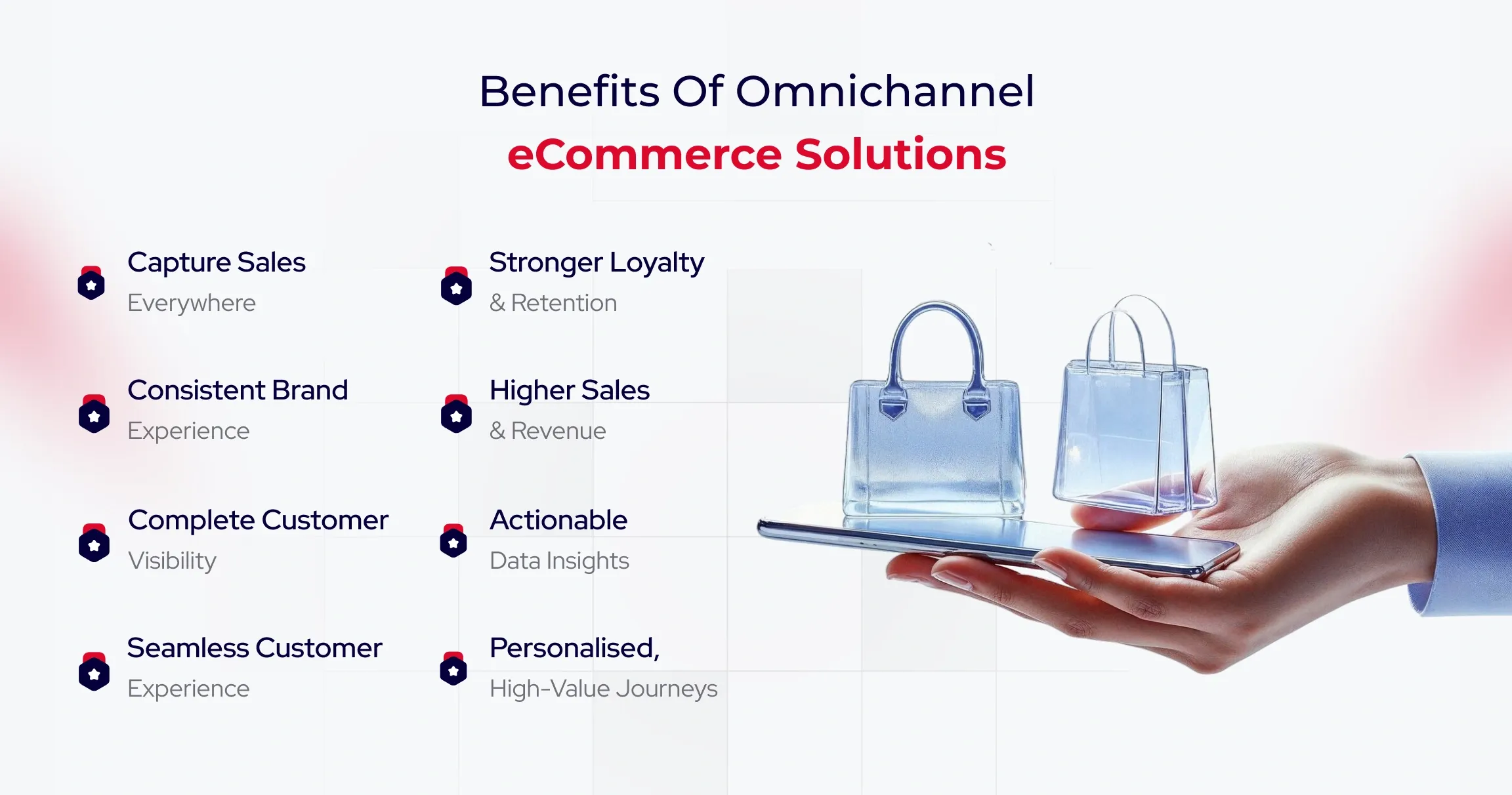
When executed well, omnichannel commerce delivers measurable gains across customer experience, operational efficiency, and revenue. Modern omnichannel eCommerce solutions transform fragmented touchpoints into a unified ecosystem, helping businesses serve customers better while building a scalable digital foundation. Here’s how.

Capture Every Sales Opportunity

Omnichannel commerce enables businesses to meet demand wherever it appears. By connecting inventory across locations and digital channels, organizations gain real-time product visibility. Customers can browse online, check availability in-store, and complete purchases from any device without friction. This ability to say “yes” at every buying moment reduces lost sales and increases conversion rates.

Why is it needed?

Customers don’t wait. If a product isn’t available in their preferred channel, they move on. Omnichannel commerce connects inventory across locations and platforms, giving real-time visibility into stock levels. This allows businesses to fulfil demand instantly, whether purchases happen online, in-store, or through mobile, which helps reduce lost sales and improves conversion rates.

Deliver a Consistent and Cohesive Brand Experience

Customers expect continuity. Omnichannel ensures consistent messaging, pricing, and brand tone across websites, marketplaces, social platforms, and physical stores. Every interaction feels intentional rather than disconnected, strengthening trust and removing confusion caused by mismatched offers or policies.

Why is it needed?

Inconsistent messaging, pricing, or promotions create confusion and erode trust. Omnichannel ensures customers receive the same experience across websites, marketplaces, social platforms, and physical stores. This consistency strengthens brand credibility while eliminating friction caused by disconnected systems.

Gain a Complete View of the Customer Journey

By merging data from every channel, businesses unlock deeper insight into how customers discover products, switch platforms, and make purchase decisions. This holistic visibility reveals drop-off points, high-performing touchpoints, and engagement patterns, enabling teams to optimize experiences with precision instead of guesswork.

Why is it needed?

Without unified data, businesses see only fragments of buyer behaviour. Omnichannel consolidates touchpoints into a single customer view, revealing how people browse, switch channels, and convert. These insights help teams optimize experiences, reduce drop-offs, and make informed decisions backed by real behaviour.

Create Personalised Experiences That Drive Higher Value

A unified customer profile allows brands to tailor recommendations, promotions, and messaging based on real behaviour and preferences. These personalized interactions increase engagement, lift average order value, and encourage repeat purchases. For organizations refining their B2B eCommerce strategy, this also supports account-based pricing, customised catalogues, and streamlined reordering.

Deliver a Superior Customer Experience

Modern buyers move fluidly between channels, and omnichannel commerce supports that behaviour naturally. Whether customers start on social media, continue on mobile, and complete purchases in-store, or the sequence is reversed, the journey remains seamless. This continuity directly impacts satisfaction and spending, as connected experiences encourage larger and more frequent purchases.

Why is it needed?

Today’s buyers expect seamless journeys across devices and platforms. Omnichannel supports natural movement between channels, ensuring every interaction feels connected. This continuity improves satisfaction, increases basket size, and encourages repeat purchases.

Build Stronger Customer Loyalty and Advocacy

Consistent experiences foster trust, leading to repeat engagement and long-term relationships. Over time, satisfied buyers become brand advocates, recommending your business to peers and driving organic growth.

Why is it needed?

Trust grows through consistent experiences. When customers feel understood and supported across every touchpoint, they return more often and recommend your brand. Long-term loyalty reduces acquisition costs while creating sustainable growth.

Unlock Deeper Data and Actionable Insights

Every connected touchpoint generates valuable behavioural data. From browsing habits to promotion response, these insights inform smarter merchandising, more effective campaigns, and ongoing experience optimization. When supported by the right omnichannel eCommerce solutions, this data becomes a strategic asset rather than an operational burden.

Why is it needed?

Every connected interaction generates valuable behavioural data. Omnichannel brings this information together, enabling smarter merchandising, more effective campaigns, and continuous optimization. These insights become a strategic asset rather than scattered operational noise.

Increase Sales and Revenue Performance

Removing barriers between channels naturally boosts both conversion rates and average order value. Customers who engage across multiple platforms tend to purchase more frequently and spend more per transaction, making omnichannel a powerful driver of sustainable revenue growth.

Why is it needed?

Removing barriers between channels directly impacts revenue. Customers who engage across multiple platforms spend more and purchase more frequently. Omnichannel commerce increases conversion rates and average order value by meeting buyers wherever they are.

Improve Inventory Management and Operational Efficiency

Integrated inventory systems provide clear visibility across all sales channels, enabling accurate demand forecasting and better supply chain decisions. Businesses reduce overstock, avoid stockouts, and operate with greater agility, delivering better customer outcomes while protecting margins. These efficiencies are among the most practical benefits of B2B eCommerce, supporting scalable growth in complex buying environments.

Why is it needed?

Integrated inventory systems provide accurate demand forecasting and real-time visibility across all channels. This reduces overstock, prevents stockouts, and creates more agile supply chains. These efficiencies represent key benefits of B2B eCommerce, helping organizations scale without sacrificing profitability.

Why Omnichannel eCommerce Is Essential for Modern Retail?

Retail is no longer driven by single sales channels. Today’s customers move effortlessly between online stores, physical locations, and social platforms, and they expect every interaction to feel connected. This growing demand for seamless, personalized journeys is why omnichannel eCommerce solutions are becoming essential for modern retail.

Shoppers now discover products on one platform, research on another, and complete purchases elsewhere. When these touchpoints don’t align, the experience breaks. Omnichannel bridges this gap by creating continuity across channels, ensuring consistency in engagement, messaging, and service.

At the same time, data plays a critical role. Tracking customer behaviour across channels provides valuable insights that help improve satisfaction and engagement. Without this visibility, marketing and sales efforts lack direction.

Omnichannel eCommerce has also evolved beyond marketing. It now supports sales, inventory, loyalty, and customer engagement as a unified business foundation, helping retailers meet rising expectations with confidence.

Conclusion

Omnichannel eCommerce is about building a business ecosystem that adapts as fast as your customers do. As buyer expectations evolve and B2B journeys become more digital-first, businesses need platforms that don’t just support growth but actively accelerate it. That’s where the real opportunity lies: turning operational complexity into competitive advantage.

QeWebby helps brands do exactly that. As a digital solutions company and omnichannel eCommerce solutions provider, we design scalable, data-driven commerce experiences that support long-term business performance. Ready to modernize your eCommerce strategy? Contact us to start building your omnichannel future with confidence and modernize your eCommerce strategy.

HTML vs WordPress: Which One to Choose for Your Website?

Did you know ? WordPress powers over 43% of all websites on the internet (more than one out of every three sites).

Building a website today is about choosing a foundation that can support your goals, growth plans, and user expectations. The website building landscape has evolved significantly, giving businesses more choices than ever before. From flexible content management systems to lightweight, code-driven setups, each approach serves a different purpose. That’s why the debate around WordPress vs HTML continues to be relevant for businesses of all sizes.

On one side, WordPress dominates the web as a powerful, open-source CMS known for its ease of use, customization options, and cost efficiency. It allows businesses to launch, manage, and scale websites without deep technical expertise. On the other hand, HTML websites are built from the ground up using clean code. They are fast, secure, and minimal, but often require hands-on development effort for updates and changes. This contrast makes WordPress vs HTML websites an important decision, not just a technical one, but a strategic one.

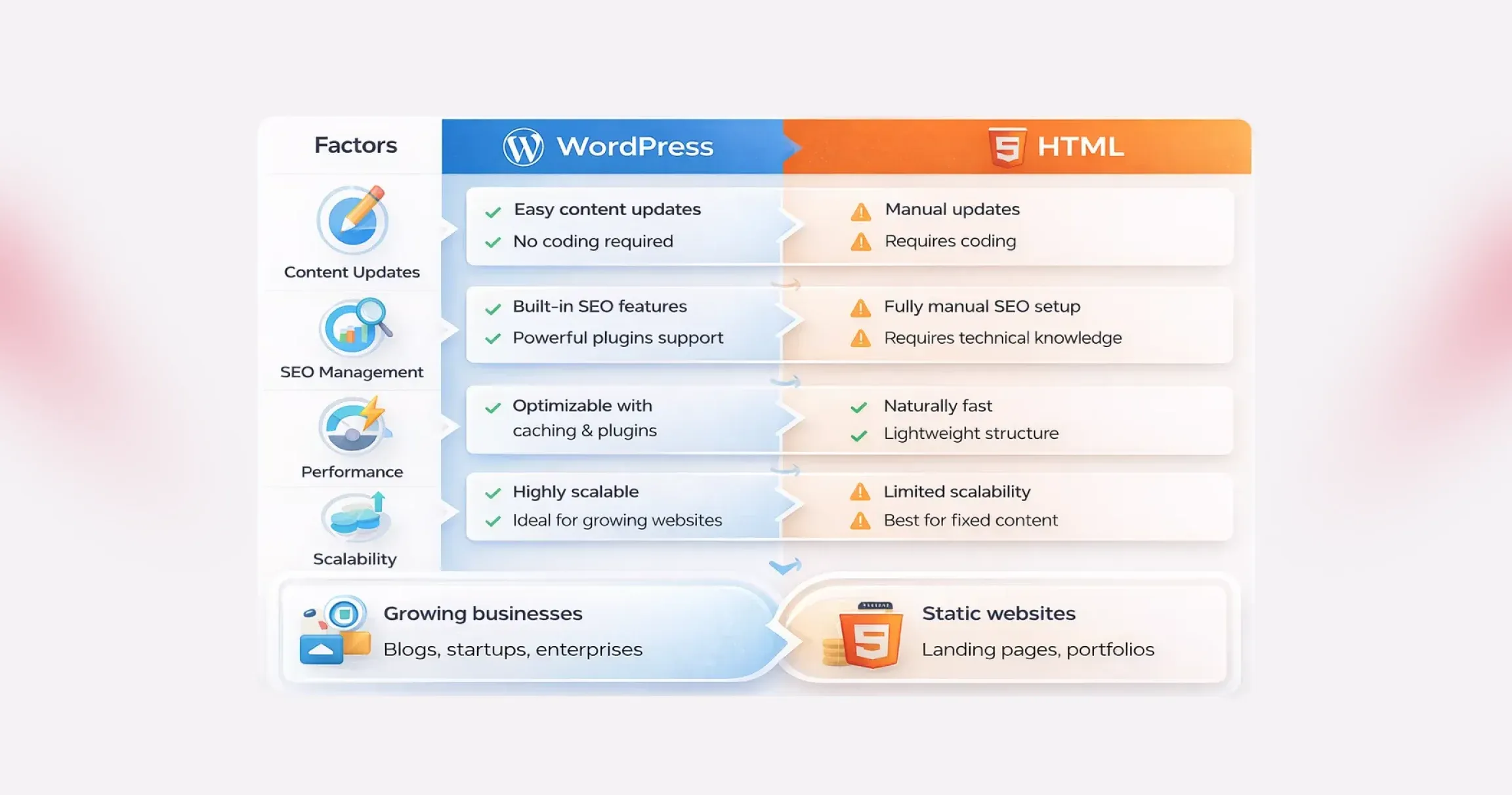
  • Choose WordPress if you plan to update content regularly, scale features, or rely on SEO and marketing.
  • Choose HTML if your website is static, rarely updated, and performance is your top priority.

In this blog, we’ll break down WordPress vs HTML in detail, compare their strengths and limitations, and help you decide which option aligns best with your website goals.

Cons of HTML Websites

  • Time-consuming updates: Every change requires manual code edits. For content-heavy or frequently updated sites, this becomes inefficient.
  • Requires technical expertise: HTML, CSS, and often JavaScript knowledge are necessary, making it less accessible for non-technical users.
  • Limited flexibility: Adding new features or redesigning sections can mean rewriting large portions of the site.
  • Not ideal for complex functionality: Static HTML struggles with advanced requirements like eCommerce, user accounts, or dynamic content.

In the broader discussion of WordPress vs HTML websites, neither option is universally better. WordPress prioritizes flexibility, growth, and ease of management, while HTML emphasizes speed, simplicity, and control. The right choice depends on how often your site changes, how complex it needs to be, and who will manage it day to day.

Why the WordPress vs HTML Decision Still Matters

To make a confident decision in the WordPress vs HTML discussion, it’s important to understand what each technology is built for and where it performs best. While both can power successful websites, they solve very different problems and support different growth paths.

That’s why understanding how each platform behaves in real business scenarios is critical.

What Is WordPress?

WordPress is a content management system designed to simplify website creation and ongoing management. It allows users to build and update websites without writing code, which is why it powers a significant portion of the web today. From blogs and corporate websites to complex eCommerce platforms, WordPress adapts easily as business needs evolve.

Its strength lies in flexibility. Themes control the visual layout, while plugins extend functionality, enabling features like SEO tools, forms, analytics, and integrations without custom development. This dynamic nature is a key factor in WordPress vs HTML websites, especially for businesses that publish content frequently or rely on user interaction.

Did you know ? WordPress captures approximately 64% of the market, far ahead of competitors like Shopify, Joomla, or Wix.

1. Ideal Use Cases for WordPress

WordPress works best when content needs to change often or when scalability matters. It’s well-suited for blogs, marketing websites, news portals, membership platforms, and online stores. Small and mid-sized businesses also favor WordPress because it reduces development time and makes ongoing updates manageable without technical teams.

2. Popular Brands Using WordPress

Many global brands rely on WordPress for its stability and flexibility. Companies like Sony Music, The Walt Disney Company, TechCrunch, and BBC America use WordPress to manage high-traffic, content-rich websites. Their adoption highlights why WordPress remains a strong contender in the WordPress vs HTML comparison.

What Is HTML?

HTML, or Hypertext Markup Language, is the core building block of the web. It’s used to create static web pages where content is manually coded and doesn’t change unless the source code is updated. Unlike WordPress, HTML websites don’t depend on databases or backend systems.

This simplicity brings performance benefits. Static HTML sites are typically faster, lighter, and less vulnerable to security threats. In comparison of WordPress vs HTML websites, HTML stands out for control and efficiency, especially when content remains consistent.

1. Static vs Dynamic Websites

The core difference between WordPress and HTML comes down to content delivery. WordPress generates dynamic pages using a database, enabling real-time updates and personalization. HTML produces static pages that remain unchanged until manually edited. Dynamic sites offer flexibility, while static sites prioritize performance and predictability.

2. Use Cases Where HTML Is Preferable

HTML is ideal for landing pages, portfolios, microsites, documentation hubs, and websites with fixed content. It’s often chosen when performance, security, and full design control matter more than frequent updates. For teams with development expertise, HTML can be the winning choice when comparing WordPress vs HTML.

3. Popular Brands Using HTML

Several high-performance and design-focused brands rely heavily on HTML for specific parts of their web presence. Companies like GitHub (documentation pages), Dropbox (landing pages), Stripe (marketing pages), and Apple (product showcases) use static HTML to deliver speed, consistency, and flawless user experiences.

WordPress vs HTML: Side-by-Side Comparison

Choosing between WordPress and HTML isn’t about which option is “better.” It’s about understanding how each one fits your goals, resources, and long-term vision. When you look closely at WordPress vs HTML, the differences become clear, not just in how websites are built, but in how they grow, perform, and stay competitive over time.

Below, we break down the key differences between WordPress and HTML websites:

#1. Ease of Use and Learning Curve

This is often the first deciding factor in the WordPress vs HTML discussion.

WordPress is designed to remove friction. You don’t need to touch code to publish content, update pages, or manage media. Everything happens inside a visual dashboard. Themes control layout. Plugins extend functionality. Even beginners can launch a professional-looking site quickly, which explains why WordPress dominates the CMS market.

HTML, on the other hand, assumes technical comfort. Building WordPress vs HTML websites with pure HTML means writing and managing code manually. You’ll need a working knowledge of HTML, CSS, and often JavaScript. Modern tools and IDEs make the process smoother, but the learning curve is still steeper, especially for non-developers.

Bottom line: If speed, accessibility, and ease matter, WordPress has a clear edge in the WordPress vs HTML comparison.

#2. Design and Customization

Design flexibility looks very different when comparing WordPress vs HTML websites.

With HTML, design freedom is absolute. Every visual element is controlled by code. Advanced developers can create highly customized layouts with pixel-perfect precision. But that freedom comes at the cost of time and effort.

WordPress takes a modular approach. You start with themes, then customize them using built-in settings, page builders, or custom development. Tools like Elementor and Divi allow drag-and-drop design, making customization accessible even without coding. For businesses that want flexibility without complexity, this balance is hard to ignore in the WordPress vs HTML debate.

Functionality follows a similar pattern. HTML sites rely on custom-coded features, while WordPress unlocks thousands of plugins that add capabilities in minutes.

Bottom line: HTML offers raw control. WordPress offers scalable customization, which is faster and more practical for most teams.

#3. Maintenance and Updates

Maintenance is where WordPress vs HTML websites start to diverge sharply.

WordPress requires ongoing attention. Core updates, plugin updates, and theme updates are essential for performance and security. While this sounds demanding, most updates are automated or handled with a few clicks and many businesses choose professional Website Maintenance Services to ensure these updates are managed consistently without disrupting site performance.

HTML websites are lighter and simpler. There’s no CMS, no database, and no plugins to update. That reduces routine maintenance. However, even small changes, like updating content or fixing a typo, require editing the code and redeploying files.

Bottom line: WordPress needs regular upkeep, but is easier to manage. HTML needs less frequent maintenance but demands technical involvement every time.

#4. SEO and Performance

SEO and speed are critical in any WordPress vs HTML comparison.

HTML websites are naturally fast. There’s no server-side processing or database queries. The server simply delivers static files, which usually means quicker load times right out of the box.

WordPress websites do more behind the scenes. Pages are generated dynamically, which can add overhead. But modern optimization techniques, such as caching, CDNs, and optimized hosting, can make WordPress sites extremely fast.

From an SEO perspective, WordPress pulls ahead. Built-in features like clean permalinks, media optimization fields, and automatic sitemaps help search engines understand your site. When supported by structured WordPress SEO Services, businesses can further refine technical optimization, content structure, and performance signals without needing to modify core code.

With HTML, SEO is entirely manual. You can achieve similar results, but every optimization requires direct code edits.

Bottom line: HTML wins on raw simplicity. WordPress wins on SEO flexibility and long-term optimization in the WordPress vs HTML websites comparison.

#5. Cost and Budget Considerations

At first glance, both options appear free. In reality, WordPress vs HTML comes down to where you spend money.

WordPress itself is open source, but costs can add up through hosting, premium themes, plugins, and maintenance. Dynamic sites also tend to need better hosting environments.

HTML websites often cost less to host because they’re lightweight. There are no paid plugins or themes by default. However, development costs can rise quickly if you don’t have in-house coding expertise and need professional help.

Maintenance costs also differ. WordPress demands ongoing attention. HTML demands fewer updates, but every change can cost time or money.

Bottom line: WordPress spreads costs over time. HTML concentrates costs upfront, especially if development skills are outsourced.

#6. WordPress vs. HTML: Scalability and Growth

Every website evolves. You add content, introduce new features, attract more visitors, and suddenly, the platform you chose in the beginning starts to matter more than expected. This is where the WordPress vs HTML comparison becomes practical rather than theoretical.

WordPress is built with growth in mind. Publishing new pages, expanding functionality, or adjusting layouts doesn’t require rebuilding the site. Plugins, themes, and hosting upgrades allow WordPress vs HTML websites to scale smoothly as traffic and business needs increase.

HTML websites, on the other hand, can handle high traffic efficiently, but growth comes at a cost. Every new feature, page, or update must be manually coded. As the project expands, development becomes slower and more resource-intensive.

Bottom line: If continuous growth, frequent updates, and evolving functionality are part of your roadmap, WordPress clearly has the edge. HTML works best when the scope is fixed and unlikely to change.

#7. WordPress vs. HTML: Security Considerations

Did you know? As per the IBM report, 44% of organizations experienced a security breach related to website vulnerabilities, highlighting the importance of active maintenance and security practices.

Security is often misunderstood in the WordPress vs HTML debate. Many assume static HTML sites are automatically secure and WordPress websites are risky. In reality, both platforms require thoughtful security practices.

WordPress websites are more complex. Databases, plugins, and themes increase the attack surface, which makes them attractive targets. However, this complexity also comes with mature security tools, regular updates, and active monitoring options.

Many businesses rely on professional WordPress Security Services to implement firewalls, malware scanning, vulnerability patching, and continuous monitoring to reduce risk and maintain site integrity.

Bottom line: WordPress demands more attention but offers more protection tools. HTML is simpler, but responsibility rests entirely on how well access and hosting are managed.

Pros and Cons of WordPress and HTML

When comparing WordPress vs HTML, the decision often comes down to trade-offs. Both platforms are powerful in their own way, yet they solve very different problems. Understanding the strengths and limitations of WordPress vs HTML websites helps you choose a platform that aligns with your goals.

Pros and Cons of WordPress

WordPress is widely adopted for a reason. It lowers the barrier to entry while offering room to grow, but that convenience comes with a few considerations.

Pros of WordPress

  • Free and open-source foundation: WordPress can be used without licensing fees, and its global developer community continuously improves performance, security, and features. This ecosystem is one of the biggest advantages in the WordPress vs HTML debate.
  • Ease of use for non-developers: The dashboard is intuitive. Creating pages, publishing content, or updating layouts doesn’t require coding skills, making WordPress ideal for teams that want speed and autonomy.
  • High flexibility and extensibility: From blogs to enterprise-grade platforms, WordPress adapts easily. Thousands of themes and plugins allow WordPress vs HTML websites to support advanced functionality without starting from scratch.
  • Cost-effective entry point: You can launch quickly using affordable hosting and free themes, which makes WordPress attractive for startups and small businesses.
  • SEO-friendly by design: Clean structure, customizable URLs, and SEO plugins help WordPress sites perform well in search results with less manual effort.

Cons of WordPress

  • Hidden and recurring costs: While the core is free, expenses can add up through hosting, premium themes, plugins, and security tools.
  • Security requires active management: WordPress sites are common targets due to their popularity. Regular updates and security plugins are essential to reduce risk.
  • Performance can suffer if unmanaged: Too many plugins or poorly optimized themes can slow down a site, impacting user experience.
  • Some technical setup is unavoidable: Initial installation, configuration, and ongoing maintenance still require a basic level of technical understanding.

Pros and Cons of HTML Websites

  • Static HTML websites take a fundamentally different approach. They prioritize simplicity and control, which can be powerful but limiting.

Pros of HTML Websites

  • Simple and lightweight development: HTML sites don’t rely on CMS platforms or databases. With basic coding knowledge, developers can build clean, predictable websites.
  • Easy and flexible hosting options: Almost any server can host an HTML site, often at a lower cost than dynamic platforms.
  • Fast loading speeds: Without server-side processing, HTML pages load quickly, offering excellent performance out of the box.
  • Smaller attack surface: The absence of databases and dynamic scripts reduces common security vulnerabilities, a key consideration in WordPress vs HTML comparisons.

WordPress vs HTML: Which Platform Makes More Sense for Your Website?

Now that the strengths and limitations are clear, the real question is simple: which option actually fits your goals? The answer depends less on technology and more on how you plan to use your website and what you expect.

If flexibility, independence, and long-term growth matter, WordPress usually comes out ahead in the WordPress vs HTML debate. It gives you control without forcing you to rely on developers for every small update. Want to add new pages, refresh content, or test new ideas? WordPress lets you do that quickly and cost-effectively, which is why many growing brands prefer WordPress over HTML websites for business use.

On the other hand, if your website is purely informational and unlikely to change, a static HTML site can be a practical choice. It’s lightweight, fast, and does exactly what it’s built to do.

But if your website is meant to evolve and you want to generate leads, sell products, build a community, or create new revenue streams, WordPress offers far more room to scale. From eCommerce and memberships to digital downloads and online payments, WordPress supports growth without rebuilding your site from scratch.

In short, HTML works when your needs are fixed. WordPress wins when your ambitions aren’t.

Conclusion

Choosing between WordPress vs HTML isn’t just a technical decision; it’s a reflection of how your business plans to evolve online. Beyond features and performance, the right platform determines how quickly you can respond to market changes, experiment with new ideas, and deliver consistent user experiences. As digital expectations grow, businesses need website foundations that support agility, scalability, and long-term value rather than short-term convenience.

This is where QeWebby stands out. As a trusted custom WordPress development company, we help businesses design, build, and optimize websites based on real business outcomes, not assumptions. From strategy to execution, our experts ensure your website is future-ready and performance-driven. Contact us to explore how we can help you build a website that grows with your business.