6 Tech Skills Entrepreneurs Must Have to Succeed

Business today operates in a state of constant change. Markets are more volatile, customer expectations shift rapidly, and new technologies continue to redefine how companies compete and grow. Relying solely on traditional business instincts is no longer enough success increasingly depends on how well you understand and apply technology.

Every business today, regardless of size or industry, runs on a combination of digital tools, platforms, and systems. You don’t need to be deeply technical, but you do need the awareness to identify the right technologies and the judgment to use them effectively. When leveraged correctly, technology simplifies operations, uncovers growth opportunities, and accelerates decision-making.

Founders who fail to adapt technology risk falling behind in a landscape where speed, efficiency, and data-driven execution define success. Strong skills of entrepreneurs now include the ability to evaluate evolving solutions, integrate systems seamlessly, and stay aligned with ongoing digital advancements.

With an overwhelming number of entrepreneur tech tools available for every business function, the real differentiator lies in knowing what to use, when to use it, and how to extract value from it.

Why Tech Skills Are Important for Entrepreneurs in 2026

According to report, global digital transformation spending is expected to exceed $3.4 trillion, highlighting how critical technology adoption has become for modern businesses.

Entrepreneurship today is about execution in a fast, unpredictable, and technology-driven environment. Markets shift quickly, customer behavior evolves overnight, and new competitors can emerge with scalable digital models at any moment.

This is exactly why technology skills for entrepreneurs have become a core business requirement. They help founders move faster, make smarter decisions, and stay aligned with how modern businesses actually operate.

Here’s why these skills matter more than ever:

  • Navigate market volatility with confidence: Rapid changes demand real-time insights. Tech skills help you track trends, adapt strategies, and respond before opportunities disappear.
  • Stay competitive in a crowded digital-first landscape: Businesses today compete on speed, experience, and efficiency. Strong skills of entrepreneurs ensure you can match and outperform digitally mature competitors.
  • Leverage AI and automation for smarter operations: From predictive analytics to workflow automation, AI is transforming how businesses function. Understanding how to apply it gives you a measurable edge.
  • Make data-driven decisions instead of guesswork: Access to data is easy; interpreting it is not. Tech literacy allows you to turn raw data into actionable insights that drive growth.
  • Maximize the value of modern tools and platforms: There’s no shortage of entrepreneur tech tools, but without the right knowledge, they become underutilized investments rather than growth enablers.
  • Scale efficiently without operational bottlenecks: Technology enables automation, integration, and streamlined workflows, these are key factors in scaling without increasing complexity.
  • Adapt quickly to continuous innovation: New technologies emerge constantly. Entrepreneurs who stay updated can identify opportunities early and implement them effectively.

Top 6 Tech Skills Every Entrepreneur Needs in 2026

The most impactful technology skills for entrepreneurs go beyond basic understanding; they enable smarter decisions, faster growth, and sustainable scalability.

Here are six essential skills of entrepreneurs that can truly be game changers, especially when powered by the right entrepreneur tech tools.

#1. Digital Marketing & SEO

Digital visibility is the backbone of modern growth, especially when supported by a strong website foundation built using professional WordPress development services that ensure performance, scalability, and SEO readiness.

Entrepreneurs who can analyze traffic patterns, optimize funnels, and refine campaigns based on data create predictable acquisition systems. To better understand how a strong website contributes to this, you can explore this WordPress website development guide.

How it can be a game changer?

You gain control over your customer acquisition channels, reduce dependency on third parties, and build a consistent pipeline of qualified leads.

Why this skill is important?

Among the most revenue-driven skills of entrepreneurs, this ensures you extract maximum value from entrepreneur tech tools while strengthening your overall technology skills for entrepreneurs.

#2. Sales and Networking Skills

Sales today is deeply integrated with technology. It involves understanding CRM platforms, managing pipelines, tracking lead journeys, and using automation for follow-ups. Networking has also evolved into a hybrid model, combining digital outreach, social platforms, and data-driven personalization. Entrepreneurs who can leverage insights to tailor communication and build relationships at scale create stronger conversion opportunities.

How it can be a game changer?

The ability to combine digital outreach with personal engagement accelerates trust-building and shortens the sales cycle.

Why this skill is important?

Modern skills of entrepreneurs include leveraging CRM and outreach platforms. When aligned with technology skills for entrepreneurs, these entrepreneur tech tools significantly amplify business growth.

#3. Basic Coding & Graphic Designs

Having foundational knowledge of coding and design empowers entrepreneurs to move faster and communicate better with technical teams. This includes understanding HTML/CSS basics, UI/UX principles, and visual hierarchy. Businesses that want to scale faster often complement this with UI/UX design and development services to create better user experiences and improve engagement.

It allows quick prototyping, minor website updates, and better decision-making when working with developers or designers. If you’re comparing development approaches, this custom WordPress vs page builders guide can help clarify the right direction. Instead of being fully dependent, entrepreneurs can validate ideas, test interfaces, and iterate quickly, reducing turnaround time and improving execution efficiency.

How it can be a game changer?

It enables faster experimentation, better collaboration with teams, and quicker implementation of ideas.

Why this skill is important?

These practical technology skills for entrepreneurs help you use entrepreneur tech tools more effectively while enhancing your overall skills of entrepreneurs.

#4. Cybersecurity Awareness

As businesses rely more on digital systems, cybersecurity becomes critical. This skill involves understanding data protection practices, secure authentication, threat detection, and compliance requirements.

Entrepreneurs must recognize vulnerabilities, implement basic safeguards, and ensure systems are protected against breaches. Implementing WordPress security services can further strengthen protection against evolving threats.

It also includes awareness to common risks in modern digitized operations such as phishing, ransomware, data leaks, and others.

How it can be a game changer?

Strong security practices prevent disruptions, protect sensitive data, and build long-term credibility.

Why this skill is important?

Cybersecurity is a core part of technology skills for entrepreneurs. Without it, even advanced entrepreneur tech tools can become liabilities, making it one of the essential skills of entrepreneurs.

#5. Cloud Computing & Remote Collaboration

Cloud computing enables businesses to operate with flexibility and scale without heavy infrastructure. This skill includes understanding cloud platforms, storage systems, SaaS tools, and real-time collaboration environments. Entrepreneurs can manage distributed teams, access data from anywhere, and ensure seamless communication across locations.

How it can be a game changer?

It allows businesses to scale efficiently, collaborate in real time, and operate without geographical constraints.

Why this skill is important?

Understanding cloud ecosystems is among key technology skills for entrepreneurs. It ensures effective use of entrepreneur tech tools while strengthening the adaptability of skills of entrepreneurs.

#6. AI Tools & Automation Platforms

A report by McKinsey & Company shows that companies using AI-driven automation can increase productivity by up to 40%, making AI one of the most impactful technology skills for entrepreneurs.

AI and automation are transforming how businesses operate. This skill involves understanding how to use AI for data analysis, customer insights, personalization, and predictive decision-making.

Automation tools streamline repetitive tasks like marketing workflows, customer support, and reporting. To further improve performance and decision-making, businesses can also explore AI A/B testing tools for WordPress for data-driven optimization.

Entrepreneurs who can identify where automation fits into their processes reduce operational load while increasing efficiency and accuracy, creating a scalable foundation for growth.

How it can be a game changer?

Automation boosts productivity, while AI enhances decision-making and operational efficiency.

Why this skill is important?

Adopting AI is a defining factor in modern skills of entrepreneurs. When combined with entrepreneur tech tools, it strengthens your technology skills for entrepreneurs and drives competitive advantage.

Strong technology skills for entrepreneurs become even more powerful when supported by the right execution partner. Whether it’s digital marketing, web development, or scalable software solutions, aligning technology with business goals ensures long-term growth and efficiency.

How to Develop and Improve These Tech Skills?

The smartest entrepreneurs focus on consistent, practical learning and apply it directly to their business. That’s how technology skills for entrepreneurs turn into real competitive advantage.

Here’s how you can systematically develop and sharpen these skills of entrepreneurs:

  • Start with problem-first learning: Don’t chase trends. Identify gaps in your business, it could be marketing, operations, or sales, and learn the tech that solves those specific problems.
  • Adopt a “learn by doing” approach: Theory won’t scale your business. Use entrepreneur tech tools hands on by setting up campaigns, automating workflows, analyzing dashboards, and experimenting in real scenarios.
  • Invest in structured learning: Take focused courses, certifications, or workshops that align with your business goals. This accelerates your understanding of key technology skills for entrepreneurs without wasting time.
  • Build a minimum viable tech stack: Start small. Select a few essential entrepreneur tech tools and learn them deeply instead of spreading yourself too thin across multiple platforms.
  • Follow industry trends and updates: Stay updated with AI advancements, automation tools, and emerging platforms to continuously upgrade your skills of entrepreneurs.
  • Collaborate with experts and teams: Work closely with developers, marketers, and analysts. This helps you learn faster and understand how different technologies work together in real business environments.
  • Analyze, optimize, repeat: Track results from every tool or system you implement. Continuous improvement is what strengthens technology skills for entrepreneurs over time.
  • Dedicate time for continuous learning: Set aside regular time each week to explore new tools, features, or strategies. Consistency compounds your growth faster than occasional learning.

The goal is to become a tech-enabled entrepreneur who knows how to leverage the right tools at the right time. That’s what transforms effort into scalable success.

When Should Entrepreneurs Invest in Technology Solutions?

As businesses grow, managing tools, automation, and integrations becomes complex. This is where entrepreneurs often need expert support.

Businesses should consider professional help when they need:

  • Scalable digital infrastructure
  • Advanced automation workflows
  • SEO-driven growth strategies
  • Custom software or platform development
  • Integration between multiple business systems

Working with the right technology partner ensures that your systems are not only functional but also optimized for long-term growth.

Conclusion

Technology is becoming the foundation of how resilient and future-ready businesses are built. Entrepreneurs who embrace this shift don’t just adapt to change; they create systems that absorb disruption and turn it into opportunity. That’s the real advantage, building a business that doesn’t just perform today but evolves continuously with the market.

This is where having the right technology partner matters. Working with a team that offers white-label WordPress development services can help agencies and businesses scale faster without increasing internal workload.

QeWebby brings deep expertise in building scalable, integrated digital solutions tailored to evolving business needs. With a strong focus on performance, usability, and innovation, we help translate technology into tangible outcomes.

If you’re ready to align your business with the evolving market requirements, contact us to get started.
How to Build a WordPress Website for Small Business

WordPress powers over 43% of all websites on the internet, and for good reason: it’s free, flexible, and designed specifically to let small business owners build professional sites without hiring developers or learning to code.

But here’s the reality: WordPress has dozens of options, infinite customization paths, and if you skip steps or misunderstand what you’re doing, things break fast. This is why many growing businesses rely on WordPress development services to build scalable and reliable websites from the start.

This guide walks you through the complete process of building a WordPress website for your small business, from choosing a domain to publishing your first post to launching live. You’ll have a fully functional, SEO-ready site that’s completely yours to control.

How to Build a WordPress Website for Small Business

Building a WordPress website for a small business involves following a clear process that ensures your site is secure, fast, and optimized for search engines.

Here are the essential steps to build a WordPress website:

  • Register a domain name for your business
  • Purchase a reliable web hosting plan
  • Install WordPress on your hosting server
  • Choose a professional WordPress theme
  • Install essential plugins for SEO, security, and backups
  • Create core pages such as Home, About, Services, and Contact
  • Add useful content and blog posts for your audience
  • Optimize your website for SEO and page speed
  • Set up website security and automatic backups
  • Launch and promote your website online

Following these steps helps you create a fully functional WordPress website that supports long-term business growth.

What You Need Before Getting Started?

Building a WordPress website for a small business requires exactly three things:

  • A domain name (your web address: yourname.com or yourbusiness.com)
  • Web hosting (the server that hosts your website files)
  • About one hour of focused time (and a notebook to write down passwords)

Your domain is your website address. Yourname.com or yourbusiness.com. Hosting is the server that your site actually lives on. Think of it like this: the domain is your street address, hosting is the actual building.

You’ll also need to decide whether to build this yourself or hire someone to do it.

Businesses that want advanced functionality or custom design often choose custom custom WordPress website development services to create a faster, more scalable platform from the beginning.

Step 1: Choose and Register a Domain Name

Your domain is the first decision for a small-business WordPress website because everything else connects to it.

Go to Namecheap or GoDaddy to register a domain for your WordPress website for a small business, and search for your preferred domain. Here’s the hard truth about building a WordPress website for a small business: most premium .com domains are already taken. Have 3–4 backup options ready before you search.

Cost & Strategy:

  • Standard .com domains: $10–$15/year
  • Register for 2 years if possible (locks in pricing, prevents accidental expiration)
  • Avoid exotic extensions (.info, .biz) unless necessary; people default to .com in their browsers

When setting up a WordPress website for a small business, your domain choice matters more than most people realize. It should be simple, memorable, and ideally include a keyword related to what you do (“plumbing-denver.com” instead of “jimbosservices.com”).

Once registered, save your domain registrar login details in a password manager. You’ll need it later.

Step 2: Purchase a Hosting Plan

For hosting a WordPress website for a small business, Bluehost is WordPress’s official recommendation and starts at around $4 a month. SiteGround costs a bit more but has better support. WP Engine is solid for more serious sites. Any of the three will work.

For a small-business WordPress website, don’t go with the cheapest option. Those providers oversell their servers, meaning your site shares resources with hundreds of other sites and loads slowly. Slow sites lose customers and rank lower on Google. Spend a few extra dollars a month and get something decent. Look for one-click WordPress installation, automatic backups, and a real uptime guarantee.

Many growing businesses later invest in professional WordPress website optimization services to improve loading speed, server configuration, and technical SEO performance. In more advanced setups, this often involves quality assurance testing services to identify performance bottlenecks and ensure stability.

After you sign up to host your WordPress website for a small business, your provider will provide you with nameservers. You plug those into your domain registrar account, and the two connect. This takes 24 to 48 hours to propagate fully.

Recommended hosting providers:

  • Bluehost– WordPress’s official recommendation, one-click installation, starts at ~$4/month
  • SiteGround– Better support quality, slightly higher cost (~$3/month base)
  • WP Engine– Premium option for more serious sites (~$20+/month)

What to look for:

  • One-click WordPress installation
  • Automatic daily backups
  • Real uptime guarantee (99.9%+)
  • SSD storage (not traditional hard drives)
  • Free SSL certificate (HTTPS)

Step 3: Install WordPress

Log in to your hosting control panel to build a WordPress website for a small business, and look for a tool called “WordPress Installer” or “Softaculous.” Click through the setup wizard, choose your domain, create an admin username and password, and hit install. The whole thing takes three minutes.

Write that admin password down somewhere real, like a password manager. Seriously. That login is how you access your entire site. If you lose it, recovering it is annoying. If someone else gets it, they control everything.

Once your WordPress website for a small business installation is done, go to yoursite.com/wp-admin and log in. That’s your backend. You’ll do everything from here. The left sidebar has Posts, Pages, Plugins, Themes, and Settings. Leave it alone for now. The first step is to pick a theme for your custom WordPress website development project.

Step 4: Choose a WordPress Theme

A theme is a pre-built design template for a small-business WordPress website. There are thousands of them. Free themes like Astra and Neve work great for a WordPress website for a small business are good enough for most small businesses and blogs. You don’t need to spend money here.

How to choose:

  • Go to Appearance > Themes > Add New
  • Browse or search for a theme
  • Preview it, then test it on your phone (over 60% of web traffic is now mobile)

Check your WordPress website for a small business on your phone before committing. Website speed directly impacts user behavior. Google reports that 53% of mobile users abandon sites that take longer than three seconds to load.

If you want to use a free WordPress builder for your WordPress website for a small business, instead of manually tweaking code, many themes come with drag-and-drop builders. These free WordPress builder tools make customization incredibly easy.

Most small-business owners building a WordPress website pick a theme and then never really change it. That’s completely fine. For your WordPress website for a small business, pick something clean, readable, and fast. Unless you work in design or fashion, flashy doesn’t help. People want to find what they’re looking for, not admire your website.

After you activate a theme for your WordPress website for a small business, go to “Appearance,” click on “Customize,” and add your site name, logo, and header image. These updates across the whole site are automatic.

Drag-and-drop builders, if you want to avoid code entirely, many themes include free builders:

  • Elementor (free version works well)
  • Beaver Builder
  • Gutenberg blocks (built into WordPress)

These let you design by dragging elements around like a Canva document.

Once you’ve chosen, activate your theme. Then go to Appearance > Customize to add:

  • Your site name and tagline
  • Your logo
  • Header images
  • Brand colors

These changes automatically apply across your entire site.

Step 5: Install Essential Plugins

Plugins add functionality to your WordPress website for a small business without code. But installing too many slows your site and creates maintenance nightmares.

When websites require features that plugins cannot support efficiently, businesses often turn to custom WordPress plugin development services to build tailored functionality.

For a WordPress website for a small business, install only these four essential plugins:

1. Yoast SEO or Rank Math

For your WordPress website for small business to rank, one of these is non-negotiable if you want your small-business WordPress website to rank in Google. They help you:

  • Optimize each page and post for search keywords
  • Generate XML sitemaps
  • Fix on-page SEO issues
  • Improve readability

Both are free. Choose one and stick with it.

2. Wordfence Security

WordPress gets attacked constantly. Wordfence monitors suspicious activity and blocks common attacks. Install it, run one security scan, then let it run in the background.

3. Jetpack or BackWPup

Automatic daily backups save you if your site ever breaks or gets hacked. Restore from yesterday’s backup with one click. This is critical.

4. Smush

Automatically compresses images on your WordPress website for small business before they are uploaded. Large image files are the #1 reason WordPress sites load slowly.

That’s it. Don’t install 20 plugins because you might need them. Every plugin you add increases your maintenance burden and slows your site.

Step 6: Customize Your Website

Most small business sites built on WordPress need five pages: Home, About, Services or Products, Blog, and Contact. Create them now for your WordPress website for a small business, even if they’re empty.

Go to Pages > Add New. Start with About. For your WordPress website for a small business’s About page, write 300 to 500 words about who you are and what you do. Write it like you’d explain yourself to someone at a coffee meeting, not like a press release.

Repeat that for Services and Contact. For Contact, just create the page for now.

Once your pages are set up, go to Settings > Reading and change your homepage from the default blog feed to your actual Home page. Then go to your Contact page, click Add Block, find your form plugin, insert it, and publish.

Step 7: Add Content to Your Site

For your first blog post, go to Posts > Add New. Don’t title it “Welcome to My Blog.” Write something useful. What’s a question your customers always ask you? Answer it in 800 to 1,200 words and publish it.

This first piece of content on your WordPress website for a small business is your foundation. It’s what Google indexes for your WordPress website for a small business, what visitors read, and where you show your expertise.

Step 8: Optimize for SEO and Speed

Go to Settings, click on “Permalinks,” and select “Post name.” For your WordPress small-business website, this makes your URLs readable instead of showing a bunch of numbers. Google prefers readable URLs.

After that, whenever you’re editing a page or post, scroll down to the Yoast or Rank Math section. It shows you what’s missing. At minimum, put your main keyword in the title and opening paragraph, and write a meta description under 160 characters.

On a WordPress website for a small business, don’t stuff keywords everywhere. Instead, focus on building a strong foundation with proper structure, which is often supported by WordPress SEO services for better long-term visibility. Write normally, and they’ll appear naturally.

To optimize your WordPress website for small-business speed, run it through Google PageSpeed Insights. It tells you what’s slow. Images are almost always the problem. Use Smush to compress them before uploading.

Step 9: Set Up Website Security

This is where WordPress security basics come into play for a small-business WordPress website. For your WordPress small-business website, use a strong password for your admin account. Not your dog’s name with a number appended. Something long and random that lives in your password manager.

Update WordPress, your theme, and plugins on your WordPress website for a small business whenever you see the notification. Outdated software is how most sites get hacked. WordPress security basics also include turning on auto-updates for plugins.

Larger websites often implement professional WordPress security services to add advanced monitoring, malware protection, and firewall configuration.

Enable the Wordfence firewall on your WordPress website for a small business. Run a security scan after you first install it. It takes a few minutes and tells you if anything is wrong.

For your WordPress small-business website, backups are critical. If your site gets hacked or something breaks, a backup from yesterday makes it a one-click fix. Jetpack’s automatic daily backups handle this for you. This is fundamental to WordPress security basics.

Step 10: Launch and Promote Your Website

Click every link on your WordPress website for a small business and make sure nothing’s broken. Fill out your WordPress website’s small-business contact form and make sure you actually receive the email. Pull up your WordPress website for a small business on your phone. Read everything for typos.

Go to Settings, “Reading,” and look for the checkbox that says “Discourage search engines from indexing this site.” If it’s checked, uncheck it. People forget to do this and then wonder why Google can’t find them.

Then go to Google Search Console, add your site, and submit your sitemap. Google will start picking up your pages within hours.

Put your WordPress website URL for a small business in your email signature. Add it to all your social profiles. Share your first blog post somewhere your audience actually is.

If you have existing customers, let them know about your new site. Ask a few if they’d be willing to link to you. Links from other sites are one of the biggest factors in where Google ranks you.

Keep publishing content on your WordPress website for a small business. If you’re planning long-term growth, this guide on tech skills for entrepreneurs can help you build the right digital foundation. One post every two weeks is manageable. The sites that consistently rank well in Google aren’t the ones with the most money. They’re the ones that kept showing up.

When Should You Hire a Custom WordPress Development Company?

Many small businesses start by building their own website using WordPress. However, as a website grows and requires more advanced functionality, businesses often choose to work with a custom WordPress development company.

A professional development team can help when your website needs:

  • A custom website design tailored to your brand
  • Advanced functionality or third-party integrations
  • Technical SEO optimization for better search visibility
  • Faster loading speeds and performance improvements
  • Ongoing website maintenance and security monitoring

A reliable custom WordPress website development company can build scalable websites that load faster, rank better in search engines, and support long-term business growth.

Common Mistakes to Avoid

  • For a WordPress website for a small business, don’t choose the wrong hosting provider. Cheap hosting with slow servers kills conversions and hurts your SEO rankings. Spend a few extra dollars for quality.
  • Don’t ignore mobile responsiveness on your WordPress website for a small business. More than half of your visitors use phones. If your site falls apart on mobile, you lose those visitors immediately.
  • Don’t skip WordPress security basics. Set strong passwords, keep everything up to date, and enable monitoring. Security isn’t optional.
  • Don’t over-install plugins. Every plugin slows your site and increases maintenance burden. Install only what you actually need.
  • Don’t write like a robot. Your website represents you. Write like a human, not like marketing copy.
  • Don’t forget to optimize for SEO. SEO isn’t magic. It’s just writing good content with keywords in the right places. Do this from the beginning.

Conclusion

Building a WordPress website for a small business feels overwhelming until you’ve done it once. Then you realize managing a WordPress website for a small business is mostly clicking around in a dashboard. Give it an afternoon, follow the steps, and you’ll have something real by the end.

Something you own completely is a WordPress website for a small business that’s yours. Not a Wix site that holds your content hostage. Not a Squarespace subscription you’re paying for forever. Your own site, on your own hosting, that you can do anything with.

If you need help with a custom WordPress website development strategy or want professional guidance, a team offering white-label WordPress development services can handle the technical setup and optimization while helping you scale faster. But you can absolutely build a WordPress website for a small business yourself.

If you want a faster launch, better SEO performance, and a scalable website architecture, partnering with a custom WordPress development company can help you build a professional website that grows with your business.

HTML vs WordPress: Which One to Choose for Your Website?

Did you know ? WordPress powers over 43% of all websites on the internet (more than one out of every three sites).

Building a website today is about choosing a foundation that can support your goals, growth plans, and user expectations. The website building landscape has evolved significantly, giving businesses more choices than ever before. From flexible content management systems to lightweight, code-driven setups, each approach serves a different purpose. That’s why the debate around WordPress vs HTML continues to be relevant for businesses of all sizes.

On one side, WordPress dominates the web as a powerful, open-source CMS known for its ease of use, customization options, and cost efficiency. It allows businesses to launch, manage, and scale websites without deep technical expertise. On the other hand, HTML websites are built from the ground up using clean code. They are fast, secure, and minimal, but often require hands-on development effort for updates and changes. This contrast makes WordPress vs HTML websites an important decision, not just a technical one, but a strategic one.

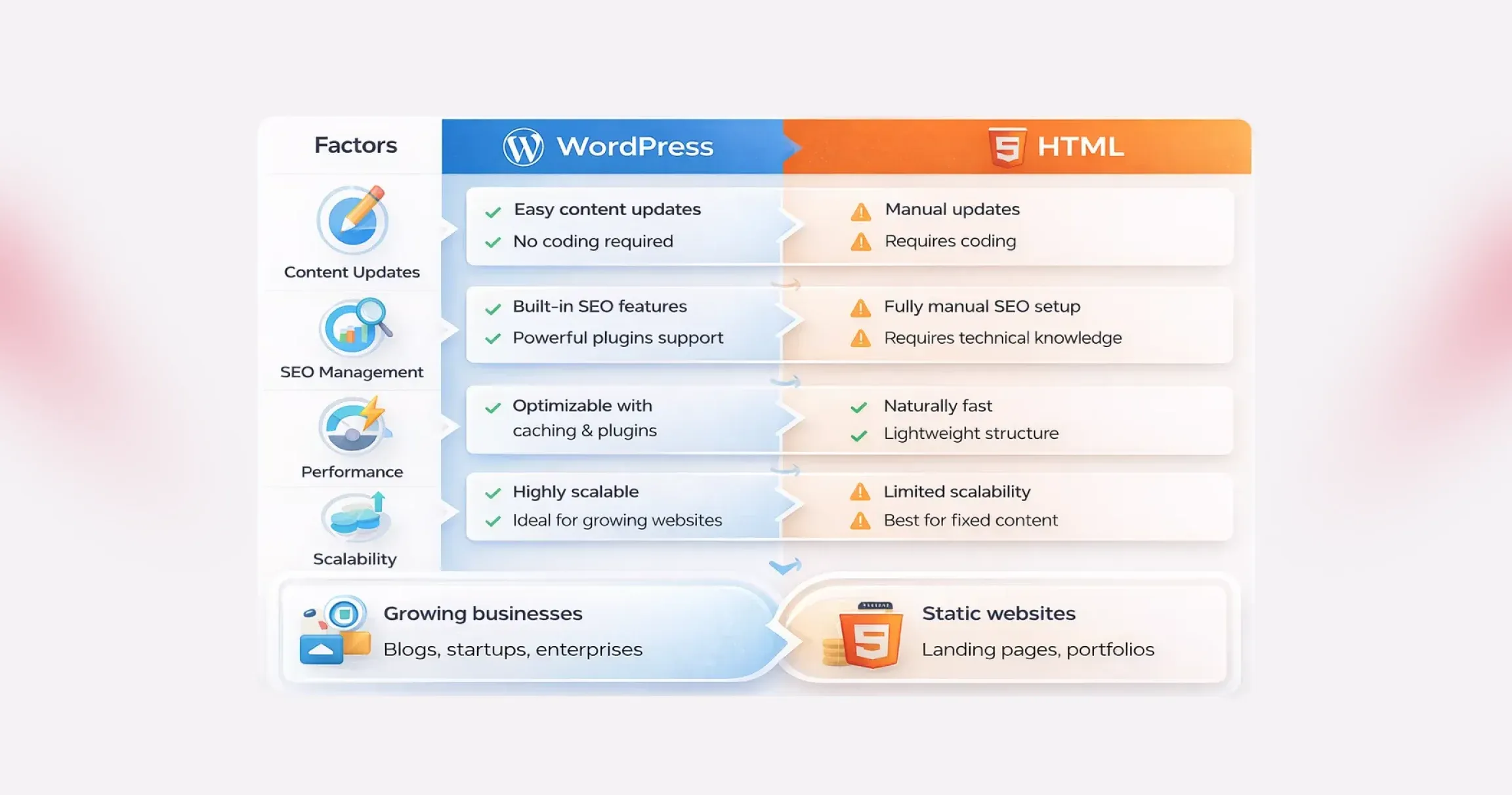
  • Choose WordPress if you plan to update content regularly, scale features, or rely on SEO and marketing.
  • Choose HTML if your website is static, rarely updated, and performance is your top priority.

In this blog, we’ll break down WordPress vs HTML in detail, compare their strengths and limitations, and help you decide which option aligns best with your website goals.

Cons of HTML Websites

  • Time-consuming updates: Every change requires manual code edits. For content-heavy or frequently updated sites, this becomes inefficient.
  • Requires technical expertise: HTML, CSS, and often JavaScript knowledge are necessary, making it less accessible for non-technical users.
  • Limited flexibility: Adding new features or redesigning sections can mean rewriting large portions of the site.
  • Not ideal for complex functionality: Static HTML struggles with advanced requirements like eCommerce, user accounts, or dynamic content.

In the broader discussion of WordPress vs HTML websites, neither option is universally better. WordPress prioritizes flexibility, growth, and ease of management, while HTML emphasizes speed, simplicity, and control. The right choice depends on how often your site changes, how complex it needs to be, and who will manage it day to day.

Why the WordPress vs HTML Decision Still Matters

To make a confident decision in the WordPress vs HTML discussion, it’s important to understand what each technology is built for and where it performs best. While both can power successful websites, they solve very different problems and support different growth paths.

That’s why understanding how each platform behaves in real business scenarios is critical.

What Is WordPress?

WordPress is a content management system designed to simplify website creation and ongoing management. It allows users to build and update websites without writing code, which is why it powers a significant portion of the web today. From blogs and corporate websites to complex eCommerce platforms, WordPress adapts easily as business needs evolve.

Its strength lies in flexibility. Themes control the visual layout, while plugins extend functionality, enabling features like SEO tools, forms, analytics, and integrations without custom development. This dynamic nature is a key factor in WordPress vs HTML websites, especially for businesses that publish content frequently or rely on user interaction.

Did you know ? WordPress captures approximately 64% of the market, far ahead of competitors like Shopify, Joomla, or Wix.

1. Ideal Use Cases for WordPress

WordPress works best when content needs to change often or when scalability matters. It’s well-suited for blogs, marketing websites, news portals, membership platforms, and online stores. Small and mid-sized businesses also favor WordPress because it reduces development time and makes ongoing updates manageable without technical teams.

2. Popular Brands Using WordPress

Many global brands rely on WordPress for its stability and flexibility. Companies like Sony Music, The Walt Disney Company, TechCrunch, and BBC America use WordPress to manage high-traffic, content-rich websites. Their adoption highlights why WordPress remains a strong contender in the WordPress vs HTML comparison.

What Is HTML?

HTML, or Hypertext Markup Language, is the core building block of the web. It’s used to create static web pages where content is manually coded and doesn’t change unless the source code is updated. Unlike WordPress, HTML websites don’t depend on databases or backend systems.

This simplicity brings performance benefits. Static HTML sites are typically faster, lighter, and less vulnerable to security threats. In comparison of WordPress vs HTML websites, HTML stands out for control and efficiency, especially when content remains consistent.

1. Static vs Dynamic Websites

The core difference between WordPress and HTML comes down to content delivery. WordPress generates dynamic pages using a database, enabling real-time updates and personalization. HTML produces static pages that remain unchanged until manually edited. Dynamic sites offer flexibility, while static sites prioritize performance and predictability.

2. Use Cases Where HTML Is Preferable

HTML is ideal for landing pages, portfolios, microsites, documentation hubs, and websites with fixed content. It’s often chosen when performance, security, and full design control matter more than frequent updates. For teams with development expertise, HTML can be the winning choice when comparing WordPress vs HTML.

3. Popular Brands Using HTML

Several high-performance and design-focused brands rely heavily on HTML for specific parts of their web presence. Companies like GitHub (documentation pages), Dropbox (landing pages), Stripe (marketing pages), and Apple (product showcases) use static HTML to deliver speed, consistency, and flawless user experiences.

WordPress vs HTML: Side-by-Side Comparison

Choosing between WordPress and HTML isn’t about which option is “better.” It’s about understanding how each one fits your goals, resources, and long-term vision. When you look closely at WordPress vs HTML, the differences become clear, not just in how websites are built, but in how they grow, perform, and stay competitive over time.

Below, we break down the key differences between WordPress and HTML websites:

#1. Ease of Use and Learning Curve

This is often the first deciding factor in the WordPress vs HTML discussion.

WordPress is designed to remove friction. You don’t need to touch code to publish content, update pages, or manage media. Everything happens inside a visual dashboard. Themes control layout. Plugins extend functionality. Even beginners can launch a professional-looking site quickly, which explains why WordPress dominates the CMS market.

HTML, on the other hand, assumes technical comfort. Building WordPress vs HTML websites with pure HTML means writing and managing code manually. You’ll need a working knowledge of HTML, CSS, and often JavaScript. Modern tools and IDEs make the process smoother, but the learning curve is still steeper, especially for non-developers.

Bottom line: If speed, accessibility, and ease matter, WordPress has a clear edge in the WordPress vs HTML comparison.

#2. Design and Customization

Design flexibility looks very different when comparing WordPress vs HTML websites.

With HTML, design freedom is absolute. Every visual element is controlled by code. Advanced developers can create highly customized layouts with pixel-perfect precision. But that freedom comes at the cost of time and effort.

WordPress takes a modular approach. You start with themes, then customize them using built-in settings, page builders, or custom development. Tools like Elementor and Divi allow drag-and-drop design, making customization accessible even without coding. For businesses that want flexibility without complexity, this balance is hard to ignore in the WordPress vs HTML debate.

Functionality follows a similar pattern. HTML sites rely on custom-coded features, while WordPress unlocks thousands of plugins that add capabilities in minutes.

Bottom line: HTML offers raw control. WordPress offers scalable customization, which is faster and more practical for most teams.

#3. Maintenance and Updates

Maintenance is where WordPress vs HTML websites start to diverge sharply.

WordPress requires ongoing attention. Core updates, plugin updates, and theme updates are essential for performance and security. While this sounds demanding, most updates are automated or handled with a few clicks and many businesses choose professional Website Maintenance Services to ensure these updates are managed consistently without disrupting site performance.

HTML websites are lighter and simpler. There’s no CMS, no database, and no plugins to update. That reduces routine maintenance. However, even small changes, like updating content or fixing a typo, require editing the code and redeploying files.

Bottom line: WordPress needs regular upkeep, but is easier to manage. HTML needs less frequent maintenance but demands technical involvement every time.

#4. SEO and Performance

SEO and speed are critical in any WordPress vs HTML comparison.

HTML websites are naturally fast. There’s no server-side processing or database queries. The server simply delivers static files, which usually means quicker load times right out of the box.

WordPress websites do more behind the scenes. Pages are generated dynamically, which can add overhead. But modern optimization techniques, such as caching, CDNs, and optimized hosting, can make WordPress sites extremely fast.

From an SEO perspective, WordPress pulls ahead. Built-in features like clean permalinks, media optimization fields, and automatic sitemaps help search engines understand your site. When supported by structured WordPress SEO Services, businesses can further refine technical optimization, content structure, and performance signals without needing to modify core code.

With HTML, SEO is entirely manual. You can achieve similar results, but every optimization requires direct code edits.

Bottom line: HTML wins on raw simplicity. WordPress wins on SEO flexibility and long-term optimization in the WordPress vs HTML websites comparison.

#5. Cost and Budget Considerations

At first glance, both options appear free. In reality, WordPress vs HTML comes down to where you spend money.

WordPress itself is open source, but costs can add up through hosting, premium themes, plugins, and maintenance. Dynamic sites also tend to need better hosting environments.

HTML websites often cost less to host because they’re lightweight. There are no paid plugins or themes by default. However, development costs can rise quickly if you don’t have in-house coding expertise and need professional help.

Maintenance costs also differ. WordPress demands ongoing attention. HTML demands fewer updates, but every change can cost time or money.

Bottom line: WordPress spreads costs over time. HTML concentrates costs upfront, especially if development skills are outsourced.

#6. WordPress vs. HTML: Scalability and Growth

Every website evolves. You add content, introduce new features, attract more visitors, and suddenly, the platform you chose in the beginning starts to matter more than expected. This is where the WordPress vs HTML comparison becomes practical rather than theoretical.

WordPress is built with growth in mind. Publishing new pages, expanding functionality, or adjusting layouts doesn’t require rebuilding the site. Plugins, themes, and hosting upgrades allow WordPress vs HTML websites to scale smoothly as traffic and business needs increase.

HTML websites, on the other hand, can handle high traffic efficiently, but growth comes at a cost. Every new feature, page, or update must be manually coded. As the project expands, development becomes slower and more resource-intensive.

Bottom line: If continuous growth, frequent updates, and evolving functionality are part of your roadmap, WordPress clearly has the edge. HTML works best when the scope is fixed and unlikely to change.

#7. WordPress vs. HTML: Security Considerations

Did you know? As per the IBM report, 44% of organizations experienced a security breach related to website vulnerabilities, highlighting the importance of active maintenance and security practices.

Security is often misunderstood in the WordPress vs HTML debate. Many assume static HTML sites are automatically secure and WordPress websites are risky. In reality, both platforms require thoughtful security practices.

WordPress websites are more complex. Databases, plugins, and themes increase the attack surface, which makes them attractive targets. However, this complexity also comes with mature security tools, regular updates, and active monitoring options.

Many businesses rely on professional WordPress Security Services to implement firewalls, malware scanning, vulnerability patching, and continuous monitoring to reduce risk and maintain site integrity.

Bottom line: WordPress demands more attention but offers more protection tools. HTML is simpler, but responsibility rests entirely on how well access and hosting are managed.

Pros and Cons of WordPress and HTML

When comparing WordPress vs HTML, the decision often comes down to trade-offs. Both platforms are powerful in their own way, yet they solve very different problems. Understanding the strengths and limitations of WordPress vs HTML websites helps you choose a platform that aligns with your goals.

Pros and Cons of WordPress

WordPress is widely adopted for a reason. It lowers the barrier to entry while offering room to grow, but that convenience comes with a few considerations.

Pros of WordPress

  • Free and open-source foundation: WordPress can be used without licensing fees, and its global developer community continuously improves performance, security, and features. This ecosystem is one of the biggest advantages in the WordPress vs HTML debate.
  • Ease of use for non-developers: The dashboard is intuitive. Creating pages, publishing content, or updating layouts doesn’t require coding skills, making WordPress ideal for teams that want speed and autonomy.
  • High flexibility and extensibility: From blogs to enterprise-grade platforms, WordPress adapts easily. Thousands of themes and plugins allow WordPress vs HTML websites to support advanced functionality without starting from scratch.
  • Cost-effective entry point: You can launch quickly using affordable hosting and free themes, which makes WordPress attractive for startups and small businesses.
  • SEO-friendly by design: Clean structure, customizable URLs, and SEO plugins help WordPress sites perform well in search results with less manual effort.

Cons of WordPress

  • Hidden and recurring costs: While the core is free, expenses can add up through hosting, premium themes, plugins, and security tools.
  • Security requires active management: WordPress sites are common targets due to their popularity. Regular updates and security plugins are essential to reduce risk.
  • Performance can suffer if unmanaged: Too many plugins or poorly optimized themes can slow down a site, impacting user experience.
  • Some technical setup is unavoidable: Initial installation, configuration, and ongoing maintenance still require a basic level of technical understanding.

Pros and Cons of HTML Websites

  • Static HTML websites take a fundamentally different approach. They prioritize simplicity and control, which can be powerful but limiting.

Pros of HTML Websites

  • Simple and lightweight development: HTML sites don’t rely on CMS platforms or databases. With basic coding knowledge, developers can build clean, predictable websites.
  • Easy and flexible hosting options: Almost any server can host an HTML site, often at a lower cost than dynamic platforms.
  • Fast loading speeds: Without server-side processing, HTML pages load quickly, offering excellent performance out of the box.
  • Smaller attack surface: The absence of databases and dynamic scripts reduces common security vulnerabilities, a key consideration in WordPress vs HTML comparisons.

WordPress vs HTML: Which Platform Makes More Sense for Your Website?

Now that the strengths and limitations are clear, the real question is simple: which option actually fits your goals? The answer depends less on technology and more on how you plan to use your website and what you expect.

If flexibility, independence, and long-term growth matter, WordPress usually comes out ahead in the WordPress vs HTML debate. It gives you control without forcing you to rely on developers for every small update. Want to add new pages, refresh content, or test new ideas? WordPress lets you do that quickly and cost-effectively, which is why many growing brands prefer WordPress over HTML websites for business use.

On the other hand, if your website is purely informational and unlikely to change, a static HTML site can be a practical choice. It’s lightweight, fast, and does exactly what it’s built to do.

But if your website is meant to evolve and you want to generate leads, sell products, build a community, or create new revenue streams, WordPress offers far more room to scale. From eCommerce and memberships to digital downloads and online payments, WordPress supports growth without rebuilding your site from scratch.

In short, HTML works when your needs are fixed. WordPress wins when your ambitions aren’t.

Conclusion

Choosing between WordPress vs HTML isn’t just a technical decision; it’s a reflection of how your business plans to evolve online. Beyond features and performance, the right platform determines how quickly you can respond to market changes, experiment with new ideas, and deliver consistent user experiences. As digital expectations grow, businesses need website foundations that support agility, scalability, and long-term value rather than short-term convenience.

This is where QeWebby stands out. As a trusted custom WordPress development company, we help businesses design, build, and optimize websites based on real business outcomes, not assumptions. From strategy to execution, our experts ensure your website is future-ready and performance-driven. Contact us to explore how we can help you build a website that grows with your business.

How Top Agencies Deliver More with White-Label WordPress Development

Most agencies struggle at scale due to resource limitations. White-label WordPress development services can help agencies scale without spreading their resources too thin. However, finding the right white-label WordPress development agency can be a complex process.

Agencies need to evaluate development, WordPress customization, and SEO expertise. However, there are many additional aspects that an agency needs to consider before selecting a white-label WordPress development service. With 43.3% of websites on the internet now using WordPress, the demand for development expertise is also higher.

This is why many agencies face questions like

  • Does investing in a white-label development service make sense?
  • What are the tasks an agency can outsource?
  • How does it impact SEO?
  • Is outsourcing the only answer to cost reduction and scalability?

In this article, you will get a comprehensive guide on why you need a white-label WordPress development agency for your projects, its benefits, and tasks that can be outsourced. So, let’s get started.
What are White Label WordPress Development Services?

White-label WordPress development services help agencies in building WordPress websites, plugins, and applications. Agencies can rebrand websites as their own. Such a partnership allows agencies to scale their services and easily expand offerings without hiring in-house staff.

What Makes White Label WordPress Unique?

White-label WordPress development offers flexibility for agencies. It ensures a custom-branded solution for agencies through outsourced development. This makes sure agencies reduce costs, simplify branding, and offer tailored solutions.

Brand Consistency Without Technical Overhead

White-label WordPress development services enable companies to deliver professional websites, ensuring consistent branding and a seamless user experience. This is particularly important if you want to ensure consistency across devices and screens.

Especially when64.2% of total traffic comes from mobile devices, it is essential to ensure branding consistency. Agencies can outsource the technical work to specialized developers and offer sites that can be rebranded for clients.

Cost-Effectiveness and Resource Optimization

Such services reduce the need for hiring in-house resources, training, and managing development teams. Due to outsourcing, the development cost has been reduced. Additionally, the time required to build websites for clients decreases, ensuring faster delivery.

Enhanced Service Portfolio and Expertise Access

Companies can easily access specialized WordPress developers and experts. It also helps create custom themes, develop plugins, provide WooCommerce solutions, and optimize performance. WordPress outsourcing service providers employ SEO best practices, security protocols, and strategies for the site. This helps agencies ensure their clients’ visibility is higher.

While the above aspects do make white-label WordPress development unique, the real question is how it fares against the standard development approach.

The Difference Between White Label and Standard WordPress Development

Here are some key differences between white-label and standard WordPress development approaches.

Aspect White Label WordPress Development Standard WordPress Development
Ownership Client owns the final product; development team remains invisible to the end customer Direct relationship between client and development team; complete transparency of providers
Branding Developed under your brand name, the third-party provider remains anonymous Development team’s branding may be visible; direct attribution to developers
Cost Structure Lower upfront costs; eliminates hiring and training expenses Higher initial investment; includes whole team setup and resource allocation
Project Timeline Faster turnaround due to specialized, ready-to-deploy teams Longer development cycles include team assembly and project planning phases
Customization Level Limited customization focuses on rebranding existing solutions Full customization capabilities; complete control over features and functionality
Scalability Highly scalable, easy to scale up/down based on project demands Requires significant resource planning; scaling involves hiring and team management
Quality Control Dependent on the provider’s standards, less direct oversight Direct quality control, complete management of development standards and processes
Communication Indirect communication through a white label provider Direct communication with the development team, immediate feedback loops
Project Complexity Best suited for standard features and simple-to-moderate projects Ideal for complex, highly customized solutions requiring unique features
Resource Management No need for internal resource management; the provider handles team allocation Full responsibility for team management, resource allocation, and coordination

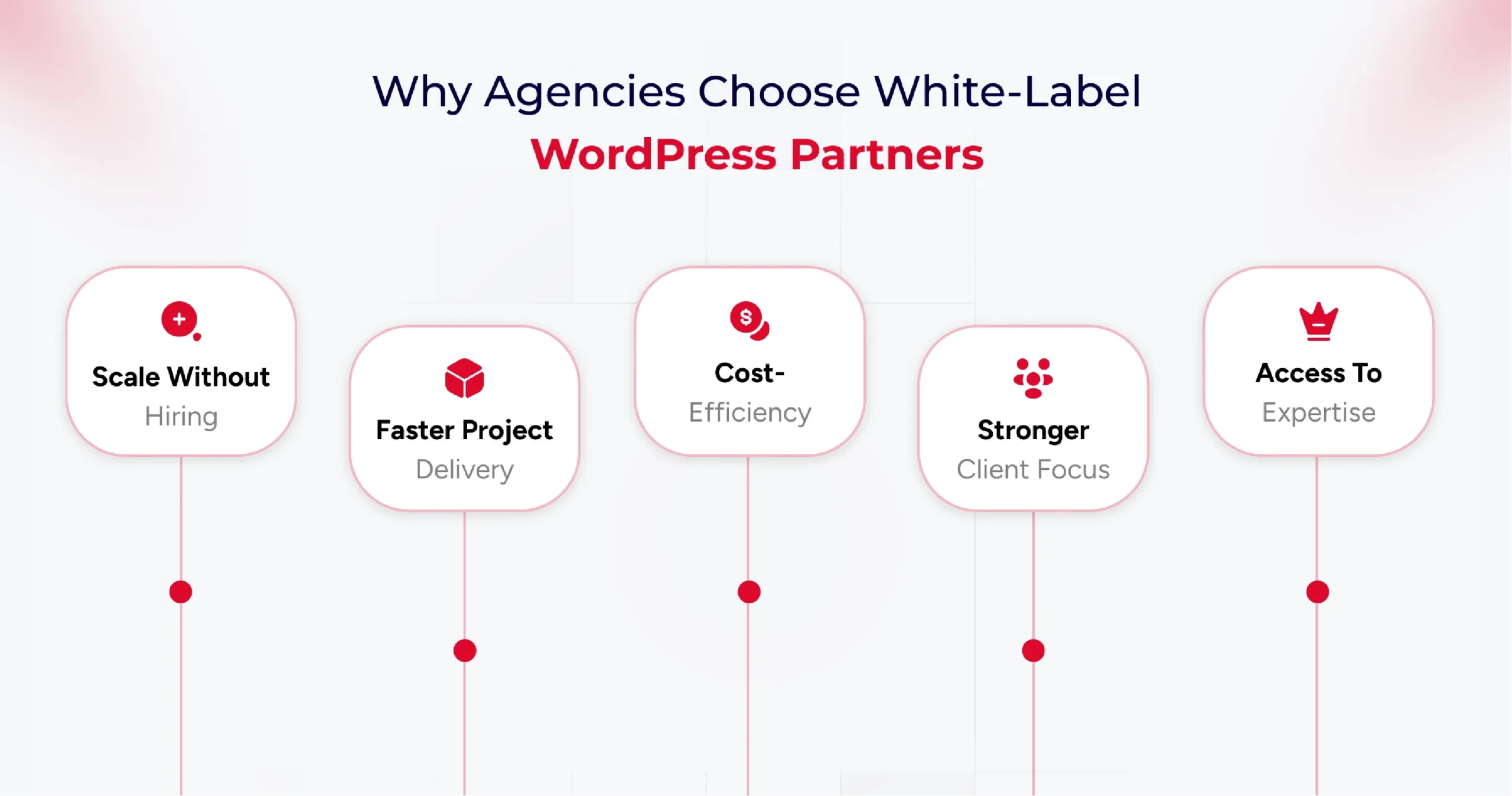
Why Top Agencies Use White-Label WordPress Partners?

Agencies often adopt white-label partnerships to get the perfect blend of strategic and practical benefits. It enables agencies to scale their services without incurring significant expenses on hiring in-house teams, focus on their core strengths, and ensure better delivery.

Here are some key reasons agencies use white-label WordPress partners,

1. Scalability without Hiring

White-label WordPress development services provide access to professionals who help agencies complete projects efficiently and deliver high-quality output. The best part is that agencies don’t need to hire these talented professionals in-house. So the cost of hiring, training, and managing talent is borne by the white-label WordPress development agency.

2. Faster Project Delivery

Partnering with a White-label WordPress agency ensures faster project delivery for top agencies and brands. With a team of dedicated experts, white-label service providers provide you with complete flexibility to add or reduce resources as per project needs.

3. Cost-Efficiency

Reduced hiring costs are just one of the many cost efficiency benefits of partnering with WordPress outsourcing services. As an agency, you can reduce the cost of development, content creation, SEO, and CMS management with this partnership.

4. Focus on Strategy and Client Relationships

Offering a finished product under the agency’s own brand creates a consistent and professional client experience. This partnership enables you to maintain smoother client relationships and ensure your team focuses on strategic tasks rather than development ones.

5. Access to Specialized Skills

Finding the right talent for your agency can be complex in a crowded market. Plus, if you need a specialized talent, hiring, onboarding, and ensuring the timely delivery of projects can be overwhelming. Partnering with a white-label development agency, you get access to specialized talents without the hassle of hiring them in-house.

Knowing the benefits of outsourcing to a white-label development agency leads to another crucial question: “What to outsource?” Yes, prioritizing specific tasks and operations for outsourcing is key to successful project delivery.

Top Tasks to Outsource Through White Label WordPress Providers

White-label WordPress providers ensure a range of services that you can outsource. But strategically planning the prioritization of tasks becomes essential. Here are some tasks that you can outsource to a WordPress development agency.

Custom WordPress Website Creation

As an agency, you can outsource the design and development of unique WordPress themes specific to your branding needs. It can help you customize a WordPress website for your clients based on their particular needs.

Plus, you can outsource custom plugin development to add unique functionalities and features to the website. And if you are looking to cater to an e-commerce brand, consider outsourcing WooCommerce development to a WordPress development agency.

You can also outsource website migration tasks, which allows you to seamlessly move the existing resources to newer WordPress versions or environments.

Ongoing Website Maintenance and Support

A key task to outsource is website maintenance. You can ensure higher website uptime by outsourcing the maintenance activities to a white-label development agency. These service providers continuously monitor your website and optimize it for performance based on analytics.

Using such services also ensures daily backups of your website. So, your site is always ready for recovery, even in the event of an incident. Plus, you get complete end-to-end technical support from a white-label development service provider.

SEO Implementation and Optimization

One of the most essential activities to outsource is search engine optimization. As an agency, you need to ensure maximum visibility for clients to ensure higher conversions. Plus, 53% of mobile visitors abandon pages, that take longer than 3 seconds to load. This makes outsourcing performance optimization to specialists crucial for your brand. A white-label WordPress development service helps you optimize SEO and provide better visibility.

  • SEO strategy development tailored to your client’s brand and target audience.
  • Identify related keywords, ensure better AIO and GEO strategies.
  • Optimize the website content, meta descriptions, titles, and images for search engines.
  • Address technical aspects of a website to ensure a better site structure, improved crawlability, and enhanced mobile-friendliness.
  • Implement link-building strategies to acquire high-quality backlinks from reputable websites with a high domain authority.
  • Create a content strategy and develop SEO-friendly resources that can offer the target audience better value.

Now that you know what tasks you need to outsource, understanding the impact and benefits of partnering with a white-label WordPress development agency becomes crucial.

Benefits of Partnering with White-Label WordPress Experts

Partnering with a white-label WordPress development agency, you can get many strategic advantages. From access to specialized talent to reduced hiring overhead and faster project deliveries, the benefits are numerous. Understanding these benefits is crucial in making informed decisions about whether to partner with a WordPress outsourcing agency.

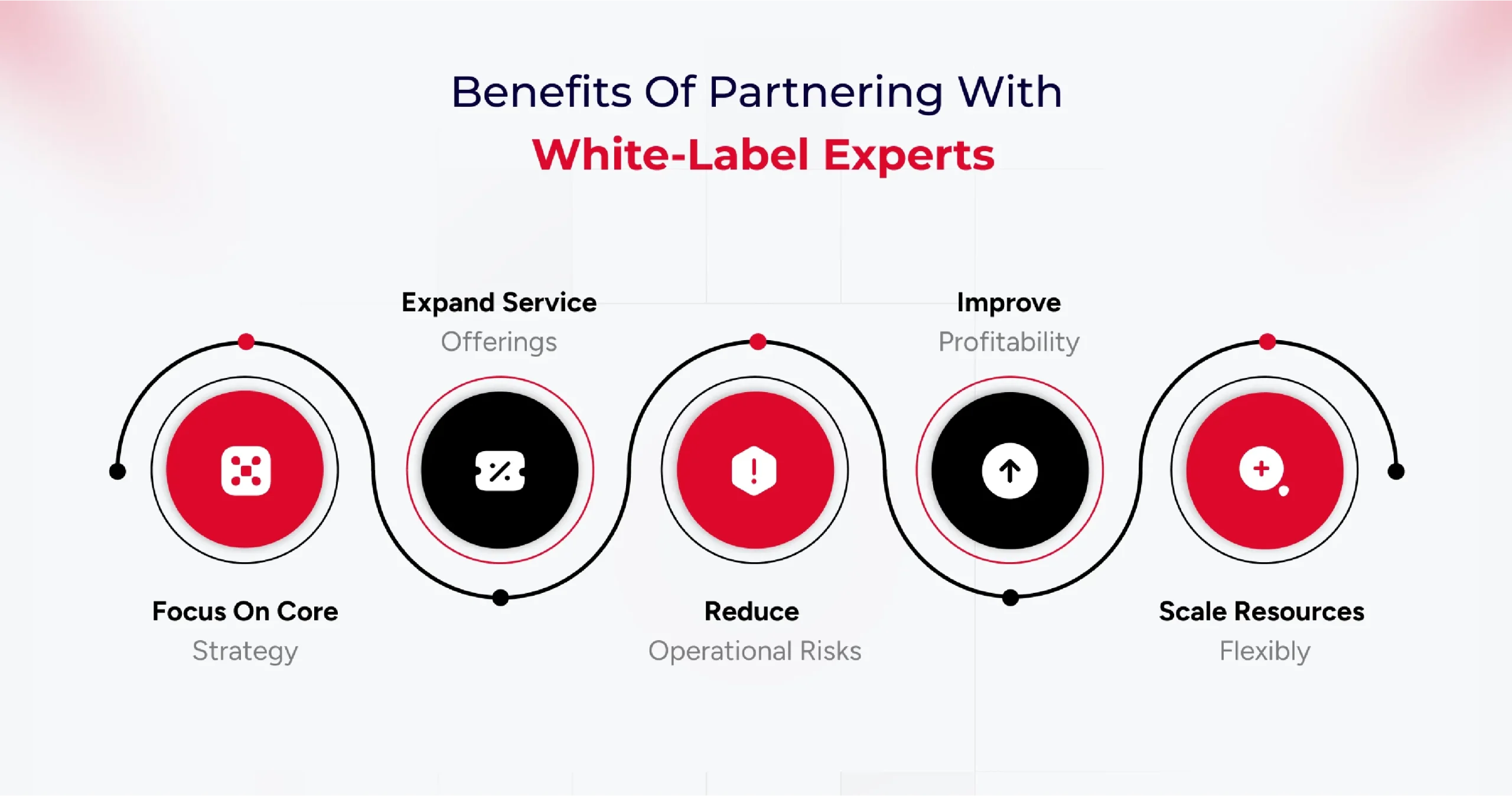
Some of the key benefits of partnering with a white-label development agency are,

  • Higher Focus on Core Competencies – Such services allow your team to focus on client relationships, strategy, and business development.
  • Service Offering Expansion – You can partner with a white-label development agency to easily scale your business offerings.
  • Risk Mitigation – Partnering with a white-label agency ensures a single point of contact for the client, providing a seamless experience. It offers better client loyalty and brand ownership.
  • Higher Profitability – With this partnership, your agency can handle more clients and increase its profitability through reduced operational costs.
  • Better Cost Efficiency – The reduced cost of recruitment, training, salaries, employee insurance, and other resources makes this partnership cost-efficient.
  • Faster Time-to-Market – Experienced teams and experts from a WordPress development agency help you deliver client projects faster. It enables you to launch a new service and meet deadlines quickly.
  • Better Flexibility & Scalability – Scaling your agency services becomes easier by partnering with a WordPress outsourcing service. Plus, you get better flexibility in adding resources as per project requirements.

A significant benefit of a white-label WordPress development service is lower cost. However, freelance developers can also help reduce the cost of development. This is why understanding the difference between freelance and white-label development becomes vital.

White-Label WordPress vs Freelance Developers (Comparison Table)

Here are some key differences between freelance and white-label development,

Criteria White-Label WordPress Design & Development Team Freelance WordPress Developer
Team Composition Multi-skilled team covering development, design, SEO, project management, and ongoing support Solo expert focuses on their core skills, may specialize in a niche
Scalability Highly scalable, can handle multiple projects and increased workloads efficiently Limited capacity is restricted by individual bandwidth and availability
Backend Support for Agencies Robust WordPress backend support; acts as a silent, invisible partner behind agency branding with long-term updates, troubleshooting, and security Often limited to core development, ongoing WordPress support depends on the freelance arrangeme
Branding Opportunities Enables agencies to offer white-label, branded services; clients see only agency brand Works under their own name; agency branding requires a special arrangement
Expertise Coverage Comprehensive covers design, speed optimization, plugin/theme customization, hosting, security, and maintenance Variable—may be deep in specific areas (e.g., WooCommerce, custom plugins), but broad coverage is often lacking
Cost Structure Higher upfront cost, but billed per actual work delivered; better cost efficiency for ongoing and larger projects Budget-friendly for small projects, flexible payment, and often lower overall costs
Project Management Dedicated account/project managers streamline workflow, communication, and deadlines Direct communication and feedback; management handled personally by the freelancer
Support & Maintenance Ongoing reliable WordPress backend support for agencies; regular updates, security, and fixes Support may be limited; post-project support depends on the freelancer’s availability and preferences
Availability Consistent—team approach ensures resources are deployed as needed Variable; freelancers may juggle multiple projects at once, affecting responsiveness
Delivery Consistency Quality assured with standardized workflows and quality checks Personalized service but variable consistency; may lack process rigor
Flexibility Can rapidly shift resources between projects as agency needs change; offers agency-focused customization. Maximum flexibility in hours and approach, direct negotiation possible

How to Choose the Right White-Label WordPress Partner

Identify your agency’s specific needs, such as full website development, plugin customization, backend support, or ongoing maintenance, before beginning your search. The ideal partner should offer in-depth WordPress expertise, align with your service requirements, and have a proven track record of delivery in similar agency models.

Essential Qualities to Look For in a Partner

  • Technical Expertise: Seek partners with a specialized team, proficiency in WordPress technologies (PHP, JavaScript, HTML, CSS), and proven experience in custom themes, plugins, performance optimization, and secure backend setups.
  • Quality Assurance: Look for robust testing processes, quality control, and attention to SEO, speed, and user experience in delivered projects.
  • White-Label Branding: The partner should work entirely behind your agency’s brand, never revealing their identity to end clients, and seamlessly adopting your branding elements.
  • Scalability & Consistency: A reliable team should scale with your project demands and provide standardized quality, regardless of order volume or complexity.
  • Communication & Support: Prioritize clear communication channels, timely responses, and dedicated support contacts. Regular updates, milestone tracking, and responsive problem-solving are vital.
  • Security and Confidentiality: Insist on NDAs and evidence of strong data protection measures, such as encryption protocols and internal security policies.
  • Ethics & Client Relationship: The partner should demonstrate transparency, intellectual property protection, and a commitment to long-term collaborative success.

Reviewing Past Work and Client Testimonials

Request portfolios, live website samples, and detailed case studies. Authentic client testimonials and reviews offer valuable insights into reliability, strengths, and real-world performance.

Quality, diversity, and relevance of past work indicate the partner’s capability to meet your agency’s standards and niche needs.

Service Agreement Factors You Should Know

Review the contract thoroughly, focusing on:

  • Project scope and deliverables
  • Timelines and benchmarks
  • Payment terms and pricing structures
  • Flexibility to tailor services
  • Post-launch support and maintenance commitments
  • Intellectual property ownership and confidentiality clauses

Clarify all terms to avoid hidden costs or misunderstandings. An explicit agreement ensures accountability and smooth execution.

Checklist for Agency Owners

Here is a checklist that you can follow as an agency owner while selecting the right white-label WordPress development service.

  • Define the exact services required for your agency’s workflow.
  • Assess the technical proficiency and WordPress specialization of the partner.
  • Review portfolios, case studies, and client testimonials for validation.
  • Confirm the partner’s experience in white-label branding and backend agency support.
  • Evaluate communication style, clarity, and responsiveness.
  • Verify security practices and willingness to sign NDAs.
  • Inspect their process for quality assurance and timely delivery.
  • Ensure flexibility in services and cost structures suited to agency budgets.
  • Clarify post-project support and troubleshooting commitments.
  • Audit for alignment in values, ethics, and collaborative approach.

Conclusion

In a fast-moving digital market, being slow is not an option for your agency. This is where a white-label development agency comes into play. It helps your agency deliver projects faster, customize the website as per branding needs, and ensure better profitability.

The key, however, lies in choosing the right partner. Agencies must carefully evaluate technical expertise, SEO know-how, communication practices, scalability, and security standards before committing. A strong partnership can empower agencies to focus on strategy, strengthen client relationships, and maintain brand ownership, all while delivering high-performing websites that meet their clients’ needs.

Ultimately, white-label WordPress development is not just about cost savings; it’s about getting higher flexibility, ensuring faster delivery, and building a sustainable growth model for agencies. By outsourcing the right tasks to the right partner, agencies can stay agile, competitive, and ready to deliver more value in an ever-evolving digital market.

8 Big WordPress Mistakes To Avoid During Website Scalability

Failure to scale your site appropriately can lead to slow load times, crashes, poor user experience, and overall a loss in revenue opportunities.

When your WordPress website is pulling in millions of views a month, it’s clear you’ve found success. But as your site grows, so do the challenges. Traffic surges can cause slowdowns, crashes, and security headaches if you’re not prepared. Failure to scale your site appropriately can lead to slow load times, crashes, poor user experience, and lost revenue opportunities.

Before scaling your WordPress website, it’s helpful to understand when the right time comes. Let us first find out how to recognize the early signs that indicate it’s time to start thinking about growth.

Identifying the Right Time to Scale Your WordPress Site

There are several signs that indicate it’s time to scale your WordPress website. If you notice any of the following, it’s time to start planning for scalability:

1. Decreasing Website Speed

If your WordPress website starts to slow down, even with a minimal increase in traffic, it may be a sign that your current hosting or website structure can’t handle the growing demand. Slow page load times can frustrate users and impact SEO rankings. It’s a strong indicator that scaling is necessary to maintain performance.

2. Traffic Surges or Spikes

Unexpected traffic spikes, like those from a viral blog post, promotional campaigns, or seasonal peaks, can overwhelm your server if your site isn’t designed to handle high volumes of visitors. If you’re experiencing frequent traffic surges, it’s time to consider scalable hosting solutions and load balancing.

3. Website Downtime

Frequent crashes or downtime are major red flags. If your site is going down often, especially during high-traffic periods, your infrastructure is likely not equipped to handle the load. This is a clear indication that scaling is necessary to keep your site running smoothly.

4. Security Concerns

As your WordPress website grows, so does the complexity of managing security. If your site is increasingly targeted by attacks, or you’re handling sensitive user data, it’s crucial to implement better security measures. Scaling your WordPress website with improved security practices, such as SSL encryption, firewalls, and regular updates, will protect your business and users.

5. Higher User Engagement

If you’ve noticed an increase in user engagement, such as more sign-ups, purchases, or interactions, your WordPress website may soon become overwhelmed by the growing demand. A scalable infrastructure will help you manage this higher engagement and ensure the user experience remains smooth.

6. Frequent Plugin and Theme Conflicts

As your WordPress website grows and you add more plugins and themes, you may begin to experience compatibility issues. If plugins are conflicting with each other, causing crashes or slowdowns, it’s a sign your site may need to be optimized for better compatibility and scalability.

7. Limited Hosting Resources

If you’re using shared hosting and see that your WordPress website performance is deteriorating, you may have reached the limits of your server’s resources. If you’re running into frequent issues with CPU usage, memory limits, or bandwidth, it’s time to consider a more robust hosting solution, such as VPS or dedicated hosting.

8. Expanding Content or Features

As your site grows, you may add more content, products, or features. These changes can significantly increase the load on your server, especially if you’re managing a large amount of data. Proper scaling helps accommodate these additions while keeping your site fast and functional.

With the right strategies and infrastructure, your site can continue to perform at its best, even as your business expands. But as your WordPress website begins to grow, it’s easy to overlook some crucial aspects that can lead to bigger problems down the line. Check out the biggest mistakes that hurt scalability and share simple tips to help your site grow without the growing pains.

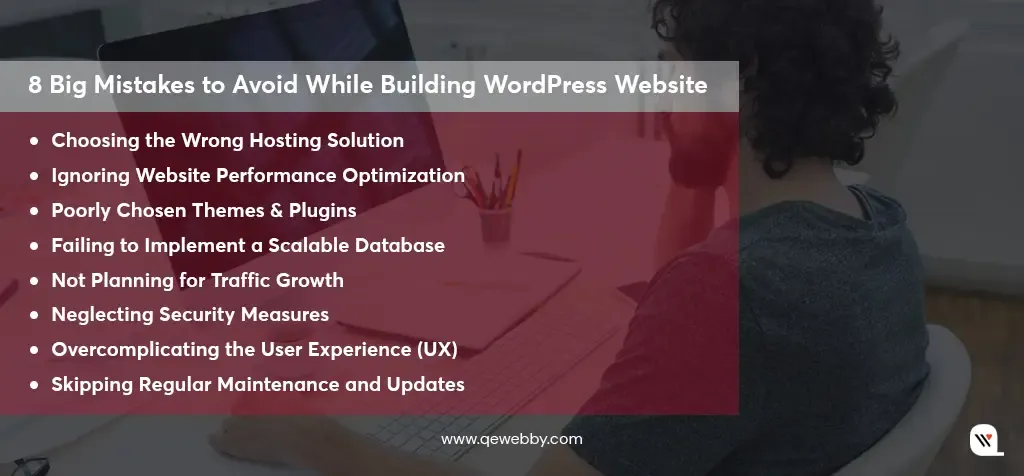
8 Big Mistakes to Avoid While Building WordPress Website

Mistake #1: Choosing the Wrong Hosting Solution

Many businesses make the mistake of going for cheap shared hosting, thinking it’s the best deal. The problem? Your site shares server space with tons of other sites, which leads to slower load times, frequent downtimes, and major issues as your site grows. It’s fine for small, low-traffic sites, but as your audience expands, you’ll quickly outgrow it.

Here’s what you should consider:

  • Shared Hosting: It’s budget-friendly but lacks the resources you need for scalability. It’s great for small sites but won’t cut it as your business grows.
  • VPS Hosting: More resources and better performance, with part of the server dedicated to your site. It’s a good middle ground for growing businesses.
  • Dedicated Hosting: All the resources of an entire server just for your site. It’s more expensive but essential for high-traffic sites or complex needs.

Choosing the right host is crucial—don’t go for a bargain if they can’t provide the support you’ll need down the line. Picking a low-cost host can backfire, causing slowdowns or even site crashes when traffic spikes.

Mistake #2: Ignoring Website Performance Optimization

A slow-loading WordPress website is a significant deterrent for users and a key ranking factor for search engines. Research shows that even a one-second delay in load time can lead to a 7% reduction in conversions. Google’s Core Web Vitals further emphasize the importance of fast load times for SEO rankings.

To improve performance:

Caching: Store static files so users don’t need to reload the same content every time they visit.

  • Image Optimization: Compress images without sacrificing quality to reduce page size.
  • Minimizing HTTP Requests: Reduce the number of elements on a page, such as scripts, images, and CSS files, to decrease load times.
  • Use Lazy Loading: Only load images and videos when they are in the user’s view to avoid unnecessary load on the initial page load.

Keeping your site lean, removing excess scripts, and reducing third-party integrations will help your site remain fast as it grows.

  • Talk about the impact of slow-loading WordPress websites on user experience and SEO.
  • Discuss strategies for optimizing performance, including caching, image optimization, and minimizing HTTP requests.
  • Share the importance of keeping your website lightweight and fast.

Mistake #3: Poorly Chosen Themes & Plugins

Themes and plugins can add great functionality to your WordPress website, but they can also hinder scalability if not chosen carefully. Poorly coded themes or plugins can cause slow performance, compatibility issues, and security vulnerabilities.

  • Choose Lightweight Themes: Opt for themes designed with scalability in mind—simple, minimalistic designs that load fast and avoid unnecessary scripts.
  • Test Plugins: Always test plugins for compatibility with your WordPress version, and ensure they are updated regularly. Overusing plugins can also bloat your site, so make sure each plugin serves a specific need.

Before adding any theme or plugin, review its performance impact using tools like GTMetrix or Pingdom.

Mistake #4: Failing to Implement a Scalable Database

A poorly structured database can easily become a bottleneck as your site grows. As data increases, the system’s ability to handle multiple queries without slowing down becomes critical.

To ensure scalability:

  • Database Indexing: Indexing helps your database quickly retrieve records, reducing load times, especially for larger websites.
  • Optimize Queries: Avoid excessive and complex database queries that slow down your site. For example, don’t use loops that make unnecessary database calls.
  • Database Cleanups: Regularly clean up unnecessary data, such as post revisions, spam comments, and expired transients, which can increase the database size unnecessarily.

A scalable database will ensure your website continues to perform well even as your business grows.

Mistake #5: Not Planning for Traffic Growth

Many businesses underestimate the future growth of traffic and fail to plan for surges, which can overwhelm their infrastructure. The lack of proper scalability can lead to crashes, slow speeds, and a poor user experience.

To scale effectively:

  • Load Balancing: Distribute traffic across multiple servers to prevent any single server from being overwhelmed.
  • Cloud Hosting: Provides the flexibility to scale your resources up or down based on demand.

Content Delivery Networks (CDNs): Distribute your site’s static content to servers worldwide, so users from different regions can load the site faster.

Mistake #6: Neglecting Security Measures

Security breaches are a common cause of site downtime, loss of data, and compromised user trust. Hackers can exploit vulnerabilities, especially on sites that aren’t regularly maintained.

To protect your site:

  • Regular Updates: Keep WordPress core, themes, and plugins updated to patch known vulnerabilities.
  • Two-Factor Authentication (2FA): Use 2FA for added protection against unauthorized logins.
  • SSL Certificates: An SSL certificate ensures data between the server and user is encrypted, improving both security and SEO.

Failing to implement proper security measures will not only harm your reputation but can also leave your website vulnerable to attacks.

Mistake #7: Overcomplicating the User Experience (UX)

A cluttered website with confusing navigation and too many distractions can overwhelm visitors. A bad user experience (UX) makes it hard for users to find what they need, increasing bounce rates and limiting conversions.

To create a user-friendly experience:

  • Intuitive Navigation: Make sure users can find what they need quickly with clear menus and categories.
  • Mobile-First Design: As mobile traffic continues to rise, your website must be optimized for mobile devices. Google even prioritizes mobile-first indexing.
  • Minimalist Design: Keep the layout clean and avoid overloading pages with excessive text or media.

Mistake #8: Skipping Regular Maintenance and Updates

Skipping updates and maintenance can lead to performance issues, security vulnerabilities, and compatibility problems. Neglecting regular WordPress core, theme, and plugin updates can lead to unforeseen problems down the line, especially when newer versions of PHP or WordPress are released.

A solid maintenance plan should include:
  • Routine Backups: Ensure you have regular backups in case of website failure.
  • Performance Audits: Run audits using tools like Google PageSpeed Insights to assess your site’s performance.
  • Consistent Updates: Regularly update the WordPress core, themes, and plugins to ensure everything is running smoothly.

By creating a solid maintenance schedule, you’ll prevent issues from escalating and ensure long-term scalability.

Don’t wait for your website traffic to slow down!

Scale up your WordPress website with us!

Contact Us Now!

In a Nutshell

Scaling your WordPress website successfully requires strategic planning and the right tools. We understand what it takes to get it right, and we’ve helped countless businesses ensure their WordPress websites stay fast, secure, and easy to navigate. Our team has a proven track record of ensuring everything runs smoothly, leaving you with more time to focus on your business.

Reach out today, and let us help you scale your WordPress website effortlessly!

5 Key Features for Flawless WordPress CRM Plugin Integration

Businesses that use CRM systems see an average increase of 29% in sales. A true CRM integrates directly with your WordPress site, allowing you to streamline your processes and automate repetitive tasks. For example, your CRM can automatically capture leads from contact forms, landing pages, or pop-ups on your WordPress site. Instead of manually entering information, all customer data is organized, segmented, and stored in a single database.

Specifically, when your CRM is synced with your WordPress site, the possibilities multiply. A connected system allows for real-time updates on customer data, ensuring your team is always working with the latest information. It bridges the gap between marketing, sales, and customer support, ensuring every team has access to the insights they need to improve customer experiences and drive growth.

Benefits of CRM Website Integration

Simply having a WordPress website isn’t enough—business leaders need to leverage data, optimize workflows, and offer personalized experiences to stay ahead. Here’s how CRM integration with WordPress can help you do exactly that:

Centralized Customer Data for Smarter Decisions

One of the most significant advantages of CRM integration is having all your customer data in one place. With this consolidated data, you can track customer behaviors, identify trends, and segment audiences more effectively. For instance, knowing which pages a visitor interacts with most can help you tailor marketing messages or promotions, increasing the likelihood of conversions. It’s about using data to take your customer relationships from transactional to transformational.

Seamless Customer Journey Across Touchpoints

Your customers engage with your business across multiple touchpoints—your website, social media, emails, and customer support. Integrating your CRM with WordPress ensures that all these touchpoints are connected, creating a seamless and cohesive customer experience. Whether it’s a personalized follow-up email, an automated discount offer, or an insightful recommendation, CRM integration helps you maintain that all-important personal touch without the need for constant manual input.

Automation That Saves Time and Boosts Efficiency

Automation is one of the key benefits that CRM integration brings to your WordPress site. With automated workflows, you can handle repetitive tasks, such as lead follow-ups, email marketing campaigns, and customer reminders, without lifting a finger. Moreover, these automated processes run 24/7, freeing up your team to focus on more strategic initiatives while ensuring no lead or customer is left behind.

Enhanced Customer Support and Engagement

When a customer reaches out via your site, the CRM automatically logs their issue, history, and prior interactions. This enables your support team to provide faster, more informed responses, ultimately improving customer satisfaction. Plus, CRM integration with WordPress gives you the ability to automate responses, set up reminders for follow-ups, and track ongoing issues—helping your team resolve cases efficiently while maintaining a high standard of service.

Scalability for Growing Businesses

Whether you’re a small startup or a large enterprise, a CRM can grow with you, ensuring that you never outgrow your system. You can add more features, integrate additional tools, or scale your automation workflows as needed—all without disrupting the user experience or workflow.

Key Features Of CRM Plugin in WordPress

1. Content Management and Segmentation
  • An effective CRM will allow you to gather, store, and organize customer data (such as email addresses, phone numbers, interactions, and behavior) in a centralized database.
  • Once your data is organized, segmentation allows you to categorize your customers based on shared characteristics, such as demographics, buying behaviors, or engagement levels. This way, you can deliver more targeted and personalized communication, whether it’s through email marketing, tailored offers, or customer service follow-ups.

HubSpot CRM automatically captures leads from forms and tracks customer interactions, making segmentation easy.

2. Lead Capture and Management

  • Integrating your WordPress site with your CRM enables automatic lead capture from forms, landing pages, and pop-ups. The CRM will then categorize, score, and assign leads to your sales team, ensuring no opportunity slips through the cracks.
  • CRM systems can even trigger automated follow-up actions based on lead behavior, ensuring you’re engaging with prospects at the right time. This automation not only saves time but ensures a consistent approach to managing leads and opportunities.

Active Campaign offers form integration that automatically pushes leads into the CRM, where they can be nurtured through email sequences.

3. Email Marketing Automation

  • With CRM integration, you can automate your email marketing campaigns based on customer behavior and interactions. For example, after a visitor signs up for your newsletter or abandons their cart, your CRM can automatically trigger personalized emails designed to move them through the sales funnel.
  • By combining customer data with behavior insights, you can craft email campaigns that feel highly personalized—building stronger connections with your audience.

Mailchimp offers advanced email automation features, including automated welcome emails, follow-ups, and cart recovery emails.

4. Sales Pipeline and Deal Tracking

  • Sales teams thrive on organized workflows and efficient pipeline management. Integrating your WordPress site with a CRM that supports sales pipeline management is critical for tracking and converting leads into customers.
  • Many CRMs offer visual pipelines, sales forecasting, and task automation to keep the process smooth and efficient.

Zoho CRM offers a seamless WordPress integration that allows you to track and manage deals, automate sales workflows, and forecast revenue.

5. Analytics and Reporting

  • Having access to data-driven insights is crucial for making informed decisions. With CRM integration, you can access powerful analytics and reporting tools that give you real-time visibility into your customer interactions, sales performance, and marketing campaigns.
  • Tracking key performance metrics, such as conversion rates, email open rates, and website traffic can be used to refine your strategies, optimize your content, and improve customer targeting.

Google Analytics Dashboard for WP (Not a CRM plugin on its own) integrates Google Analytics with your WordPress site, providing the valuable data you need to enhance CRM performance and optimize your site’s marketing efforts.

Whether it’s lead capture, sales pipeline management, email marketing automation, or customer support, integrating the right CRM features will streamline your processes, increase your team’s productivity, and ultimately drive better customer experiences.

Choosing the Right CRM for Your WordPress Website

Implementing a CRM can dramatically improve how you manage customer relationships, streamline your business operations, and enhance your marketing efforts. Keep these essential factors in mind when choosing the best CRM for your needs:

  • Ensure Easy Integration: Choose a solution that connects effortlessly with your forms, landing pages, and eCommerce tools without requiring complex setups or technical knowledge.
  • Prioritize Scalability: Select a CRM that grows with your business. It must handle increased leads, customers, and workflows as your business expands, so you never outgrow your system.
  • Demand Customization Flexibility: The CRM should be fully customizable to fit your unique business needs. Look for options that allow you to create custom fields, modify reports, and adjust user roles to align with your workflow.
  • Stick to Your Budget: Choose a CRM that fits within your budget while still delivering essential features. Take advantage of free versions or tiered pricing plans that offer flexibility as your business needs change.
  • Focus on Ease of Use: The CRM must be intuitive and easy for your team to use. A user-friendly interface ensures quick adoption, reduces the need for extensive training, and enables your team to get started immediately.
  • Demand Excellent Customer Support: Reliable customer support is non-negotiable. Ensure the CRM provider offers accessible channels like live chat, comprehensive help documentation, and training resources to resolve any issues swiftly.
  • Automate Key Processes: Look for CRM solutions with powerful automation features. Automate email marketing, lead nurturing, and task management to improve efficiency and reduce manual work.
  • Leverage Analytics for Better Decisions: The CRM must offer robust analytics and reporting tools. Track key metrics such as customer engagement, sales performance, and campaign success to make informed, data-driven decisions.

Transform your customer relationships today!

Let’s integrate a CRM solution for your WordPress site.

Let’s Connect

Take the Next Step with CRM Website Integration

Whether you’re looking to automate lead generation, enhance customer service, or gain deeper insights into customer behavior, the right CRM can make a world of difference. Our expert team has years of experience in customizing CRM solutions to meet the unique needs of our clients. From setting up automated workflows to ensuring seamless synchronization with your WordPress site, we’ll guide you every step of the way.

Contact us today to get started with a consultation, and let’s take your customer relationships to the next level.

7 Proven Strategies to Safeguard Your WordPress eCommerce Store

The global average cost of a data breach in 2024 is $4.88 million—an alarming 10% increase from last year. It’s a staggering number and a wake-up call for all of us in the online retail space.

When customers shop on your site, they expect their personal and payment information to be protected. A security breach can lead to financial losses and, even worse, a loss of trust. And we all know that trust is everything in eCommerce!

A secure online store reassures customers that their sensitive information is safe, fostering loyalty and encouraging repeat business. Here, we’ll explore 7 proven strategies to safeguard your WordPress eCommerce store.

Let’s dive in!

Our 7 Strategies for Your WordPress Store Safety

1. Use HTTPS to Protect Transactions
2. Choose Trusted Payment Processors
3. Opt for Reliable Hosting
4. Strengthen User Account Security
5. Regularly Backup Your Store
6. Monitor User Activity & Access
7. Educate Your Team and Customers

1. Use HTTPS to Protect Transactions

HTTPS (HyperText Transfer Protocol Secure) encrypts data transferred between your website and your customers’ browsers. This encryption makes it much harder for hackers to intercept sensitive information, like credit card details. Displaying HTTPS in the browser’s address bar signals to customers that their data is secure. A padlock icon reassures users that the site is trustworthy, which can significantly reduce cart abandonment rates and increase conversion rates.

Moreover, search engines like Google prioritize HTTPS websites in their rankings. By adopting HTTPS, eCommerce stores can improve their visibility in search results, potentially driving more traffic and sales.

Many payment processors and regulatory bodies require HTTPS for online transactions. Using HTTPS helps ensure compliance with standards such as PCI DSS (Payment Card Industry Data Security Standard), which is essential for accepting credit card payments.

How we implement:
  • Get an SSL Certificate: Purchase an SSL certificate from your hosting provider or a trusted certificate authority. Many hosts offer free options, like Let’s Encrypt.
  • Install the Certificate: Follow your host’s instructions to install the SSL certificate. Most providers have a simple setup process.
  • Redirect HTTP to HTTPS: Ensure that all traffic is redirected to the secure version of your site. This can usually be done in your website’s settings or via your .htaccess file.

Security for WooCommerce plugin ensures SSL is configured correctly and assists with PCI-DSS compliance for handling payment information.

2. Choose Trusted Payment Processors

Customers are more likely to complete purchases when they see familiar and reputable payment options. Well-known processors like PayPal, Stripe, and Square carry a reputation for security, which helps build trust and can lead to higher conversion rates.

Many established payment processors offer user-friendly interfaces and seamless integration with WordPress. This enhances the overall shopping experience, making it easier for customers to complete transactions and reducing cart abandonment rates.

Reputable payment processors typically support multiple currencies and various payment methods, including credit cards, digital wallets, and bank transfers. This flexibility can cater to a broader audience and enhance the store’s global reach.

What to look for:
  • Security Certifications: Ensure the processor complies with PCI-DSS (Payment Card Industry Data Security Standard), which sets security requirements for handling credit card information.
  • User Reviews: Check reviews for customer feedback on reliability and security.

WordFence Security plugin monitors traffic and provides login security features such as two-factor authentication (2FA).

3. Opt for Reliable Hosting

Fast-loading websites are crucial for eCommerce success. Reliable hosts utilize high-performance servers and Content Delivery Networks (CDNs) to optimize site speed. A well-performing site improves user experience, reduces bounce rates, and increases conversion rates.

Reliable hosting providers implement robust security measures, such as firewalls, DDoS protection, and malware scanning. These features help protect the eCommerce store from various cyber threats, including hacking attempts and data breaches.

As your eCommerce business grows, your hosting needs may change. Reliable hosting services offer scalable solutions that allow you to upgrade your resources (such as bandwidth and storage) easily, ensuring your site can handle increased traffic without compromising performance.

Key Features to Consider:
  • Automatic Updates: Ensure your host automatically updates WordPress core, themes, and plugins.
  • Backups: Choose a host that provides regular backups, so you can restore your site easily if something goes wrong.

Sucuri Security plugin helps mitigate the risks of DDoS attacks and malware infections.

4. Strengthen User Account Security

User accounts typically store sensitive information such as names, addresses, and payment methods. By enhancing account security, you significantly reduce the risk of unauthorized access and data breaches.

When customers feel their accounts are secure, they are more likely to make purchases and return to your store. Building trust through security measures can lead to increased customer loyalty and sales.

Strong account security measures help prevent unauthorized transactions and account takeovers. This not only protects the business but also fosters trust with customers.

Tips for Implementation:

  • Use plugins like Google Authenticator or Wordfence to set up 2FA for both admin and customer accounts.
  • Provide easy instructions for customers on how to enable 2FA.

2FA adds an extra layer of security by requiring a second form of verification (like a text message) in addition to a password.

5. Regularly Backup Your Store

Regular backups protect against data loss due to hacks or technical failures. If something goes wrong, you want to be able to restore your site quickly.

Analyzing user activity can provide insights into potential vulnerabilities in your security protocols. This information can guide improvements, allowing you to adapt your security measures based on real user behavior.

Our Easy Backup Solutions:

Keep track of failed login attempts and set thresholds for account lockouts. Notifying users of failed attempts can prompt them to strengthen their passwords or enable additional security measures.
Use user-friendly plugins like UpdraftPlus or BackupBuddy to automate backups. Set your backups to run daily or weekly, depending on how often you update your site.

Aim for daily backups if you frequently add new products or content. For less active sites, weekly backups may suffice.

6. Monitor User Activity and Access

Early detection allows for prompt action to mitigate potential threats. Regularly monitoring user activity can help identify unusual patterns, such as repeated failed login attempts or access from unfamiliar IP addresses.

Account takeovers are a significant threat in eCommerce. Monitoring user activities can help detect signs of account compromise, such as unexpected changes to user profiles or unauthorized transactions. Swift intervention can mitigate damage and protect both customer data and business assets.

Understanding how users interact with your site can provide valuable insights into their preferences and behaviors. This information can help you optimize the user experience while identifying potential security weaknesses based on usage patterns.

Easy Implementation Tips:
  • IP Address Monitoring: Track the IP addresses from which users log in. Identify and flag logins from unusual or unexpected locations, allowing for additional verification steps if necessary.
  • Regularly Review Activity Logs: Schedule routine audits of user activity logs to identify any patterns or anomalies. This proactive monitoring can help catch potential security issues before they escalate.

Jetpack Security offers a complete suite of features including real-time backups, malware scanning, and spam protection.

7. Educate Your Team and Customers

Many security breaches occur due to human error, such as weak passwords or falling for phishing scams. Training your team to recognize these risks helps minimize mistakes that could compromise the store’s security.

Many data protection regulations require businesses to implement training programs for employees regarding data security and privacy. Educating your team helps ensure compliance and protects your business from legal repercussions.

Regularly educating your team about security is one best practice. This can be done by recognizing phishing emails and using secure connections.

Easy Ways for Informing Customers:
  • Customer Awareness Campaigns: Implement campaigns to educate customers about account security. This could include blog posts, email newsletters, and social media content that highlight best practices for online safety.
  • Phishing Awareness: Provide training and resources that help users recognize phishing attempts. This includes identifying suspicious emails and messages that could lead to compromised accounts.

Send out security tips through newsletters or blog posts to keep security awareness high among your customer base.

End Note

A secure eCommerce store is not just a necessity; it’s a promise to your customers that their shopping experience will be safe and trustworthy. By focusing on creating a secure shopping experience, you’re not just protecting your business; you’re also fostering confidence and loyalty among your customers. Every time they make a purchase, they should feel safe and supported, knowing that you’re taking every possible step to safeguard their data.

By implementing robust security measures, you demonstrate to your customers that their safety is your top priority. Ultimately, the commitment to security transforms your eCommerce store into a trusted space for customers to explore and shop. A secure shopping environment not only enhances the customer experience but also serves as a powerful differentiator in a crowded marketplace.

Investing in the security of your WordPress eCommerce store is an investment in your business’s future. Connect with us to elevate your eCommerce store security standards. We secure your storefront with our customized security measures for eCommerce store owners.

Contact Form 7 vs. WPForms – A Business Owner’s Guide

Companies generating 40% or more of their leads through online forms grow 4X faster than those relying on offline channels. [Hinge Marketing]

An effective contact form is indispensable for any business website. It streamlines communication, enhances user experience, and supports your lead generation efforts while reflecting your business’s commitment to professionalism. Hence, by focusing on the unique needs of businesses, this article aims to simplify the decision-making process, ensuring you select the contact form solution that best supports your business objectives and drives your online success. Let’s learn more about this!

Finding the Right Contact Form Plugin for Your WordPress Site

When it comes to optimizing your WordPress website’s contact capabilities, the choice of plugin can make a significant difference. Among the leading options are Contact Form 7 and WPForms, each offering distinct advantages to cater to various business needs. Whether you need a basic solution or a robust, feature-rich tool, understanding the unique benefits of each can guide you to the perfect choice for enhancing your website’s communication efficiency.

Ready to find out which contact form plugin suits your WordPress site?

Let’s see when and why each option might be the right choice.

Contact Form 7

Contact Form 7, a long-standing player in the WordPress ecosystem, is celebrated for its simplicity and flexibility, ideal for straightforward form creation.

It operates through a text-based interface that requires users to work with HTML and shortcodes. This setup can be quite challenging for beginners, as it demands a certain level of technical knowledge to create and customize forms effectively. The learning curve can be steep, especially for those not familiar with coding. Customizing forms beyond basic functionality requires manual adjustments and a good understanding of HTML and CSS.

With Contact Form 7, users enjoy extensive customization options, but these require working directly with HTML and CSS. The plugin does not include built-in conditional logic, which means implementing advanced features often necessitates additional custom code or third-party add-ons. While there is a broad selection of third-party extensions available, these typically require manual installation and configuration.

It supports a range of third-party services through various add-ons, including popular tools like Mailchimp and Google reCAPTCHA. However, integrating these services often requires manual installation and setup of additional extensions, which can be time-consuming and complex.

Contact Form 7 relies on community-based support through forums, with official assistance being relatively limited. The documentation, while thorough, is often technical and assumes some level of coding knowledge, which might be a barrier for users who are not familiar with programming.

The plugin contact form 7 is entirely free, making it an attractive option for users seeking a no-cost solution. However, advanced features may require additional paid add-ons, which can add to the overall cost if specific functionalities are needed. It is best suited for users who need basic form capabilities and are comfortable with manual configurations.

WP Forms

WPForms provides a more intuitive experience with its drag-and-drop builder. This user-friendly interface allows for real-time previews, making it easy for users of all skill levels to design and adjust forms without needing technical expertise. The drag-and-drop functionality simplifies the form creation process, making WPForms ideal for those who want to build forms quickly and efficiently.

It simplifies customization through its drag-and-drop interface and a library of pre-built templates. This plugin includes built-in conditional logic, allowing users to create dynamic forms that respond to user input. Additionally, WPForms comes with a variety of built-in add-ons, especially in its pro versions, covering functionalities such as payment processing, CRM integration, and email marketing, thereby enhancing flexibility and ease of use.

In contrast to Contact Form 7, WPForms offers seamless integration with major services such as PayPal, Stripe, and Mailchimp. The process of connecting these services is straightforward, thanks to its easy-to-configure options. Furthermore, WPForms’ pro versions include a comprehensive array of add-ons that enhance functionality and provide additional integration options, making it easier to extend the plugin’s capabilities.

WPForms offers a more robust support system, including premium options for live chat and email support available with its paid versions. The free version also benefits from community support. The documentation for WPForms is user-friendly, featuring detailed guides and tutorials that are accessible to users of all levels. Paid plans come with responsive support, ensuring that users receive timely help when needed.

What is the best contact form builder?

Contact Form 7 vs WPForms

Feature Contact Form 7 WPForms
Ease of Use Text-based interface; requires HTML/coding Drag-and-drop builder; user-friendly
Customization Extensive with HTML/CSS; no built-in logic Drag-and-drop; includes built-in conditional logic
Integration Supports via third-party add-ons; manual setup Seamless integrations (e.g., PayPal, Mailchimp)
Add-ons Many third-party add-ons; manual installation Comprehensive built-in add-ons; easy configuration
Support Community forums; limited official support Premium support with live chat; extensive documentation
Documentation Technical; requires coding knowledge User-friendly guides and tutorials
Pricing Free; some advanced features require paid add-ons Free version available; pro versions start at $39.50/year

Which Contact Form is Best for Your WordPress Site?

When deciding between Contact Form 7 and WPForms for your WordPress site, it’s essential to consider the specific needs of your business. Different types of websites may benefit from different features offered by these plugins. Here’s a breakdown based on various business sectors:

eCommerce Websites

eCommerce sites benefit from user-friendly contact forms that can handle customer inquiries effectively. WPForms offers features like conditional logic and payment integrations, making it easy for customers to get in touch or make purchases. Contact Form 7 requires more setup for similar functionalities.

We recommend: WPForms for eCommerce Websites

Portfolio and Creative Websites

Artists and freelancers who showcase their work may prefer a minimalist contact form. Contact Form 7 offers straightforward functionality that lets visitors easily reach out without overwhelming them with options.

We recommend: Contact Form 7 for eCommerce Websites

Service-Based Businesses

Service providers need forms that facilitate appointment bookings and inquiries. WPForms includes features for appointment scheduling and customizable fields, creating a seamless booking experience. While Contact Form 7 can be adapted for this purpose, it often requires additional technical work.

We recommend: WPForms for eCommerce Websites

Blog and Personal Sites

For bloggers and personal websites, simplicity is key. Contact Form 7 is lightweight and straightforward, making it a good choice for basic needs. However, WPForms provides a more polished experience that can enhance user engagement.

We recommend: Contact Form 7 for eCommerce Websites

Non-Profit Organizations

Non-profits often need to manage donations and volunteer sign-ups efficiently. WPForms supports donation collection and integrates easily with payment gateways, making it ideal for these needs. Contact Form 7 can be customized, but lacks built-in donation options.

We recommend: WPForms for eCommerce Websites

Corporate Websites

Corporate sites demand professional, branded contact forms. WPForms offers a user-friendly drag-and-drop builder that allows for quick customization, saving time for busy professionals. Contact Form 7 can be styled, but may not be as intuitive.

We recommend: WPForms for eCommerce Websites

Educational Institutions

Schools and universities often need simple forms for inquiries and feedback. Contact Form 7 is easy to implement and can be tailored to collect specific information from students and parents without unnecessary complexity.

We recommend: Contact Form 7 for eCommerce Websites

Local Businesses

Local businesses, such as restaurants and salons, often need basic contact forms for reservations or inquiries. Contact Form 7 is simple to set up and can be customized to fit specific needs without the complexity of advanced features.

We recommend: Contact Form 7 for eCommerce Websites

The Crux

While both Contact Form 7 and WPForms have their strengths, WPForms generally stands out for its advanced features and ease of use, making it suitable for a wide array of businesses. Contact Form 7 is an excellent choice for those seeking a simple, customizable solution, especially in sectors like education, creative portfolios, and local businesses.

By carefully assessing your specific requirements—whether it’s ease of use, integration capabilities, or support options—you can choose the solution that best aligns with your goals. Ultimately, investing in an effective contact form will streamline communication, boost lead generation, and reinforce your commitment to professionalism, paving the way for your online success.

Our team has successfully helped hundreds of business owners navigate this process. Contact us today to unlock our expertise that helps you attract leads and propel your business forward!

WordPress Maintenance vs. Managed Hosting – What’s Best for Your Site’s Growth?

A 1-second delay in page load time can lead to a 7% reduction in conversions and a 16% decrease in customer satisfaction. For online businesses, this translates into real financial losses and missed opportunities.

Effective site management isn’t just a technical necessity—it’s a critical driver of growth and user engagement that is majorly done in two ways: via Maintenance Services and Managed Hosting.

Both options offer distinct advantages and can significantly affect your site’s performance, security, and scalability. By exploring the benefits and challenges of each approach, we’ll provide you with the insights needed to make an informed choice that aligns with your business goals.

Let’s dive in!

Table of Contents

  • What is WordPress Maintenance?
  • What is Managed Hosting
  • Comparing the Two Approaches for Business Growth
  • Making Decisions for Your Business
  • Wrap Up

What is WordPress Maintenance?

WordPress maintenance is like giving your website a regular check-up to keep it in top shape. It involves tasks like applying updates, backing up your data, and monitoring security to ensure everything runs smoothly. For businesses, this kind of regular upkeep is essential—it helps prevent unexpected problems, boosts site performance, and keeps your site secure from emerging threats. Essentially, it’s about making sure your website stays functional, user-friendly, and protected, so you can focus on growing your business without worrying about technical glitches.

Typical Maintenance Tasks Include:

1. Updates:
  • Regular updates to the WordPress core software help patch security vulnerabilities and introduce new features. Ensuring these updates are applied promptly prevents compatibility issues and security breaches.
  • Keeping themes and plugins updated is essential for compatibility with the latest WordPress versions and for ensuring that any known vulnerabilities are patched.
2. Backups:
  • Scheduled backups of your website’s files and database ensure that you have recent copies available in case of data loss or site failure. Backups can be stored locally, on a remote server, or in cloud storage.
  • Periodically testing backups to ensure they are functional and complete is essential for quick recovery in the event of an issue.
3. Security Monitoring:
  • Regular scans for malware, vulnerabilities, and unauthorized changes help protect your site from attacks.
  • Implementing and managing a firewall helps prevent malicious traffic and potential security threats.
  • Enhancing login security through measures like two-factor authentication and monitoring login attempts to prevent unauthorized access.
4. Performance Optimization:
  • Regularly testing and optimizing site speed, including image optimization, caching, and minimizing code, to ensure fast load times.
  • Cleaning and optimizing the WordPress database to improve performance and reduce clutter.
5. Content Management:
  • Ensuring that content remains current and relevant, and making updates as needed.
  • Regularly checking and fixing broken links to maintain a smooth user experience and improve SEO.

What is Managed Hosting?

Managed hosting is like having a dedicated team of experts take care of all the technical details of your website’s server and operations. Instead of you needing to dive into the complexities of server management and maintenance, the hosting provider handles it all. They ensure everything runs smoothly, from setting up the server to optimizing performance and securing your site.

For businesses, this means less stress and more focus on what you do best. You can rest easy knowing that skilled professionals are managing the nuts and bolts of your website’s infrastructure, leaving you with peace of mind and more time to grow your business.

What Managed Hosting Includes:

  • Server Management: The hosting provider takes care of the entire server environment, including hardware and software setup, configuration, and maintenance. This means you don’t have to worry about server issues, performance tuning, or hardware failures—everything is managed on your behalf.
  • Performance Optimization: Managed hosting includes performance enhancements to ensure your website runs smoothly. This often involves optimizing server settings, caching solutions, and load balancing to improve site speed and handle traffic spikes efficiently.
  • Security: Security is a top priority with managed hosting. Providers implement robust security measures, including firewalls, intrusion detection systems, and regular security updates. They also monitor for potential threats and respond to security incidents to keep your site safe.
  • Backups: Regular backups are a standard feature of managed hosting. The provider schedules automatic backups of your website’s files and database, ensuring you have up-to-date copies available in case of data loss or site failure. Backup solutions are often tested to ensure quick recovery.

Comparing the Two Approaches for Business Growth

When choosing between WordPress maintenance services and managed hosting, understanding how each approach impacts your business growth is crucial.

Comparing Factor WordPress Maintenance Services Managed Hosting
Initial Investment Generally lower, as you choose specific services. Typically higher due to comprehensive all-in-one packages.
Long-Term Value Variable; potential for additional costs and service upgrades. Generally high, with predictable costs and extensive support.
Time Commitment Requires more time from your team for management. Minimal time commitment; provider handles most tasks.
Effort and Expertise Requires technical expertise; may need in-house or external support. Minimal technical expertise needed; managed by the provider.
Scalability May involve separate arrangements for scaling. Typically includes built-in scalability options.
Performance Speed Performance optimization varies; may need additional services. Often includes advanced performance optimization features.
Security Measures Depends on chosen services; may vary in quality. Comprehensive security features included by default.
Backup Solutions Backup solutions vary; may need additional management. Regular, automated backups with robust recovery options.

Here’s a detailed comparison to help you make an informed decision:

Initial Investment:
  • Managed Hosting: Generally higher upfront cost due to its all-inclusive nature, covering server management, performance, and security. This premium provides convenience and expert support.
  • WordPress Maintenance Services: Lower initial cost, especially with a la carte options. Costs depend on selected services like updates, backups, and security, with potential additional expenses for in-house management.
Long-Term Value:
  • Managed Hosting: Offers long-term value with a worry-free experience and predictable costs. All-inclusive services reduce unexpected expenses from server issues or security breaches.
  • WordPress Maintenance Services: Value varies based on service quality. Flexibility to choose services can save money, but extra costs may arise from issues or upgrades.
Time and Effort:
  • Managed Hosting: Minimizes team time investment. The provider handles technical aspects, allowing focus on core business activities.
  • WordPress Maintenance Services: Requires more time and effort from your team, especially for in-house tasks like updates and security checks.
Effort and Expertise:
  • Managed Hosting: Minimal technical expertise needed from your end. The provider manages server operations and security.
  • WordPress Maintenance Services: Requires technical skills from your team or external experts to handle updates, troubleshooting, and security.
Growth and Scalability:
  • Managed Hosting: Offers robust scalability with easy upgrades to resources like storage and bandwidth, often with minimal disruption.
  • WordPress Maintenance Services: Scaling may involve managing or coordinating upgrades separately, potentially causing additional work and disruptions.
Performance and Speed:
  • Managed Hosting: Includes advanced performance optimization like caching and load balancing, ensuring fast load times.
  • WordPress Maintenance Services: Performance optimization varies and might require separate management or additional hosting provider support.
Security and Backup:
  • Managed Hosting: Includes comprehensive security features like firewalls and malware scanning, with regular updates and proactive management.
  • WordPress Maintenance Services: Security quality depends on selected services. You may need multiple solutions to match the level of protection offered by managed hosting.
Backup Solutions:
  • Managed Hosting: Provides automated, regular backups with off-site or cloud storage and quick recovery options.
  • WordPress Maintenance Services: Backups might be part of the package but can lack the integration and reliability of managed hosting solutions.

Making the Decision for Your Business

When deciding between WordPress maintenance services and managed hosting, it’s crucial to align your choice with your specific business needs, team capabilities, and long-term goals. Here’s a detailed guide to help you make the best decision:

Assess Your Business Needs

Site Size and Complexity:
  • Small, Simple Sites: For low-traffic, straightforward sites, WordPress maintenance services offer a cost-effective way to handle updates, backups, and security without excessive features.
  • Large, Complex Sites: For high-traffic sites with extensive plugins and custom functions, managed hosting provides robust infrastructure and performance optimization, ensuring reliability and responsiveness.
Budget Considerations:
  • Cost Efficiency: WordPress maintenance services typically have a lower initial cost but can add up with multiple services or unexpected issues. Managed hosting has a higher upfront cost but offers comprehensive support and potentially better long-term value.
  • Budget Flexibility: Managed hosting usually provides predictable costs, aiding financial planning. WordPress maintenance may involve variable costs, so ensure your budget can handle potential fluctuations.

Consider Your Team’s Expertise

In-House Skills:
  • Technical Capabilities: If your team has strong technical skills and can handle maintenance tasks, WordPress maintenance services might be suitable. This approach allows you to manage site operations internally.
  • Capacity and Bandwidth: If your team is stretched thin, managed hosting can offload technical responsibilities, allowing your team to focus on core activities.
Support Requirements:
  • Level of Support Needed: For 24/7 support and rapid issue resolution, managed hosting is ideal. WordPress maintenance services vary in support availability, so ensure it meets your operational needs.
  • Risk of Disruptions: Managed hosting typically offers higher reliability and minimizes downtime. With WordPress maintenance, ensure you have reliable support and a plan to address potential disruptions.

Align with Growth Goals

Long-Term Vision:
  • Growth Compatibility: Managed hosting supports scalability and can handle increased traffic and complexity, making it suitable for significant expansion. Ensure the solution aligns with your long-term growth and performance goals.
  • Performance Expectations: Managed hosting often includes advanced performance tools, maintaining high performance as your site grows. Verify that the solution meets your evolving performance needs.
Future-Proofing:
  • Technological Advancements: Managed hosting providers stay updated with the latest technologies, offering features to keep your site current. WordPress maintenance may require you to actively seek new tools or upgrades.
  • Adaptability: Managed hosting offers greater flexibility in scaling resources and integrating new technologies. WordPress maintenance might need manual adjustments to accommodate growth and new features.

Wrap-Up

Deciding between WordPress maintenance services and managed hosting comes down to what works best for your business. If you’re running a smaller site and prefer a more hands-on approach, WordPress maintenance could be a great fit. It’s flexible and cost-effective, though it does require some technical know-how and time. For those with bigger sites or plans for significant growth, managed hosting offers a worry-free, all-in-one solution that can handle your needs as they evolve.

Want to see how we can help your website thrive? Reach out to us today! We’re excited to help you achieve your goals and ensure your site performs at its best. Let’s make your website work wonders for your business!

How InstaView for WooCommerce Helps You Sell Quicker

Are you looking for a simpler way to showcase product details and improve the customer experience?

The quick product view presents a fantastic opportunity to grab attention and enhance engagement. It provides an effortless way for customers to preview products and swiftly add them to the cart.

By incorporating a quick view plugin, you streamline the buying process, making it more convenient for customers to make purchasing decisions, ultimately aiming to boost conversions and revenue.

Let’s explore more!

What does the Plugin Do?

InstaView for WooCommerce stands as a dynamic and feature-rich plugin meticulously crafted to elevate the overall user experience and functionality of WooCommerce online stores. This innovative tool represents a paradigm shift in how customers engage with products, introducing an array of functionalities aimed at streamlining the shopping journey, fostering instant engagement, and promoting overall efficiency.

At its core, InstaView redefines the conventional product interaction process by offering customers an immediate and comprehensive overview of the available products. This goes beyond the traditional approach of navigating through individual product pages, allowing users to quickly assess and explore various items directly from their current location within the online store.

InstaView for WooCommerce Plugin

Sell quicker with

Free Download

Why Do You Need InstaView for WooCommerce?

Whether you’re a seasoned eCommerce entrepreneur or just venturing into the online retail space, InstaView offers a universal solution. It’s not just a plugin; it’s a commitment to providing a modern, efficient, and enjoyable shopping experience for your customers. In the crowded digital marketplace, where every click matters, InstaView is your gateway to unlocking enhanced user satisfaction, increased engagement, and sustained success for your WooCommerce store.

For businesses operating WooCommerce stores, integrating the InstaView plugin becomes not just a choice but a strategic necessity. This plugin addresses several crucial aspects of the online shopping experience, making it an invaluable asset for enhancing their store’s performance and user satisfaction.

Here’s how your eCommerce business can benefit from incorporating this plugin:

  • Enhanced User Experience – InstaView creates an immersive and user-friendly product exploration experience. Customers can quickly access product details without navigating away, reducing friction and enhancing overall satisfaction.
  • Faster Decision-Making – The plugin’s quick popups and instant loading capabilities empower customers to make faster purchasing decisions. The immediate access to key product information eliminates delays, reducing the likelihood of hesitation or second-guessing.
  • Reduced Cart Abandonment – By streamlining the shopping process with features like asynchronous cart operations and express checkout, InstaView minimizes steps, making it less likely for customers to abandon their carts. This contributes to higher conversion rates and increased revenue.
  • Competitive Advantage – Offering a modern and efficient shopping experience sets your eCommerce business apart from competitors. InstaView provides a competitive edge by aligning with contemporary customer expectations, attracting and retaining customers in a competitive market.
  • Improved Customer Engagement – The visually appealing popups and dynamic content loading keep customers engaged with your products. Extended time spent exploring products translates into increased interaction and a higher likelihood of making a purchase.
  • Mobile Responsiveness – InstaView’s mobile-first design ensures a seamless experience for customers accessing your store from smartphones and tablets. This adaptability caters to the growing trend of mobile commerce, expanding your reach and potential customer base.
  • Efficient Resource Utilization – The selective fetching of information and intelligent caching mechanisms optimize resource utilization. This not only contributes to a faster website but also ensures that server resources are used efficiently, improving overall site performance.
  • Time and Cost Savings – The efficiency gained by minimizing page reloads and unnecessary clicks results in time and cost savings. Users spend less time navigating, and your business benefits from a more streamlined and resource-efficient operation.
  • Positive Impact on SEO – Fast-loading pages and a smooth user experience contribute positively to search engine optimization (SEO) rankings. Google and other search engines prioritize user-friendly websites, potentially improving your eCommerce store’s visibility in search results.

How To Setup InstaView for WooCommerce Plugin?

InstaView transforms the traditional WooCommerce experience into a dynamic and efficient process. By leveraging asynchronous loading, selective data retrieval, lazy loading, efficient modal windows, intelligent caching, mobile-first design, event-driven interactivity, and asynchronous cart operations, the plugin ensures that users can explore and interact with products swiftly, resulting in a responsive, engaging, and streamlined shopping experience.

Step 1: Install and enable the InstaView for WooCommerce Plugin

Upon installation and activation of InstaView for WooCommerce plugin, it seamlessly integrates product quick view capabilities into your WooCommerce store immediately. By default, an InstaView button is automatically added to the primary shop page and category archives.

Upon clicking the button, the InstaView lightbox unveils and showcases:

  • Brief product description
  • Add to cart button
  • Image Gallery
  • Additional metadata including category, tags, and SKU code
  • Price information
  • Reviews
  • Along with various other essential product data as needed
Step 2: Select the InstaView Opening Preference for Shoppers

To access the settings for WooCommerce InstaView, utilize the plugin’s setup wizard or navigate to:

WooCommerce → Settings → Products → InstaView.

The initial setting to configure involves determining how shoppers initiate the quick view popup. Initially, you can decide whether to employ the dedicated quick view button. If opting for the button, you also have the flexibility to, enable or disable the button icon. Furthermore, you can specify whether to activate the quick view when a shopper clicks on the product’s title or image.

Quick Tip: In online shopping, visually driven products benefit from InstaView with larger images, making it easy for users to add items like dresses to their carts. Conversely, spec-driven products, such as laptops, require a deeper dive into detailed specs, usually found on the product details page. These detailed specifications are crucial for relatively expensive purchases. For websites focused on spec-driven products, like consumer electronics or industrial equipment, prioritizing improvements in Product List UX proves more effective than just focusing on InstaView Feature for your products.

Get The Most Convenient WooCommerce InstaView Plugin Today!

InstaView for WooCommerce goes beyond being a mere plugin; it transforms the entire shopping experience. By integrating this innovative tool into your WooCommerce store, you not only provide customers with a more engaging and efficient means of product exploration but also lay the foundation for increased satisfaction and potential improvements in conversion rates. Moreover, statistics reveal that approximately 45% of shoppers are inclined to utilize InstaView features.

Transform your eCommerce vision into reality! Elevate your online store with our expert WooCommerce development services. Let’s build a seamless and high-performing shopping experience together. Contact us now for tailored solutions that drive success in the digital marketplace

InstaView for WooCommerce Plugin

Sell quicker with

Free Download