What to Expect in WordPress 7: Features, Roadmap and Changes

WordPress 7.0 launched on May 20, 2026, and it is the most consequential release the platform has shipped in nearly a decade.

This is not a point release with incremental improvements. WordPress 7.0 formalizes Phase 3 of the Gutenberg roadmap, ships a provider-agnostic AI infrastructure layer, rebuilds the admin interface using React, and restructures how editorial teams collaborate inside the editor.

The release was originally scheduled for April 9, 2026, but the core team delayed it to address architectural concerns, a decision that signals where priorities sat. WordPress 7.0 has officially arrived. It came with one flagship feature removed and the platform’s foundations meaningfully strengthened.

In this blog, you will get a breakdown of what’s changed in WordPress 7.0, why recent changes matter the most, new features, its impact on plugins, themes, security, and what to check before installing it.

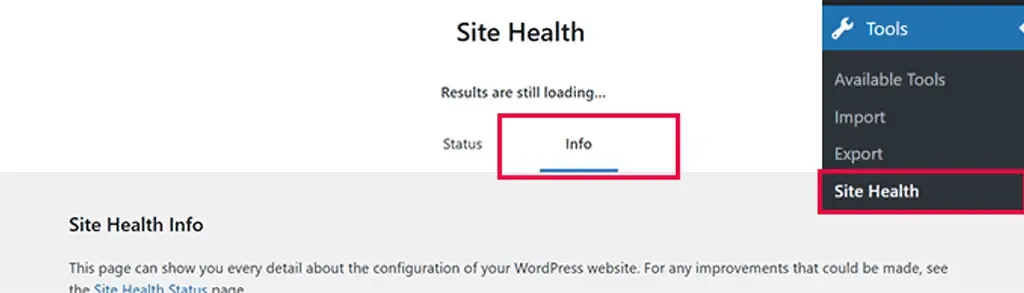
Work through each item on staging, document any failures, fix them, and schedule the production upgrade only when a rollback path is confirmed.

WordPress 7.0 Upgrade Guide: Plugin and Theme Compatibility Testing

The shift from classic PHP list tables to the React-based DataViews interface means certain plugins are at risk. Admin plugins that add custom columns, filters, bulk actions, meta boxes, or custom quick-edit fields to the Posts, Pages, or Users screens may not render correctly until their maintainers ship compatibility patches.

Media Plugins: Because image processing now begins in the browser before server-side hooks fire, media plugins that rely on early-stage upload interception must update their integration points. Actively maintained plugins should already have patches.

  • Warning: Abandoned plugins (inactive for more than 12 months) are high-risk and should be replaced rather than tested.

Why WordPress 7.0 Matters More Than Recent Updates

WordPress 7.0 formalizes Gutenberg Phase 3, which shifts the platform’s editorial model from individual-user publishing to team-based content operations.

Infrastructure Evolution, Not Just an Interface Refresh

WordPress 7.0 is not a cosmetic update. The admin interface, AI integration model, media processing pipeline, and PHP support boundaries have all been rearchitected to touch every layer of a running WordPress installation.

That separation from typical incremental updates changes the risk profile for agencies and enterprise teams planning upgrades, and it is the first thing worth understanding before a single plugin compatibility check.

WordPress 7.0 as the Foundation for AI-Ready Sites

The most important thing WordPress 7.0 ships is not a single feature. It is the AI infrastructure layer that governs how every future AI-powered plugin interacts with the platform.

Before this release, WordPress had accumulated a fragmented set of competing AI implementations, in which each plugin built its own permission system, provider connection, and access logic. That fragmentation created security exposure and unpredictable behavior across sites running multiple AI tools simultaneously.

WordPress 7.0’s AI Client and Abilities API resolve that fragmentation structurally rather than through guidelines alone. Whether or not you activate any AI features today, your site now runs on a platform that has defined how AI integration should work for the entire ecosystem going forward.

Major Features in WordPress 7.0: A Complete Breakdown

WordPress 7.0 introduces fundamental shifts in how the platform handles artificial intelligence, backend management, and team collaboration. Here is an optimized look at what you need to know about this landmark update.

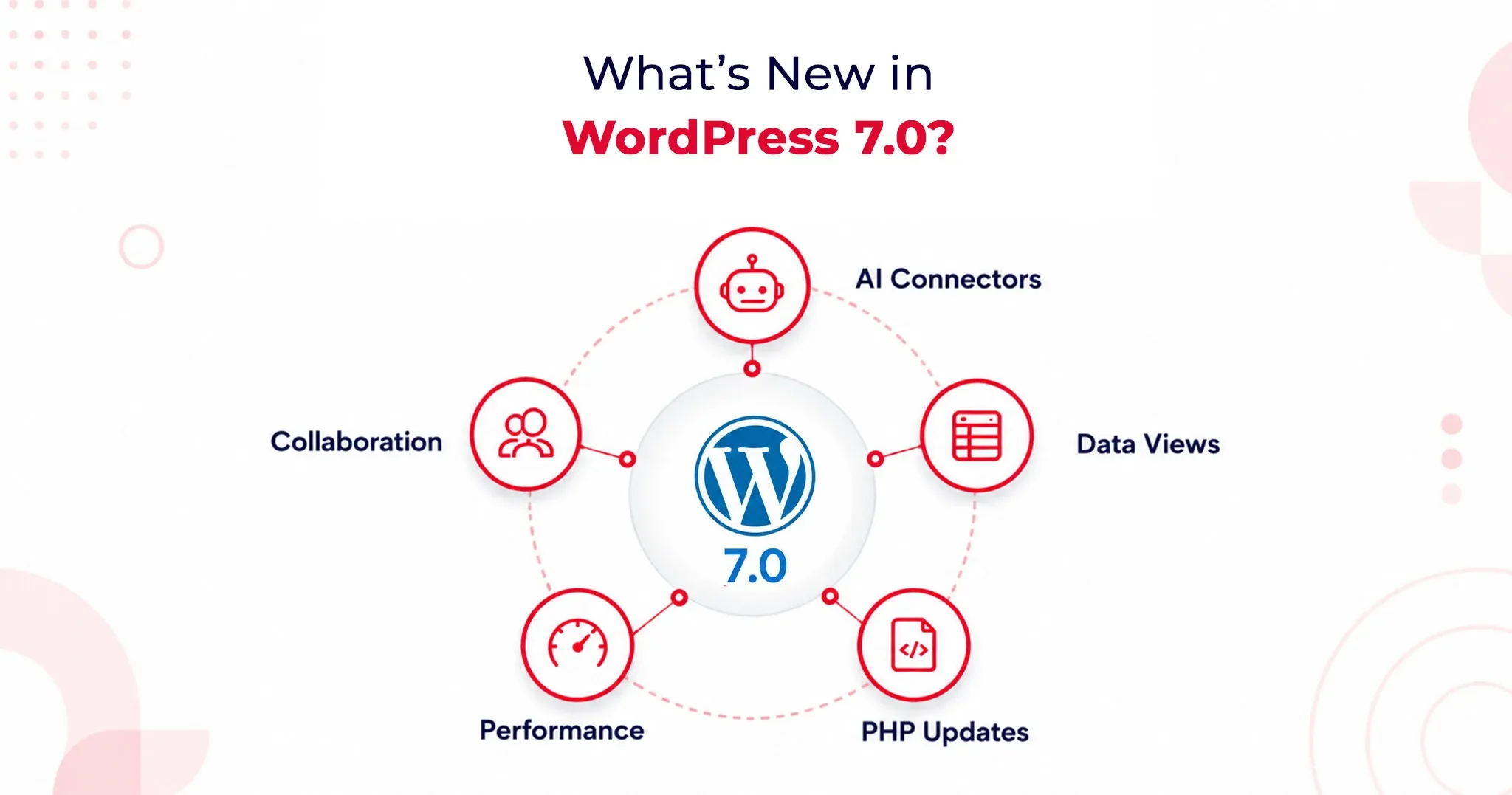
1. AI Client and AI Connectors: A Provider-Agnostic AI Layer

WordPress 7.0 officially brings AI into the core experience by shipping a Web Client AI API. This establishes a standardized, deeply integrated interface that plugins and themes can use to connect to external AI providers.

According to WordPress.com’s official release documentation, the platform includes three pre-registered connectors right out of the box: OpenAI, Anthropic, and Google.

Why this matters:

  • Vendor Neutrality: The core team deliberately avoided locking users into a preferred AI service. You aren’t forced into a single model provider.
  • Centralized API Management: Site administrators simply enter one API key per provider. Any plugin built against the AI Client can leverage that connection immediately without requiring a separate plugin-level setup.
  • Future-Proofing: This design protects site owners from lock-in as the AI landscape shifts and gives developers a highly stable API surface to build against.

Practically, this streamlined setup powers features like:

  • Smart content suggestions
  • Auto-generated alt text
  • One-click summarization
  • Translation assistance

The Abilities API: Enterprise-Grade Security

To keep these powerful tools in check, WordPress 7.0 introduces the Abilities API. This defines exactly what AI tools are permitted to do within your installation.

Plugins must explicitly register their capabilities (e.g., creating posts, editing metadata, generating image descriptions). AI tools read these permissions in a structured way and operate strictly within defined boundaries. For enterprise site owners managing complex automation workflows, this boundary enforcement provides foundational security architecture, not just a convenience layer.

2. DataViews Admin Redesign: A Modern SaaS-Style Control Center

Say goodbye to WordPress’s classic PHP-rendered admin list tables. DataViews is a new React-based content management interface for posts, pages, media, and users. This redesign fundamentally alters how the backend behaves, not just how it looks.

The DataViews Upgrade:

  • Zero Reloads: Filtering, sorting, and bulk editing happen instantly without a full-page reload.
  • Seamless Toggling: Site administrators can fluidly switch between table, grid, and list views on the exact same screen.
  • Instant Updates: Grouping by status, author, or category updates on the spot.

This operational speed saves measurable hours per month for teams managing large content libraries. By bringing the admin experience closer to modern SaaS workflows like Notion and Airtable, editorial teams no longer have to justify a clunky backend to stakeholders.

3. Notes and Editorial Collaboration

Editorial workflows are getting a massive asynchronous upgrade, though the highly anticipated live-editing feature has been pushed back.

Real-Time Co-Editing Delayed

Real-time collaborative editing was officially removed from WordPress 7.0 on May 8, 2026. The core team pulled the flagship feature after race conditions, fuzz testing failures, and server memory concerns under concurrent load made it unsafe to release at scale.

If you were planning to restructure your editorial workflow around live co-editing, you will need to look toward a future WordPress release.

What Shipped: The Block-Level Notes System

While live co-editing is delayed, the new block-level Notes system has successfully shipped, and it covers the vast majority of what editorial teams actually need daily.

Key Collaboration Features:

  • Targeted Feedback: Editors can leave comments tied directly to specific blocks or text selections.
  • Team Tagging: Easily loop in teammates using @mentions.
  • Suggestions Mode: Propose changes that preserve the original text until the author explicitly accepts or rejects the edit.

This asynchronous collaboration model resolves major coordination friction without demanding the heavy WebSocket infrastructure that live co-editing requires from hosting environments.
Performance and Infrastructure Improvements

WordPress 7.0 Upgrade Guide: What Changes Under the Hood

Browser-side media processing is one of the most significant infrastructure changes in WordPress 7.0, profoundly impacting both site performance and plugin compatibility.

Uploaded images are now processed directly in the browser using WebAssembly before ever reaching the server. This means compression, resizing, and thumbnail generation all happen on the client side.

  • The Benefit: This shift drastically reduces server resource consumption and adds native support for modern image formats, including HEIC and AVIF, without requiring server-side library updates or changes to your hosting environment.

The media uploader now features real-time compression previews via slider controls, alongside saliency detection for automatic smart cropping based on an image’s most visually significant area.

With WordPress 7.0, the Block Editor loads noticeably faster. The iframe isolation model, which prevents style bleed between the admin area and the frontend, has also been refined, improving editing accuracy across both Block and Classic theme configurations.

PHP 7.4 Minimum Requirement and PHP 8.3 Compatibility

WordPress 7.0 officially draws a line in the sand regarding server environments:

  • The Baseline: It sets the PHP 7.4 Minimum Requirement, officially dropping support for PHP 7.2 and 7.3. Sites running those outdated versions will remain on the 6.9 branch (which receives security patches only) and will not receive the WordPress 7.0 update. Discovering this non-negotiable boundary on upgrade day is an avoidable operational disruption.
  • The Goal: The core team strongly advocates for PHP 8.3 Compatibility. Running PHP 8.3 or higher delivers measurable performance improvements, stronger type safety, and better alignment with modern development tooling. Upgrading to 8.3 positions your site safely for the next two to three release cycles.
  • Action Item: Check your hosting control panel or contact your host to verify your PHP version before scheduling your upgrade.
What Website Owners Should Check Before Updating to WordPress 7.0

Your WordPress 7.0 Upgrade Guide: Pre-Update Checklist

The only safe path to upgrading to WordPress 7.0 runs through a staging environment first. You must clone your production site, apply the update, and test comprehensively before pushing it live. This is entirely non-negotiable for installations that run custom blocks, have heavy admin modifications, or use server-side image plugins.

Your Pre-Update Checklist:

  • Full Backup: Secure the database and file system. WordPress 7.0 alters database structures and file handling, complicating mid-upgrade recovery if things go wrong.
  • PHP Verification: Confirm your version at the hosting level.
  • DataViews Compatibility: Review plugin changelogs for explicit DataViews support notes.
  • Editor Testing: Verify theme behavior within the new iframe-based editor.
  • React 19 Audit: Test custom block compatibility with React 19’s updated patterns.
  • Rule Validation: Check your caching and CDN rules following the admin interface change.

WordPress 7.0 Upgrade Guide: Plugin and Theme Compatibility Testing

The shift from classic PHP list tables to the React-based DataViews interface means certain plugins are at risk. Admin plugins that add custom columns, filters, bulk actions, meta boxes, or custom quick-edit fields to the Posts, Pages, or Users screens may not render correctly until their maintainers ship compatibility patches.

Media Plugins: Because image processing now begins in the browser before server-side hooks fire, media plugins that rely on early-stage upload interception must update their integration points. Actively maintained plugins should already have patches.

  • Warning: Abandoned plugins (inactive for more than 12 months) are high-risk and should be replaced rather than tested.

WordPress 7.0 WooCommerce Compatibility: What Store Owners Need to Know

Major ecosystem players WooCommerce, Yoast SEO, ACF, and Elementor have already shipped WordPress 7.0 compatibility updates ahead of the May 20 release. WooCommerce’s compatibility advisory confirmed rigorous testing across the release candidate cycle; standard configurations with major eCommerce extensions passed without regressions.

Where the risk lies:

  • Older, poorly maintained WooCommerce extensions.
  • Custom payment gateway integrations using legacy WordPress admin hooks.
  • Modified checkout flows are dependent on classic list table structures for order management.

If your store runs a standard WooCommerce setup, your risk is low. If your order management relies on custom admin modifications, prioritize those on your staging checklist immediately.

Will WordPress 7.0 Break Existing Plugins or Themes?

Yes, WordPress 7.0 carries a meaningfully higher risk profile than a typical point update. This is due to architectural depth, not careless engineering. The core shifts to the admin interface, media processing pipeline, and React version create new surface areas where older integrations can break without warning.

However, the core team’s commitment to backward compatibility remains firm:

  • Classic themes remain fully supported.
  • The Font Library, previously restricted to Block Themes, now officially extends to Classic Themes.

Is WordPress 7.0 Safe to Update Immediately?

  • For personal sites & standard blogs: Yes. Test on staging first, then update.
  • For Enterprise, Agencies & WooCommerce: No. Wait for the 7.0.1 and 7.0.2 minor patch releases before touching production.

Minor patches historically address the edge-case failures that crop up in the first 2–4 weeks. Given the architectural depth of 7.0, an active issue queue is guaranteed. Waiting costs little, but protects you from disproportionate recovery efforts in complex environments.

Agency Best Practice: Build a validation workflow. Require staging confirmation, plugin compatibility sign-off, client communication regarding interface changes, and a verified rollback path. WordPress 7.0 is stable, but planning for edge cases is the only professional response.

The Verdict

WordPress 7.0 is a genuine infrastructure release, not a marketing milestone. The AI Client, DataViews admin redesign, and browser-side media processing collectively shift what WordPress can do for content teams operating at scale. While real-time collaborative editing did not ship, the platform’s foundations are substantially stronger, highly AI-ready, and better suited to modern content operations than they were before May 20, 2026.
What’s New in WordPress 6.7: Key Features and Enhancements

WordPress 6.7 will go live on 12 November! Packed with powerful new features, it’s set to take your website-building experience to new heights. From a sleek, brand-new default theme that makes design a breeze, to major enhancements in the block editor that boost both speed and creativity, WordPress 6.7 is all about making your workflow smoother and more efficient.

At QeWebby, we’ve been closely monitoring the development of WordPress 6.7, testing its beta release, and we are excited to share the new features and improvements that are set to elevate the website-building experience. Add in some impressive backend optimizations, and you’ve got an update that’s bound to transform how you build and manage websites.

Here’s a quick look at what’s coming in WordPress 6.7!

1. New Default Theme – Twenty Twenty-Five

Every year, WordPress introduces a new default theme, and Twenty Twenty-Five continues this tradition. What sets Twenty Twenty-Five apart is its versatility. It offers a wide variety of patterns, layouts, and styles, enabling users to express their stories in countless ways.

The theme’s design draws inspiration from the beauty of nature and the flow of time, invoking themes of impermanence, growth, and transformation.

The overall aesthetic of Twenty Twenty-Five leans into positivity, with soft colors, light textures, and an inspiring vibe. Whether you’re building a personal blog or a professional site, this theme invites you to explore endless creative possibilities while maintaining a sense of calm and elegance throughout.

2. Zoom-Out View for Site Editing

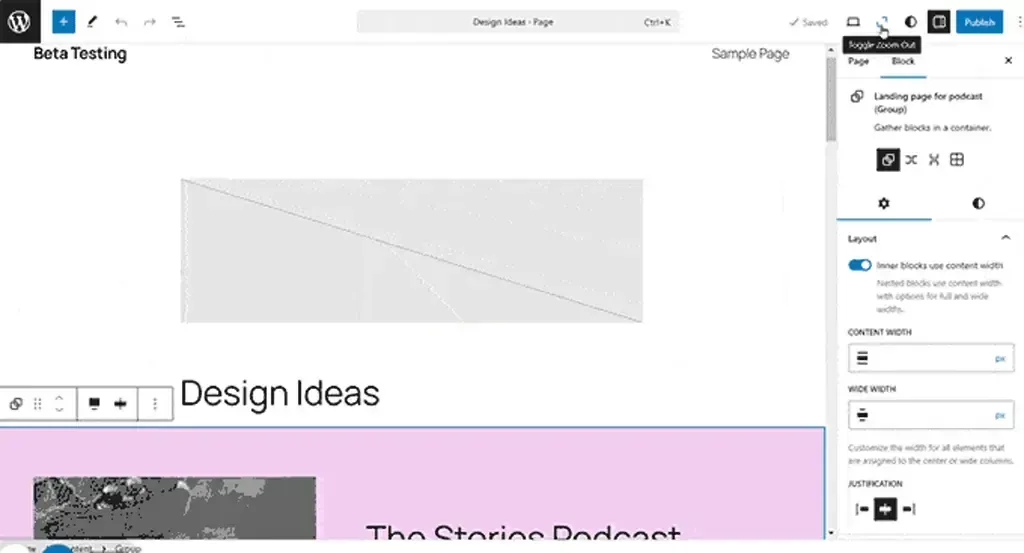
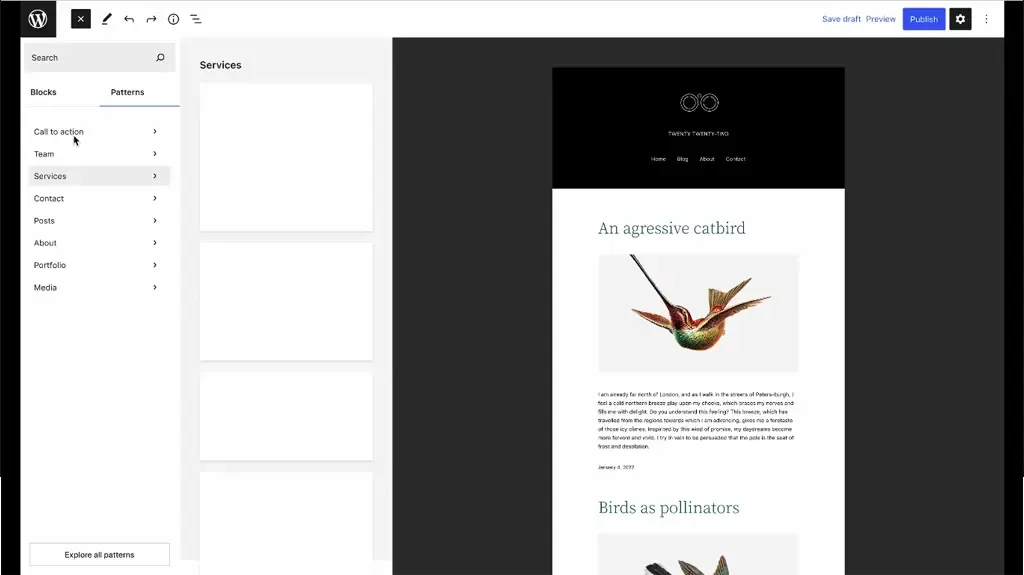
WordPress 6.7 is making it easier than ever to design and edit your site with a new “zoomed-out” approach, allowing you to work at the pattern level and get a better overview of your layout.

Here’s a quick look at what’s coming:

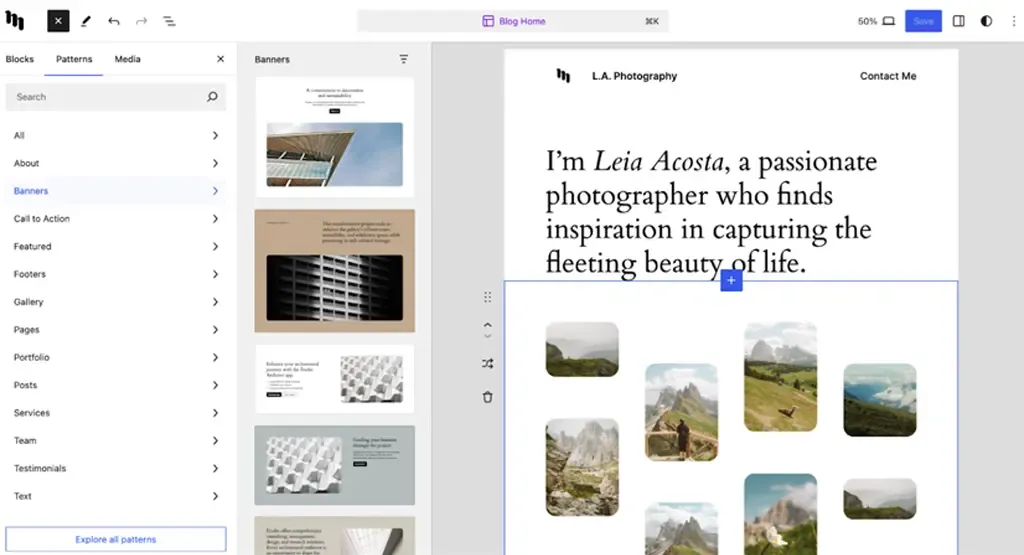
  • Zoomed-Out Pattern View: When inserting or creating patterns, you’ll be able to zoom out and see how everything fits together, making it easier to plan and organize your design.
  • Pattern-Focused Page Creation: Adding new pages will feel more intuitive, with a zoomed-out view that highlights patterns and helps you maintain the big picture.
  • Easier Pattern Manipulation: Moving, deleting, or adjusting patterns in the template will be smoother, with a handy new vertical toolbar to give you better control.
  • Smoother Dragging: The user experience for dragging patterns around has been improved, making it easier to reposition elements without breaking your flow.
  • Quick Zoom Toggle: A simple toggle will let you switch between zoomed-out and zoomed-in views in the preview panel, so you can adapt to your needs on the fly.
  • Seamless Block Editing: You can easily switch between block-level editing and the zoomed-out view, keeping your workflow flexible and efficient.
  • Content-Only Editing: With content-focused editing, you can stay focused on what matters most and get things done faster without distractions.

3. Media File Improvements

WordPress 6.7 is making major strides in how we add and interact with media, offering enhanced flexibility and performance. New features include support for the HEIC image format, auto-sizing for lazy-loaded images, and expanded background image options at both the block and global levels. These updates are designed to improve how you manage media on your site, making it more efficient and visually appealing.

  • HEIC Support: Upload HEIC images seamlessly, with automatic conversion and optimizations for better performance and compatibility.
  • Auto Sizes for Lazy-loaded Images: Lazy-loaded images will now automatically adjust their size, improving page load times and user experience.
  • Block-Level Background Images: Apply background images to individual blocks and set global background styles across your site for a consistent design.
  • Background Attachment Support: Add fixed backgrounds (attachment) for a more dynamic, scrolling effect.
  • Streamlined Background Image UI: A new modal for background images consolidates the UI, making it easier to customize your site’s visuals.

4. Preview Options API

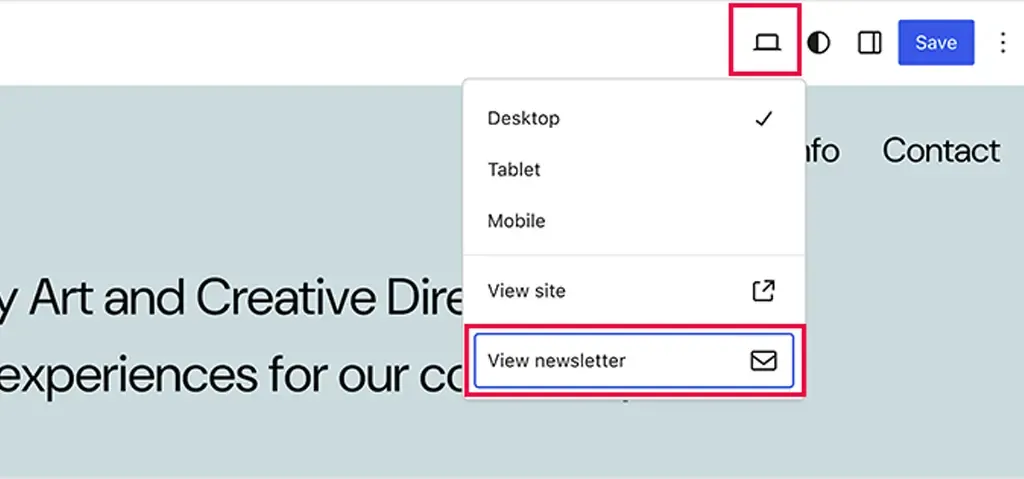
WordPress 6.7 introduces a new API that takes the Preview dropdown menu in the post and page editor to the next level. With this update, plugin developers can now add their own custom menu items, offering more flexibility and personalized preview options directly within the editor.

Key features of this update include:

  • PreviewDropdownMenuItem Component: This new component allows plugins to easily add custom items to the Preview dropdown, enhancing the previewing process.
  • Custom Menu Items: Plugins can now include menu items with custom titles and click handlers, giving developers more control over what users can preview and how.
  • Extensibility with Consistency: While the core structure of the Preview dropdown remains unchanged, this API makes it easy to extend its functionality without disrupting the existing layout.

5. Refined Query Loop Block

While it’s crucial for the block to offer a wide range of features, it’s equally important that it remains easy to customize and use. That’s why the Query Loop is getting a thoughtful refresh — from refining the settings copy to enhancing how it detects context, the goal is to make this block more intuitive without sacrificing its capabilities. This update is all about making the Query Loop easier to work with, so you can unlock its full potential with less effort.`

For example, the block’s settings copy is being reworked for clarity, making it easier to understand what each option does. At the same time, better context detection will allow the block to automatically adjust based on where it’s used, saving time and reducing the need for manual adjustments.

These thoughtful improvements aim to make the Query Loop block not only more powerful but also more intuitive, giving you the ability to create dynamic, content-driven pages with ease.

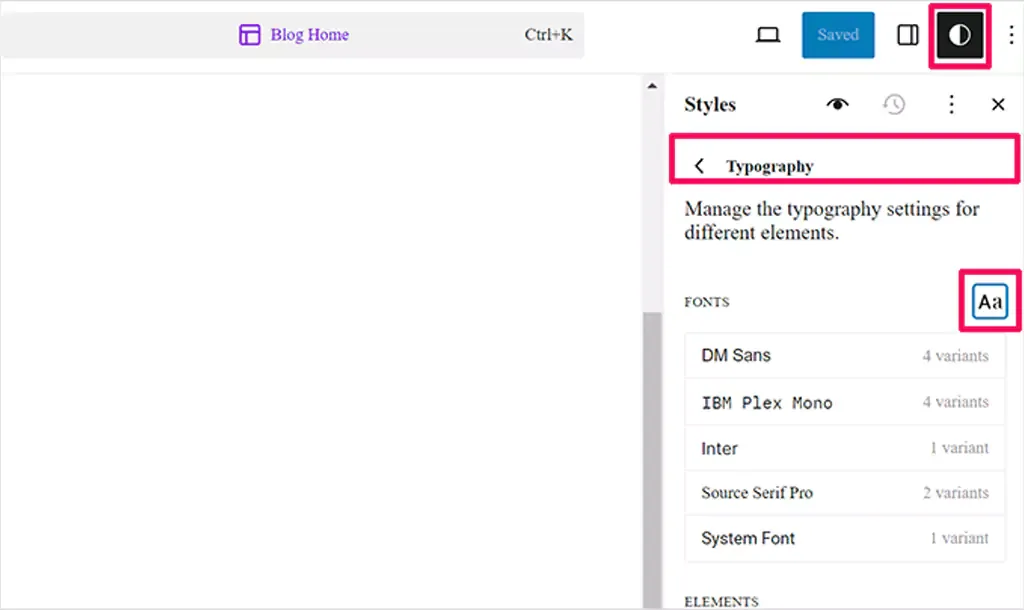
6. Enhanced Typography and Font Management
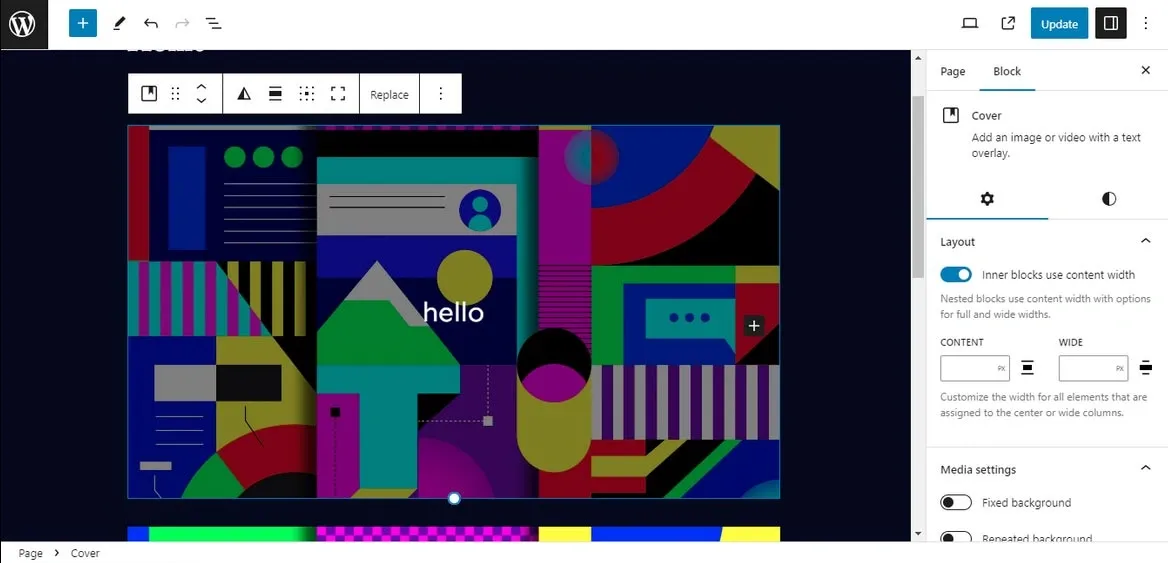
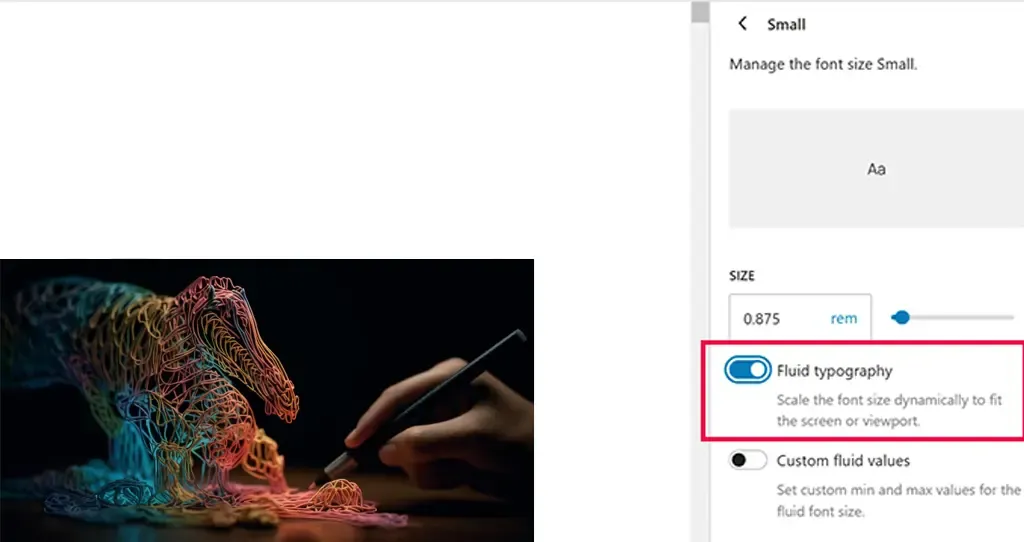
Gone are the days of manually tweaking font sizes for different devices! One of the new exciting features in WordPress 6.7 is fluid typography — a smart update that ensures your text looks great no matter what device it’s viewed on.
Fluid typography lets your text resize smoothly and automatically, so your site’s content always looks polished and easy to read. It’s a simple update that makes a big difference, ensuring your typography is always responsive and user-friendly, no matter where it’s being viewed.

In addition to the front-end and editor updates, WordPress 6.7 includes performance optimizations and new APIs for developers:

PHP 8.X Compatibility: Updates to ensure seamless integration with modern PHP versions.
Template Registration API: A new API simplifies how templates are registered programmatically, making plugin development more straightforward.
Script Loader Enhancements: Obsolete polyfills are removed, reducing unnecessary script dependencies.

Wrap Up

With all these exciting updates in WordPress 6.7, it’s clear that the platform is evolving to make site-building easier, more flexible, and more powerful. Whether it’s improving how you work with media, offering more customization options, or enhancing the overall user experience, WordPress is becoming a more intuitive tool for everyone.

Ready to unlock the full potential of your WordPress site? At QeWebby, our team of experts is here to help you make the most of these new features and create a site that truly works for you. Get in touch with us today to take your WordPress experience to the next level!

Additionally, improvements are underway to make the API more accessible for developers, particularly by simplifying how core sources like “Post Meta” manage bindings. This includes expanding support for more core sources and refining the block bindings editor to be more flexible for future needs, such as supporting new pattern override features. These updates will make working with dynamic content in WordPress even easier and more powerful.

Under-the-Hood Improvements

In addition to the front-end and editor updates, WordPress 6.7 includes performance optimizations and new APIs for developers:

  • PHP 8.X Compatibility: Updates to ensure seamless integration with modern PHP versions.
  • Template Registration API: A new API simplifies how templates are registered programmatically, making plugin development more straightforward.
  • Script Loader Enhancements: Obsolete polyfills are removed, reducing unnecessary script dependencies.

7. Interactivity API Enhancements

WordPress 6.7 continues to focus on improving the Interactivity API, aiming to make the code cleaner, more stable, and better suited for asynchronous tasks.

These internal improvements are laying the groundwork for future performance boosts, such as enabling directive code splitting and lazy loading for interactive blocks. WordPress will offer a smoother experience when adding interactive elements to your site by making the API more resilient.

One notable update is the addition of lightbox support to the Gallery block, allowing images to open in a larger view when clicked, providing a richer visual experience. This update will ensure that galleries with multiple images display seamlessly with the lightbox feature, creating a cohesive and engaging browsing experience.

8. Improved Block Library & Patterns

Several improvements have been made to the Block Library and Block Patterns. Notable changes include:

The latest release WordPress 6.7 is all about fine-tuning the user experience with a handful of exciting new features. These include the ability to adjust the density of information in grid layouts, toggle filters in the interface, and customize the order of columns in table views. Additionally, users will now have more control over the aspect ratio of the grid layout, making it easier to tailor designs to their specific needs.

These updates aim to offer greater flexibility and functionality, allowing users to customize their views more effectively. By moving data view options out of menus and giving more control over layout and presentation, WordPress 6.7 enhances the overall usability of these features, making it easier to create clean, user-friendly designs without sacrificing functionality.

9. Refined Data Views

After its initial introduction in WordPress 6.5 and further enhancements in 6.6, the latest release is focused on polishing the user experience with a few key upgrades.

Here are some of the key features for Refined Data Views in WordPress 6.7, in short:

  • Adjust Grid Layout Density: Customize how much information is displayed in grid layouts.
  • Toggle Filters Visibility: Option to hide or show filters in the user interface.
  • Customize Column Order: Rearrange columns in table views to suit your needs.
  • User-Controlled Grid Aspect Ratio: Adjust the aspect ratio of grid layouts for better design flexibility.
  • Streamlined Data View Options: Move data view options out of menus for more intuitive design and customization.

10. Manage Block Bindings Directly

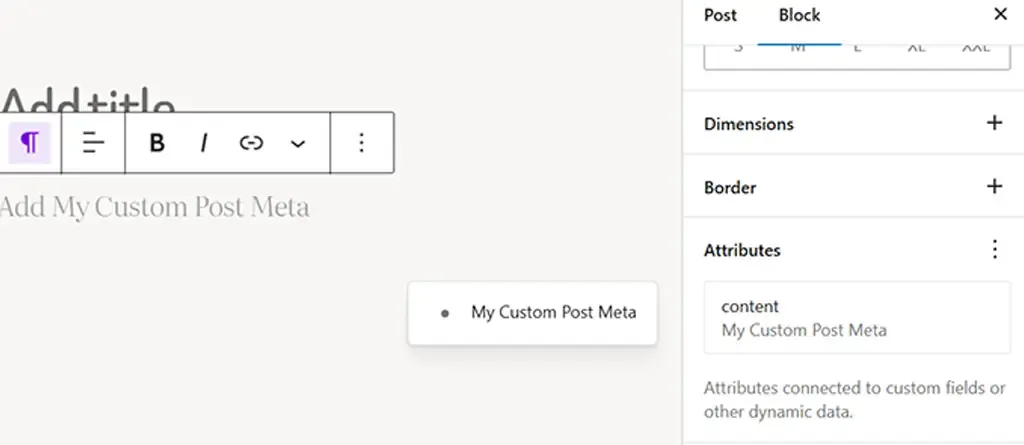
For block bindings, WordPress is now focusing on making the process more user-friendly by adding a new UI that lets you directly connect attributes to data sources, without needing to dive into the Code Editor.

Additionally, improvements are underway to make the API more accessible for developers, particularly by simplifying how core sources like “Post Meta” manage bindings. This includes expanding support for more core sources and refining the block bindings editor to be more flexible for future needs, such as supporting new pattern override features. These updates will make working with dynamic content in WordPress even easier and more powerful.

Under-the-Hood Improvements

In addition to the front-end and editor updates, WordPress 6.7 includes performance optimizations and new APIs for developers:

  • PHP 8.X Compatibility: Updates to ensure seamless integration with modern PHP versions.
  • Template Registration API: A new API simplifies how templates are registered programmatically, making plugin development more straightforward.
  • Script Loader Enhancements: Obsolete polyfills are removed, reducing unnecessary script dependencies.
Wrap Up

With all these exciting updates in WordPress 6.7, it’s clear that the platform is evolving to make site-building easier, more flexible, and more powerful. Whether it’s improving how you work with media, offering more customization options, or enhancing the overall user experience, WordPress is becoming a more intuitive tool for everyone.

Ready to unlock the full potential of your WordPress site? At QeWebby, our team of experts is here to help you make the most of these new features and create a site that truly works for you. Get in touch with us today to take your WordPress experience to the next level!

How WordPress 6.6 Drives Engagement To Your Website with Advanced Features

WordPress 6.6 is set for release on July 16, 2024. This update introduces new features like section styles and overrides in synced patterns, along with enhancements to the Font Library and Interactivity API. These improvements streamline site editing, enhance design flexibility, and boost overall performance for business websites.

WordPress 6.6 brings significant benefits to website owners by enhancing site editing capabilities, improving design flexibility with new features like section styles and synced pattern overrides, and optimizing overall performance through updates to the Font Library and Interactivity API. These enhancements translate into streamlined site management, increased customization options, and improved user engagement, ultimately empowering website owners to create more dynamic and efficient online experiences for their audience.

Let’s discover how these updates can empower your WordPress website with deeper insights.

Enhanced Site Editing Capabilities
  • Advanced-Data Views in the Site Editor
  • Zoomed Out Composition with Patterns
  • Viewing Inherited Style Values
Unified Editor Experiences
  • Streamlined Publish Flow
Design Tools Empowerment
  • Expanded Style Variation Options
  • Synced Blocks and Pattern Attributes
  • Enhanced Grid Layout and Font Library
Performance and API Enhancements
  • Performance Improvements
  • API Iterations: Interactivity, Block Hooks, and HTML
Infrastructure and Compatibility Updates
  • PHP Version Support Update
  • Rollback Feature for Auto-Updates
Upgrade to WordPress 6.6 Today
  • For Agencies
  • For Business Leaders
Take the Next Step

Enhanced Site Editing Capabilities

Advanced-Data Views in the Site Editor

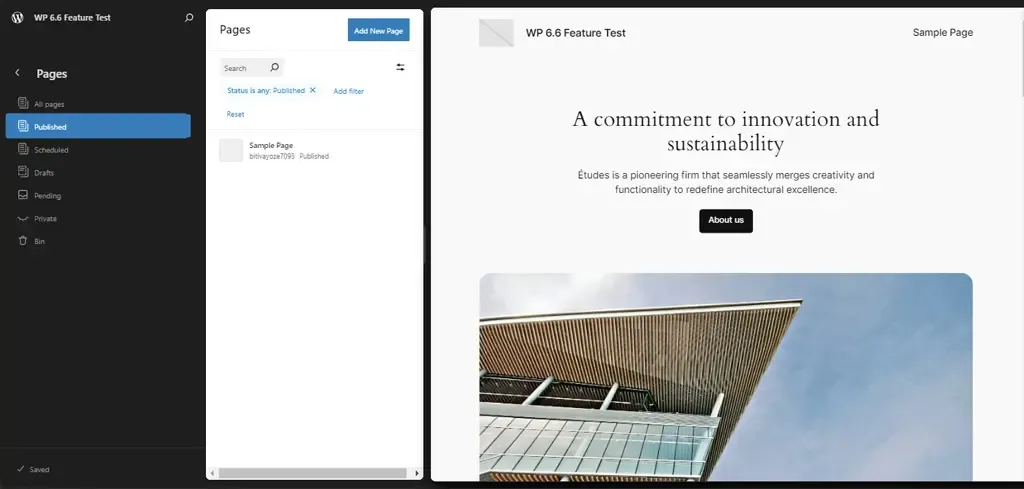
WordPress 6.6 introduces advanced data views in the Site Editor, enhancing how site administrators manage templates, template parts, and pages. Key updates include:

  • Improved Management Pages: Options for managing all templates, template parts, and pages are now consolidated into easily accessible sections.
  • Side-by-Side Layout: Users can view all pages alongside a larger preview of the selected page, reducing the steps needed to access critical information.

These enhancements streamline site management, offering quicker navigation and preview capabilities crucial for efficient content updates and template adjustments.

Zoomed Out Composition with Patterns

A standout feature of WordPress 6.6 is its zoomed-out composition capability with patterns, revolutionizing how users interact with site content. This feature allows for a high-level overview of site structure through patterns, facilitating the manipulation of patterns within templates effortlessly.

Users can now explore alternative layouts and adjust patterns more efficiently, thanks to UX enhancements that simplify pattern management. This not only enhances design flexibility but also significantly improves the efficiency of site-building processes, empowering users to create and modify complex site layouts with ease.

Viewing Inherited Style Values

WordPress 6.6 enhances the understanding and management of site-wide design consistency with improved handling of inherited style values. Key improvements include:

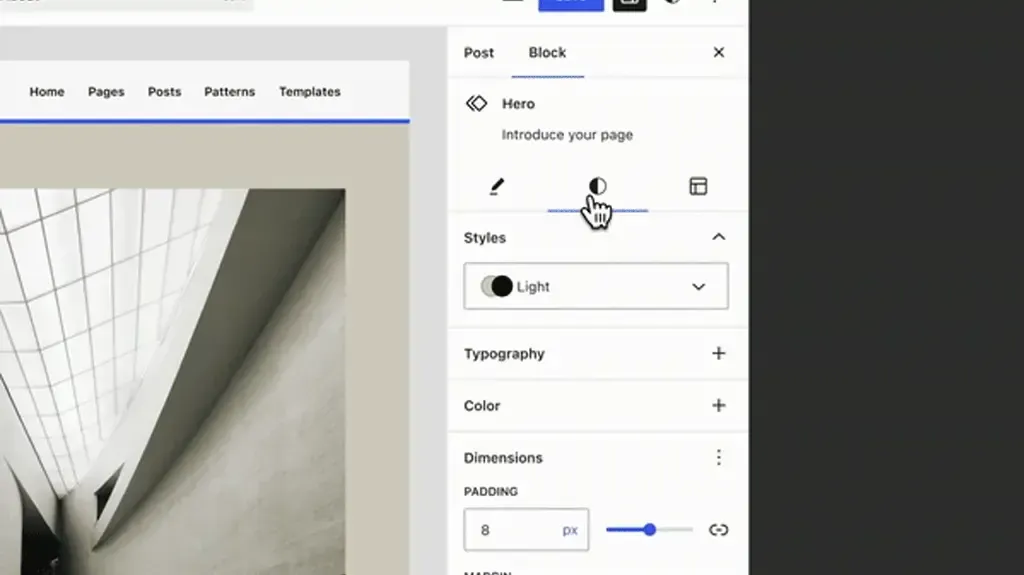
  • Clear Display of Inherited Styles: Users can now see globally inherited block styles directly within the editor interface, ensuring transparency in how styles propagate across different blocks and pages.
  • Elimination of Confusion: The exact inherited style values are displayed locally when applicable, making it easier to identify and modify design elements consistently throughout the website.

This clarity promotes better design decisions and enhances the overall visual coherence of WordPress-powered websites.

Unified Editor Experiences

Streamlined Publish Flow

WordPress 6.6 introduces a streamlined publishing flow, unifying the publishing process across both post and site editors. This update ensures a coherent experience when publishing content, whether managing individual posts or updating entire site sections.

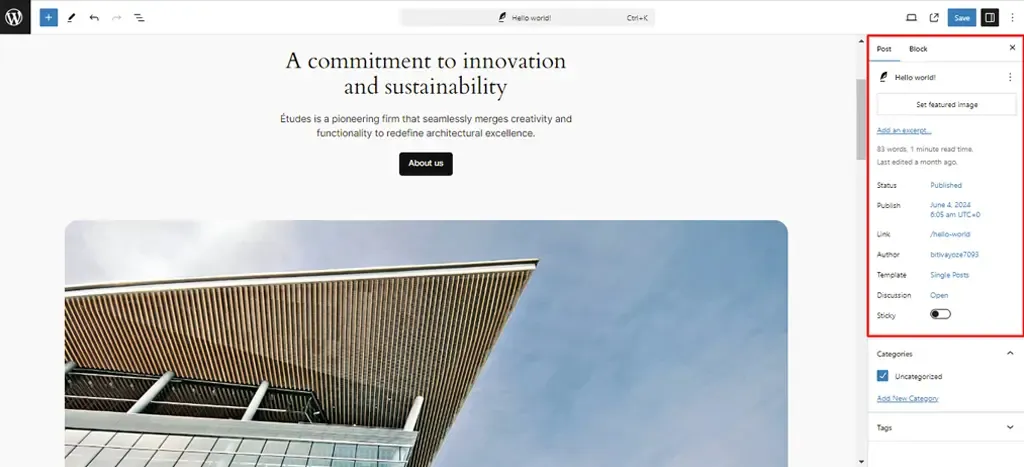
A key enhancement is the introduction of a unified “summary” inspector panel, consolidating essential controls and settings into a single, intuitive interface. This panel offers a comprehensive overview of content status, revisions, and publishing options, simplifying content management tasks for users.

By streamlining the publishing flow, WordPress 6.6 enhances user efficiency and ensures a seamless editing experience from creation to publication.

Design Tools Empowerment

Expanded Style Variation Options

WordPress 6.6 introduces expanded style variation options, allowing users to mix and match typography and color palettes across different style variations effortlessly. This update enables increased design customization without requiring additional theme adjustments.

By leveraging existing style presets and the Font Library, users can create unique visual identities for their websites while maintaining consistency across various sections. This enhancement provides designers and developers with greater flexibility to tailor site aesthetics according to specific branding needs and user preferences, ultimately enhancing the overall visual appeal and user experience.

Synced Blocks and Pattern Attributes

With WordPress 6.6, maintaining design consistency across multiple instances of synced patterns is made easier than ever. This update ensures that layout and styling attributes remain synchronized across different content areas, while allowing for customizable content within each instance.

Users can now deploy patterns across various pages or posts without compromising design integrity, facilitating efficient content management and design updates.

By offering flexibility alongside uniformity, this feature empowers users to deliver cohesive yet personalized web experiences, aligning with diverse content requirements and user expectations.

Enhanced Grid Layout and Font Library

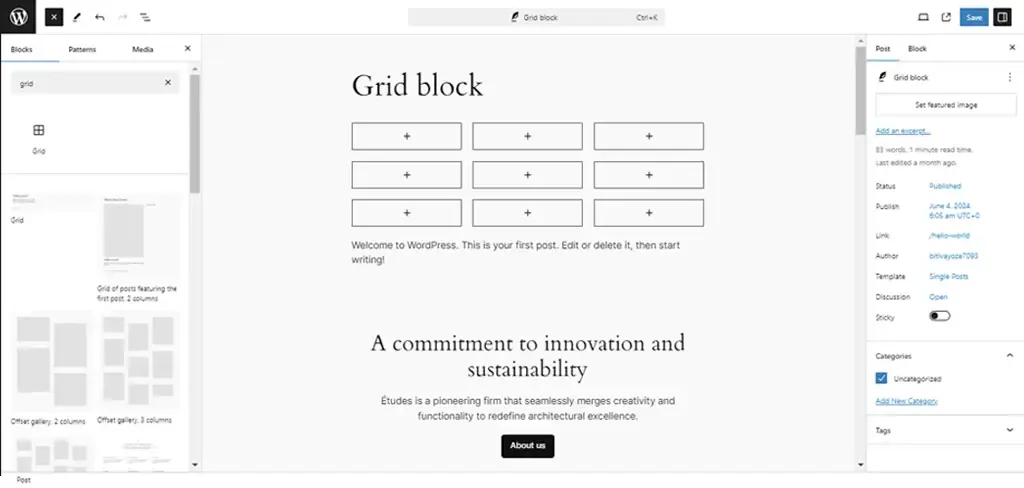
WordPress 6.6 enhances design flexibility with the introduction of grid layout options within the Group block, providing users with advanced layout control and customization capabilities. This update enables seamless arrangement of content elements in grid format, offering improved visual organization and structure for website layouts.

Additionally, refinements to the Font Library based on user feedback enhance typography choices, allowing for richer text styling options throughout the site. These enhancements collectively contribute to enhanced site aesthetics, offering users more creative freedom and usability in designing captivating and functional websites.

Performance and API Enhancements

Performance Improvements

WordPress 6.6 brings significant optimizations aimed at improving site performance and user experience. These optimizations include faster template loading times and overall enhancements to site responsiveness.

By improving caching mechanisms and optimizing autoload options, WordPress 6.6 ensures that websites load quicker and operate more efficiently, leading to enhanced user engagement and satisfaction. These performance improvements not only benefit site visitors by reducing wait times but also support administrators in managing content more seamlessly, thereby boosting overall site performance metrics.

API Iterations: Interactivity, Block Hooks, and HTML

In WordPress 6.6, several APIs receive iterative enhancements to empower developers with advanced customization capabilities and improved tools. Key updates include:

Interactivity API Enhancements:
  • Better error handling
  • Improved debugging tools
  • Increased code quality These enhancements provide developers with more robust options for adding interactive features to websites, enhancing user engagement and interaction possibilities.
Block Hooks API Refinements:
  • Dynamic insertion of blocks into themes
  • Enhanced content flexibility and customization options By refining the Block Hooks API, WordPress enhances its extensibility, enabling developers to create more versatile and feature-rich websites tailored to specific client needs.
HTML API Improvements:
  • Enhanced encoder/decoder functionalities
  • Improved compatibility with web standards These advancements streamline the creation and modification of HTML content within WordPress, ensuring consistency and reliability across different browsers and devices.

By enhancing these foundational APIs, WordPress 6.6 equips developers with powerful tools to build robust and scalable web solutions, driving innovation and efficiency in web development practices.

Infrastructure and Compatibility Updates

PHP Version Support Update

WordPress 6.6 marks a strategic shift by dropping support for older PHP versions in favor of enhancing site security and performance. With this update, WordPress recommends using PHP versions that ensure optimal performance and compatibility with modern technologies. By encouraging users to upgrade to newer PHP versions (specifically PHP 7.2.24 or higher), WordPress 6.6 aligns with industry standards and best practices for web security and performance. This proactive approach not only strengthens site defenses against potential vulnerabilities but also ensures seamless integration with the latest WordPress features and functionalities, offering users enhanced stability and efficiency in their website operations.

Rollback Feature for Auto-Updates

A standout feature introduced in WordPress 6.6 is the rollback capability during automatic plugin updates. This feature mitigates risks associated with plugin updates by allowing administrators to revert to the previous version in case of compatibility issues or unexpected errors. By enabling automatic rollbacks, WordPress 6.6 minimizes downtime and enhances reliability during plugin updates, ensuring uninterrupted site performance and user experience. This capability empowers administrators with greater control over plugin management, offering peace of mind and confidence in maintaining a stable and secure website environment.

Maximize the Benefits of WordPress 6.6

Upgrade Your Site with Experts

Connect Now!

Upgrade to WordPress 6.6 Today!

WordPress 6.6 introduces a host of powerful features and enhancements designed to elevate your website’s performance, security, and user experience. Whether you’re an agency looking to deliver cutting-edge solutions or a business leader aiming to enhance your online presence, now is the time to upgrade to WordPress 6.6.

For Agencies

Embrace the latest in design flexibility with expanded style variations and enhanced grid layouts. WordPress 6.6 empowers you to create visually stunning websites tailored to your client’s unique branding and functional requirements. Take advantage of streamlined site editing capabilities and advanced APIs to streamline development workflows and deliver exceptional results faster.

For Business Leaders

Ensure your website operates at peak performance with optimized site loading times and improved caching mechanisms. Upgrade to WordPress 6.6 for enhanced security features and compatibility with modern PHP versions, safeguarding your online presence against potential threats. Experience a seamless publishing process and intuitive content management with unified editor experiences and rollback capabilities during plugin updates.

Take the Next Step

Explore the benefits of WordPress 6.6 and unlock new possibilities for your website. Upgrade today to harness the full potential of these advanced features and stay ahead in the digital landscape. Contact our team to learn more about upgrading to WordPress 6.6 and discover how we can support your journey towards a more secure, efficient, and engaging web presence.

WordPress 6.5 Release Highlights: Everything You Need To Know

WordPress 6.5 update is not just about minor tweaks – it’s a game changer!

This latest release introduces enhanced design flexibility and more options, bolstered block capabilities through new APIs, accessibility to current block theme features for classic themes, and the initial stages of the new admin redesign.

Just as we ensured you stayed ahead with the previous release of WordPress version 6.4, we’re here again with the latest version to keep you informed and up to date.

So, let’s look at the amazing features and enhancements in WordPress 6.5.

UPDATE: Originally planned for release on the 26th, WordPress 6.5’s release has been pushed back by one week and is now slated for Tuesday, April 2nd, 2024.

Within Core Trac, nearly 350 tickets awaited attention, comprising 99 enhancements and feature requests, 216 bug fixes, and 35 other important tasks. Notably, 20 tickets prioritize performance, 19 address accessibility, and 23 focus on modernizing code and adhering to coding standards. Gutenberg has been enhanced, 515 bugs have been fixed, and 65 accessibility improvements have been made as part of the 6.5 release. Overall, the updates in version 6.5 span across 40 core components.

Table of Contents

  • New in Design Tools
    • Font library
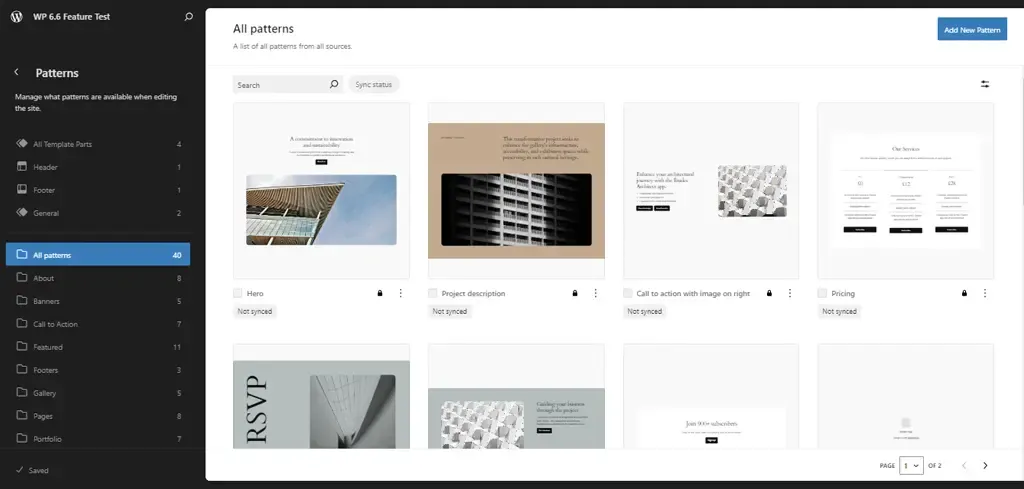
    • Improved pattern functionality
    • Theme.json Colorways
    • Automatic overlay color selection
    • AVIF support
  • New in Appearance Tools
    • Appearance tools in classic themes
    • Improved pattern management in classic themes
  • New in Foundational Experience in Site Editor
    • Tailored presentation options
    • Streamlined filtering and sorting capabilities
    • Efficient bulk actions
  • New in API
    • Interactivity API
    • HTML API
    • Script loader
  • Wrap Up

1. New in Design Tools

Font Library

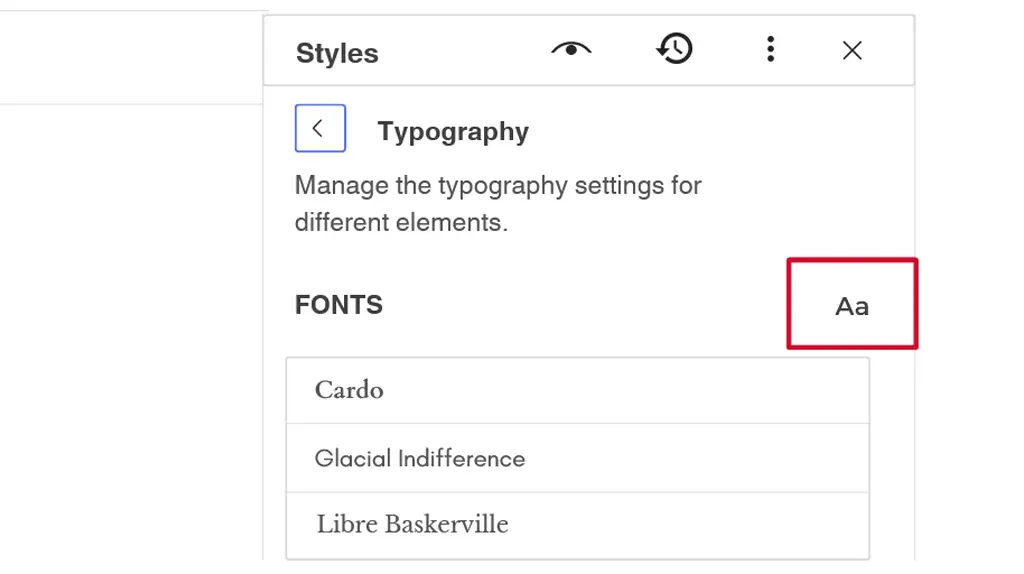
The Font Library, a highly anticipated addition to the WordPress block theme ecosystem, is now available in the Site Editor’s global style panel. Users can easily upload fonts or choose from the extensive collection provided by Google Fonts. Initially, Web Fonts API in WordPress 6.0 enabled users to register new fonts through theme.json. Despite being initially slated for release with WordPress 6.4, the feature faced delays due to concerns regarding code quality. However, with the forthcoming WordPress 6.5 update, users can finally experience the Font Library firsthand. The Font Library will simplify the process of adding, removing, and activating fonts on your website. Just like the Media Library, it’s available globally, regardless of your theme. Once a font is installed, whether by you or your theme, it can be used throughout your editing experience.

Improved Pattern Functionality

Expanding on the concept of synced patterns, the introduction of pattern overrides (formerly known as partial sync patterns) enables users to maintain a synchronized layout and style while permitting customized content for each instance of the pattern. This ensures consistency in design across various content pieces. For example, imagine a testimonial pattern displayed in a grid format. With this enhanced feature, users can incorporate the testimonial pattern into multiple posts, ensuring that the layout and styling, such as the overall design of the recipe card, remain consistent across all instances. However, individual elements like the Name, Image, and Role can be tailored to each instance for personalized content. Furthermore, users will have the ability to revisit and adjust the design of the overall testimonial pattern without impacting the content in existing instances. It’s important to note that this development will need to align with both the Custom Fields API and Block Binding API.

Theme.json and Colorways

Expanding on the existing styling system that includes features like style variations, section-specific theme.json offers finer control over specific parts of your website using the same underlying system. In version 6.5, color variations are introduced through Colorways for group blocks, which is a comprehensive set of updates. Colorways, a subset of section-specific theme.json, specifically deals with styling elements. Initially, this option will be accessible only for Group blocks through code, with minimal user interface interaction for selection. These styles will encompass curated colors, typography, border styles, and other element styles like links and buttons. Currently, the primary use case is for theme authors to predefine a set of colors that are carefully selected based on considerations such as contrast and aesthetics. Looking ahead, there are plans to explore enabling users to create Colorways directly within the Styles interface.

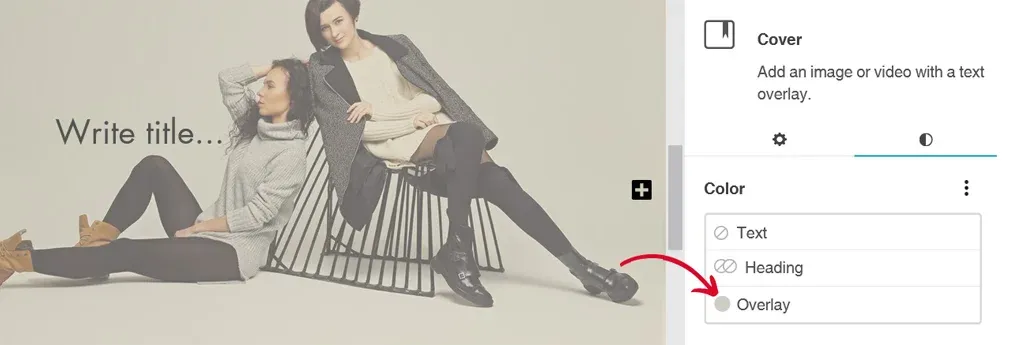
Automatic Overlay Color Selection

Now, users no longer need to spend time selecting the perfect overlay color manually. In WordPress 6.5, when you add a cover block and upload or select an image from the media library, the system automatically applies an overlay color that matches the dominant color of the image. This saves users from the hassle of choosing the overlay color themselves. However, if desired, users still have the flexibility to change or customize the overlay color according to their preferences.

To test this feature:

  • Insert a “Cover block” into your content.
  • Upload or select an image from the media library.

You’ll notice that an automatic overlay color is applied, matching the dominant color of the image. However, you can easily modify this overlay color to suit your needs.

AVIF Support

WordPress 6.5 now supports AVIF, a modern image format offering superior image quality and compression compared to JPEG, PNG, and WebP. AVIF images can be up to 50% smaller than JPEGs while maintaining high quality. They also support a wide color range, including HDR, and produce sharper images, particularly in detailed areas. You can seamlessly upload and use AVIF images in WordPress 6.5, provided your hosting environment supports AVIF. Transitioning to AVIF is likely to enhance your site’s performance and improve user experience.

Looking to boost your site speed?

Reach out to us TODAY!

2. New in Adoption Pathways

Appearance Tools in Classic Themes

The inclusion of support for Appearance Tools broadens the scope of design possibilities that were previously exclusive to Block Themes or themes utilizing theme.json. For instance, functionalities like adding a basic border to a Group block necessitate the use of Appearance Tools. Efforts are currently in progress to enable Classic Themes to safely integrate support for most of these tools, ensuring compatibility and avoiding disruptions. This expansion unlocks an accessible plethora of design options for a wide range of websites, significantly enhancing their visual appeal.

Improved Pattern Management in Classic Themes

The themes not built with the Block Editor or theme.json will soon be able to tap into the rich library of Patterns, allowing for more versatile and modern design options. In addition to this fundamental shift, a direct link will be incorporated within the Appearance menu, leading users to the Patterns section. This link aims to enhance accessibility and promote awareness of Patterns as a core feature within WordPress. By making Patterns more visible and easily accessible to users of Classic Themes, WordPress is ensuring that all users can benefit from the latest design tools and functionalities, regardless of their theme choice.

3. New Foundational Experience in Site Editor

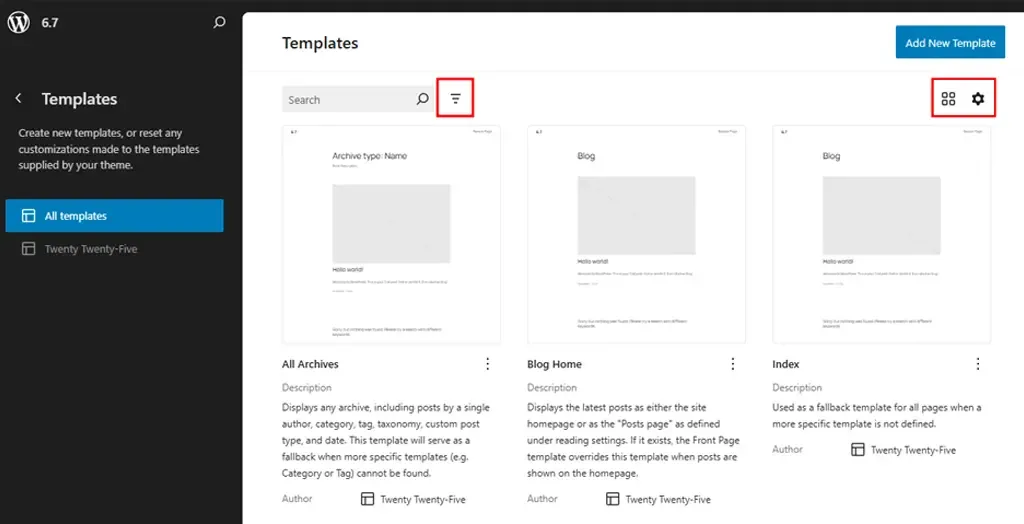
The Site Editor undergoes a significant enhancement with the introduction of robust new view modes tailored for efficient management of pages, patterns, templates, and template parts. These modes introduce heightened flexibility and user-friendliness, empowering users to seamlessly explore, filter, and manipulate their site’s components with enhanced efficiency.

Tailored Presentation Options

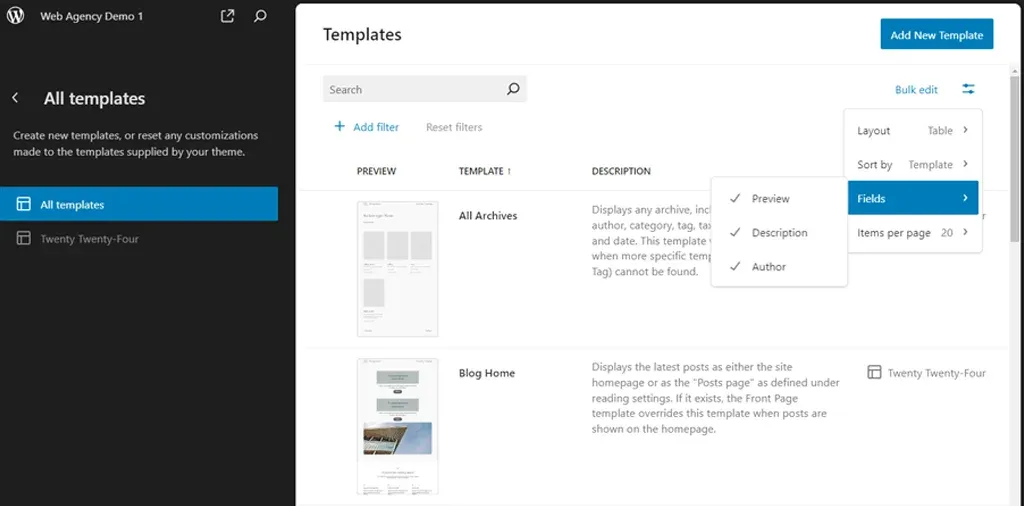
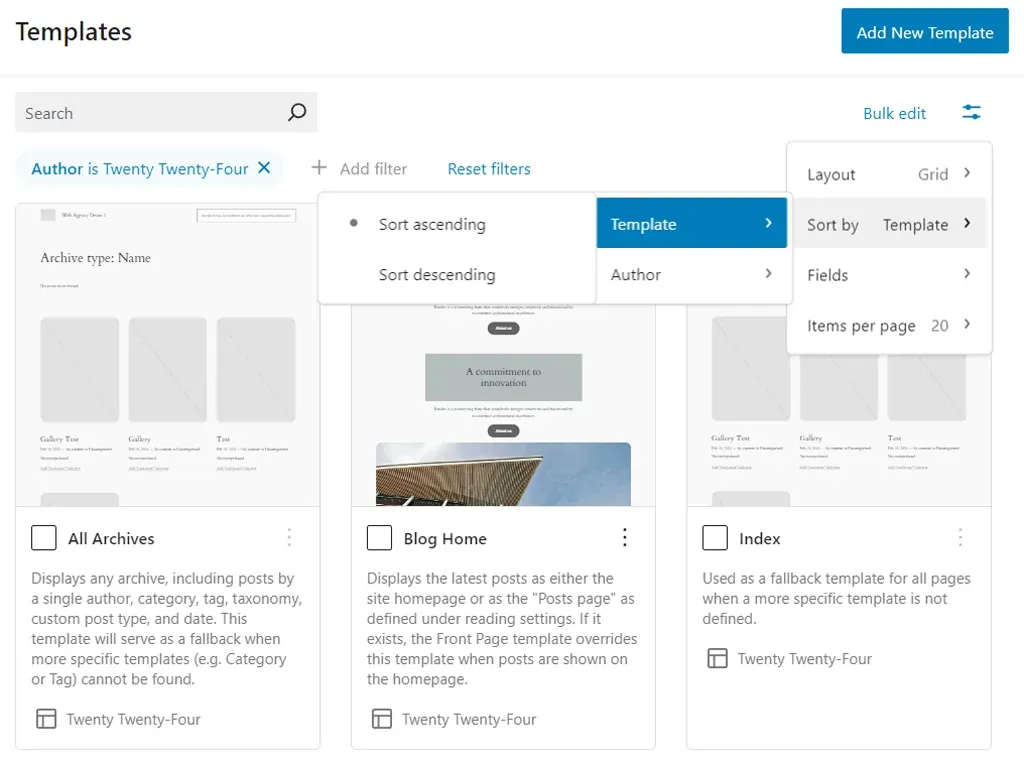
The updated library presentation now offers various layout options, allowing users to personalize the displayed information by selectively hiding or revealing specific fields. Accessible through the View options button located on the top-right corner of the panel, these settings enable users to tailor their viewing experience to suit their preferences.

Streamlined Filtering and Sorting Capabilities

For users managing multiple items, filtering based on authorship is now simplified through the Add filter setting located beneath the search bar. Additionally, organizing items is made easier with sorting options available in the View options settings. Users can choose to sort items by template names or authors, enhancing organization and accessibility.

Efficient Bulk Actions

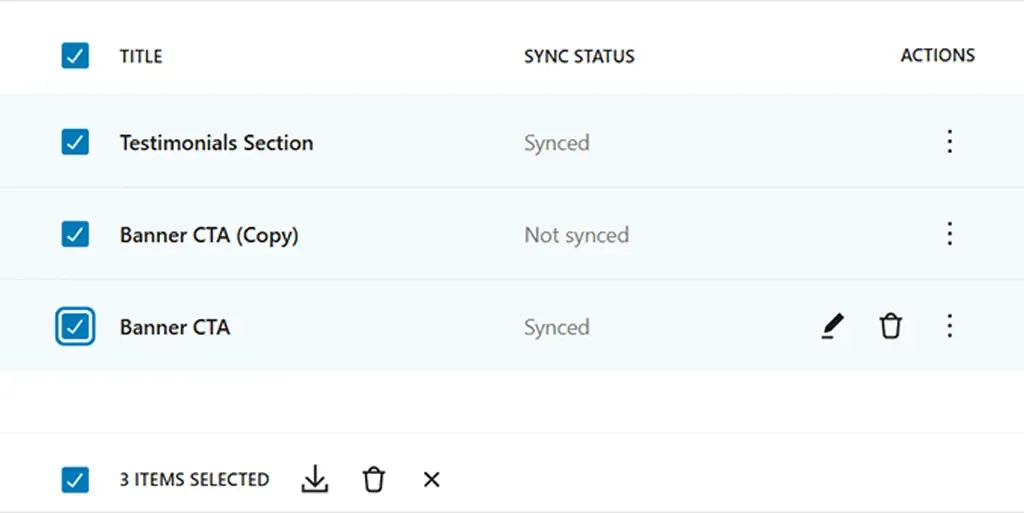
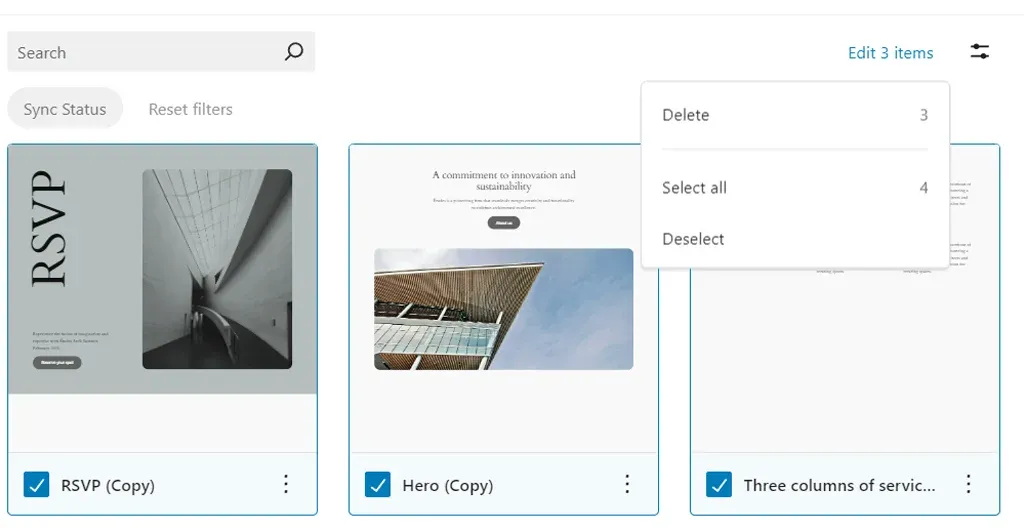
The revamped library facilitates quicker workflow management by enabling users to select and manipulate multiple items simultaneously. For instance, within the patterns library, users can swiftly delete multiple patterns at once. Similarly, managing template parts is streamlined with the ability to perform bulk resets, allowing users to quickly revert multiple changes.

It’s important to note that certain locked patterns and native theme template parts cannot be deleted.

4. New in API

Interactivity API

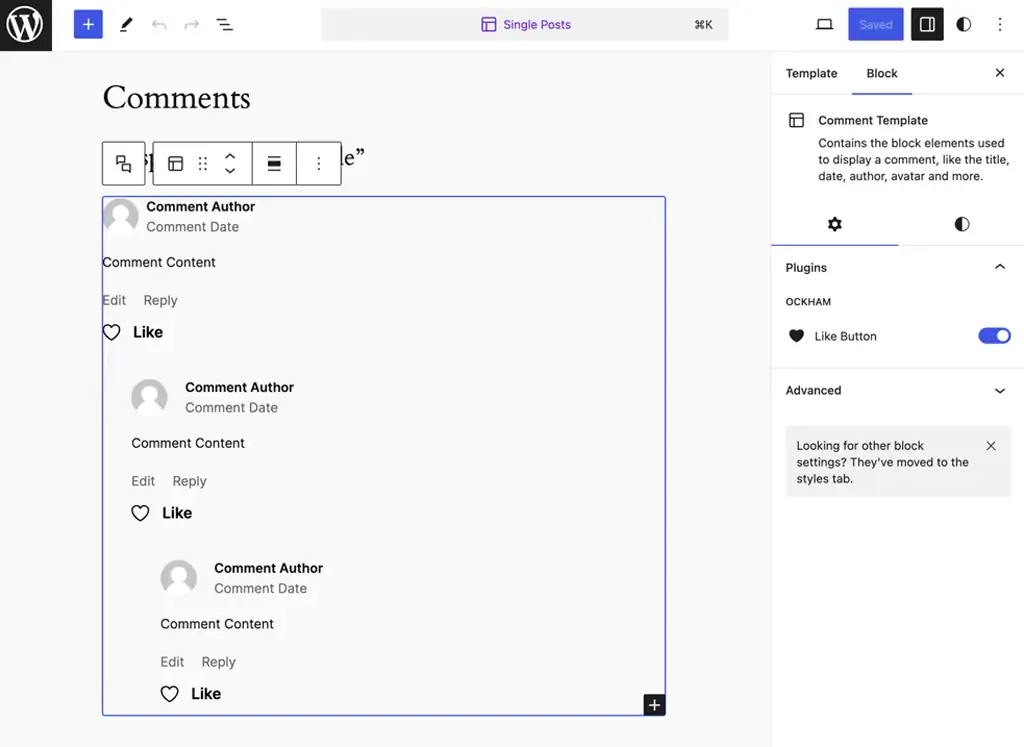
The Interactivity API is designed to offer developers a standardized method for adding interactive elements to the front end of their blocks. This includes features such as liking a post or adding items to a cart without needing to reload the page. By establishing a standard, developers can more easily create engaging user experiences, ranging from simple actions like counters or pop-ups to more complex functionalities such as instant page navigation, search, or online shopping carts. Following months of testing within specific core-provided blocks in the Gutenberg plugin and, more recently, within WordPress 6.4, there are a few remaining tasks to make the API available for extensible use.

HTML API

The Tag Processor has been enhanced to thoroughly examine every tag within an HTML document, disregarding non-tag tokens. In WordPress 6.5, it gains the capability to analyze all elements. Tokens, the basic components of a document, encompass tags, comments, doctype definitions, and text nodes within HTML. This advancement allows for easier handling of tasks such as removing tags or truncating HTML, as the text content of an HTML document can now be readily accessed. Facilitating this enhancement is the introduction of a novel concept known as modifiable text. Modifiable text denotes content enclosed within token boundaries, which can be altered without impacting the overall structure of the document.

Script Loader

WordPress has introduced a new “Script Modules” interface to accommodate native JavaScript modules. JavaScript modules, also known as ECMAScript Modules or “ESM,” utilize import and export functionalities. In this post, we’ll use “scripts” and “modules” to refer to the concepts of Scripts and Script Modules, respectively. JavaScript modules are integral to web development, offering benefits such as proper scoping through import and export, enforced strict mode, and deferred loading. Supporting and promoting the use of modules is crucial for WordPress, as they represent the future of JavaScript development.

Ready for an upgrade?

Stay ahead of the curve with the newest version!

Connect with us NOW!

Wrap Up

WordPress 6.5 brings a host of exciting features and enhancements to the table! These updates position WordPress as a leading choice for website development, catering to the diverse needs of developers, designers, and content creators alike. As we move forward, we can anticipate even more exciting developments that continue to push the boundaries of what is possible with WordPress.

If you’re looking to leverage the full potential of WordPress for your website or project, our team offers expert WordPress development services tailored to your specific needs. From theme customization to plugin development and site optimization, we’re here to help you make the most out of WordPress. Contact us today to discuss how we can elevate your WordPress experience and bring your vision to life.

WordPress 6.4 Release Update – What You Need To Know?

WordPress continues to lead the way with its groundbreaking updates. As we eagerly anticipate the arrival of WordPress 6.4 on November 7, 2023, it’s not just another release—it’s a significant leap forward in the world of website building. Moreover, the core web vitals performance has almost doubled since the 2021 proposal for the WordPress Performance Team, showcasing a delightful trend of continuous improvement. So, gear up for an exciting upgrade that promises to elevate your website experience to new heights!

What Makes WordPress 6.4 Special?

WordPress 6.4 is more than just a software update; it’s a game-changer for website developers and creators. This release represents a carefully crafted culmination of innovative features, user-centric enhancements, and a forward-thinking approach to design and functionality.

Its significance lies in the standardization of web development. With intuitive tools, diverse themes, and powerful customization options, building a website that aligns with your vision has never been easier.

Let’s explore some significant changes that are arriving with WordPress 6.4!

The Rise of Twenty Twenty-Four

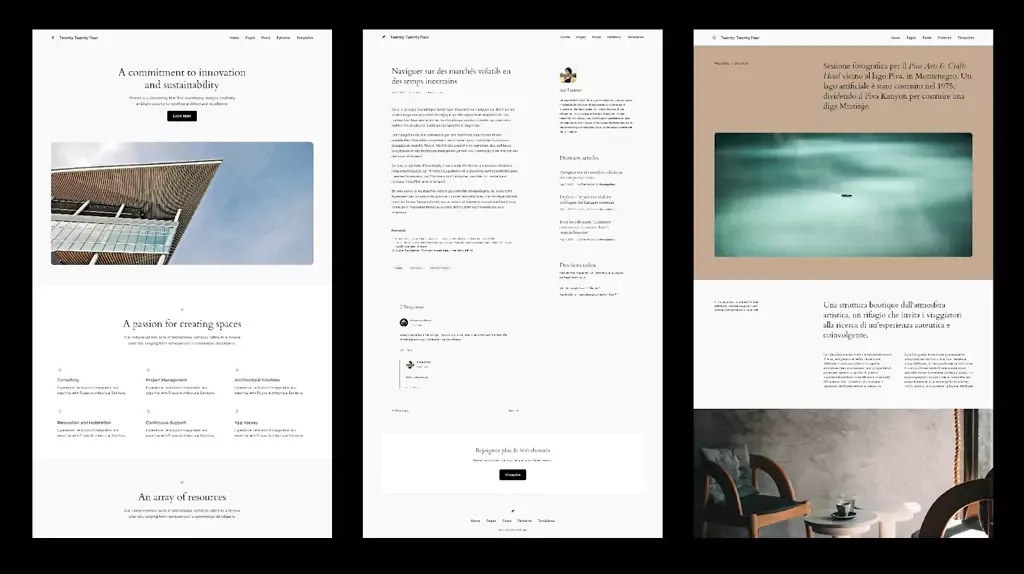
WordPress 6.4 introduces its new default theme, Twenty Twenty-Four. Departing from the conventional approach, Twenty Twenty-Four is a paradigm shift in theme design.

In addition to catering to entrepreneurs, artists, and writers, it embraces versatility. Twenty Twenty-Four explores three distinct use cases instead of one:

a. Entrepreneurs and Small Businesses: This iteration focuses on functionalities essential for businesses, incorporating sections like services, testimonials, and contact forms. The design emphasizes professionalism and accessibility, ensuring businesses create an impactful online presence.

b. Photographers and Artists: For creatives, Twenty Twenty-Four offers dynamic gallery layouts, seamless integration of multimedia elements, and a focus on visual storytelling. Artists and photographers can showcase their work in an immersive and visually appealing manner, enhancing their online portfolios.

c. Writers and Bloggers: Writers and bloggers benefit from clean and reader-friendly layouts. Twenty Twenty-Four prioritizes readability, featuring elegant typography and customizable post layouts. With intuitive navigation and emphasis on content, writers can captivate their audience without distractions.

Empowering Block Editor with Block Hooks

In WordPress 6.4, the introduction of Block Hooks marks a pivotal moment in the evolution of WordPress themes. Block Hooks redefines the way developers approach theme customization by providing an advanced extensibility mechanism for Block Themes.

Unlike traditional themes, Block Themes can now leverage Block Hooks to insert blocks relative to instances of other block types dynamically. This groundbreaking feature allows for precise control and seamless integration, empowering developers to craft more intricate and user-friendly interfaces.

Block Hooks revolutionizes the theming experience by enabling developers to extend Block Themes using filters and actions. As a result, themes can now respond dynamically to user interactions, creating highly interactive and dynamic websites. With the ability to insert blocks intelligently, Block Themes can cater to a wide range of user preferences, making the browsing experience more engaging and tailored.

Enhancement in User Interactivity and Functionality

WordPress 6.4 introduces several innovative blocks designed to enhance user experience and content engagement. The latest WordPress release is poised to revolutionize the way websites engage with their audiences. These technical advancements will not only elevate the visual appeal of websites but also simplify the process of creating dynamic, interactive, and user-friendly web experiences.

Content Organization and Engagement

The Table of Contents block provides seamless navigation within lengthy articles, enabling users to jump to specific sections effortlessly. The Time to Read block caters to user preferences by displaying estimated reading time, offering a more user-friendly reading experience.

Additionally, the Scrolling Marquee block adds a dynamic touch, allowing content to scroll horizontally or vertically, making certain types of information, such as news updates or testimonials, visually more appealing and attention-grabbing.

Aesthetic Image Presentation Reinvented
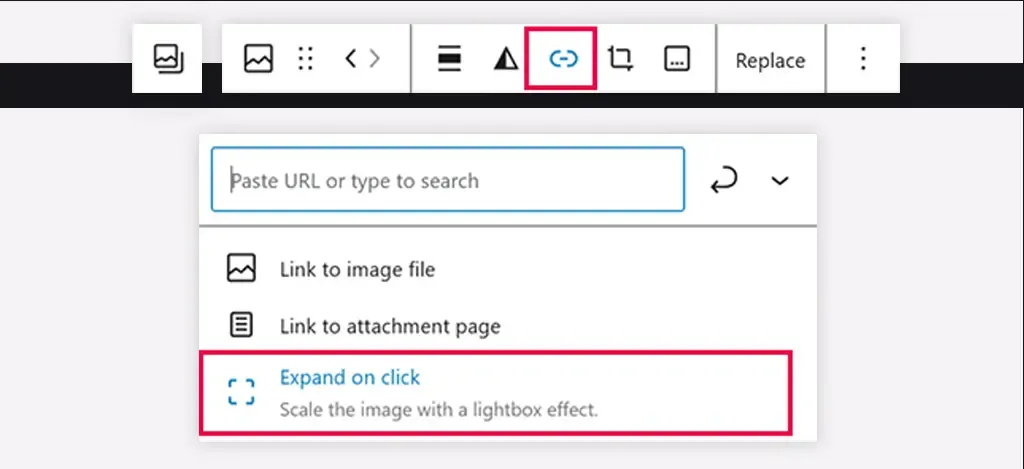
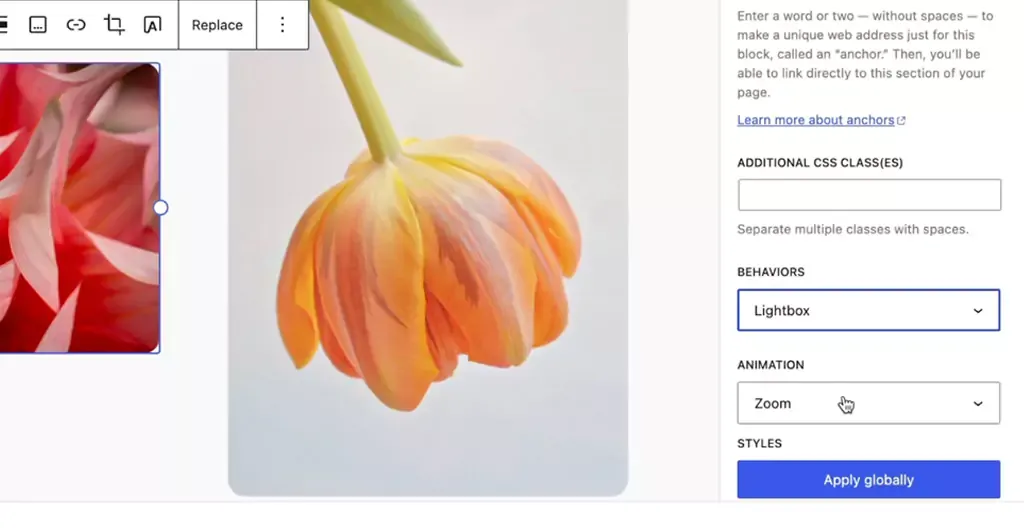
  • Among the exciting additions in WordPress 6.4 is the Image Lightbox feature. This feature significantly enhances the way images are presented on websites.
  • By implementing a lightweight standardized JavaScript library, WordPress 6.4 now offers a native lightbox functionality. When toggled on, this feature allows individual image blocks to expand elegantly when clicked, providing a distraction-free, immersive viewing experience for website visitors. This feature not only improves aesthetics but also ensures a more engaging interaction with multimedia content.
Streamlining Content Integration
  • WordPress 6.4 introduces Auto-Insert Blocks, a feature designed to simplify the process of integrating blocks into websites. With this functionality, WordPress intelligently suggests and embeds relevant blocks based on the user’s actions.
  • For instance, when a user installs a plugin and modifies the navigation, a prompt pops up, offering to seamlessly integrate a login/logout option. This proactive approach not only saves time but also enhances user-friendliness, allowing users to effortlessly enrich their website’s functionality without extensive manual block integration.

Empowering Intuitive Customization

WordPress 6.4’s enhancements in the writing experience, interface refinement, and site editing tools redefine the user experience. By focusing on fluid creativity, offering optimized interfaces like List View iterations and Distraction-free mode, and introducing intuitive site editing improvements, WordPress ensures that both content creators and developers can unleash their creativity effortlessly.

Fluid Creativity

Enhanced text formatting options, including typography and spacing presets, provide writers with the tools to craft visually appealing and engaging content. Additionally, the streamlined handling of media elements ensures that multimedia integration is smooth and intuitive, fostering a more immersive storytelling experience.

Interface and Tool Enhancements
  • WordPress 6.4 introduces several interface and tool enhancements aimed at optimizing user interaction. The List View iterations feature provides a comprehensive overview of the content structure, enabling users to easily navigate and manage complex layouts. Distraction-free mode is refined for a truly immersive writing experience, allowing writers to focus solely on their content without any interface clutter.
  • Keyboard shortcuts for duplicating blocks and media previews for gallery and image blocks enhance efficiency, making the content creation process both intuitive and swift.
Site Editing Improvements
  • Site editing in WordPress 6.4 is elevated to a new level of intuitiveness. Introducing the “Show Template” toggle provides users with a clear visual representation of their website’s structure while editing pages, ensuring precise customization.
  • Discussion settings/details for pages are seamlessly integrated, offering enhanced control over user interactions. The “Browse styles” panel now displays current modifications, allowing users to track changes effortlessly.
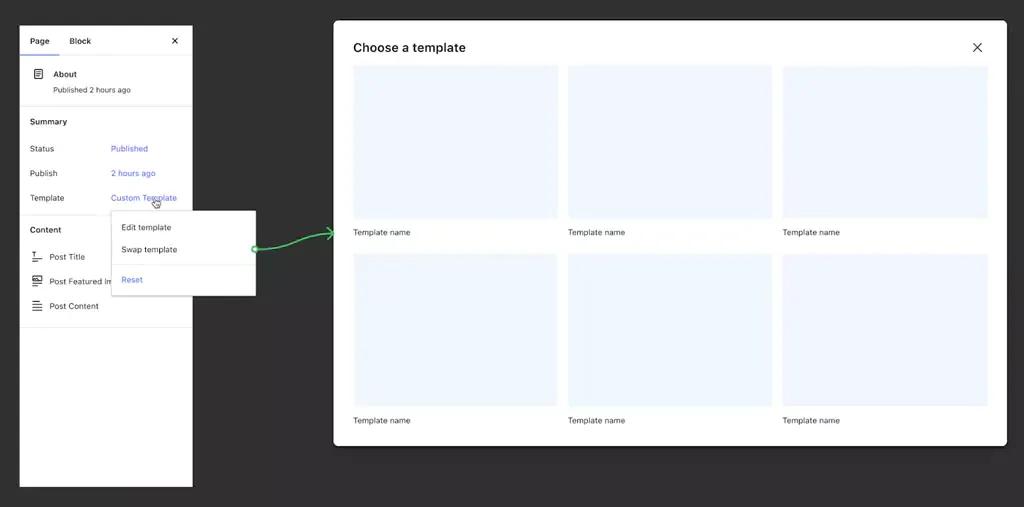
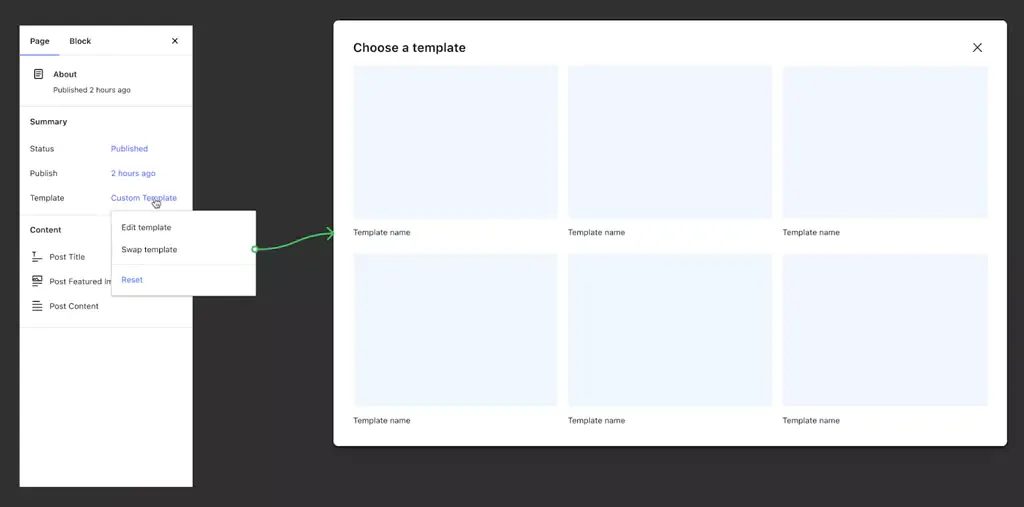
  • Additionally, switching templates within the Page Inspector empowers users to explore different design possibilities without complications. CSS class additions to templates offer developers greater flexibility in customization, making it easier to style specific elements according to their vision.

Design Tools and Global Styles

WordPress 6.4 sets a new standard in web design, empowering users to craft websites that are not only functional but also visually exceptional. By offering advanced layout controls, custom CSS enhancements, and a streamlined approach to managing global styles, WordPress ensures that designers and developers have the tools needed to create visually captivating and user-friendly websites.

Precision in Layout and Styling
  • WordPress 6.4 introduces advanced design tooling, enhancing precision and creativity in layout and styling. The layout controls now offer intricate adjustments, enabling developers and designers to fine-tune the placement and spacing of elements with exceptional accuracy.
  • Additionally, custom CSS enhancements empower developers to inject specific styles, ensuring pixel-perfect designs. These tools provide a robust framework for crafting visually stunning and responsive websites, catering to diverse user preferences and device types.
Streamlining Styling Across Websites
  • The evolution of Global Styles in WordPress 6.4 denotes a significant leap in managing styling elements across websites efficiently. With Global Styles, developers can implement consistent design patterns throughout the entire site. This comprehensive system allows for effortless management of typography, color schemes, spacing, and other design elements across various pages and sections.
  • The intuitive interface of Global Styles simplifies the process of applying site-wide changes, ensuring a cohesive and harmonious visual identity across the entire website.
Introducing Patterns
  • WordPress 6.4 introduces Patterns, a revolutionary feature that elevates the editing experience and enhances user engagement. Patterns are pre-designed blocks or layouts that offer advanced editing features. These meticulously crafted patterns streamline the design process, allowing users to create complex and visually appealing sections effortlessly.
  • From interactive call-to-action sections to immersive multimedia displays, Patterns enable users to implement intricate designs without extensive coding or design expertise. By providing a library of versatile and aesthetically pleasing patterns, WordPress empowers users to enhance their website’s visual appeal and user experience significantly.

Navigation and Query Loop Enhancements

  • With the Navigation block’s advanced customization features and responsive options, users can create menus that are not only visually appealing but also highly intuitive across all devices.
Introducing Patterns
  • WordPress 6.4 brings forth significant updates to the Navigation block, providing users with advanced customization options and enhanced responsiveness. Users can now tailor menu items more precisely, defining unique styles and interactions for each item. This granular control ensures a seamless and intuitive navigation experience for website visitors.
  • Furthermore, the Navigation block introduces responsive options, enabling users to configure menu behaviors for different devices and screen sizes. This flexibility ensures that menus adapt seamlessly, delivering an optimal user experience across various platforms, from desktops to smartphones.
Query Loop Block Enhancements
  • The Query Loop Block in WordPress 6.4 undergoes transformative enhancements, enabling users to create dynamic and personalized content displays. Users can now incorporate complex queries, allowing them to filter posts based on multiple criteria such as categories, tags, custom fields, and post types. This versatility empowers content creators to showcase specific content tailored to their audience’s interests.
  • Additionally, the Query Loop Block introduces post-display options, enabling users to determine how posts are presented, whether as grids, lists, or carousels. These options enhance the visual appeal of the displayed content, ensuring a captivating and engaging user experience.

End Note

With WordPress 6.4, a wave of innovation and user-centric design will reshape the landscape of WordPress website development. Its intuitive interface, coupled with a diverse array of features, caters to beginners and seasoned developers alike. Are you excited about the possibilities that WordPress 6.4 offers? We’re here to bring your vision to life! Our expert team specializes in the latest WordPress development, ensuring your website stands out in the digital landscape. Let’s turn your ideas into a captivating online presence. Contact us now and embark on a journey of innovation and creativity with WordPress 6.4!

WordPress 6.3 Unwrapped: Discover What’s New and Exciting

WordPress 6.3 marks the second major release of 2023, bringing with it a plethora of notable updates, fresh features, enhancements, and bug fixes that amplify the strength and utility of WordPress. With the changes that are spread across 43 core components, WordPress 6.3 opens new possibilities for the creative expression of designers, creators, and builders.

Within this post, we’ll unveil the highlights of WordPress 6.3 and spotlight the features that deserve your attention following the update.

Let’s take a look!

Enhancements in Selectors API

Designed to elevate your styling capabilities to unprecedented heights, this advanced API empowers you with the ability to configure multiple CSS selectors, ensuring a seamless generation of global styles across your blocks. Notably, this can be achieved across three distinct levels: root, feature, and sub-feature.

  • Root Selectors At the core of the Selectors API lies the root selector, your block’s principal CSS selector. Every block requires a primary CSS selector to orchestrate global style declarations. Should you not designate one through the Block Selectors API, rest assured that a default selector (in the form of .wp-block-) will be generated for you.
  • Feature-level Selectors In the new version, API empowers you to target specific block features with unparalleled precision – be it borders, colors, typography, or other attributes. This facet enables you to bestow distinct styles upon various elements within your block. For instance, imagine applying color schemes to your block’s wrapper while refining typographic elements within an inner text element.
  • Subfeature Selectors The Subfeature Selectors elevate your styling prowess to unparalleled heights. Now, individual styles associated with block features (e.g., background-color or border-radius) can be expressed through unique selectors. This proves invaluable when aiming to implement diverse styles within a single feature. Consider a scenario where the block’s typography necessitates font family at the wrapper level while specifying distinct text decoration and font size for inner elements.

The brand-new Command Palette

This exciting feature takes center stage within the post and site editors, granting users swift access through keyboard shortcuts, namely ctrl + k or command + k. It offers two avenues to maximize command utilization: static and dynamic commands.

  • Static Commands: Easily register static commands using the wp.data.dispatch( wp.commands.store ).registerCommand action or the wp.commands.useCommand React hook. With either approach, a command object is provided, equipped with a distinct name, a clear label, an icon, a callback function invoked upon command selection, and potentially, a context.
  • Dynamic Commands: Dynamic commands, on the other hand, are enabled via “command loaders.” These prove invaluable when command availability hinges on user-input search terms or certain conditions.

The command palette’s versatility extends to contextual commands, ensuring priority visibility and a seamless user experience. These commands shine in specific contexts, such as navigating the site editor or editing a template. Currently, two key contexts have been implemented:

  • Site-editor – While navigating the site editor with the sidebar visible.
  • Site-editor-edit – When engaged in editing a document (template, template part, or page) within the site editor.
  • And the journey doesn’t end here. As adoption grows, additional contexts will be seamlessly incorporated

To manipulate the command palette’s behavior, it is enriched with a host of selectors and actions through the WordPress Data API. These include:

  • Retrieving registered commands and command loaders with selectors like getCommands and getCommandLoader.
  • Checking whether the command palette is open via the isOpen selector.
  • Programmatic control over opening and closing the command palette using the open and close actions.

Evolution of Layout Support

The latest WordPress 6.3 update brings exciting enhancements to layout support, marking its graduation from experimental to stable. While the functionality remains consistent, the upgrade comes with a small change: when you’re adding block support for layout in your block.json, the syntax “layout” now replaces “__experimentalLayout.” Although the support for the “__experimentalLayout” syntax will still be retained for a transitional period, we strongly recommend that you seize the opportunity to elevate your custom blocks by transitioning to the rock-solid layout syntax.

Innovations in CSS Specificity for Enhanced Layouts:

When you offer something valuable in exchange for someone’s email (like a free trial, eBook, or exclusive demo), you’re not just collecting random email addresses. You’re attracting leads who are genuinely interested in what your software can do. This means the leads you gather are more likely to convert into paying clients.

Empowering Complex Block Markup with Classnames:

Building on the foundation laid in WordPress 6.2, the latest version integrated layout classnames into the block inner wrapper. While this aligns with the outer wrapper for most blocks, certain blocks (like the core Cover block) encompass multiple inner containers. With WordPress 6.3, a novel classname graces the inner wrapper of all blocks with layout, amalgamating the block classname with the layout classname.

Say Hello to the New Grid Layout:

Embrace innovation with the introduction of the all-new grid layout type, underpinned by the power of CSS Grid. This dynamic layout defaults to an auto-fill approach, complete with configurable column widths. For those seeking precise control, the columnCount property within the layout object allows you to establish a fixed number of columns.

Elevated Layout and Spacing in the Post Template Block:

Embrace innovation with the introduction of the all-new grid layout type, underpinned by the power of CSS Grid. This dynamic layout defaults to an auto-fill approach, complete with configurable column widths. For those seeking precise control, the columnCount property within the layout object allows you to establish a fixed number of columns.

Seamless Spacer Block Alignment with Parent Layouts:

Spacer blocks now seamlessly integrate with parent layout configurations, taking on the orientation of the parent layout, especially within flex-type layout blocks. While you can still manually set an orientation for Spacer blocks based on parent context, flex layouts grant priority to the flex orientation, ensuring consistent and harmonious designs.

Dynamic Coloring of Social Icons Block

The Social Icons block now offers the option to customize both the “Icon color” and “Icon background color” in WordPress 6.3. Prior to this version, the chosen colors were hardcoded as hex code values within the block, even if you selected a color from the theme palette defined in theme.json.

Now, with WordPress 6.3 release, the Social Icons block embraces CSS classes that seamlessly align with your chosen color values. These classes are an integral part of the WordPress ecosystem, ingeniously generated in harmony with the color palette outlined in your theme.json file. Their structure is straightforward:

has-[color_slug]-color

has-[color_slug]-background-color

It’s essential to note that these empowering classes won’t come into play when a user opts for a custom color. This dynamic integration ensures that your design retains its integrity and aligns seamlessly with your chosen color palette, making WordPress 6.3 the pinnacle of design control and cohesion.

Bundled Themes Drops Internet Explorer Scripts and Styles

In recognition of the diminishing traffic from Internet Explorer users and WordPress’ discontinuation of support for this outdated browser, certain default themes have taken proactive steps. By removing specific Internet Explorer-oriented scripts and styles, these themes are ensuring that the majority of users can enjoy a smoother and faster browsing journey.

Moreover, these optimizations extend to focus enhancement scripts that were previously tailored for Internet Explorer and older versions of Chrome. With the arrival of WordPress 6.3, themes like Twenty Thirteen and Twenty Fourteen have gracefully evolved, no longer incorporating these scripts in their functions.js files. Additionally, from Twenty Fifteen to Twenty Twenty-One, themes have been fine-tuned to neither enqueue nor print these scripts.

This strategic move not only aligns with modern web standards but also reflects our commitment to delivering a top-tier experience for every user. Embrace these enhancements as we usher in a new era of optimized performance and a richer online encounter.

Improvements to the Cache API

WordPress 6.3 release brings forth an array of strategic enhancements that redefine how queries are cached within the WordPress ecosystem.

Elevating Cache Group Dynamics:

Diving into the heart of WordPress 6.3, a paradigm shift in cache group dynamics emerges. Previous versions of WordPress stored query results in cache groups aligned with their corresponding objects. However, the landscape has evolved, and WordPress 6.3 introduces a groundbreaking approach that offers developers unprecedented control and precision.

As the WP_User_Query class joins the cache hierarchy, a dynamic modification unfolds. The introduction of distinct cache groups tailored for queries becomes the cornerstone of this evolution. Developers now hold the reins to specify cache group expiration times, enabling the fine-tuning of cache duration. The innovative wp_cache_flush_group() function stands ready for developers seeking tailored cache clearance.
Flexibility extends even further, granting developers the ability to designate cache groups as non-persistent, if necessary. The newly introduced cache groups encompass:

  • post-queries
  • term-queries
  • comment-queries
  • network-queries (global cache group)
  • site-queries (global cache group)
  • user-queries (global cache group)

Enhancement to get_pages() Function

WordPress 6.3 introduces a significant improvement to the get_pages()function. It now utilizes WP_Query internally, addressing a 13-year-old ticket (#12821). This update reduces complexity by offloading database queries and cache handling to WP_Query.

As a result, this eliminates redundancy and ensures that all filters within WP_Query apply to get_pages(). Users employing filters like posts_pre_query or posts_results for customized WP_Query behavior, including data retrieval from alternative sources such as cache or other databases, will benefit. Additionally, a new filter named get_pages_query_args has been added, allowing developers to modify parameters passed to WP_Query while maintaining compatibility with original arguments.

PHP Support

WordPress 6.3 no longer provides support for PHP 5.

The minimum supported PHP version has been raised to 7.0.0.

Wrap Up

WordPress 6.3 release represents a significant leap in the editing experience. The improvements are substantial, covering various new editing features in the site editor, a redesigned and versatile block pattern system, new blocks, improved performance, enhanced accessibility, and internationalization enhancements, among other improvements.

If you’re thinking about upgrading your WordPress site to leverage these remarkable advancements, our skilled team of WordPress professionals is here to offer seamless assistance and guidance. Embrace the capabilities of WordPress 6.3 and discover new possibilities for your online presence.

WordPress 6.3 introduces notable improvements aimed at enhancing load time performance for content containing images. The impact of these enhancements is particularly evident in the Largest Contentful Paint (LCP) metric, which gauges the time taken from the request initiation until the largest content element within the viewport is rendered.

Automated fetchpriority Support

WordPress 6.3 latest release, now includes the fetchpriority attribute, set to “high,” within the image tag it identifies as the “LCP image” – the image constituting the largest content within the viewport. This attribute instructs the browser to prioritize this image, boosting LCP performance by approximately 5-10%. For further context, refer to the initial proposal post.

Automated lazy-loading

A series of refinements and resolutions have been introduced to enhance the automatic management of lazy-loading using the loading attribute. This refinement process, initiated in WordPress 5.9 and continued in 6.2, culminates in comprehensive enhancements in WordPress 6.3. This meticulous approach ensures the more accurate identification of images where omission of the attribute is appropriate, thereby contributing to optimized performance. For deeper insights into the significance of not lazy-loading in-viewport images, especially the LCP image, in the context of performance, refer to the relevant WordPress 5.9 dev note post.