What to Expect in WordPress 7: Features, Roadmap and Changes

WordPress 7.0 launched on May 20, 2026, and it is the most consequential release the platform has shipped in nearly a decade.

This is not a point release with incremental improvements. WordPress 7.0 formalizes Phase 3 of the Gutenberg roadmap, ships a provider-agnostic AI infrastructure layer, rebuilds the admin interface using React, and restructures how editorial teams collaborate inside the editor.

The release was originally scheduled for April 9, 2026, but the core team delayed it to address architectural concerns, a decision that signals where priorities sat. WordPress 7.0 has officially arrived. It came with one flagship feature removed and the platform’s foundations meaningfully strengthened.

In this blog, you will get a breakdown of what’s changed in WordPress 7.0, why recent changes matter the most, new features, its impact on plugins, themes, security, and what to check before installing it.

Work through each item on staging, document any failures, fix them, and schedule the production upgrade only when a rollback path is confirmed.

WordPress 7.0 Upgrade Guide: Plugin and Theme Compatibility Testing

The shift from classic PHP list tables to the React-based DataViews interface means certain plugins are at risk. Admin plugins that add custom columns, filters, bulk actions, meta boxes, or custom quick-edit fields to the Posts, Pages, or Users screens may not render correctly until their maintainers ship compatibility patches.

Media Plugins: Because image processing now begins in the browser before server-side hooks fire, media plugins that rely on early-stage upload interception must update their integration points. Actively maintained plugins should already have patches.

  • Warning: Abandoned plugins (inactive for more than 12 months) are high-risk and should be replaced rather than tested.

Why WordPress 7.0 Matters More Than Recent Updates

WordPress 7.0 formalizes Gutenberg Phase 3, which shifts the platform’s editorial model from individual-user publishing to team-based content operations.

Infrastructure Evolution, Not Just an Interface Refresh

WordPress 7.0 is not a cosmetic update. The admin interface, AI integration model, media processing pipeline, and PHP support boundaries have all been rearchitected to touch every layer of a running WordPress installation.

That separation from typical incremental updates changes the risk profile for agencies and enterprise teams planning upgrades, and it is the first thing worth understanding before a single plugin compatibility check.

WordPress 7.0 as the Foundation for AI-Ready Sites

The most important thing WordPress 7.0 ships is not a single feature. It is the AI infrastructure layer that governs how every future AI-powered plugin interacts with the platform.

Before this release, WordPress had accumulated a fragmented set of competing AI implementations, in which each plugin built its own permission system, provider connection, and access logic. That fragmentation created security exposure and unpredictable behavior across sites running multiple AI tools simultaneously.

WordPress 7.0’s AI Client and Abilities API resolve that fragmentation structurally rather than through guidelines alone. Whether or not you activate any AI features today, your site now runs on a platform that has defined how AI integration should work for the entire ecosystem going forward.

Major Features in WordPress 7.0: A Complete Breakdown

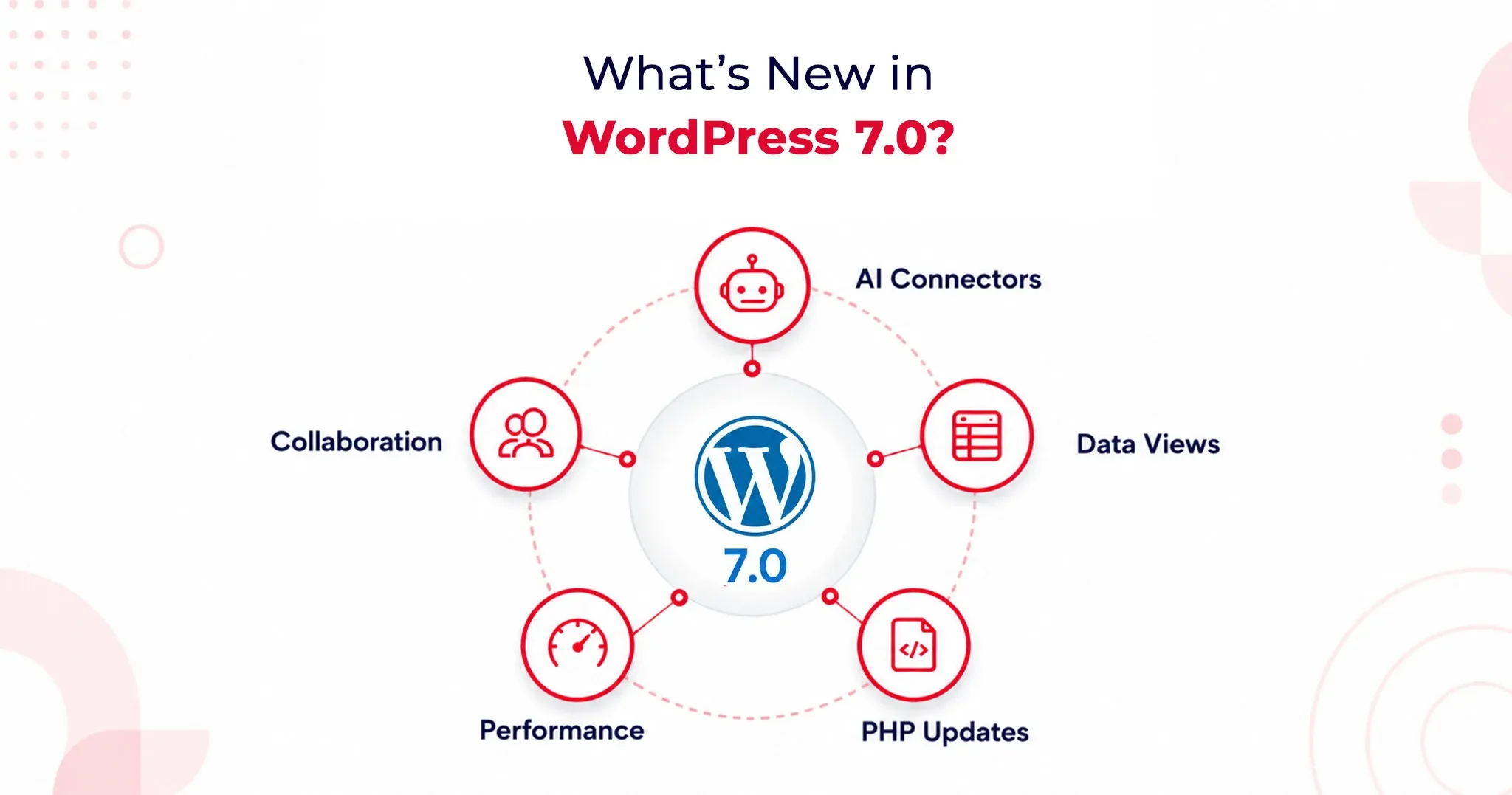
WordPress 7.0 introduces fundamental shifts in how the platform handles artificial intelligence, backend management, and team collaboration. Here is an optimized look at what you need to know about this landmark update.

1. AI Client and AI Connectors: A Provider-Agnostic AI Layer

WordPress 7.0 officially brings AI into the core experience by shipping a Web Client AI API. This establishes a standardized, deeply integrated interface that plugins and themes can use to connect to external AI providers.

According to WordPress.com’s official release documentation, the platform includes three pre-registered connectors right out of the box: OpenAI, Anthropic, and Google.

Why this matters:

  • Vendor Neutrality: The core team deliberately avoided locking users into a preferred AI service. You aren’t forced into a single model provider.
  • Centralized API Management: Site administrators simply enter one API key per provider. Any plugin built against the AI Client can leverage that connection immediately without requiring a separate plugin-level setup.
  • Future-Proofing: This design protects site owners from lock-in as the AI landscape shifts and gives developers a highly stable API surface to build against.

Practically, this streamlined setup powers features like:

  • Smart content suggestions
  • Auto-generated alt text
  • One-click summarization
  • Translation assistance

The Abilities API: Enterprise-Grade Security

To keep these powerful tools in check, WordPress 7.0 introduces the Abilities API. This defines exactly what AI tools are permitted to do within your installation.

Plugins must explicitly register their capabilities (e.g., creating posts, editing metadata, generating image descriptions). AI tools read these permissions in a structured way and operate strictly within defined boundaries. For enterprise site owners managing complex automation workflows, this boundary enforcement provides foundational security architecture, not just a convenience layer.

2. DataViews Admin Redesign: A Modern SaaS-Style Control Center

Say goodbye to WordPress’s classic PHP-rendered admin list tables. DataViews is a new React-based content management interface for posts, pages, media, and users. This redesign fundamentally alters how the backend behaves, not just how it looks.

The DataViews Upgrade:

  • Zero Reloads: Filtering, sorting, and bulk editing happen instantly without a full-page reload.
  • Seamless Toggling: Site administrators can fluidly switch between table, grid, and list views on the exact same screen.
  • Instant Updates: Grouping by status, author, or category updates on the spot.

This operational speed saves measurable hours per month for teams managing large content libraries. By bringing the admin experience closer to modern SaaS workflows like Notion and Airtable, editorial teams no longer have to justify a clunky backend to stakeholders.

3. Notes and Editorial Collaboration

Editorial workflows are getting a massive asynchronous upgrade, though the highly anticipated live-editing feature has been pushed back.

Real-Time Co-Editing Delayed

Real-time collaborative editing was officially removed from WordPress 7.0 on May 8, 2026. The core team pulled the flagship feature after race conditions, fuzz testing failures, and server memory concerns under concurrent load made it unsafe to release at scale.

If you were planning to restructure your editorial workflow around live co-editing, you will need to look toward a future WordPress release.

What Shipped: The Block-Level Notes System

While live co-editing is delayed, the new block-level Notes system has successfully shipped, and it covers the vast majority of what editorial teams actually need daily.

Key Collaboration Features:

  • Targeted Feedback: Editors can leave comments tied directly to specific blocks or text selections.
  • Team Tagging: Easily loop in teammates using @mentions.
  • Suggestions Mode: Propose changes that preserve the original text until the author explicitly accepts or rejects the edit.

This asynchronous collaboration model resolves major coordination friction without demanding the heavy WebSocket infrastructure that live co-editing requires from hosting environments.
Performance and Infrastructure Improvements

WordPress 7.0 Upgrade Guide: What Changes Under the Hood

Browser-side media processing is one of the most significant infrastructure changes in WordPress 7.0, profoundly impacting both site performance and plugin compatibility.

Uploaded images are now processed directly in the browser using WebAssembly before ever reaching the server. This means compression, resizing, and thumbnail generation all happen on the client side.

  • The Benefit: This shift drastically reduces server resource consumption and adds native support for modern image formats, including HEIC and AVIF, without requiring server-side library updates or changes to your hosting environment.

The media uploader now features real-time compression previews via slider controls, alongside saliency detection for automatic smart cropping based on an image’s most visually significant area.

With WordPress 7.0, the Block Editor loads noticeably faster. The iframe isolation model, which prevents style bleed between the admin area and the frontend, has also been refined, improving editing accuracy across both Block and Classic theme configurations.

PHP 7.4 Minimum Requirement and PHP 8.3 Compatibility

WordPress 7.0 officially draws a line in the sand regarding server environments:

  • The Baseline: It sets the PHP 7.4 Minimum Requirement, officially dropping support for PHP 7.2 and 7.3. Sites running those outdated versions will remain on the 6.9 branch (which receives security patches only) and will not receive the WordPress 7.0 update. Discovering this non-negotiable boundary on upgrade day is an avoidable operational disruption.
  • The Goal: The core team strongly advocates for PHP 8.3 Compatibility. Running PHP 8.3 or higher delivers measurable performance improvements, stronger type safety, and better alignment with modern development tooling. Upgrading to 8.3 positions your site safely for the next two to three release cycles.
  • Action Item: Check your hosting control panel or contact your host to verify your PHP version before scheduling your upgrade.
What Website Owners Should Check Before Updating to WordPress 7.0

Your WordPress 7.0 Upgrade Guide: Pre-Update Checklist

The only safe path to upgrading to WordPress 7.0 runs through a staging environment first. You must clone your production site, apply the update, and test comprehensively before pushing it live. This is entirely non-negotiable for installations that run custom blocks, have heavy admin modifications, or use server-side image plugins.

Your Pre-Update Checklist:

  • Full Backup: Secure the database and file system. WordPress 7.0 alters database structures and file handling, complicating mid-upgrade recovery if things go wrong.
  • PHP Verification: Confirm your version at the hosting level.
  • DataViews Compatibility: Review plugin changelogs for explicit DataViews support notes.
  • Editor Testing: Verify theme behavior within the new iframe-based editor.
  • React 19 Audit: Test custom block compatibility with React 19’s updated patterns.
  • Rule Validation: Check your caching and CDN rules following the admin interface change.

WordPress 7.0 Upgrade Guide: Plugin and Theme Compatibility Testing

The shift from classic PHP list tables to the React-based DataViews interface means certain plugins are at risk. Admin plugins that add custom columns, filters, bulk actions, meta boxes, or custom quick-edit fields to the Posts, Pages, or Users screens may not render correctly until their maintainers ship compatibility patches.

Media Plugins: Because image processing now begins in the browser before server-side hooks fire, media plugins that rely on early-stage upload interception must update their integration points. Actively maintained plugins should already have patches.

  • Warning: Abandoned plugins (inactive for more than 12 months) are high-risk and should be replaced rather than tested.

WordPress 7.0 WooCommerce Compatibility: What Store Owners Need to Know

Major ecosystem players WooCommerce, Yoast SEO, ACF, and Elementor have already shipped WordPress 7.0 compatibility updates ahead of the May 20 release. WooCommerce’s compatibility advisory confirmed rigorous testing across the release candidate cycle; standard configurations with major eCommerce extensions passed without regressions.

Where the risk lies:

  • Older, poorly maintained WooCommerce extensions.
  • Custom payment gateway integrations using legacy WordPress admin hooks.
  • Modified checkout flows are dependent on classic list table structures for order management.

If your store runs a standard WooCommerce setup, your risk is low. If your order management relies on custom admin modifications, prioritize those on your staging checklist immediately.

Will WordPress 7.0 Break Existing Plugins or Themes?

Yes, WordPress 7.0 carries a meaningfully higher risk profile than a typical point update. This is due to architectural depth, not careless engineering. The core shifts to the admin interface, media processing pipeline, and React version create new surface areas where older integrations can break without warning.

However, the core team’s commitment to backward compatibility remains firm:

  • Classic themes remain fully supported.
  • The Font Library, previously restricted to Block Themes, now officially extends to Classic Themes.

Is WordPress 7.0 Safe to Update Immediately?

  • For personal sites & standard blogs: Yes. Test on staging first, then update.
  • For Enterprise, Agencies & WooCommerce: No. Wait for the 7.0.1 and 7.0.2 minor patch releases before touching production.

Minor patches historically address the edge-case failures that crop up in the first 2–4 weeks. Given the architectural depth of 7.0, an active issue queue is guaranteed. Waiting costs little, but protects you from disproportionate recovery efforts in complex environments.

Agency Best Practice: Build a validation workflow. Require staging confirmation, plugin compatibility sign-off, client communication regarding interface changes, and a verified rollback path. WordPress 7.0 is stable, but planning for edge cases is the only professional response.

The Verdict

WordPress 7.0 is a genuine infrastructure release, not a marketing milestone. The AI Client, DataViews admin redesign, and browser-side media processing collectively shift what WordPress can do for content teams operating at scale. While real-time collaborative editing did not ship, the platform’s foundations are substantially stronger, highly AI-ready, and better suited to modern content operations than they were before May 20, 2026.

AI Search Visibility Audit: The Exact Checklist Agencies Should Use in 2026

An AI search visibility audit is a process that evaluates how often your brand is mentioned, cited, and accurately represented across AI search engines like ChatGPT, Google AI Overviews, and Perplexity.

It measures citation frequency, retrieval accuracy, and whether your content is selected as the source in AI-generated answers.

Clients want to know why their brand does not appear in ChatGPT answers or Google AI Overviews’ citations. And agencies need to answer in terms of strategy and numbers. But why is this so urgent?

In July 2025, TechCrunch reported that Google AI Overviews reached about 2 billion monthly users, with AI Mode at around 100 million in the US, making AI discovery a measurable channel rather than a future bet.

This guide gives you a productizable AI visibility audit you can sell as a repeatable service deliverable. You will get a six-category checklist, a 0 to 100 scoring rubric, and a 30/60/90 day execution roadmap. You will also get a prompt-based system that replaces keywords as the primary measurement unit as the primary measurement system for AI search.

What Is an AI Search Visibility Audit (And Why It’s Different from an SEO Audit)?

An AI search visibility audit or Generative Engine Optimization audit is a process to evaluate how well your brand is understood, trusted, and cited by AI-powered answer engines. This includes AI engines like ChatGPT, Perplexity, and Google AI Overviews.

An AI visibility audit measures:

  • Your brand presence: Does your brand appear in AI-powered answer engine responses?
  • Your branding accuracy: Is your brand information being captured accurately by LLMS?
  • Customer sentiment: How does AI frame your brand? (Is it described as an industry leader in your market niche?)
  • Competitive positioning: How is your brand pitched against the competition when it comes to answering specific queries in the niche?

However, if you want to measure these parameters, your AI visibility audit needs to include,

  • Technical AI readiness
  • Semantic content structure
  • Entity trust signals

How AI Search Visibility Differs from Traditional SEO?

Traditional SEO still plays a foundational role in AI visibility, especially for crawlability, content structure, and authority signals. Many businesses now combine SEO services with GEO/AEO strategies to improve both search rankings and AI citations.

This matters because AI answers compress the buyer journey, and a single cited source can win the click that organic listings used to capture.

Here are some key differences.

Dimension SEO Audit AI Visibility Audit (GEO and AEO)
Primary goal Improve rankings and traffic Improve citations and answer selection
Inputs measured Keywords, pages, links, crawl Prompts, entities, schema, citations, trust
Success metrics Rank, CTR, sessions Mentions, cited URLs, accuracy, coverage gaps
Optimization focus SERP positions Model retrieval and citation readiness
Client question answered Did we rank? Did we become the answer?

Why AI Search Visibility Matters in 2026

AI search visibility matters because buyers are outsourcing evaluation to assistants that summarize, compare, and recommend vendors in one step. For businesses, the risk is that a competitor becomes the default recommendation inside answers, even when your brand ranks well for classic queries.

The fastest way to make this tangible is to define a baseline AI visibility audit score, then map each fix to the exact prompts where the brand currently disappears.

When you present improvements as citation lift and answer coverage, the audit stops being subjective and becomes operational.

Step 1: Set the Audit Scope (Platforms, Audience, Goals)

The audit scope matters because you cannot fix what you cannot measure across the right engines and buyer intents.

Start by selecting the AI platforms relevant to this client’s market.

  • A B2B SaaS client may prioritize ChatGPT and Perplexity prompts, while a multi-location consumer brand may prioritize Google AI Overviews.
  • Next, map prompt intent to the ideal customer profile and the buying stage, because informational prompts and vendor selection prompts require different content structures.
  • Finally, define what winning means for this client, such as accurate positioning, brand-mention coverage, or citations for high-intent prompts.
  • Create a one-page audit scope sheet that lists target engines, target personas, and the goal definition for reporting.

Step 2: Build Your Money Prompt Set (10-30 Prompts)

A money prompt set matters because prompts replace keywords as the unit of measurement for AI discovery. Build ten to thirty prompts that mirror real buyer questions and decisions, and then use the same prompt set as your audit baseline and ongoing reporting cadence. Use three prompt categories so you capture awareness, evaluation, and conversion intent in one system.

Category prompts for agency services.

Write prompts like Best payroll software implementation partner for healthcare so you can test whether the client appears in curated recommendations. Track which competitors show up, and record which URLs get cited in the answer.

Problem solution prompts for buyer pain.

Write prompts like How do retail brands reduce checkout abandonment without redesigning everything so you can test whether the client’s expertise gets pulled into the explanation. These prompts often cite guides, research summaries, and pages with clear definitions.

Comparison prompts for shortlist decisions

Write prompts like Brand A vs Brand B and Alternatives to Brand B so you can see where the model positions the category and which comparison pages it trusts. This is where agencies can sell AI-driven visibility services in geo aeo as a recurring program, because the prompts keep changing with the competitive landscape.

Deliverable: Create a prompt tracker sheet with columns for engine, prompt, response summary, brand mention, cited URLs, and competitors shown.

The AI Visibility Audit Checklist: Six Core Categories

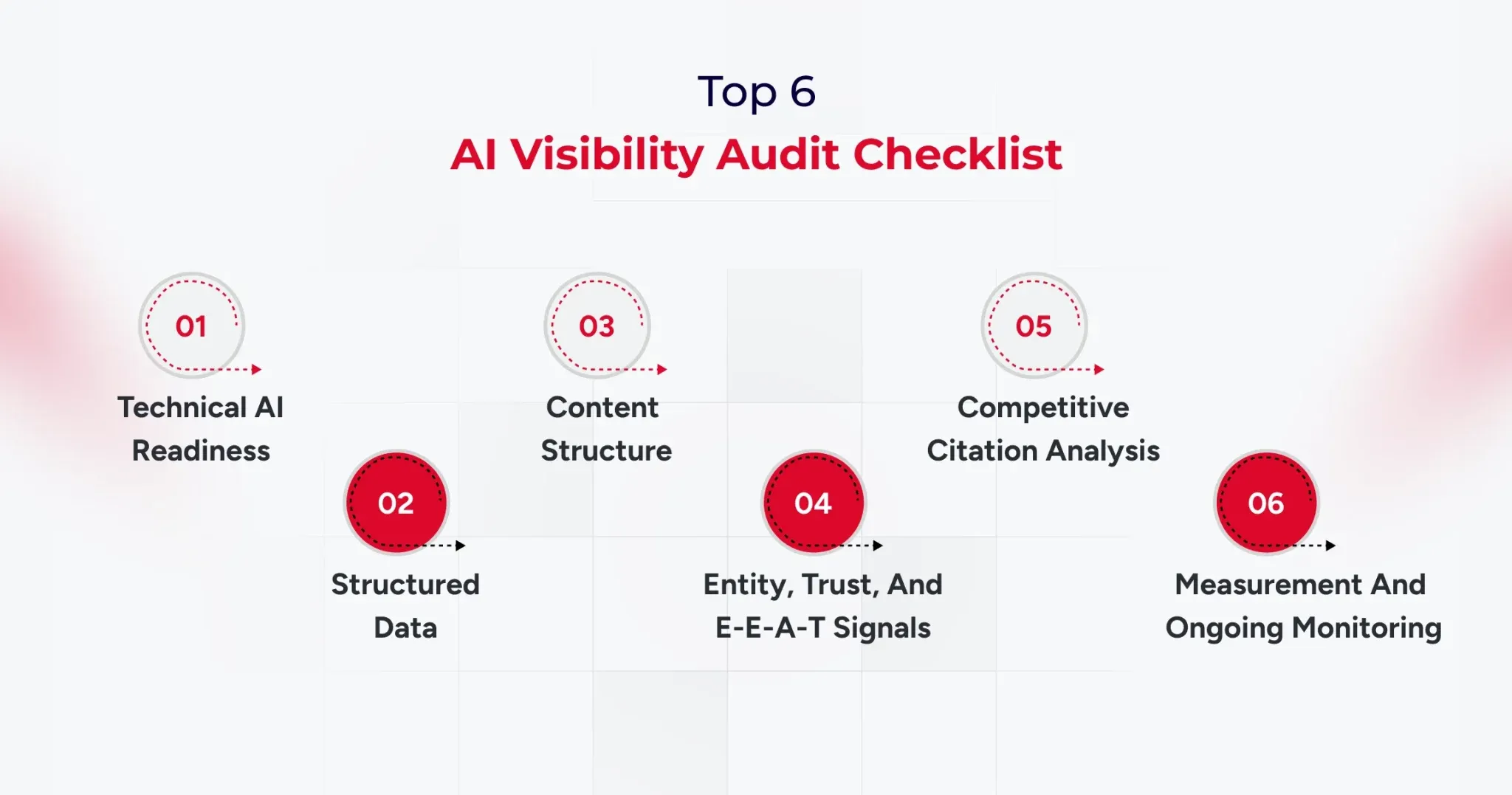
A six-category checklist matters because clients approve audits when you show clear weights, concrete checks, and failure definitions. Use a scored checklist totaling 0 to 100 points, and force every finding into a measurable category with a clear remediation path.

1) Technical AI Readiness (20 points)

  • Confirm that key AI user agents are not blocked in robots.txt, including GPTBot, ClaudeBot, and PerplexityBot.
  • Verify crawl eligibility, indexability, and snippet extractability on priority pages.
  • Check performance, rendering, and stability on critical templates, especially on mobile.
  • Confirm HTTPS, canonical consistency, and sitemap freshness for the pages you expect to be cited.

Failure looks like blocked bots, inconsistent canonicalization, and pages that render poorly for crawlers.

2) Structured Data and Machine Understanding (20 points)

  • Validate JSON-LD schema for Organization, Article, FAQ, and Product where relevant.
  • Confirm that the schema matches the visible content, with no mismatches that could raise trust issues.
  • Check for an llms.txt file if the client uses one, and ensure it aligns with content priorities.
  • Verify Knowledge Graph entity claims, including consistent brand descriptors across properties.

Failure can look like missing, mismatched, or inconsistent entity descriptions.

3) Content Structure and Citation Readiness (30 points)

  • Ensure the answer appears in the first two to three sentences after each heading.
  • Write clean definitions that are copy-friendly and context complete.
  • Add lists and tables where the prompt expects them.
  • Support claims with proof such as data, case studies, and measurable outcomes.
  • Use question-based H2 structures when the prompt set indicates direct questions.

Failure looks like slow responses, vague claims, and pages that read like marketing copy rather than evidence.

4) Entity, Trust, and E-E-A-T Signals (20 points)

  • Add author bylines with credentials when expertise matters.
  • Maintain consistent brand descriptions across the website, profiles, and listings.
  • Identify third-party mentions, citations, and references from authoritative sources.
  • Evaluate the entity’s presence on sources like Wikipedia and Wikidata when relevant to the brand.
  • Document methodology on key pages so claims look reviewable.

Failure looks like anonymous content, inconsistent brand bios, and no third-party validation.

5) Competitive Citation Analysis (5 points)

  • Identify which competitors win citations for the target prompt set.
  • Capture which competitor URLs are being cited and why they fit the prompt.
  • Map content gaps where the client is missing pages that match the prompt intent.

Failure appears when competing pages are consistently cited, even though the client has no equivalent asset.

6) Measurement and Ongoing Monitoring (5 points)

  • Maintain a prompt tracking system with weekly or biweekly checks.
  • Track citation frequency and brand mention coverage by engine and prompt cluster.
  • Create a before-and-after report format that clients can sign off on.

Failure looks like one-off screenshots and no repeatable baseline.

Scoring note: A score below 60 indicates a high risk of AI invisibility and should be addressed as a priority.

AI Visibility Checking Tools Agencies Should Use in 2026

AI visibility checking tools matter because agencies need proof, baselines, and ongoing monitoring beyond traditional rank tracking.

You need four tool categories, and you should select tools based on the audit category they support, not based on brand popularity.

AI Visibility Checking Tools for Technical and Crawl Readiness

Use Google Search Console, Screaming Frog, and a crawler suite like Semrush to validate indexability, rendering, and template issues. Tie every finding back to the prompt set pages you expect to be cited, because generic crawl stats do not move AI citations by themselves.

AI visibility checking tools for structured data validation

Use Google’s Rich Results Test and Schema Markup Validator to confirm schema accuracy and coverage. Report schema findings as pass fail checks with URLs, so the remediation list becomes straightforward for engineering teams.

AI visibility checking tools for citation monitoring and AI tracking

Use an AI visibility tracker when you need prompt-level history, citation URLs, and sentiment trends across engines. Platforms like Profound and Wellows are positioned around multi-engine citation tracking and workflow reporting, while suites like SE Ranking are building bridges between classic SEO signals and AI visibility monitoring.

AI visibility checking tools for reporting and workflow proof

Use prompt tracking spreadsheets, annotated screenshots, and versioned reporting templates so the client can see progress by prompt cluster.

This is also how you turn AI visibility work into a monthly program, because the system becomes your audit-and-reporting engine.

How to Package AI-Driven Visibility Services in GEO/AEO for Clients

Packaging matters because the AI visibility audit becomes more valuable when it leads directly to an execution motion. You can offer three service models, each with a clear scope, deliverables, and reporting cadence.

Model 1: One-time AI Visibility Audit Report

The scope focuses on baseline scoring, findings, and a Top 10 GEO fixes list.

Model 2: Monthly GEO retainer

Scope focuses on prompt tracking, monthly citation delta reporting, and ongoing content and structure improvements.

Model 3: Full GEO as a service

Scope includes audit, content restructuring, technical fixes, schema improvements, entity building, and reporting.

Timeline expectations should be conservative and measurable, with early movement often visible within four to eight weeks and more stable citation gains typically visible within eight to sixteen weeks.

Scoring Your Client’s AI Visibility (0-100 Agency Rubric)

A scoring rubric matters because clients approve work when you quantify risk and prioritize fixes with a consistent standard.

  • Use the 0 to 100 score as a weighted summary of the six audit categories, and make sure every finding can be traced to an explicit score impact.
  • Use three score bands so the client can quickly understand severity.
  • A score below 60 indicates high risk and major visibility gaps.
  • A score from 60 to 79 indicates moderate risk with clear optimization opportunities.
  • A score of 80 or above indicates strong readiness, with effort shifting to competitive citations and prompt coverage expansion.

From Audit to Action: The 30/60/90-Day GEO Roadmap

A 30/60/90 roadmap matters because clients want a plan that converts audit findings into a calendar they can approve.

Start by building a priority matrix based on impact and effort, then map each fix to a time-bound sprint.

30/60/90 structure

  • Days 0 to 30: complete technical fixes, finalize baseline prompt tracking, and deliver the scored report.
  • Days 31 to 60: restructure content for answer first format, improve definitions, add tables and comparisons, and align entity language.
  • Days 61 to 90: monitor citations, run competitive gap analysis, and deliver a second baseline comparison with deltas.

Deliverable: Create a Top 10 GEO fixes list with issue, impact, effort, owner, and deadline.

Conclusion

An AI visibility audit is now a core agency deliverable because AI answers shape discovery at a massive scale. When Google AI Overviews alone reach about two billion monthly users, agencies cannot treat citations and answer selection as optional.

Use this AI visibility audit checklist to score readiness, prioritize fixes, and move from baseline to measurable citation gains with a 30/60/90 roadmap. If you standardize prompts, scoring, and reporting, you can turn AI visibility audit work into a repeatable service line with clear proof.

And if you are looking to improve AI search visibility without going through the hassle of creating a template, connect with our experts now.