Backup Made Easy: Effortless Methods to Secure Your WordPress Site

Websites are a business’s lifeline, and these online entities’ vulnerability should never be underestimated. Without comprehensive WordPress backup measures in place, website owners expose themselves to a multitude of risks that could result in irreversible damage. This comprehensive blog post delves into the intricacies of website backups, shedding light on their pivotal role in fortifying your WordPress site against potential disasters.

Let’s start right away!

As a prudent WordPress website owner, you need to have a clear understanding of the diverse risks that can potentially impact your digital endeavors. By recognizing these risks, you can adopt a proactive and responsible approach toward safeguarding your online presence.

Potential Risks of Not Having a Reliable Backup Solution

Data Loss

Recent studies at IBM found that specific industries like healthcare, financial, pharmaceutical, and technology face the most significant challenges when it comes to data breaches.
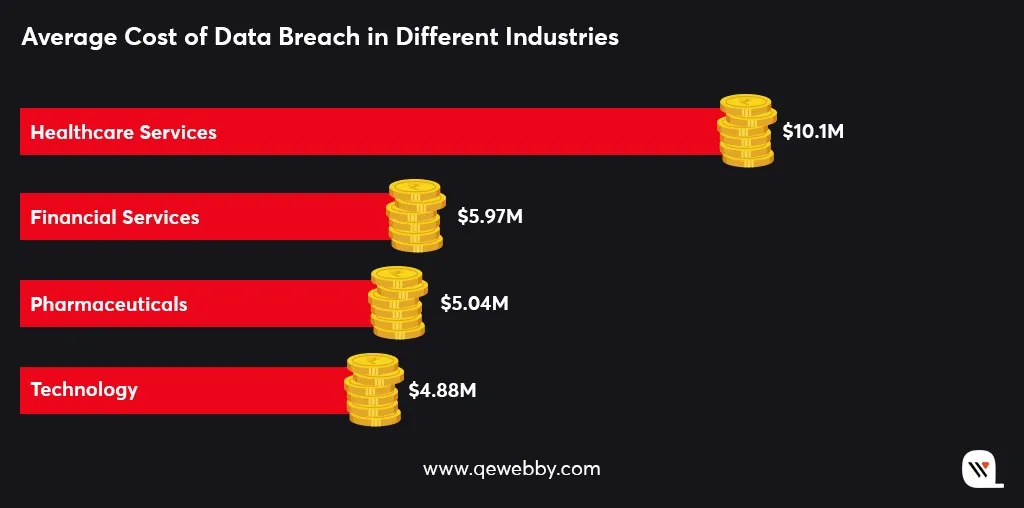
Data loss incidents are not uncommon in the digital landscape, with human errors, software glitches, and hardware failures being prominent culprits.

Human errors can occur in the form of accidental deletion of critical files or content, unintended modifications that render the website dysfunctional, or mishandling during website migrations or updates.

Similarly, software glitches, including conflicts between different plugins or themes, can result in data corruption or loss. Hardware failures, such as disk malfunctions or server crashes, which pose additional risks to the integrity and availability of your website’s data.

Cyber Attacks
Research by Databaraccks, reveals cyber attacks have been the primary reason for data loss over human errors and hardware failure.
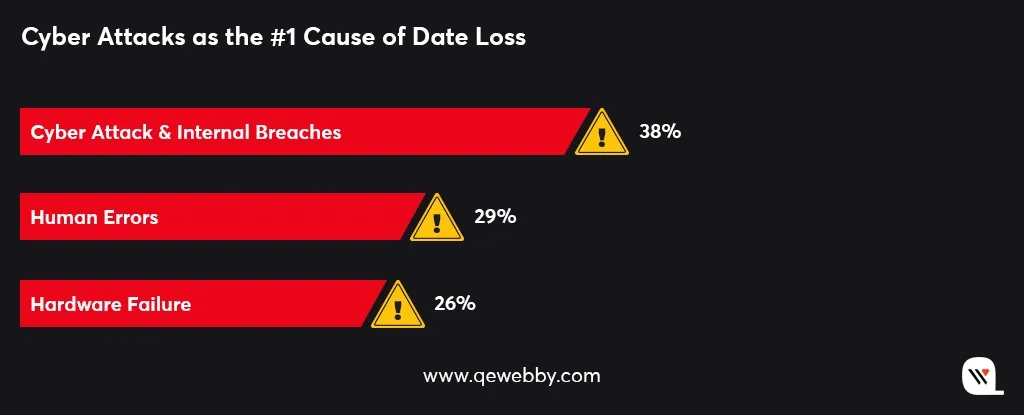
Cyber attacks not only result in the theft of sensitive information but also disrupt website functionality, compromise customer trust, and lead to financial losses.

Cyber attacks continue to evolve in sophistication and frequency, making it crucial for website owners to prioritize backups as an integral part of their security measures.

Difficult Updates

When updates are released, there is always a risk of compatibility issues or unexpected conflicts arising between different components of your website. These conflicts can lead to errors, broken functionality, or even website crashes.

Furthermore, updates are not immune to human errors. It is possible to mistakenly update the wrong version of a plugin or accidentally delete critical files during the update process. Without a backup as a safety net, these mistakes can have severe consequences, causing data loss, website downtime, and potential damage to your online reputation.

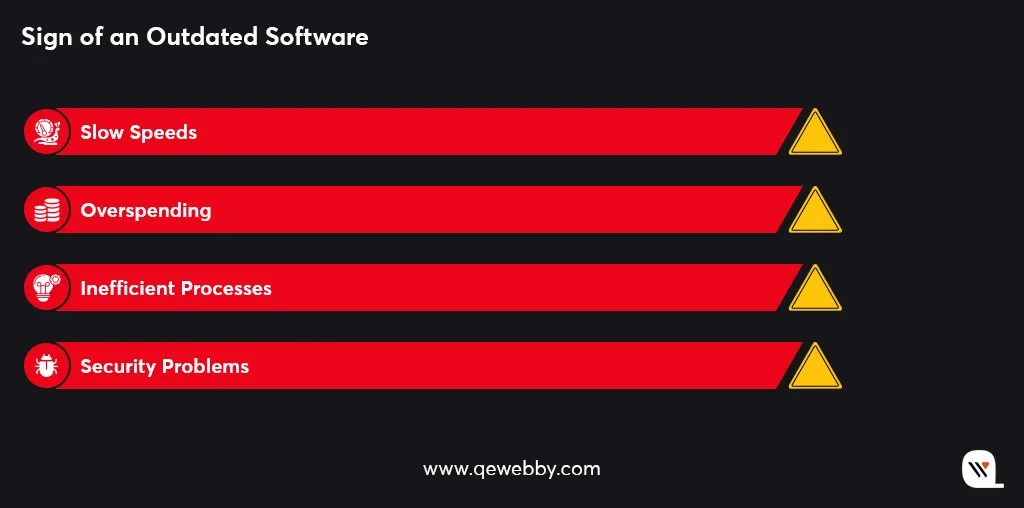
Without a reliable backup solution, you may find yourself in a difficult position if your website falls victim to a security breach due to outdated software. Here are some of the reasons that prove your software to be outdated:
Downtime Mitigation

Downtime refers to periods when your website is inaccessible or experiences disruptions in functionality, which can lead to frustration for visitors and potential loss of business.
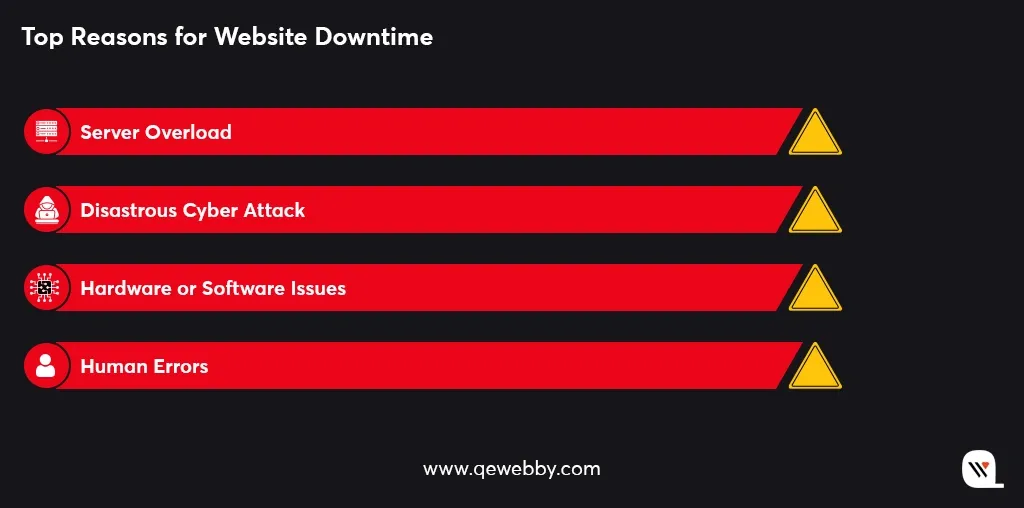
Website downtime can occur due to various reasons, such as server issues, software conflicts, security breaches, or even human errors. Whether it’s a server failure, a plugin update gone wrong, or a malicious attack, backups provide a reliable fallback option. They allow you to revert your website to a known stable configuration, eliminating the need to troubleshoot from scratch and reducing the time required to get your website back online.

Content Management

One of the key risks of not having a reliable backup solution is the potential loss of content. Whether it’s due to accidental deletion, website errors, or malicious activities, valuable content can be irretrievably lost without a backup.

Imagine spending hours crafting compelling blog posts, curating engaging images, or recording informative videos, only to have them disappear into the digital abyss.
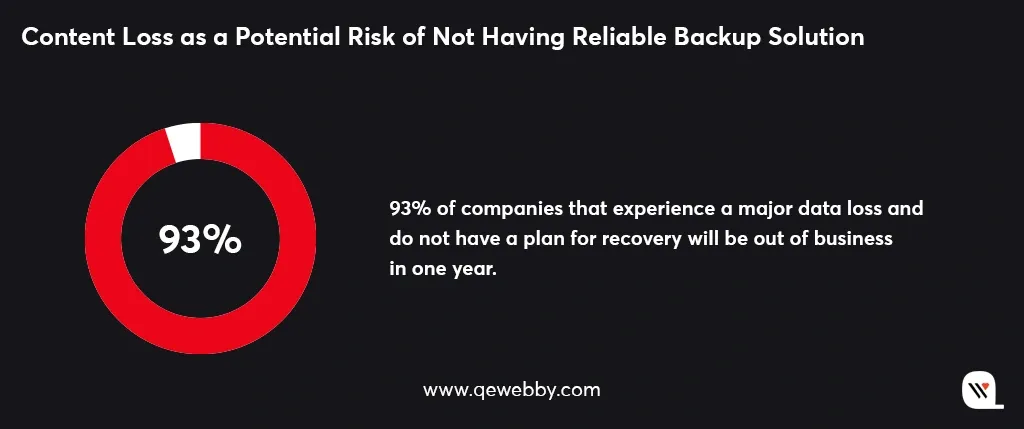
Without a reliable backup strategy in place, managing your website’s content becomes a challenging and risky endeavor.

Easy Ways to Backup Your WordPress Site

Manual Backups

Creating manual backups provides a straightforward approach to safeguarding your WordPress site. Here’s how you can do it:
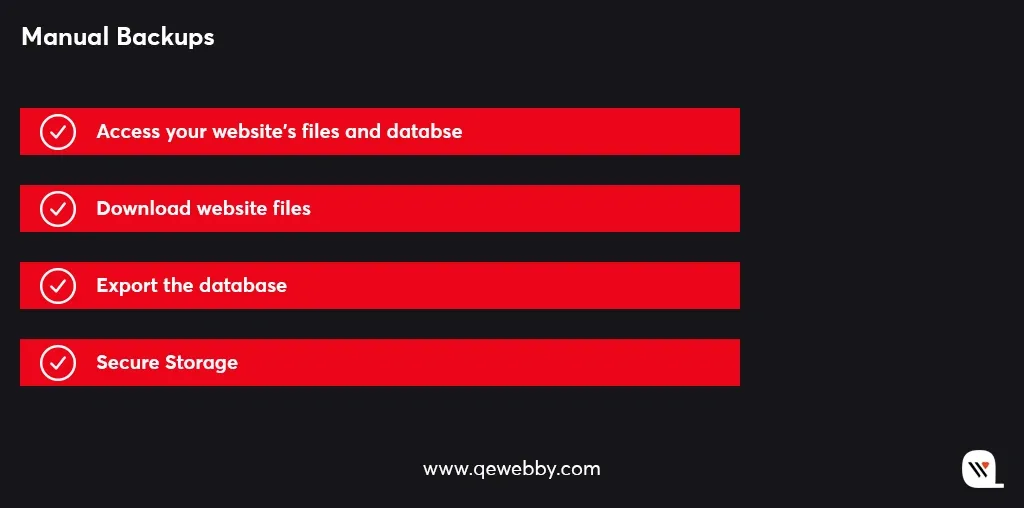
Access your website’s files and database:

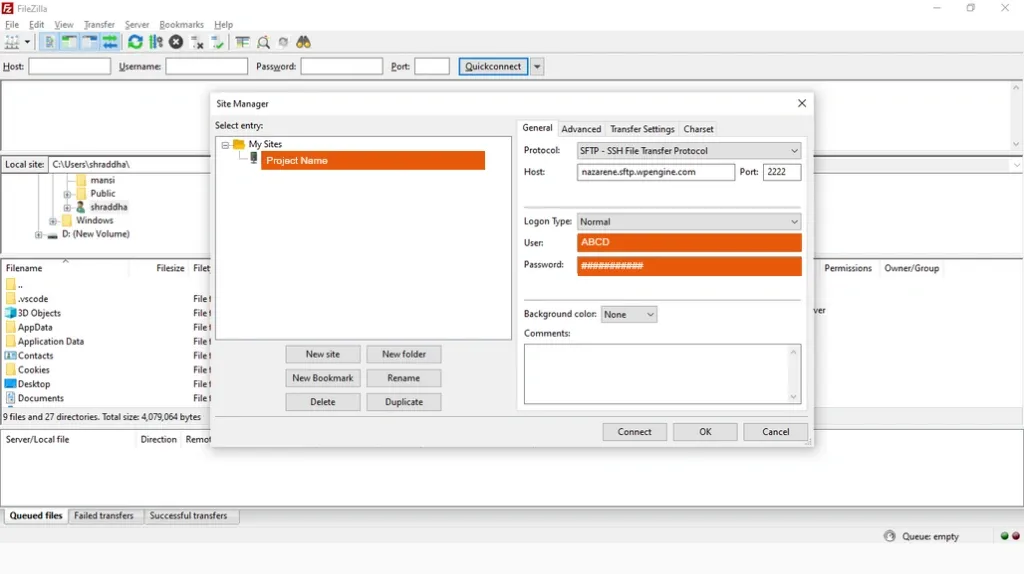
Use FTP (File Transfer Protocol) or your hosting control panel to gain access to your website’s files and database.
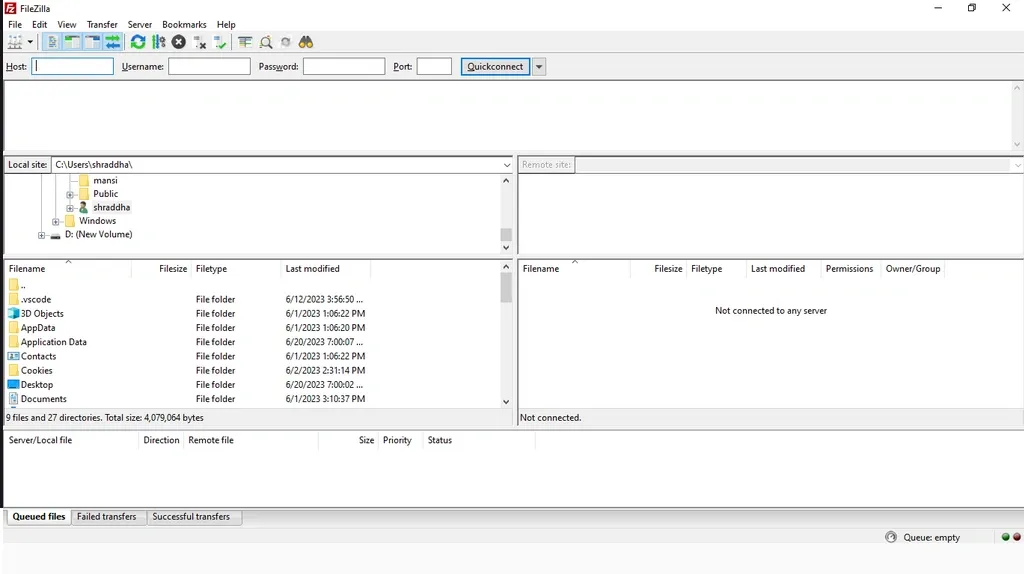
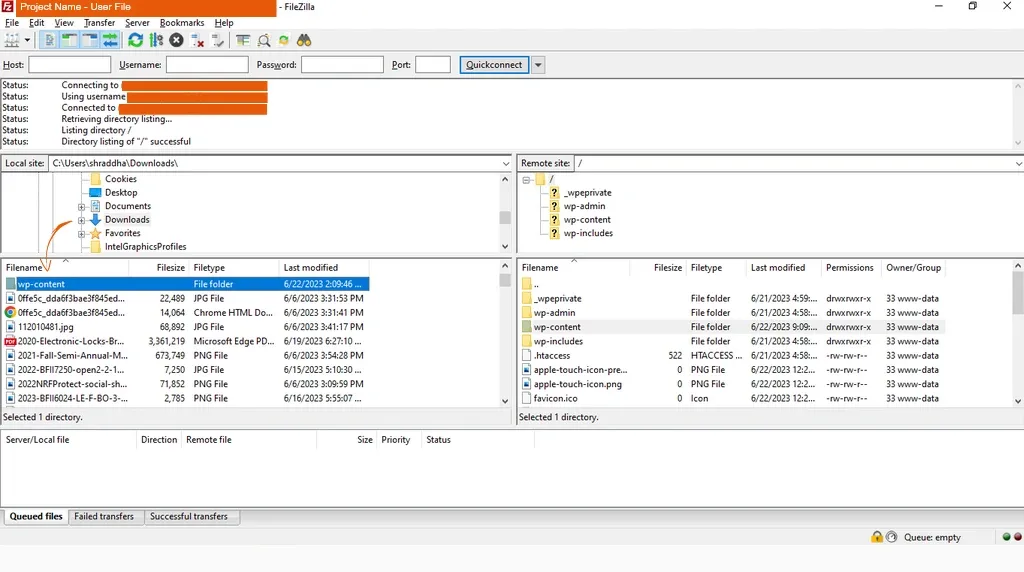
Download website files:

Copy your website’s files and folders from the server to your local computer. This ensures that you have a local copy of all the website’s components.
Export the database:

Use tools like phpMyAdmin or MySQL Workbench to export your website’s database. This step ensures that you have a backup of all your website’s content, settings, and other important data.
By performing manual backups, you retain full control over the backup process and the ability to store backups wherever you prefer. It’s a reliable method to ensure the safety of your WordPress website’s files and database.

Backup Plugins

By utilizing reliable backup plugins, you can automate the backup process, ensuring the regular protection of your WordPress site. These plugins offer a range of features that enhance the backup experience, providing you with flexibility, convenience, and peace of mind regarding the safety of your website’s data. Follow these steps to effectively use backup plugins:
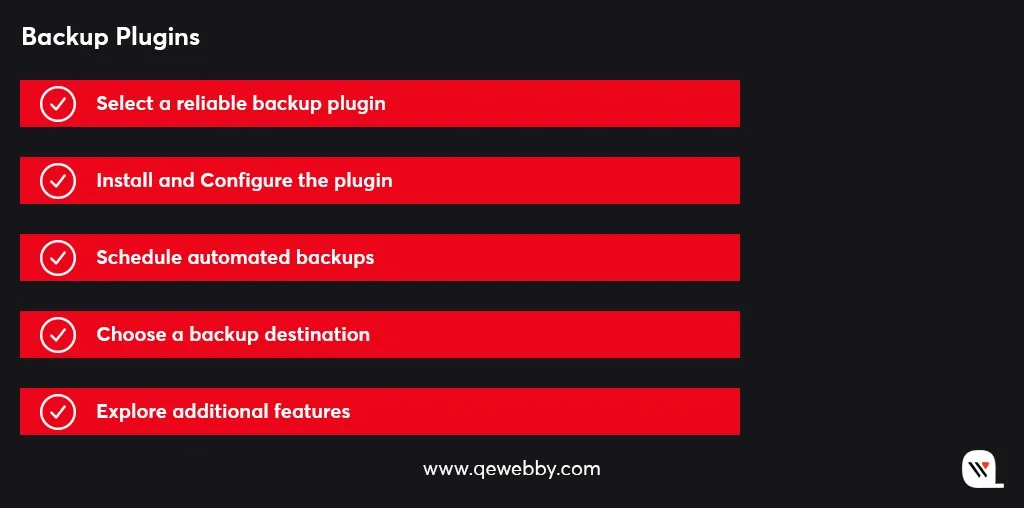
Select a reliable backup plugin:

Explore reputable backup plugins available in the WordPress repository, such as UpdraftPlus, BackupBuddy, or VaultPress. Choose a plugin that suits your needs and has positive user reviews.

Install and configure the plugin:

Install the chosen backup plugin on your WordPress site and follow the provided setup instructions. Configure the plugin according to your preferences, including backup frequency, retention period, and compression settings.
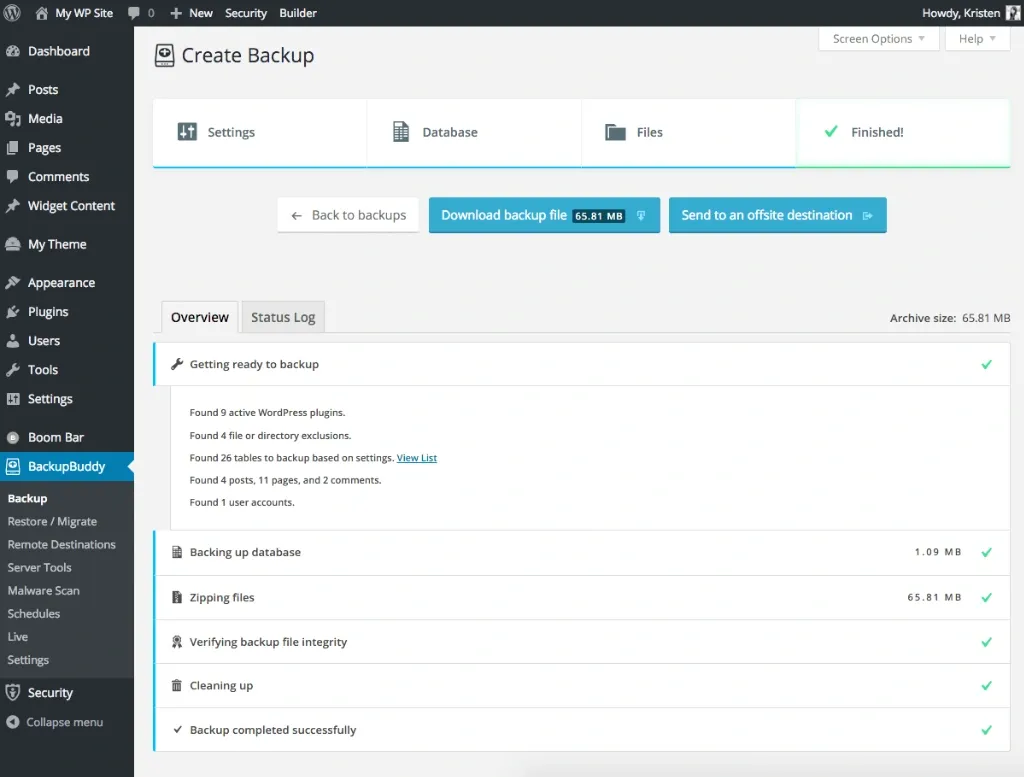
Schedule automated backups:

Set up automated backup schedules to ensure your data is consistently protected. You can choose to schedule backups daily, weekly, or monthly, depending on the frequency of updates to your site.

Choose a backup destination:

Determine where you want to store your backups. Many backup plugins offer various options such as cloud storage services like Dropbox or Google Drive, FTP (File Transfer Protocol), or email. Select a destination that suits your storage preferences and provides secure storage for your backup files.

Explore additional features:

Some backup plugins offer advanced features like incremental backups, which only backup changes since the last backup, reducing storage space and backup time. Look for plugins that provide one-click restoration capabilities, making it easier to restore your website in case of emergencies. Additionally, consider plugins that allow you to exclude specific files or directories from backups, ensuring you have control over what is included in your backups.

Backup plugins provide a convenient and feature-rich solution for securing your WordPress site.

Web Hosting Backup

By assessing your web hosting provider’s backup services, you can ensure the safety and availability of your website’s data. Thus, when it comes to web hosting backup services, consider the following steps to ensure your data is protected:
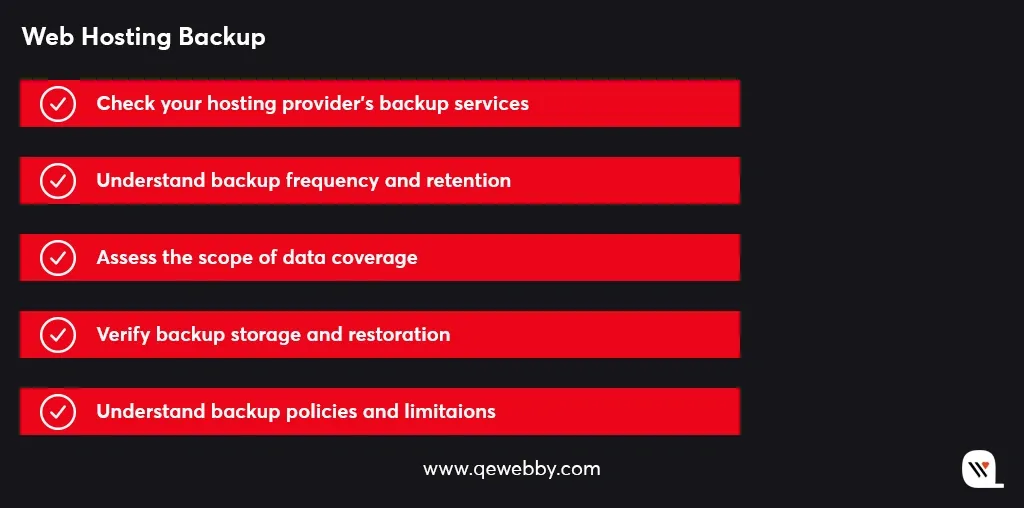
Check your hosting provider’s backup services:

Review your web hosting package to determine if backup services are included. Some hosting providers offer automatic backups as part of their hosting plans.
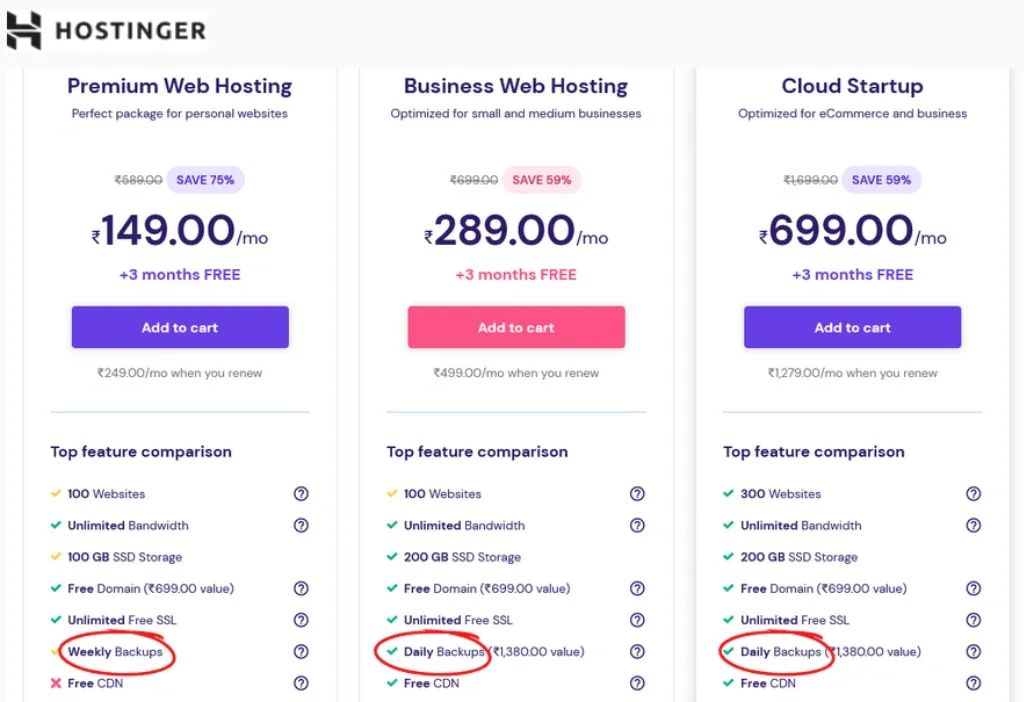
Understand backup frequency and retention:

Learn about the frequency at which your hosting provider performs backups. Ideally, backups should be conducted regularly to minimize data loss. Additionally, familiarize yourself with the retention period, which defines how long backups are stored before being overwritten.

Assess the scope of data coverage:

Determine the extent of data covered by your hosting provider’s backups. Ensure that both your website files and databases are included in the backup process. It’s crucial to have a comprehensive backup to restore your site fully.

Verify backup storage and restoration:

Confirm that the backups are stored securely by your hosting provider. They should utilize reliable storage systems to protect your data from loss or unauthorized access. Additionally, check if the restoration process is straightforward, allowing you to easily retrieve your website from a backup when needed.

Understand backup policies and limitations:

Take the time to thoroughly understand your hosting provider’s backup policies and any limitations that may be in place. This includes the maximum size of backups, restrictions on the number of backup copies, and any specific terms regarding data restoration.

Understanding the backup frequency, retention, data coverage, storage security, and policies will help you make informed decisions about additional backup strategies to complement your hosting provider’s services.

Managed WordPress Hosting

Managed WordPress hosting takes care of the backup aspect, ensuring that your website’s data is protected without you having to handle the technicalities. So if you’re looking for a hassle-free backup solution, managed WordPress hosting can be an excellent choice. Here’s what you need to know:
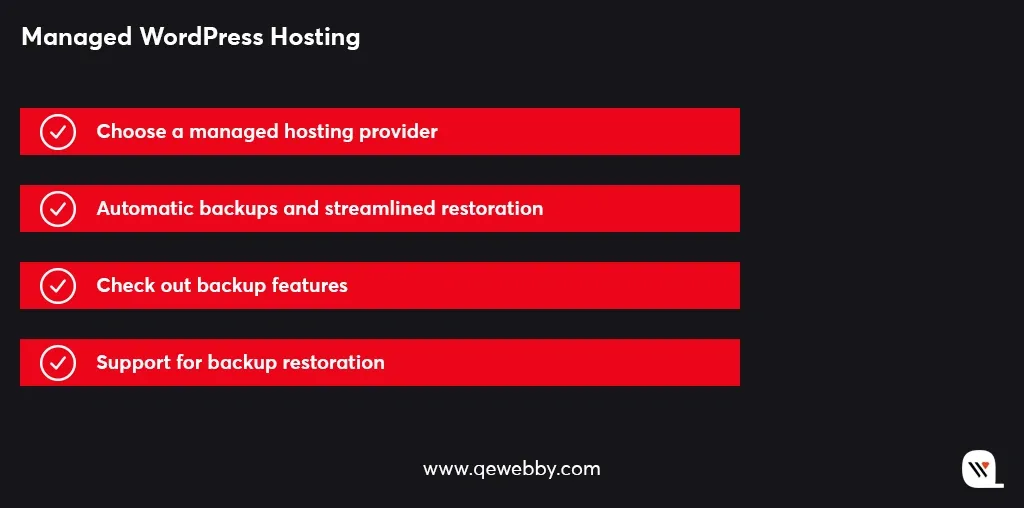
Choose a managed hosting provider:

Consider opting for managed WordPress hosting providers such as WP Engine, SiteGround, or Flywheel. These providers specialize in WordPress hosting and offer built-in backup solutions as part of their services.

Automatic backups and streamlined restoration:

Managed hosts typically offer automatic backup services, ensuring your website’s data is backed up regularly without requiring manual intervention. Additionally, they often provide streamlined restoration processes, simplifying the recovery of your website in case of any data loss incidents.

Research backup features:

Before selecting a managed hosting provider, research the backup features they offer. Look into factors such as backup frequency, which determines how often backups are performed, and retention period, which specifies how long backup copies are stored. Also, check if they allow you to create on-demand backups whenever you need them.
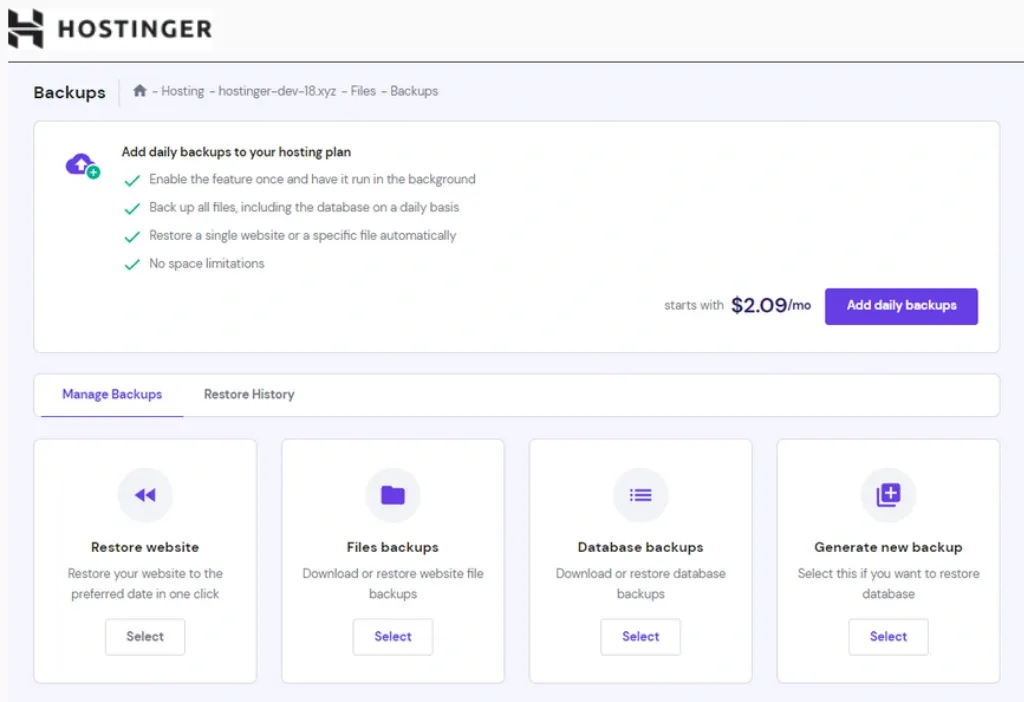
Support for backup restoration:

Understand the level of support provided by the hosting provider when it comes to backup restoration or data loss incidents. Check if they have dedicated support teams available to assist you promptly and efficiently in case you encounter any issues during the restoration process.

By choosing a reputable managed hosting provider, you can enjoy the convenience of automatic backups, streamlined restoration, and reliable support, providing you with peace of mind and a robust backup solution for your WordPress site.

Cloud-based Backup Services

When it comes to reliable and secure backups for your WordPress site, cloud-based backup services are worth considering. Follow these steps to explore and utilize cloud-based backup services effectively:
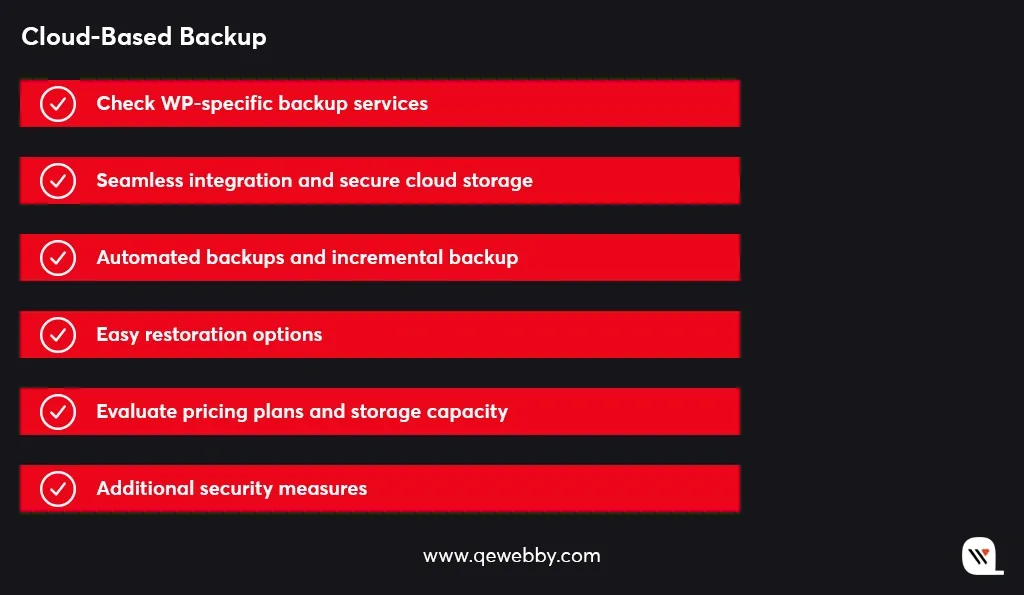
Research WordPress-specific backup services:

Look into reputable cloud-based backup services specifically designed for WordPress, such as BlogVault, CodeGuard, or Jetpack Backup. These services are tailored to the needs of WordPress websites and offer specialized features.

Seamless integration and secure cloud storage:

Cloud-based backup services seamlessly integrate with your WordPress site, ensuring easy setup and smooth operation. They securely store your backups in the cloud, protecting them from hardware failures and other local storage issues.

Automated backups and incremental backups:

Look for services that offer automated backups, allowing you to schedule backups at regular intervals without manual intervention. Additionally, consider services that provide incremental backups, which only back up the changes made since the last backup. This speeds up the backup process and reduces storage space requirements.

Easy restoration options:

Ensure that the backup service offers straightforward restoration options. Look for features like one-click restoration or simple step-by-step guides to quickly restore your website from a backup when needed.

Evaluate pricing plans and storage capacity:

Compare the pricing plans offered by different cloud-based backup services. Consider factors such as storage capacity, the number of websites covered, and any limitations on backup frequency or retention. Select a service that aligns with your budget and backup requirements.

Additional security measures:

Assess the additional security measures provided by the backup service. Look for features like encryption, two-factor authentication, and malware scanning to enhance the overall security of your backups and data.
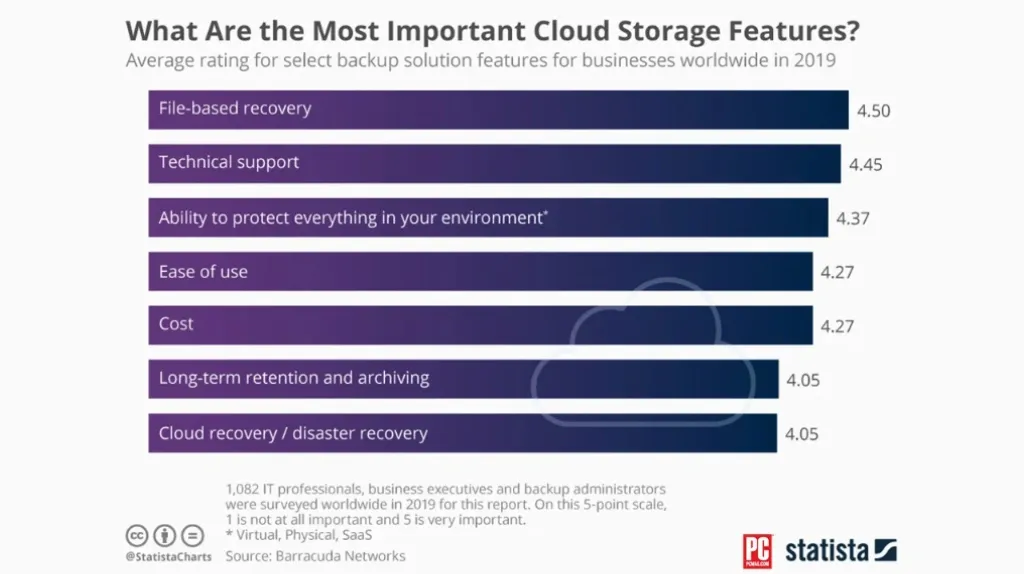
Cloud-based backup services offer convenience, scalability, and reliable storage for your WordPress backups. By selecting a WordPress-specific service that fits your needs and budget, you can ensure the safety and accessibility of your website’s backups in the cloud.

cPanel Backup

If your hosting control panel includes cPanel, you can take advantage of its built-in backup functionality. By utilizing cPanel’s backup functionality, you can easily create backups of your website files and databases. Follow these steps to create backups using cPanel:
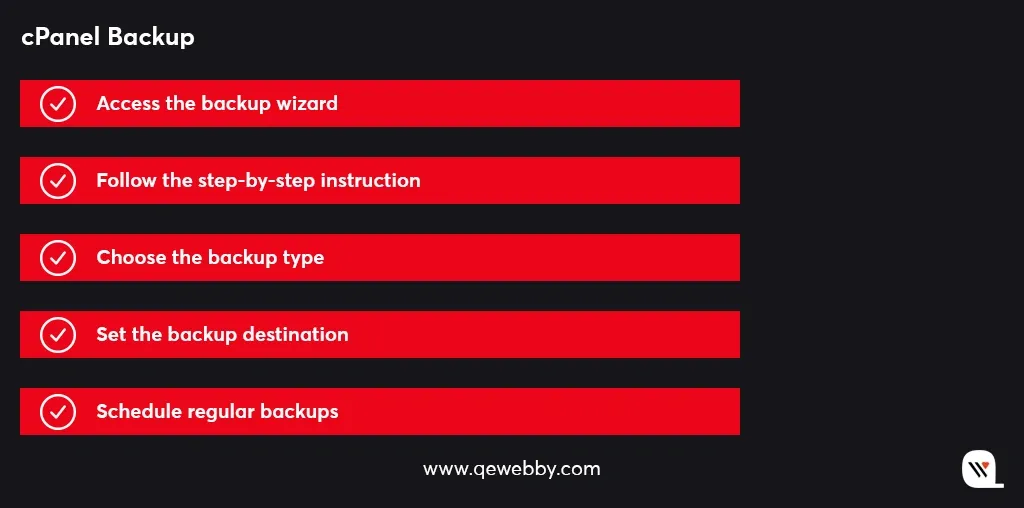
Access the backup wizard:

Log in to your hosting control panel and locate the backup wizard within the cPanel interface. This user-friendly tool simplifies the backup process.
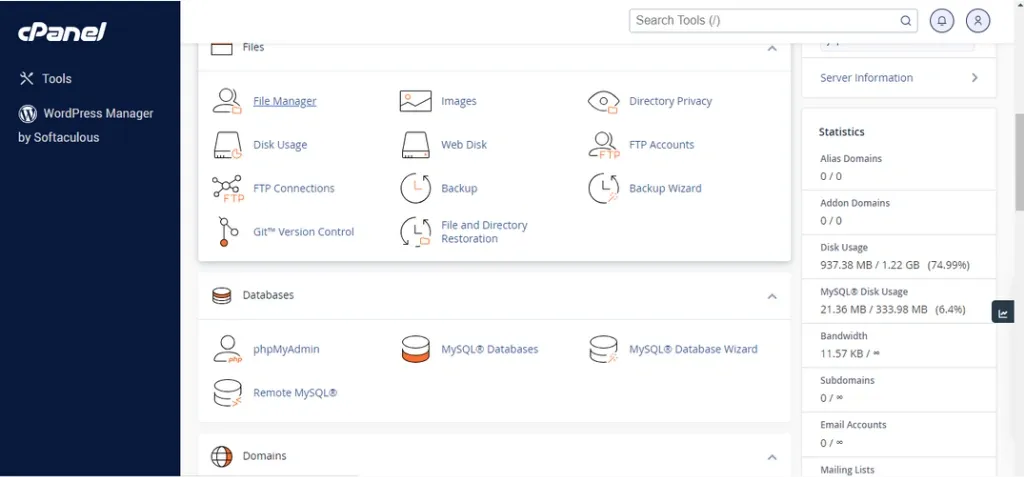
Step-by-step instructions:

Follow the step-by-step instructions provided by the backup wizard to create your backups. The wizard will guide you through the necessary configuration options.

Choose the backup type:

Select the desired backup type based on your requirements. You can choose between a full backup, which includes all files and databases, or a partial backup, where you can select specific files or databases to include in the backup.

Set the backup destination:

Determine where you want to store your backups. cPanel allows you to choose from various destinations, such as local storage or remote locations like FTP servers or cloud storage services.

Schedule regular backups:

To ensure automated protection for your website, schedule regular backups through cPanel’s interface. Set the backup frequency according to your needs, whether it’s daily, weekly, or monthly.

The intuitive interface and step-by-step instructions make the process straightforward, even for those without advanced technical knowledge. Take advantage of this built-in feature to ensure the safety and availability of your website’s data.

Content Delivery Network Backup

Certain content delivery networks, such as Cloudflare or Sucuri, provide backup features in addition to their caching and security services. Consider the following steps when exploring CDN backup options:
Check for backup functionality:

Determine if the CDN you have chosen offers backup functionality either as part of their service or through integration with third-party backup plugins. This ensures a seamless backup experience within the CDN ecosystem.
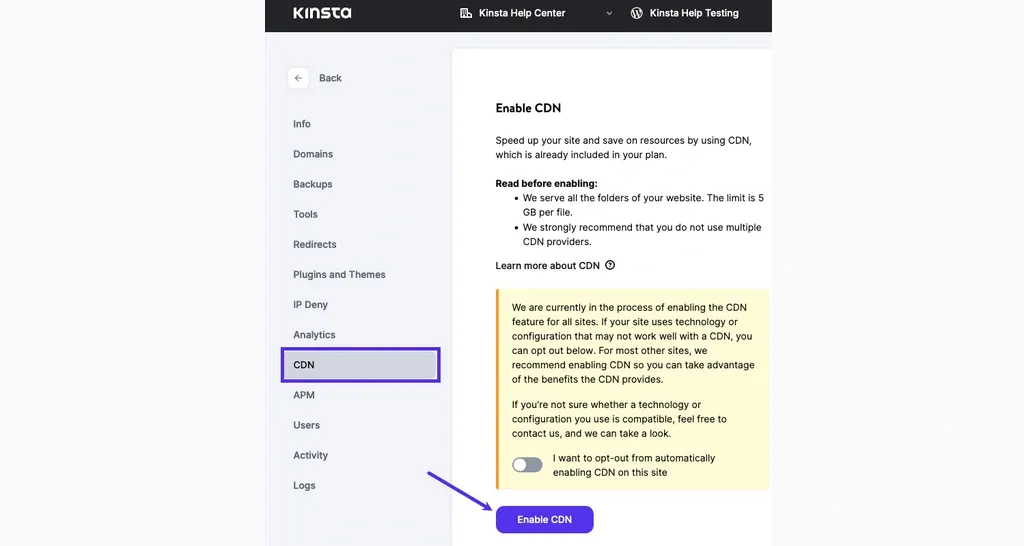
Backup frequency, storage capacity, and restoration options:

Understand the backup frequency provided by the CDN, ensuring it aligns with your backup needs. Also, consider the storage capacity available for your backups and evaluate the restoration options provided by the CDN. Look for features like one-click restoration or straightforward recovery procedures.

Performance impact and CDN usage limits:

Assess the potential impact of backups on your website’s performance when utilizing a CDN backup. Understand any usage limits set by the CDN, such as bandwidth or storage limitations, to ensure they meet your requirements.

By leveraging a CDN backup, you can combine the benefits of content delivery networks, caching, security, and backup functionality. Ensure that your chosen CDN offers reliable backup features, supports your backup frequency needs, provides sufficient storage capacity, and offers convenient restoration options. This way, you can effectively protect and restore your website’s data while leveraging the advantages of a CDN.

Wrap Up

The risks of data loss, cyberattacks, and website disruptions are ever-present, and the consequences can be severe for businesses of all sizes. So just don’t leave the fate of your WordPress website to chance. By partnering with a trusted IT provider, you can ensure efficient backup practices and protect your valuable online assets. Whether it’s implementing automated backup plugins or leveraging managed hosting services or exploring cloud-based backup solutions, an IT partner will ensure your data is safeguarded and readily recoverable.

QeWebby is well-versed in the latest backup methods and technologies, ensuring that your WordPress website is backed up efficiently and securely. We understand the importance of data protection and offer tailored solutions to meet your unique requirements. Contact QeWebby today and ensure the protection and availability of your valuable online assets. Let us be your reliable IT partner for all your WordPress website solutions.
The 5-Step Blueprint to Monetize Your WordPress Blog Like a Pro

Over 60% of bloggers who use monetization strategies earn income from their blogs. Effective monetization methods play a pivotal role in transforming your WordPress blog from a mere hobby into a profitable venture.

By strategic implementation, you get the potential to generate substaantial revenue and turn your passion for blogging into a sustainable source of income.

Let’s explore the details.

But first, here is what you get by effectively monetizing your WordPress blog:
  • Generate a steady income stream to support your blogging activities and potentially replace traditional employment.
  • Invest in improving the quality of your content, design, and user experience, further attracting and retaining readers.
  • Unlock opportunities for professional growth, including collaborations with brands, speaking engagements, and book deals.
Along with this, your WordPress blog can become a profitable venture, allowing you to:
  • Earn passive income while you focus on creating valuable content and engaging with your audience.
  • Gain financial independence, allowing you to pursue blogging full-time or explore other entrepreneurial ventures.
  • Enjoy the flexibility of working from anywhere, without being tied to a traditional 9-to-5 job.
  • Remember, effective monetization methods are key to transforming your WordPress blog into a lucrative platform.

Exploring the wide range of monetization methods available for WordPress blogs is crucial for maximizing your revenue potential.

Strategies to Monetize Your WordPress Blog

Advertising:

Advertising is a powerful monetization method that allows you to generate income by showcasing relevant promotional content on your WordPress blog. By strategically implementing different types of ads, you can effectively capitalize on your blog’s traffic and engagement. Let’s explore three key advertising options:

  • Display ads: Capitalize on banner or sidebar advertisements to generate income.
  • Native ads: Seamlessly integrate promotional content into your blog’s design for enhanced user experience.
  • Programmatic advertising: Leverage automated systems to optimize ad placements and maximize earnings.

Interesting Facts:

Display ads contribute to over 60% of bloggers’ income.
Programmatic advertising spending is projected to reach $147 billion by 2024.

Affiliate Marketing:

This is a powerful monetization method that allows you to earn commissions by promoting products or services through unique affiliate links. By partnering with brands and businesses, you can tap into a vast array of affiliate programs available across various industries.

  • Promote products or services through unique affiliate links and earn commissions on resulting sales.
  • Tap into the vast array of affiliate programs available across various industries.

Interesting Facts:

  • Affiliate programs account for 15% of bloggers’ earnings.
  • In the U.S. only, affiliate marketing spending reached $8.2 billion by 2022.

Sponsored Content:

Sponsored content is a lucrative monetization method that allows you to collaborate with brands to create engaging and promotional content on your WordPress blog. By partnering with brands, you can create sponsored posts, product reviews, or endorsements that provide value to your audience while benefiting from the compensation provided by brands.

  • Collaborate with brands to create sponsored posts, product reviews, or endorsements.
  • Benefit from the compensation provided by brands in exchange for exposure to your audience.

Interesting Facts:

84% of brands plan to include influencer marketing in their strategies.
Sponsored posts generate an average of $300-$500 per post for bloggers.

Digital Products:

Digital products offer an excellent opportunity to monetize your WordPress blog by creating and selling tailored products that cater to your niche. Whether it’s ebooks, online courses, or plugins, digital products allow you to tap into the growing demand for digital content while capitalizing on your expertise.

  • Create and sell digital products tailored to your niche, such as ebooks, online courses, or plugins.
  • Tap into the growing demand for digital content and capitalize on your expertise.

Interesting Facts:

  • The global e-learning market size is projected to exceed $375 billion by 2026.
  • Ebooks remain a popular choice, with digital book sales reaching $15.3 billion in 2020.

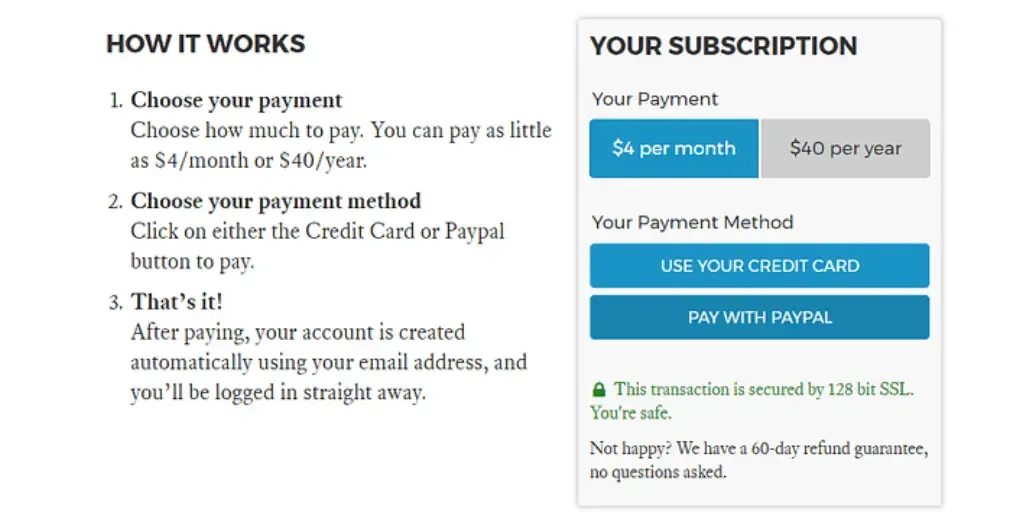
Membership and Subscription:

Membership and subscription models provide a powerful way to monetize your WordPress blog by offering premium content, exclusive resources, or membership tiers to your dedicated audience. By providing added value to subscribers, you can generate recurring revenue and build a loyal community.

  • Offer premium content, exclusive resources, or membership tiers to your dedicated audience.
  • Provide added value to subscribers and generate recurring revenue.

Interesting Facts:

  • The subscription e-commerce market has grown by more than 100% each year for the past five years.
  • Subscription-based businesses experience an average annual growth rate of 300%.

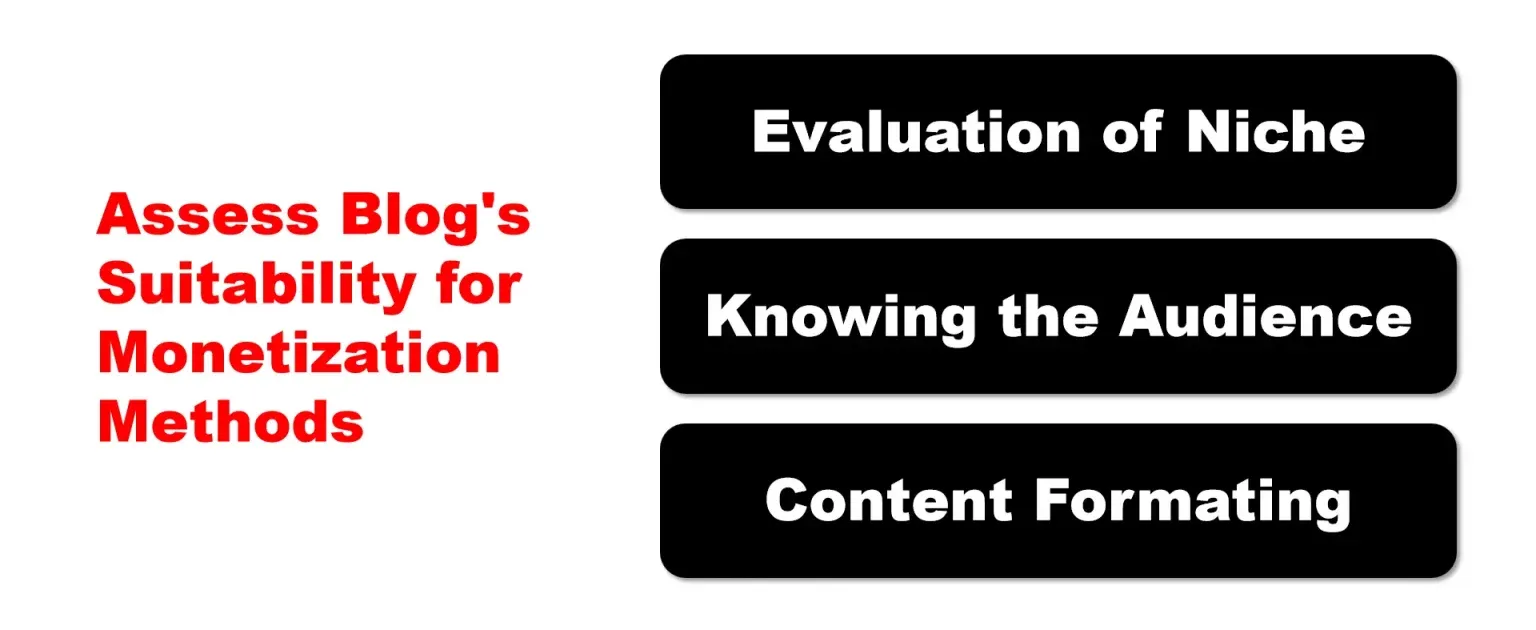
How to Assess Your Blog’s Suitability for Monetization Methods?

Monetizing your blog is an exciting endeavor, but before diving into revenue generation, it’s crucial to assess your blog’s suitability for various monetization methods. Just as each blog is unique, different methods align differently with your niche, audience, and content.

Take a look at the best-suited monetization methods for your blog:

  • The Power of Evaluation – To begin, take a step back and evaluate your blog’s niche, audience, and content. This process involves a thoughtful examination of your blog’s DNA and its alignment with different monetization avenues. By understanding your blog’s unique characteristics, you can make informed decisions and create a tailored monetization strategy.
  • Knowing Your Audience – Your audience holds the key to unlocking successful monetization methods. Dive deep into their demographics, preferences, and behavior to gain invaluable insights. Consider factors such as age, location, interests, and engagement levels. Understanding their needs and desires empowers you to choose methods that resonate and provide value to them.
  • Content is King – Assessing your blog’s content is crucial in determining the ideal monetization methods. Examine the format of your content—whether it’s blog posts, videos, podcasts, or a combination thereof—and identify opportunities that seamlessly integrate with your existing content strategy. Consider how different methods can enhance or complement your content, providing a cohesive and engaging experience for your audience.

In the quest for the perfect monetization method, it’s important to consider a range of factors that influence the suitability of your blog. These factors will guide you in making informed decisions and pave the way to monetization success. Let’s delve into the key factors:

  • Audience Demographics – Understanding your audience’s demographics, such as age, gender, occupation, and interests, enables you to align monetization methods that cater to their preferences. For instance, if your audience consists mainly of professionals, offering premium services or products might be an enticing option.
  • Engagement Levels – Evaluate the level of engagement your audience has with your blog. Are they actively participating in discussions, leaving comments, or sharing your content? High engagement levels indicate a dedicated community that is more likely to support and engage with monetization efforts.
  • Content Format – The format of your content plays a significant role in determining the most suitable monetization methods. For example, if you have a popular YouTube channel, exploring ad revenue or sponsored content on videos may be an effective approach. Tailor your monetization strategy to leverage the strengths of your content format.

Diversification is the Name of the Game

When it comes to monetizing your blog, diversification is the name of the game. While individual monetization methods can be effective, combining multiple methods creates a harmonious symphony of revenue streams. Let’s explore the importance of diversifying your monetization methods and how it can supercharge your earnings:

  • Amplifying Revenue Potential – Diversifying your monetization methods opens up multiple avenues for generating income. Relying solely on one method puts all your eggs in one basket, leaving you vulnerable to market fluctuations or changes in user behavior. By diversifying, you mitigate risks and unlock the potential for exponential revenue growth.
  • Catering to Audience Preferences – Your audience is diverse, with varying preferences and consumption habits. By offering a mix of monetization methods, you cater to different segments of your audience. Some may prefer ad-supported content, while others may be willing to pay for exclusive resources or access. Diversification allows you to meet the unique needs of your audience and provide value in different ways.
  • Adapting to Market Dynamics – The digital landscape is dynamic, with new trends and technologies emerging regularly. By diversifying your monetization methods, you stay agile and adaptable. If one method experiences a downturn or becomes less effective, you have alternative streams to rely on. This flexibility ensures your revenue remains stable and resilient to market shifts.

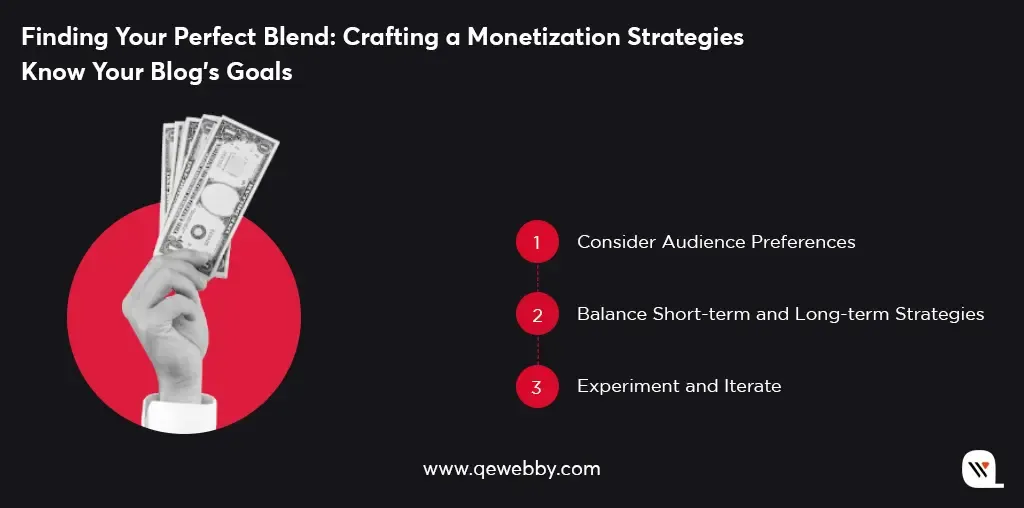
Finding Your Perfect Blend: Crafting a Monetization Strategy

Crafting the perfect blend of monetization methods requires careful consideration and alignment with your blog’s goals and audience. Here’s how you select the right mix that propels your blog towards monetization success:

  • Know Your Blog’s Goals – Define your blog’s goals and objectives. Are you aiming to generate passive income, build a sustainable business, or establish authority in your niche? Understanding your goals provides clarity in selecting methods that align with your desired outcomes.
  • Consider Audience Preferences – Delve into your audience’s preferences, consumption habits, and willingness to pay. Conduct surveys, engage with your audience, and analyze user data to gain insights. This understanding enables you to choose monetization methods that resonate and provide value to your specific audience segments.
  • Balance Short-term and Long-term Strategies – Consider a combination of short-term and long-term monetization methods. Short-term strategies like display ads or sponsored content can provide immediate revenue, while long-term strategies like affiliate marketing or creating digital products offer sustainable income over time. Balancing both allows for steady growth and stability.
  • Experiment and Iterate – Don’t be afraid to experiment with different monetization methods. Test and measure the performance of each method, and iterate based on the results. Continuously refine your monetization mix to optimize revenue generation and align with the evolving needs of your audience.

Wrap Up

Monetizing your WordPress blog is an exciting journey that requires continuous experimentation, analysis, and refinement. But remember, the digital landscape is constantly evolving, and new opportunities for monetization are always emerging. Stay up-to-date with industry trends and be open to exploring innovative approaches. Moreover, monetizing your blog is not just about generating income. It’s about transforming your passion into a sustainable business and creating a lasting impact on your audience.

While many bloggers make the common mistake of settling for generic theme options, it’s time to embrace the transformative power of theme customization. It’s all about giving your blog the precise look and feel that perfectly matches your awesome content. And, if you want this job done by experts, we’ve got you covered! Let’s take your WordPress blog to the next level together.

Top 7 Reasons Why Outsourcing WordPress Development Takes You to the Next Level

Over 50% of businesses outsource their web development needs, with WordPress being one of the top platforms outsourced. It is a substantiated matter that with outsourcing, businesses can focus on their core competencies while leaving the technical details to experts. Moreover, in a report by Global Market Insights, the global WordPress services market is expected to reach $4.4 billion by 2027, with a CAGR of 17.5% from 2021 to 2027. This clearly demonstrates the growing trend of businesses outsourcing WordPress development to third-party service providers.

Let’s explore the top reasons why it could be a game-changer for your website!

#1 Gain Access to the Global WordPress Wizards

Outsourcing companies like ours have teams of experienced WordPress developers that are proficient in using the latest development tools and techniques. They have the knowledge and expertise needed to create high-quality and exclusive WordPress websites. Moreover, you get to have access to a dedicated team of professionals who can work on your project full-time. Along with this, it can help you tap into new markets and expand your business.

#2 Revamp your website without breaking the bank

According to a report by Clutch, 37% of businesses outsource to reduce costs. Certainly as outsourcing WordPress development can save you money on salaries, benefits, and other employee-related expenses. It even eliminates the need to invest in expensive infrastructure such as hardware, software, and office space. And more importantly, outsourcing reduces costs while still getting the job done right.

#3 Create a website tailored specifically for your needs

In this highly competitive digital time, it is important to create a unique website that stands out from the crowd. Outsourcing WordPress development allows you to get customized solutions that are tailored to your unique needs. You can work closely with the outsourcing company to ensure that your website reflects your brand and meets your specific requirements. Experienced outsourcing companies like ours have the resources and infrastructure to scale up or down based on your needs. This means you can get the support you need when you need it.

#4 Free up your time and focus on what matters most for your businessI

As a business owner, you have a lot on your plate, from managing employees to overseeing daily operations. Outsourcing your WordPress development needs can help you focus on what really matters by taking website development off your plate. This will allow you to focus on your core business activities. At the same time, having a committed WordPress agency for your website will consequently generate revenue and grow your business.
#5 Discover lightning-fast turnaround times

One of the most significant benefits to outsource WordPress web design is faster turnaround times, which can have a significant impact on a business’s bottom line. Besides, WordPress outsourcing agencies have experience working on similar projects, and they have the resources to complete projects quickly. They can work on projects around the clock to meet tight deadlines, which means businesses can launch their products or services on time.

#6 Harness the power of scalability

WordPress outsourcing companies have the resources and infrastructure to scale up or down based on your needs. This means you can get the support you need, when you need it, without having to worry about the costs associated with hiring and training new employees. By partnering with an agency that has a diverse team of developers with different skill sets and experience levels, businesses can tap into innovative solutions that may not be available in-house. This can lead to better outcomes for the business and its clients.

#7 Mitigate potential hazards effectively

Experienced WordPress outsourcing agencies like ours have a deep understanding of the WordPress platform and its associated technologies. Due to this, they can help businesses avoid common pitfalls and reduce the risk of technical errors that could impact their website’s functionality. Moreover, they even ensure that their consumer’s website development project is compliant with relevant regulations and standards. This consequently reduces the financial risk and clichés that their website development project stays within budget.

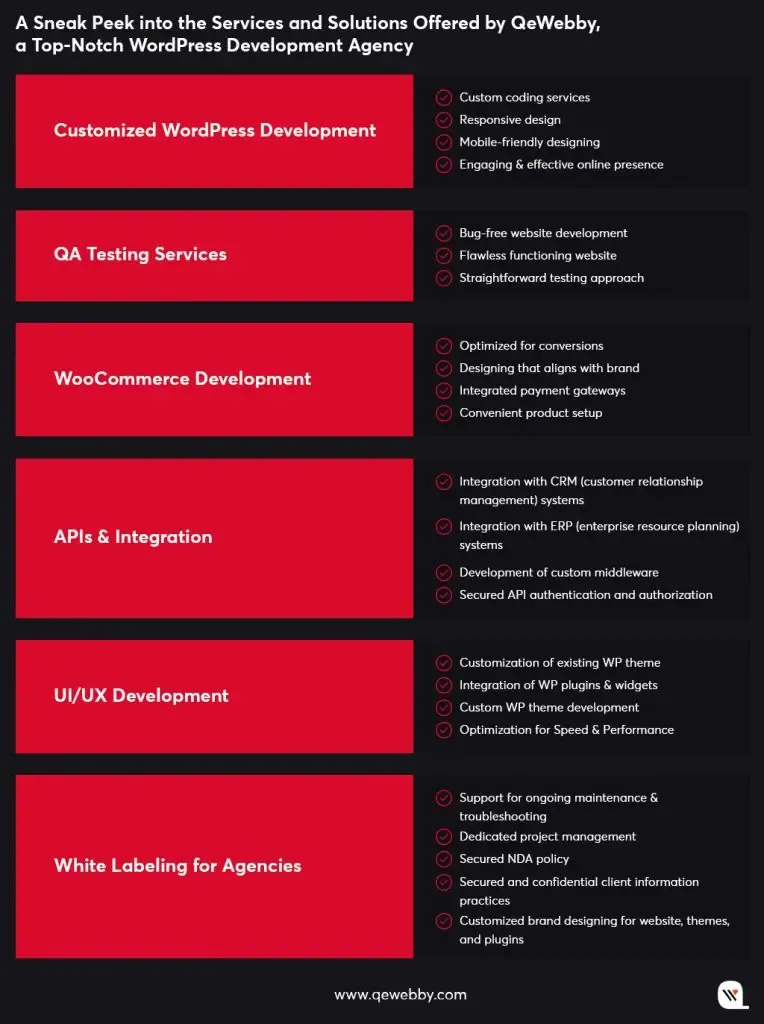
A Sneak Peek into the Services and Solutions Offered by QeWebby, a Top-Notch WordPress Development Agency
End Note

Whether it’s customizing WordPress themes, designing a new website, or maintaining an existing one, outsourcing WordPress development can help businesses to achieve their goals faster and more efficiently than doing it in-house. By partnering with our reputable WordPress development agency, QeWebby, you gain access to top talent, reduce costs, achieve your unique vision, focus on core business functions, and mitigate potential hazards. Let us take your online presence to the next level and keep you ahead of the competition! Contact us today to create an amazing WordPress website!

Boost Your WordPress Site’s Speed in 9 Simple Steps

The first 3 seconds of webpage load times can make or break conversion on a website! This means a user will take only 3 seconds to make an opinion about your website. That’s why your website speed is a critical factor in determining success – a user will stay or leave. Slow loading times can have a detrimental effect on user experience, leading to high bounce rates, low conversions, and ultimately, reduced revenue. Moreover, search engines like Google also take website speed into account when ranking websites, which makes it essential for website owners to optimize their website’s speed.

While improving website speed seems dismaying, there are several actionable steps that website owners can take to speed up their WordPress websites. Let us discuss some effective strategies that will help you improve your website’s speed and performance.

9 Steps that will improve your WordPress website speed

Step 1: Choose a Fast and Reliable Web Hosting Provider

When selecting a hosting plan, it’s important to understand the differences between shared, VPS, and dedicated hosting and their impact on website speed. Shared hosting is the most common and affordable hosting option, where multiple websites share the same server resources. Shared hosting can be slow and unreliable, as the server resources are divided among several websites.

VPS (Virtual Private Server) hosting is a more advanced hosting option that offers more control and better performance than shared hosting. VPS hosting involves dividing a single physical server into several virtual servers, each with its own resources and operating system. This ensures that the server resources are not shared among several websites, resulting in better performance and speed.

Dedicated hosting is the most advanced hosting option, where a single physical server is dedicated to a single website. It provides complete control over the server resources and offers the best performance and speed. However, it’s also the most expensive hosting option and may not be suitable for small businesses or websites with low traffic.

Shared Hosting

  • Lowest cost
  • Low performance
  • Low security
  • Restricted configurability
  • Limited scalability

VPS Hosting

  • Highest security
  • High performance
  • Highest configurability
  • Mid-level cost

Dedicated Hosting

  • Highest security
  • Some configurability
  • Mid-tier performance
  • Mid-level scalability
  • High cost

Understanding the differences between shared, VPS, and dedicated hosting and their impact on website speed can help you choose the hosting option that best suits your needs and budget. Some highly exercised hosting providers by our patrons include web hosting providers like GoDaddy, WPEngine, and SiteGround.

Step 2: Use a Lightweight and Optimized WordPress Theme

A theme with excessive features, complex code, and bloated scripts can significantly slow down your website, resulting in a poor user experience, low conversions, and reduced search engine rankings. A lightweight and optimized theme, on the other hand, can provide faster loading times, better performance, and improved user experience.

Highly recommended themes to consider while comparing a variety of others
  • Astra Theme
  • Elegant Themes-Divi
  • Avada Themes
  • Ocean WP Themes
  • Uncode Themes
  • Adios Themes

When evaluating the performance and optimization of a WordPress theme, several key factors should be considered, including page load time, page size, script optimization, and compatibility with caching plugins. Page load time is the time it takes for your website to load, and it should ideally be under three seconds. Page size is the amount of data that needs to be downloaded to load your website, and it should ideally be under 1 MB. Script optimization involves optimizing JavaScript and CSS files to reduce the amount of data that needs to be downloaded to load your website. Compatibility with caching plugins is essential for improving website speed, as caching plugins can help reduce server load and improve website performance.

Step 3: Optimize Images and Media Files

Images and media files are an essential part of any website, but they can also significantly slow down a website if they are not optimized. Large image and media files can increase the loading time of a website, resulting in a poor user experience and reduced search engine rankings. Therefore, it is crucial to optimize images and media files to improve website speed and performance.

Several tools and plugins are available for optimizing images and media files on WordPress websites. These tools can compress, resize, and optimize images and media files to reduce their size without compromising their quality. Popular image optimization plugins for WordPress include Smush, ShortPixel, and Imagify. These plugins can automatically optimize images and media files on your website and reduce their size without compromising their quality.

Smush
ShortPixel
Imagify

To reduce the size and improve the loading speed of images and media files, several tips should be followed.

Firstly, images should be compressed and resized to reduce their size without compromising their quality. Image compression tools can reduce the size of images without affecting their quality.

Secondly, images should be optimized for the web, which involves reducing their resolution, file size, and file format. JPEG and PNG are the most commonly used file formats for images on the web.

Thirdly, lazy loading should be enabled for images and media files. Lazy loading delays the loading of images until they are required, which can significantly improve website speed and performance.

Step 4: Minimize HTTP Requests and Database Queries

Excessive HTTP requests and database queries can have a consequential impact on website speed and performance. HTTP requests are made each time a resource, such as an image or a script, is requested from the server. Similarly, database queries are made each time a user requests data from the website. These requests slow down the website and result in a poor user experience. Therefore, it is crucial to minimize HTTP requests and database queries to improve website speed and performance.

One way to reduce HTTP requests is to minify website resources, such as CSS and JavaScript files. Minifying involves removing unnecessary characters from code, such as white spaces and comments, which can significantly reduce the size of website resources. Additionally, website owners can combine multiple CSS and JavaScript files into a single file to reduce the number of HTTP requests made to the server.

Optimizing database queries is another way to improve website speed and performance. This involves reducing the number of queries made to the database and optimizing existing queries. Additionally, optimizing database queries by using indexes and limiting the number of returned results can significantly improve website speed and performance.

Step 5: Use Content Delivery Networks (CDNs)

Content Delivery Networks (CDNs) are an excellent solution for improving website speed and performance. CDNs work by distributing website resources, such as images, videos, and scripts, across multiple servers located in various geographic regions. By doing so, CDNs reduce the distance between website users and website resources, resulting in faster loading times and improved website performance.

Using a CDN can be particularly useful for WordPress websites that have a global audience. When a user requests a resource from a website, the request is sent to the server hosting the website. However, if the user is located far from the server, the request may take longer to process, resulting in slower loading times. By using a CDN, website resources are distributed across multiple servers, allowing users to request resources from a server located closer to them, resulting in faster loading times.

Popular CDNs for WordPress websites include Cloudflare, MaxCDN, and Amazon CloudFront. Cloudflare, in particular, offers a free plan that includes a range of features, such as content optimization, security, and analytics. MaxCDN and Amazon CloudFront are paid services that offer more advanced features, such as real-time analytics and advanced caching options.
It’s important to note that while CDNs can significantly improve website speed and performance, they are not a replacement for other speed optimization techniques. Website owners should still optimize images and other website resources, minimize HTTP requests, and use a lightweight WordPress theme to achieve the best possible website speed and performance.

Step 6: Enable Gzip Compression and Browser Caching

Enabling Gzip compression and browser caching are two effective techniques for improving website speed. Gzip compression is a method of compressing files before they are sent to the user’s browser, reducing the size of the files and speeding up the website’s loading time. This is particularly effective for text-based files like HTML, CSS, and JavaScript. By enabling Gzip compression, you can significantly reduce the size of these files, resulting in faster load times.

Enabling Gzip Compression:

  • Log in to your WordPress dashboard and navigate to the “Appearance” menu.
  • Click on “Editor” and select “functions.php” from the list of files on the right-hand side.
  • Add the following code to the bottom of the file, and save the changes to the file.

add_filter(‘wp_headers’, ‘my_gzip_output’);
function my_gzip_output($headers) {
$headers[‘Content-Encoding’] = ‘gzip’;
ob_start(‘ob_gzhandler’);
return $headers;
}

Browser caching, on the other hand, allows the user’s browser to store a copy of certain files, such as images, CSS, and JavaScript, on their computer. The next time the user visits your website, their browser can retrieve these files from their cache, rather than having to download them from your server again. This reduces the number of server requests, resulting in faster load times for your website.

Enabling Browser Caching:

  • Install and activate a caching plugin like WP Fastest Cache, WP Super Cache or W3 Total Cache.
  • Navigate to the plugin settings and enable browser caching.
  • Configure the settings according to your preferences. Generally, it’s recommended to set the cache expiration time to at least a month. Save the changes to the settings.
WP Fastest Cache
WP Super Cache
W3 Total Cache

Step 7: Minimize Plugins and Remove Unused Ones

Plugins are undoubtedly one of the key features of WordPress that make it such a popular and flexible platform for website creation. However, it’s important to remember that each additional plugin you install on your WordPress website comes with a cost, in terms of server requests, file size, and potential conflicts. Excessive plugins can significantly slow down your website and negatively impact its performance, which is why minimizing plugins and removing unused ones is an important step in optimizing website speed.

To evaluate and remove unused plugins, start by taking an inventory of all the plugins you currently have installed on your WordPress website. You can do this by logging in to your WordPress dashboard and navigating to the Plugins page, which will list all the plugins you have activated. Take a critical look at each plugin and ask yourself whether it’s really necessary for your website’s functionality or performance. Are there any plugins that you haven’t used in a while, or that duplicate the functionality of another plugin you have installed?

Once you’ve identified the plugins that you no longer need, it’s important to properly remove them from your website. Simply deactivating a plugin isn’t enough, as it can still leave behind residual code and database entries that can negatively affect website performance. To fully remove a plugin, you should first deactivate it, then delete it from your WordPress dashboard. Be sure to check for any plugin-specific settings or options that you may need to manually remove or reset as well. Additionally, try to use plugins from reputable developers who update their plugins regularly and provide good support.

Step 8: Optimize Website Database and Server

The website database is an influential component of a WordPress website. It stores all the website data, including posts, pages, media files, and user information. A poorly optimized database can slow down website performance, leading to longer loading times and increased bounce rates. To optimize the website database, you can use plugins like WP-Optimize, which can remove unnecessary data, compress images, and optimize database tables.

WP Optimize

In addition to optimizing the database, it’s also essential to optimize the server configuration for WordPress. This includes adjusting the server settings, such as increasing the PHP memory limit, enabling caching, and configuring the server to use HTTP/2.

Furthermore, to optimize your PHP configuration, you can edit the php.ini file on your server to adjust settings like memory limits and file upload sizes.

Step 9: Monitor and Test Website Speed Regularly

Monitoring and testing your website speed on a regular basis can help you identify potential issues early and take necessary actions to optimize your website’s performance. Regular monitoring and testing can also help you keep up with the latest website speed trends and best practices, ensuring that your website is up-to-date and competitive in the online market.

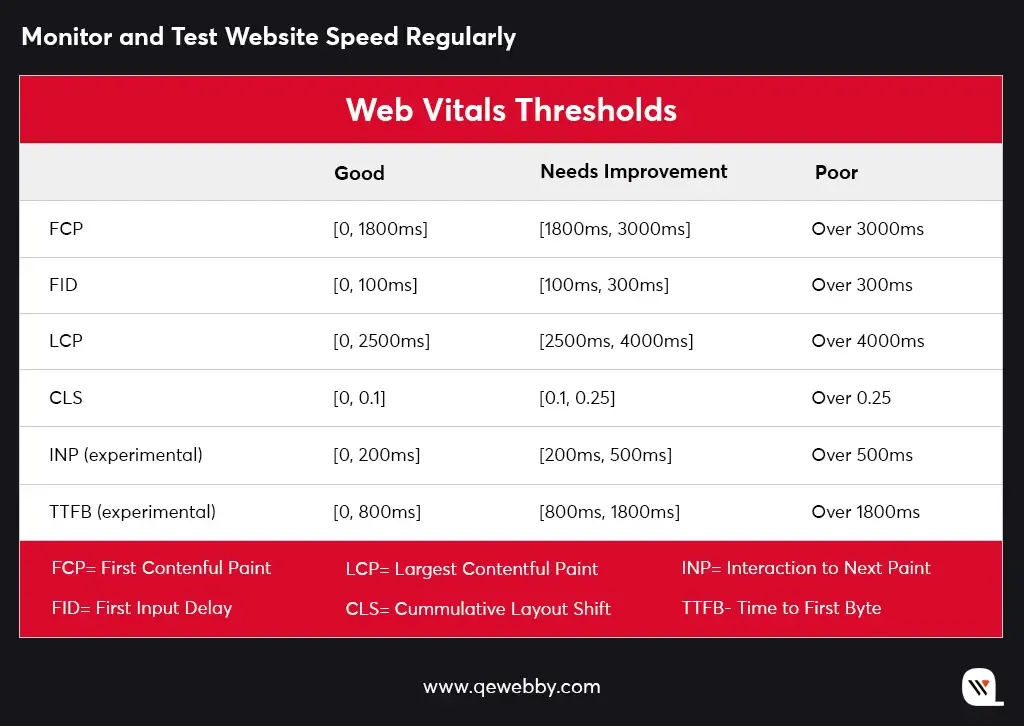
Web vitals is an initiative by Google that bestows consolidated guidance for quality signals essential in delivering great user experience on the web. This initiative simplifies the landscape and helps website to focus on the metrics that are crucial for analyzing user experience.

There are several tools available for measuring website speed and performance. Some popular tools include:

  • Google PageSpeed Insights:This tool analyzes website speed and provides a score based on various factors such as page load time, server response time, and more. It also provides suggestions for improving website speed.
  • GTmetrix: This tool provides a comprehensive analysis of website speed and performance, including page load time, page size, and the number of requests made to the server. It also provides recommendations for optimizing website speed.
  • Pingdom: This tool provides real-time monitoring of website speed and performance, including uptime, downtime, and response time. It also provides alerts for potential issues and suggestions for improving website speed.

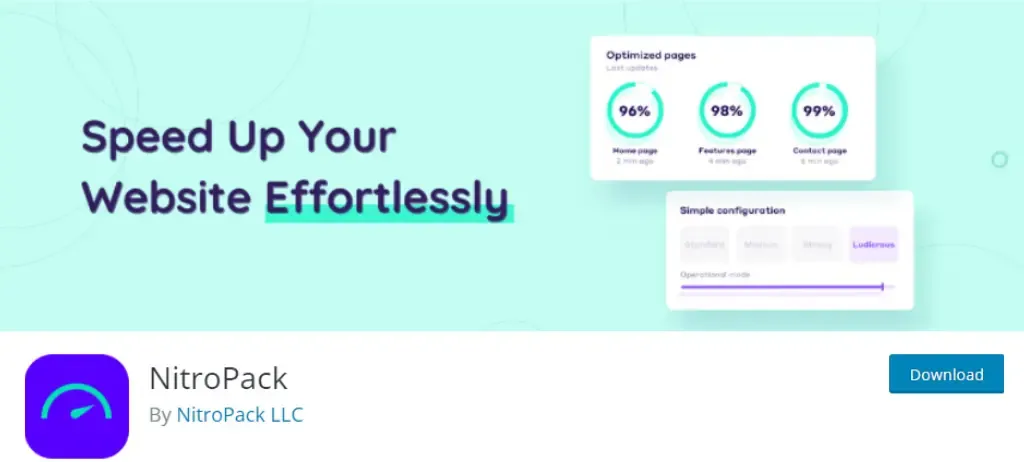
Pro Tip: Install Nitro Pack

Are you tired of slow-loading WordPress websites?

Look no further than NitroPack – the ultimate solution for website speed optimization.

If you face difficulties implementing the above enhancements and plugins to your WordPress website, the NitroPack plugin will handle it all for you. With NitroPack, you can drastically improve the speed of your WordPress website with just a few clicks. Its powerful optimization algorithms compress and optimize your website files, images, and code, reducing your website’s loading time and improving user experience.

Here are some of the benefits of NitroPack:

  • Instant speed improvements: NitroPack is designed to instantly speed up your website, without requiring any technical knowledge. Our innovative optimization technology ensures that your site is fully optimized for maximum speed and performance.
  • Easy setup: Setting up NitroPack on your WordPress site is quick and easy. Just install our plugin, and our optimization process will automatically begin. You can also customize your optimization settings to suit your specific needs.
  • Reliable hosting: We provide reliable and fast hosting solutions for your website. Our hosting infrastructure is optimized for maximum performance, ensuring that your site is always lightning fast.
  • Continuous optimization: We continuously monitor your website’s performance and make real-time optimizations to ensure that your site is always performing at its best.
  • Comprehensive support: Our support team is available 24/7 to assist you with any questions or issues you may have. We are committed to providing the best possible service and support to our customers.

So, if you want to improve your WordPress site’s speed and performance, NitroPack is the perfect solution for you. Try NitroPack today and experience the difference!

Conclusion

Remember, website speed is a critical factor in the success of your online presence. Slow loading times can negatively impact your bounce rates, conversions, and revenue. By optimizing your website speed, you can keep your visitors engaged, improve your search engine ranking, and boost your bottom line. The actionable tips recommended in this post will help you to improve your site speed and performance. However if you don’t have technical expertise to implement these yourself, consider hiring our professional web development services. Our team of experts can optimize your website speed, enhance its functionality, and provide ongoing maintenance and support.

Don’t let slow website speed hold you back from achieving your online goals. Our team has years of experience in optimizing WordPress websites for maximum speed and performance. We can help you identify areas for improvement, implement the necessary changes, and monitor your website’s progress over time. With our expertise, you can expect faster loading times, improved user experience, and better search engine rankings. Plus, you’ll see an increase in conversions and revenue as a result. So why wait?

Contact us today to learn more about how we can help you take your website to the next level.

The Battle of the Themes: How To Choose the Right One for Your WordPress Site?

Setting up a WordPress website can be both exciting and overwhelming! Although with many options available, choosing the right theme can feel like a battlefield. Certainly, it is an important decision that you will want to get right with, as the theme you choose is responsible for the look, feel, and functionality of your website. Let’s explore the process of selecting the perfect theme for your website, considering your needs and budget.

Before that, let’s understand the importance of selecting the right theme!

Why is selecting the right WordPress theme important after all?

In today’s digital age, having a well-designed website is crucial for businesses and individuals who want to establish an online presence. And for that, selecting the right WordPress theme is a critical step in building a successful website. Here is how.

  • Firstly, the right theme can enhance the visual appeal of your site and make it more intriguing to visitors. A well-designed theme can help you create a professional image and increase brand recognition. A visually enticing website also helps in keeping visitors engaged and encourages them to explore further.
  • Additionally, the right theme can greatly improve the functionality of your site. Some themes are specifically designed for a particular niche, such as eCommerce, blogging, or portfolios, and come with built-in features to support these purposes. For example, an eCommerce theme may include features like product listings, shopping carts, and payment gateways. On the other hand, a blog theme may have features such as social sharing buttons, related posts, and a commenting system.
  • Moreover, the right theme can also play a role in search engine optimization (SEO). An SEO-optimized theme can help your site rank higher in search engine results, making it easier for potential visitors to find your site. This is particularly important for businesses that want to drive traffic and generate leads through their website.
  • Ultimately, a suitable theme makes it easier to manage and maintain your site. A well-designed theme will be user-friendly and allow you to make changes to your site with ease. Furthermore, many themes come with an intuitive dashboard that makes it simple to customize and manage your site.

What factors to consider when selecting your WordPress theme?

It is important to consider various factors to ensure that the WordPress theme you select for your site meets your specific needs and helps your website perform at its best. Here are the key factors that you should never ignore:

  • Functionality – Consider the features and capabilities that are essential for your websites, such as eCommerce functionality, contact forms, social media integration, and more. Ensuring these functionalities will make your website run effectively.
  • Design and Aesthetic – Consider your brand’s visual style and select a theme that aligns with your aesthetic. This will help your website to be more visually appealing and engaging for your visitors.
  • User Experience – this is crucial for keeping your visitors engaged and coming back for more. Select a theme that offers a clean and intuitive design that is easy to navigate.
  • Customization Option – Customization allows you to personalize your website and make it truly your own. Consider the level of customization that includes options for changing colors, fonts, and more.
  • Responsiveness – Ensure your selected theme offers responsive behavior to your visitors’ navigation on your site.
  • Mobile Optimization – It is important that your website has a theme that adapts to different screen-size and provides an optimal viewing experience for all visitors, no matter what device they are using.
  • Speed and Performance – This is important to reduce the bounce rate of your website. If your theme is optimized for better speed and performance, then it allows your website to load quickly and smoothly, even with a large amount of content.
  • Support and Documentation – A theme from a reputable author can offer excellent customer support and clear documentation. Moreover, verifying the theme clinches the regular updates that address any bugs or security vulnerabilities.

How to select the right WordPress theme for your specific needs?

Determine your website’s goals and objectives

Before you start your search for the perfect theme, it is important to determine your website’s goals and objectives. You can recognize it by answering the questions like

  • What is the primary purpose of your website? Is it to showcase your portfolio, sell products, or provide information on a specific topic?
  • What kind of content will you be publishing? Will you be publishing articles, blog posts, or both?
  • What kind of functionality do you need? Do you need an eCommerce solution, a contact form, or a photo gallery?

A clear vision will help you narrow down your search and select a theme that meets your purpose for the website.

Evaluate your budget

WordPress themes can range in price from free to several hundred dollars. For this, it is fundamental to calculate how much you are willing to spend on a theme. While it is tempting to choose a free theme, it is important to remember that you get what you pay for. Free themes often lack the functionality and customization options that you will find in premium themes.

Accordingly, also keep in mind that a high-priced theme does not always equal a high-quality theme and that there are many themes available at a reasonable price. If you have a limited budget, consider choosing a premium theme that offers a free demo version to test whether the theme suits your requirements or not.

Research and compare different themes

Once you have a clear understanding of your goals and budget, you can now start researching to compare different themes.

Start by browsing the WordPress theme repository, which offers a wide range of free and premium themes. You can also search the websites like ThemeForest and Creative Market, which offer a large collection of premium themes.

Look at the variety of themes that interest you and meet your needs, essentially paying close attention to the factors discussed above. Enlist the themes that intrigue you and compare them side-by-side to determine what fits best for your website.

Research and compare different themes

Before you make a final decision, it is crucial to try out a demo version of the theme to get a feel for how it looks and works. Most theme developers offer demo versions or trials, which allow you to test the theme and see how it will resemble your website’s purpose.

When testing a demo version, be attentive to the following:

  • Are there options for changing colors, fonts, and background images?
  • Does the theme look good on both desktop and mobile devices?
  • Can you customize the theme for your specific needs?
  • Does the design match your brand and style?
  • Does the theme load quickly and efficiently?
  • Is it optimized for smart devices like tablets?
  • Is the layout clean and easy to navigate?
  • Is the theme user-friendly?

The demo version trial is an excellent opportunity to check out the feasibility of a theme for your website.

A Curated list of the best WordPress themes for your site

Here, we bring to you some selected WordPress themes that you should consider while comparing a variety of others.

ASTRA THEME

1+ M Active Installations

Astra is a lightweight and customizable theme that is designed for speed and performance. It is compatible with popular page builders like Elementor and Beaver, has pre-built templates, and offers various customization options.

WordPress Astra Theme Features
  • Pre-built websites
  • Customize without code
  • Made for page builders
  • Super fast performance
  • Visual theme customizer
  • Glutenberg compatible
  • Live editing

ELEGANT THEMES -DIVI

880K+ Active Installations

Elegant themes – Divi is a popular WordPress theme known for its drag-and-drop interface with a built-in page builder and a wide variety of design options.

Elegant Themes – Divi Features
  • True-visual editing
  • Custom CSS control
  • Responsive designing
  • Design options galore
  • Inline text editing
  • Global elements and styles
  • Undo, Redo, and revisions

AVADA THEME

880K+ Active Installations

Avavda is another popular multipurpose theme that offers a broad spectrum of customization options. It comes with an integral page builder, responsiveness, and ready-made templates.

WordPress Avada Theme Features
  • Live visual builder
  • Build custom layout
  • Off-canvas builder
  • Array of styling and layout options
  • Setup wizard
  • Prebuilt Avada studio
  • WooCommerce integration

OCEAN WP THEME

590K+ Active Installations

OceanWP is a fast and lightweight theme that offers an extensive variety of personalization alternatives. It is designed to work with popular templates, page builders, and artistic schemes.

WordPress OceanWP Theme Features
  • No coding skills required
  • Global fonts & typography
  • Global site layouts
  • Customizable header styles
  • Social media collaboration
  • Free WooCommerce integration
  • Smooth eCommerce customization

UNCODE THEME

10K+ Active Installations

Uncode is a versatile and powerful theme that is designed to help you create a unique and professional-looking website.

WordPress Uncode Theme Features
  • Frontend page builder
  • WooCommerce builder
  • Wireframes plugins
  • One click import
  • Dynamic srcset images
  • WPML certified and RTL
  • Power elite support

ADIOS THEME

2K+ Active Installations

Adios is a minimal and modern WordPress theme that is designed for creatives and agencies, that offers an extensive variety of features to build your WordPress site.

WordPress Adios Theme Features
  • One click demo importer
  • Advanced blog layouts
  • Advanced portfolio layouts
  • Fully responsive parallax layout
  • Portfolio filtering option
  • Isotope plugin
  • Page metabox options

Wrap Up

The right theme for your WordPress site is essential as it governs the success of your website. With so many options available, it can be astounding to make a decision. However, keeping in mind the checkpoints like theme functionality, design & aesthetics, user experience, responsiveness & mobile optimization, customization options, proper documentation, etc. can help you make an informed decision.

In case, you still find difficulty in considering the right theme for your WordPress site, ask the experts! QeWebby has a proficient team of WordPress experts that will help you acquire a brilliant WordPress theme that matches your needs.

Top 3 AI Plugins for WordPress That Are Dominating 2025

AI (artificial intelligence) tools are estimated to save content creators up to 80% of the time and effort required to create content manually. Moreover, this helps to increase productivity by allowing them to focus on other aspects of content creation like content strategy and promotion. Companies now equip their content team with such AI tools that automate the process of researching, writing, and editing content.

Are you too willing to improve your content marketing with the help of AI?

Using WordPress plugins can actually be one of the best things you can do if you have the skill set to install additional plugins on your website. This post discusses how AI helps in content generation and the best AI content generator tools for your WordPress site.

Let’s dive in!

How AI helps in creating meaningful content?

The ways AI is utilized in content marketing include

  • Natural Language Processing (NLP): AI algorithms analyze and understand human language to generate content that is more natural and human-like.
  • Text Generation: AI models are trained to generate written content, like articles, blog posts, and various other descriptive sections of the website.
  • Content Optimization: The AI method optimizes content for SEO and other metrics, like readability and engagement.
  • Personalization: AI tools even personalize content for specific audiences, based on data like demographics, browsing history, and past interactions.
  • Summarization: AI tools can summarize long-form content into shorter, more digestible pieces.

3 Best WordPress Plugins for AI Content Generation

Present-day websites are highly subjugated with AI since it is flourishing day by day with progress in technologies like machine learning and artificial intelligence. A similar tendency is observed with WordPress plugins that are generated specifically to redeem the time and effort required for content generation.

Let us take a look over the best AI content generation plugins that can help your WordPress site with optimum results in content creation.

GPT AI Power

GPT-AI Power is one beneficial plugin that can generate high-quality content for blog posts, product descriptions, or any other type of content on your WordPress site. GPT AI Power can understand and interpret user input utilizing state-of-the-art natural language processing technology.

Attractive Features of GPT AI Power:

  • It can generate superlative, long articles using the GPT-3 language model.
  • Furthermore, it can fine-tune the writing style to make it informative, descriptive, creative, narrative, persuasive, expository, reflective, argumentative, analytical, critical, evaluative, journalistic, technical, and simple.
  • The plugin can even set the tone of the generated content to make it sound formal, neutral, assertive, cheerful, humorous, informal, inspirational, sarcastic, professional, and skeptical.
  • It supports 23 different languages that include English, Spanish, French, German, Italian, Portuguese, Russian, Japanese, Korean, Chinese, Dutch, Indonesian, Turkish, Polish, Ukrainian, Arabic, Romanian, Greek, Czech, Bulgarian, Swedish, and Hungarian.
  • Additionally, it can manage to customize heading tags, hyperlinks, and anchor text of the content by generating the introduction and conclusion segments of your content.
  • The bulk editor tool (Pro Plan) can allow bulk updates via CSV and copy-paste with embedding ChatGPT in the front-end along with a featured image, and art style.
  • Specific WooCommerce integration can help to optimize product titles, and descriptions, and even train your AI by fine-tuning the GPT model.

Using Plans for GPT-AI Power:

FREE $0 / Month

  • Generate high-quality, longer articles
  • 23 different languages supported
  • Image Generator
  • ChatGPT
  • WooCommerce Product Writer
  • AI Training

PRO $9.99 / Month

  • All Free Features
  • Ability to add keywords
  • Make keywords bold
  • Ability to avoid certain keywords
  • Ability to generate Q&A
  • Bulk Content Writer (20 content at a time)
  • Bulk Content Writer via CSV (20 content at a time)
  • Bulk Content Writer via Copy-Paste (20 content at a time)
  • Schedule Posts
  • Additional Writing Styles
  • Additional Writing Tones
  • Priority support

AI Engine

AI Engine is another WordPress plugin, rated 5-star on WordPress.org, exploring the AI discipline for quick generations, suggestions, translation, corrections, SEO, etc.

Attractive Features of AI Engine

  • It empowers WordPress sites with AI-powered chat functionality by adding a short code [mwai_chatbot] for ChatGPT & Image generation bot.
  • The plugin makes content generation effortless with attributes to customize headings, language, and other related parameters.
  • Utilizing the DALL-E model, the AI engine also facilitates image generation. However, as it is a Beta version, image generation exclusively allows square formats (1024×1024).
  • The Fine-tuning arena helps in the preparation of datasets and managing them and even training new models using the same data set.
  • AI Engine uses the API from OpenAI and gathers the number of tokens utilized over its usage.

Using Plans for AI Engine

FREE VERSION

  • Chatbot (GPT-like)
  • Content Generator
  • Quick Suggestions
  • AI Playground
  • Train your AI
  • Casually Fined-Tuned
  • Internal API

PRO VERSION

  • Everything from the Free Version
  • Statistics Module
  • Content-Aware Chatbot
  • Much more to come…
  • STARTER $29 Yearly/ 1 Website
  • STANDARD $39 Yearly/ 5 Websites
  • PROFESSIONAL $59 Yearly/ 20 Websites
  • PRO VERSION CART $59 Yearly/ 20 Websites
  • STANDARD $169 Lifetime/5 Websites
  • PROFESSIONAL $249 Lifetime/20 Websites
  • DEVELOPER $349 Lifetime/500 Websites
  • AGENCY $499 Lifetime/2500 Websites

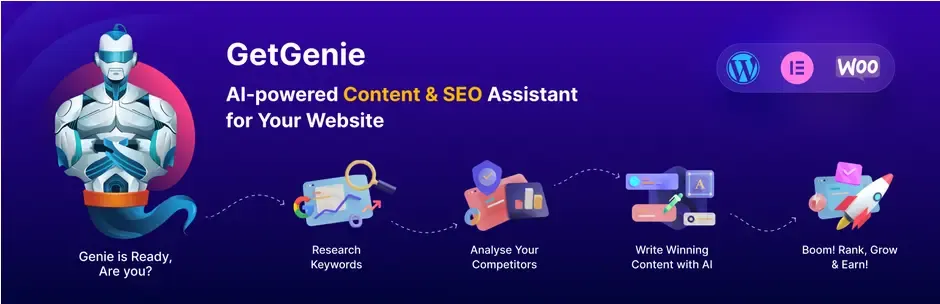
GetGenie

GetGenie is an effective plugin with 2000+ active installations in the WordPress community. It is beautifully crafted for multiple needs for content creation.

Attractive Features of GetGenie

  • It creates long-form content like blogs, product descriptions, video scripts, and fictional/ non-fictional books in your way using huge data.
  • The plugin also helps you in making your content SERP-ready, to give tough competition to your competitors.
  • The SEO-friendly feature helps to rank your content over search engines by providing keyword analysis, and competitor analysis.
  • Another important feature it provides for creating bigger impacts is by creating innovative shorter content for social media, ad platforms, and landing pages in the tone set with your project requirements.
  • The Genie Mode is provided as the special template of GetGenie to make content generation super easy and fast.
  • Moreover it provides SEO-friendly URLs with full control over word usage and gets the option to set the paragraph limit for better writing with this google and text assistant.

STARTER (FREE)

  • 1 Website
  • Unlimited Users
  • 1,500 AI Writing Words Per Month
  • 10 SEO Keyword Analysis Per Month
  • 5 Competitor SERP Analysis Per Month
  • 30+ AI Templates
  • WordPress Plugin
  • WordPress Blog Wizard
  • WooCommerce Product Wizard
  • Elementor Builder Support

WRITER $19/ MONTH

  • Unlimited Websites
  • Unlimited Users
  • 12,000 AI Writing Words Per Month + Extra 3,000 Words month Bonus for a limited time
  • 40 SEO Keyword Analysis Per Month + Extra 20 Bonus for a limited time
  • 20 Competitor SERP Analysis Per Month + Extra 10 Bonus for limited time
  • 30+ AI Templates
  • 14-Day Money Back Guarantee Premium Support
  • WordPress Plugin
  • WordPress Blog Wizard
  • Woocommerce Product Wizard
  • Elementor Builder Support
  • Chrome Browser Extension Coming soon

PRO $49/ MONTH

  • Unlimited Websites
  • Unlimited Users
  • 40,000 AI Writing Words Per Month + Extra 30,000 Words month Bonus for a limited time
  • 250 SEO Keyword Analysis Per Month + Extra 50 Bonus for a limited time
  • 80 Competitor SERP Analysis Per Month + Extra 20 Bonus for limited time
  • 30+ AI Templates
  • 14-Day Money Back Guarantee Premium Support
  • WordPress Plugin
  • WordPress Blog Wizard
  • Woocommerce Product Wizard
  • Elementor Builder Support
  • Chrome Browser Extension Coming soon

AGENCY $99/MONTH

  • Unlimited Websites
  • Unlimited Users
  • 150,000 AI Writing Words Per Month + Extra 100,000 Words month Bonus for a limited time
  • 600 SEO Keyword Analysis Per Month + Extra 200 Bonus for a limited time
  • 200 Competitor SERP Analysis Per Month + Extra 50 Bonus for limited time
  • 30+ AI Templates
  • 14-Day Money Back Guarantee Premium Support
  • WordPress Plugin
  • WordPress Blog Wizard
  • Woocommerce Product Wizard
  • Elementor Builder Support
  • Chrome Browser Extension Coming soon

Wrap Up

Remember that AI content generation isn’t going to be a silver bullet to solve all your problems. Although these plugins are important and complement one another, they require minor maintenance and updates on a semi-regular basis. Don’t overload your site with too many plugins, and always check the WordPress forum. In order to stay competitive and comply with upcoming trends, we suggest keeping an eye on these new AI plugins.

Want to add these benefits to your WordPress site? Don’t worry, QeWebby is right here for your help! Contact us now, for all your WordPress needs!

Increase Sales by Optimising the WooCommerce Product Pages

In the current social media obsessed world, businesses can get a good number of visitors to their e-commerce site. All they need to do is target the right set of audiences. Although all these things might seem fascinating, the real challenge is whether all visitors or users are buying your product or not.

Getting a massive amount of visitors on your website but no one is buying? This is why the Woocommerce product page conversion rate is such an important statistic for evaluating the success of your efforts and optimizing the performance of your WooCommerce store.

Fortunately, there are a few simple techniques to boost your conversion rate and optimize your product pages. Since all the below techniques which we have discussed in the article are primarily the major factor in most customers’ purchase decisions, you should do everything you can to improve their efficacy.

How Do You Measure Conversion Rate?

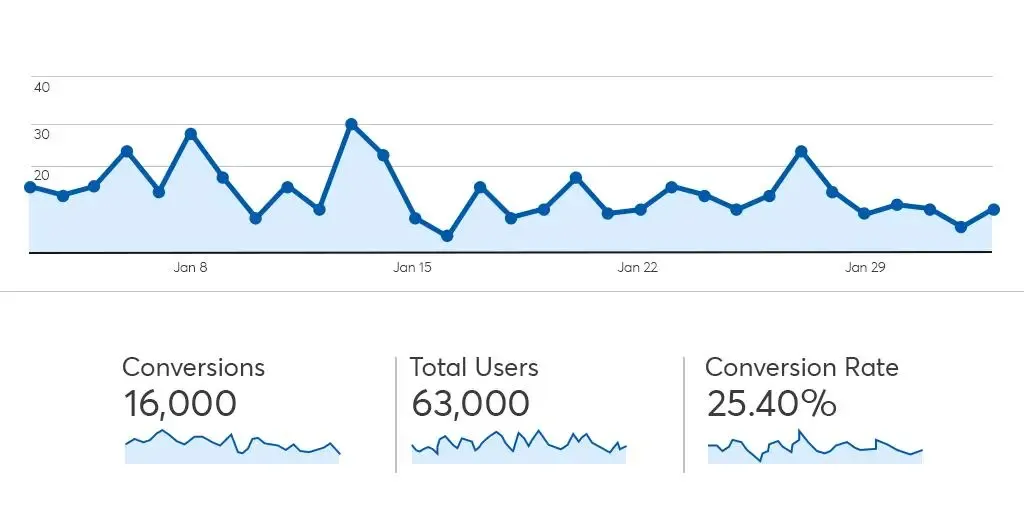
Consider below image as an example from Google Analytics to measure conversion rate:

Conversion Rate Formula

Conversions/total users X 100= Conversion rate

16000/63,000 X 100= 25.40%

Conversion rate optimization is applied to the people of the following phases of the purchase process:

  • Discover Phase– the people or the one who wants to know your brand and learn about your product and services.
  • Select Phase– the people who know your brand, service, and product and those are taking the next step to make a purchase or visit your website.
  • Purchase Phase– this is for the people who make the final decision and purchase from your e-commerce store.

During the above phases, people always compare the product and the services with your competitors and take their time to make the final decision. So, boosting or optimizing your WooCommerce store for higher conversions is significant to generate more revenue and increase sales. Hire WooCommerce developers to boost your WooCommerce store for higher conversions.

To build the optimal storefront for your customers, WooCommerce optimization requires a combination of marketing and internet skills. Here are simple techniques to boost your conversion rate.

Tips to Optimize or Ways to Boost WooCommerce Product Page Conversions:

1) High-Quality Images

Great images are part of successful product pages. Customers depend on visuals before deciding to buy because they can’t touch or see products in e-commerce stores. So use lots of high-quality images.

As per eMarketer, on e-commerce websites, the average customer expects to view at least six photos per product. Include high-quality photographs from numerous perspectives with each of your product pages to give your customers the clarity they desire.

One of the best things to do is enable the image zoom feature, by doing so you can boost your customer’s ability to visualize your products. Customers can focus on a certain section of an image to obtain a close-up look at the features using image zoom.

2) Build your Ecommerce Site Mobile Friendly

To increase WooCommerce conversion optimization, make sure your store is as easy to navigate on a smartphone as it is on a desktop. Your online store should always be responsible. Always test the UI on mobile and make sure the speed is up to the standard.

Custom breakpoint for elementors helps you to target any kind of devices like mobile, laptop, tablet, and desktop allowing you complete control over the appearance of your website on any screen.

While editing you can see your website the same as visitors would see, regardless of which device you wish to replicate. With dozens of compatible themes that are mobile responsive by default, you can drag and drop items around to build the style you want.

3) Upgrade your UI

Your conversion rate is influenced by a clear user interface (UI). Look into the following points:

  • Do you have a clear call to action (CTA)? If not then add a clear CTA.
  • Make graphic modifications to your product pages as necessary. Product images that are clear and load quickly, as well as seamless navigation and contrasting colors, all help to sell your products.
  • Consider using a tool like Hotjar to see which aspects of your website appeal to users the most.

An e-commerce store can benefit greatly from a user interface that is focused on functionality and has a clean design.

4) Add Customer Reviews

Good descriptions and visuals alone aren’t always enough to persuade customers to purchase your products. People frequently want additional assurance that a product will match their requirements. Social proof is one of the most effective techniques to convey such confidence.

User-generated content and product reviews, such as a social media post with a customer using the product, are the most popular kinds of social proof for e-commerce product pages.

According to ShopperApproved, 91% of customers read product reviews before making a purchase. Products with good numbers and positive feedback get more purchases.

That’s not all, below points has detailed data analysis by ShopperApproved that reviews have a direct impact on purchases:

  • 91 % of customers read online reviews.
  • 88% of purchasers trust reviews as much as personal guidance.
  • 42% of companies with reviews report higher average purchase values.
  • Displaying reviews can boost conversions by 270 percent.
  • The products that have positive reviews are sold 200% more than those without.

5) Security of your E-commerce Site

E-commerce buyer’s the first main concern is transaction security. Inform your clients about the security of your site and the efforts you’ve done to protect their personal information. To enhance your conversion rate in the long run, you must establish a trustworthy reputation.

Setting up SSL on your site and displaying security badges at checkout helps persuade customers that the site is fully reliable.

6) Increase Urgency by Promotions

As per famous sales guru’s there are four reasons why customers are not buying from you:

  • There’s no need.
  • There’s no money.
  • There’s no trust.
  • There’s no rush

While the first two factors are beyond your control, you can certainly influence urgency and develop trust. Let’s start with urgency first and then move on to trust later.

The law of supply and demand can be used to generate urgency on your product page. You can create different types of unavailability pop-up messages like:

  • Unavailability due to a lack of quantity (Only 2 items left at this price)
  • Unavailability due to the passage of time (Last hours to buy)

If your product’s supply is never-ending, you can provide time-sensitive rewards, such as a free present to the first X number of buyers or a discount if they complete the transaction within a particular amount of time.

Now if we talk about trust your unavailability messages or promotions should be genuine. Never ever lie to your customer by promoting fake urgency as your customers will notice that and will create trustworthiness issues. If it’s a fake urgency promotional campaign then customers will never rely on your advertisement in future.

Conclusion

Shoppers that visit your product pages are only a few clicks away from making a purchase. You have a better chance of converting them into a customer if you can provide them the information they desire in a painless manner.

Now as you know how to boost or optimize your WooCommerce product page conversions and resolve issues related to low conversion rate. You may successfully increase your conversion rate by adopting the above points. If you already have a WooCommerce store and want to boost or customize WooCommerce product page, then contact us for more details. For all your queries and related solutions, You can also join our Groups on – Facebook, linkedin, Insta, Twitter

Progressive Web Apps: Exaggeration or Evolution?

World has come to a mutual understanding that evolution can only happen with iterations and synchronicities. Especially after the discovery of learning algorithms, technology has reached a point where it can adapt itself to deal with newer problems. PWA (Progressive Web Apps) are a type of web apps with a similar kind of taste. It has one for all and all for one sort of functionality. They are known for their flexibility of running in different systems as well as for reaching maximum people or users.

What areProgressive Web Apps?

PWAs are software applications that can work with any device that has a basic browsing system. They are installable, linkable, with push notifications, progressively enhanced (meaning can work on older browser versions with lesser efficiency) and use SEO to appear first on Google Index. This is what makes these types of apps more reachable. They are specially built in such a way that they are extremely easy to handle and use.

As you might know there are now in total 3 basic types of apps: Web apps, Native apps, and PWAs.
Web apps are more reachable.
Native apps have more features whereas,
PWAs are sort of a hybrid of both.

What makes Progressive Web Apps so special?

1) Discoverability:

PWAs can be easily found over the grid as they only require a basic web browser. This makes it easy for the content available inside the app to get indexed in Google Indexing. This makes it appear before any other apps on google search page. SEO (Search Engine Optimization) plays a very important role in creation of content for the PWA. It is the main reason why a PWA stays trending.

2) Capable:

Until recently video chatting was only available on platform specific apps but with the recent development of programming languages, one can easily integrate two languages as extensions to add more functionality. This makes the creation of PWAs easier and also makes them more capable.

3) Reliable:

One more interesting fact about PWAs is that they work regardless of the quality of internet connection that the user has. Even if the network is bad or the user is offline, PWAs are reliable and fast. The quickness of these apps is what makes them more reliable. As the page load time increases, the bounce rate of the webpage also increases simultaneously. This reduces the quantity of the audience that visits the website. Thus, to avoid such hassle, PWAs are made to make the app content available and the app usable in the blink of an eye.

4) Installable:

Another thing that makes PWAs so interesting is the fact that they can easily be installed over the computer. The app opens in a separate window over which the user can operate it easily. This gives extra functionality to the user and the data that is modified over the installed app automatically saved over the browser PWA. For example: the latest WordPress.

5) Progressive:

PWAs are specially made to make them usable in older versions of web browsers. As the version of browsing improves, the functionality of the app also improves. This makes it possible for them to be available everywhere no matter how much older technology the user is using. This in turn increases the traffic of the website making them more and more popular.

6) Linkability:

Last but not the least, PWAs are also very linkable meaning they can be easily shared through various devices using a link. These days, links can be shared easily using any social media platform like-Whatsapp and since PWAs can be made available on any device with a basic web browser, its linkability supports the overall reach.

If you have further queries regarding how affordable they can be or if you are interested in making one, then you can always Hire WordPress Developers to fulfil your IT needs and additionally, we have Digital Marketing to help you reach further.

Divi vs Elementor: Which WordPress Page Builder is Better?

Choosing the right tools for your WordPress website can make or break your digital growth. Among those tools, page builders play a central role. They define how quickly you can design pages, how flexible your layouts are, and how well your site performs across devices. With dozens of options available, finding the best WordPress page builder is not as straightforward as it seems.

This is where the comparison of Divi vs Elementor becomes highly relevant. Both are powerful, widely used, and packed with features. Yet, they differ in how they handle speed, usability, customization, and scalability. What works perfectly for one business might create limitations for another. That is why understanding their strengths and trade-offs is critical before making a decision.

Selecting the wrong page builder can lead to slower load times, restricted design control, and higher maintenance effort over time. On the other hand, the right choice can streamline your workflow and improve user experience.

In this blog, we will break down Divi vs Elementor across key factors like performance, ease of use, pricing, and real-world usability, helping you confidently choose the best WordPress page builder for your needs.

Divi vs Elementor: Understanding the Builders Behind the Decision

Not all page builders deliver the same experience once you move beyond the surface. The Divi vs Elementor comparison is less about which has more features and more about which aligns better with your workflow, performance needs, and long-term goals. Before choosing the best WordPress page builder, it is important to understand how each one truly operates in real-world scenarios.

What is Divi?

Divi is a powerful visual builder developed by Elegant Themes, designed to simplify website creation without compromising on design depth. Known as the Divi WordPress builder, it combines a theme and a page builder into one unified ecosystem. This means you are not just editing pages; you are controlling the entire site structure with consistency. For users exploring Divi vs Elementor, Divi often stands out for its design flexibility and built-in editing experience that feels seamless and intuitive.

It is particularly favored by designers and agencies that want complete creative control while maintaining reusable design systems across projects.

Key Features of Divi

  • True visual front-end editing with real-time changes
  • Built-in theme builder for headers, footers, and templates
  • Extensive design modules and layout packs
  • Global elements and styles for consistency
  • Advanced responsive editing controls
  • Integrated A-B testing for conversion optimization
  • No dependency on third-party add-ons for core functionality

What is Elementor?

Elementor is one of the most widely adopted WordPress builders, powering millions of websites globally according to BuiltWith technology usage data. It focuses on ease of use, speed, and scalability, making it a strong contender for the best WordPress page builder. When comparing Divi vs Elementor, Elementor often appeals to users who want granular control through widgets and a lightweight editing experience that integrates smoothly with various themes.

Its ecosystem is vast, allowing users to extend functionality through plugins and third-party tools, which makes it highly adaptable for different project needs.

Key Features of Elementor

  • Intuitive drag and drop editor with a clean interface
  • Wide range of widgets for design and functionality
  • Theme builder for customizing site-wide elements
  • Popup builder for marketing and lead generation
  • Strong third-party plugin ecosystem
  • Advanced motion effects and animations
  • Flexible styling and typography controls

Divi vs Elementor: Feature-by-Feature Comparison That Impacts Your Choice

Feature Divi WordPress Builder Elementor
Ease of Use Visual front-end editing, slightly complex at first Clean UI with sidebar, beginner-friendly
Learning Curve Moderate to high Low to moderate
Design Flexibility Highly customizable with deep styling controls Flexible with structured widget-based design
Performance & Speed Improved, but can be heavy if not optimized Generally faster and lighter by default
Pricing Model Yearly and lifetime plans Subscription-based with multiple tiers
Value for Money High for long-term and multiple sites Good for short-term or single-site usage
Built-in Features Extensive, fewer external plugins needed Core features are strong, relies on add-ons
Integrations Limited compared to Elementor Large ecosystem of third-party integrations
WooCommerce Support Strong customization options Equally strong with more plugin flexibility
Global Design Controls Advanced global styles and reusable elements Available but less centralized
Support & Community Good support, strong design-focused community Massive global community and resources
Best For Designers, agencies, branding-focused builds Beginners, marketers, scalable projects

Picking the best WordPress page builder is rarely a quick decision. On paper, both tools promise speed, flexibility, and control. In reality, the experience can feel very different once you start building pages, managing layouts, and optimizing performance.

Ease of Use

According to Statista, mobile devices account for more than half of global website traffic, making mobile optimization a critical factor when selecting a WordPress page builder.

Ease of use is not just about drag-and-drop functionality. It is about how quickly you can move from idea to execution without second-guessing your steps. A builder that feels intuitive reduces rework, speeds up delivery, and improves overall productivity for teams and individuals.

  • The Divi WordPress builder offers a fully visual editing experience that places design controls directly on the page. This approach feels natural once you get used to it, especially for users who prefer real-time interaction. However, the interface includes multiple layers of settings, which can feel overwhelming in the beginning. It rewards users who invest time in learning its system.
  • Elementor follows a more structured layout with a fixed sidebar and clear widget-based controls. This separation makes navigation simple and predictable, especially for beginners. You can quickly locate elements, adjust settings, and preview changes without confusion. It is designed to reduce the learning curve and help users build faster from day one.

Design Capabilities and Flexibility

Design flexibility defines how unique and scalable your website can become. The best WordPress page builder should allow you to move beyond templates and create experiences that align with your brand and business goals.

  • Divi stands out with its deep design customization options. From advanced styling controls to global design settings, it allows you to fine-tune every element on the page. The ability to reuse layouts and apply global changes adds efficiency, especially for larger projects. It is particularly strong for users who want complete creative freedom within a single ecosystem.
  • Elementor offers powerful design capabilities through its modular widget system. Each widget can be customized with precision, giving users strong control over layout and styling. While slightly more structured than Divi, it provides enough flexibility for most use cases. Its third-party extensions further enhance what you can achieve visually.

Performance and Speed

Website performance directly impacts user experience, conversions, and search rankings. Even the most visually appealing design loses value if the site loads slowly or struggles to perform under real conditions.

  • Divi has made noticeable improvements in performance through features like dynamic CSS and optimized asset loading. However, complex designs with heavy modules can still increase load time if not optimized properly. It requires a more mindful approach to maintain speed and efficiency.
  • Elementor is generally perceived as more lightweight in its default setup. It delivers faster load times when paired with optimized themes and hosting. That said, overusing widgets or relying heavily on add-ons can gradually impact performance. Proper optimization practices are still essential.

Pricing and Value for Money

Cost is not just about the initial investment. It is about how pricing aligns with your long-term usage, scalability, and the number of projects you manage.

  • Divi offers a straightforward pricing structure with both yearly and lifetime plans. The lifetime option is especially attractive for agencies or freelancers working on multiple websites. It provides long-term value without recurring costs, making budgeting more predictable.
  • Elementor follows a subscription-based pricing model with multiple tiers depending on usage. This makes it accessible for beginners, but costs can increase over time as you scale. The value depends on how extensively you use its premium features across projects.

Integrations and Add-ons

Modern websites often rely on multiple tools working together. Integration capabilities determine how easily your builder fits into your broader tech stack.

  • Divi comes with a wide range of built-in features, reducing the need for additional plugins. While it supports integrations, its ecosystem is more self-contained. This can simplify management but may limit flexibility in certain advanced use cases.
  • Elementor excels in integrations and add-ons. Its open ecosystem allows you to extend functionality with a wide range of third-party plugins. Whether it is marketing automation, advanced design elements, or analytics tools, the possibilities are extensive.

Support and Community

Strong support and an active community can significantly influence your experience, especially when dealing with complex builds or troubleshooting issues.

  • Divi provides dedicated support along with detailed documentation and tutorials. Its community is active and particularly strong among designers and agencies. Users often benefit from shared resources, layouts, and practical insights.
  • Elementor has one of the largest communities in the WordPress space. From forums to tutorials and third-party resources, help is widely available. Official support quality varies by plan, but the overall ecosystem makes it easier to find solutions quickly.

Divi vs Elementor: Pros and Cons You Should Know Before Choosing

Before you finalize a page builder, it helps to look beyond features and understand the real advantages and limitations. The Divi vs Elementor debate often comes down to how each tool performs in everyday use, not just what it promises on paper. This section breaks down the pros and cons in a clear, practical way so you can evaluate what fits your workflow, team structure, and goals.

Pros of Divi

  • Strong visual editing experience that lets you design directly on the page
  • Deep customization controls for layouts, spacing, and styling
  • Built-in features reduce dependency on multiple plugins
  • Global elements and reusable styles improve consistency across pages
  • One pricing model with a lifetime option offers long-term value
  • Ideal for designers who want full creative control

Cons of Divi

  • Learning curve can feel steep for first-time users
  • The interface can become overwhelming due to multiple settings layers
  • Performance may require additional optimization for complex designs
  • Limited third-party ecosystem compared to competitors
  • Can feel heavier when handling large-scale or dynamic websites

Pros of Elementor

  • Clean and structured interface that is easy to navigate
  • Faster onboarding for beginners and non-technical users
  • Lightweight performance in default setups
  • Large ecosystem of third-party plugins and integrations
  • Flexible widget system for building dynamic layouts
  • Strong community support and learning resources

Cons of Elementor

  • Advanced features often require paid plans
  • Over-reliance on add-ons can impact performance
  • Design consistency may require more manual control
  • Pricing increases as you scale across multiple sitesc
  • Some customization limits compared to more design-focused builders

Divi vs Elementor: Who Should Use Which Builder?

Not every page builder fits every user. The real decision in the Divi vs Elementor comparison depends on how you work, what you prioritize, and how complex your projects are. The best WordPress page builder for you is the one that aligns with your workflow, not just the one with the most features. Here is how each builder fits different types of users and use cases.

Who Should Use Divi?

The Divi WordPress builder is best suited for users who want complete control over design and prefer an all-in-one ecosystem. It works well for those who value consistency, reusable design systems, and deeper customization without relying heavily on third-party tools.

Ideal for:

  • Design-focused freelancers who want pixel-level control and creative flexibility
  • Agencies managing multiple websites that benefit from global styles and reusable layouts
  • Business owners are focused on branding and want a visually unique website experience
  • Teams looking for long-term value with a one-time investment approach

Divi becomes especially powerful when you are building multiple pages with consistent design patterns. It rewards users who invest time in mastering its interface.

Who Should Use Elementor?

Elementor is a strong choice for users who prioritize ease of use, speed, and flexibility through integrations. It is often considered the best WordPress page builder for those who want to get started quickly while keeping the option to scale with additional tools.

Ideal for:

  • Beginners and non-technical users who need a simple and intuitive interface
  • Developers and marketers who rely on integrations and third-party plugins
  • Startups and small businesses looking for quick deployment and fast iterations
  • Agencies need flexibility across different types of client requirements

Elementor works best when you need adaptability. Its ecosystem allows you to extend functionality based on project needs without being locked into a single system.

Conclusion

The Divi vs Elementor decision is not just about selecting a tool. It is about setting the foundation for how your website evolves over time. The best WordPress page builder should support growth, simplify execution, and adapt to changing business needs without creating technical debt. That is why making the right choice early can save both time and resources later.

At QeWebby, we approach builders like the Divi WordPress builder and Elementor from a performance and scalability lens, not just design. Our focus is on aligning the right technology with your business goals to ensure long-term success. If you are planning your next build or migration, contact us to explore the right solution for your website.