Managed WordPress Maintenance vs DIY: What B2B Companies Need to Know

For modern B2B organizations, a WordPress website serves as a vital revenue channel and lead-generation engine. However, maintaining its stability, security, and performance is essential and requires ongoing upkeep, especially as businesses scale.

Managed WordPress maintenance is best for B2B companies that rely on their website for lead generation, security, and uptime, while DIY maintenance is suitable only for small or low-risk sites with in-house technical expertise and time to manage updates, security, and performance manually.

Many companies face the dilemma of whether to manage WordPress maintenance in-house or outsource it to specialists. While the DIY approach may seem cost-effective, it can quickly become a burden for stretched marketing and IT teams, especially as the complexity of plugins and cyber threats grows.

With over 300,000+ websites powered by WordPress, competition is high. Making regular updates, implementing security monitoring, maintaining backups, and optimizing performance are crucial. DIY maintenance demands technical expertise and constant attention, whereas outsourcing to trusted providers offers predictable performance, quicker issue resolution, and robust security.

This article will outline the pros and cons of each approach, helping B2B owners, IT managers, and digital marketers select the most suitable maintenance model to ensure business continuity and optimize site performance.

What Is Managed WordPress Maintenance?

Managed WordPress maintenance is a continuous process where a specialist team handles everything from core updates to theme changes, security monitoring, backups, performance tuning, and more. It differs from the DIY approach to handling updates, security, and bug fixes. This reduces the time and expertise required to run a website – how?

Managed WordPress maintenance often comes with hosting services bundles, which add to the WordPress-optimized infrastructure. It offers better scalability and ensures high availability for the site without disruptions. With such a service, you can provide predictable performance, strong security, and rapid bug fixes without the hassle of managing servers.

Who Should Choose Managed WordPress Maintenance?

Managed WordPress maintenance is recommended for:

  • B2B companies generating leads through their website
  • Sites with CRM, marketing automation, or gated content
  • Teams without dedicated WordPress engineers
  • Businesses requiring high uptime, security, and predictable performance
Key Features of Managed WordPress Maintenance Services

  • Automated WordPress updates for core systems, plugins, and themes.
  • Regular site backups with quick restore points that ensure faster recovery in case of incidents.
  • 24/7 security monitoring with comprehensive malware scanning, firewall implementations, and multi-factor authentication.
  • Performance optimization for the website through server-level caching, CDN integrations, and database fine-tuning for faster loading.
  • Complete uptime and health monitoring of the website
  • Access to WordPress expert teams to resolve plugin conflicts, errors, and best practice applications.
  • End-to-end testing of the website, including staging environment configurations and automation.
  • Migration assistance and disaster recovery options

Pros of a Managed WordPress Maintenance Service

  • Managed WordPress maintenance services can help you save time and focus on content, growth, and business priorities.
  • Ensures better website security posture through continuous monitoring, regular updates, and established procedures.
  • Faster, more consistent performance via WordPress-tuned infrastructure and caching/CDN layers.
  • Expert, WordPress-specific support that shortens troubleshooting and reduces downtime.
  • Effortless scalability for campaigns and traffic spikes without manual capacity planning.
  • Peace of mind with automated backups and quick restores if something goes wrong.

Cons of a Managed WordPress Maintenance Service

  • Managed WordPress services can have a higher initial cost but offer more returns in the long term.
  • Businesses have less control over server configurations, advanced customizations, and plugins.
  • No flexibility to run different types of sites or migrate them to another CMS.
  • Some managed services are often limited to specific plugins, which can reduce your options.

What Does DIY WordPress Maintenance Involve?

DIY WordPress maintenance is an approach of taking full responsibility for your website’s care, updates, and performance without relying on any managed service. It requires hands-on management to ensure your WordPress site is up-to-date, secure, and runs smoothly. This includes regular updates, backups, performance checks, and troubleshooting to ensure optimal system performance.

Who Should Choose DIY WordPress Maintenance?

DIY maintenance may be suitable for:

  • Small, low-traffic sites
  • Teams with in-house WordPress expertise
  • Non-critical marketing websites

Key Features of DIY WordPress Maintenance Approach

  • Regular updates for WordPress core, plugins, and themes
  • Routine backups and testing restore points.
  • Security monitoring (utilizing plugins such as Wordfence or Sucuri).
  • Database cleanup and optimization.
  • Spam comment management and user account reviews.
  • Broken link checks and form testing.
  • Performance monitoring and error log review.
  • SEO audits and content updates.
  • Manual documentation and training for involved team members.

Pros of DIY WordPress Maintenance Approach

  • Complete control over server setup, plugins, updates, and customizations.
  • Lower cost, as you avoid fees charged by managed service providers.
  • Flexibility for advanced or unique technical needs, including specialized plugins or scripts.
  • Ability to optimize, experiment, and troubleshoot as needed.

Cons of DIY WordPress Maintenance Approach

  • Time-consuming and requires ongoing attention to detail.
  • Increased risk if security vulnerabilities, plugin conflicts, or errors go unnoticed.
  • Requires technical knowledge to troubleshoot, restore, and prevent major issues.
  • Mistakes during updates or backups can result in downtime or data loss.
  • No guaranteed expert support, leaving all maintenance and fixes up to the site owner.

Now that you know what managed WordPress maintenance is and the DIY approach to it, let’s compare them to understand which is best for you.
Detailed Comparison of Managed WordPress Maintenance vs DIY Approaches

Comparing managed WordPress maintenance services with a DIY approach requires consideration of cost, expertise requirements, security, performance, scalability, and support.

Key Differences at a Glance

The main difference between managed WordPress maintenance and DIY maintenance lies in responsibility, risk, and scalability. Managed services offer proactive security, automated updates, and expert support, while DIY maintenance requires manual effort, technical expertise, and carries higher operational risk as websites grow.

Let’s start with the cost considerations of using both methods for B2B companies.

Feature DIY WordPress Maintenance Managed WordPress Maintenance
Cost (Estimation) $0–$100/month $100–$500+/month
Time Commitment 5–15+ hours/month (staffed) Minimal (provider handles most tasks)
Required Expertise Moderate to high technical troubleshooting skills Minimal WordPress usage/familiarity
Security & Risk Manual, expertise-dependent; higher exposure Proactive, expert auditing, 24/7 monitoring
Performance Manual optimization; plugin/setup dependent Server, CDN, cache optimized by experts
Scalability & Support Poor, increasingly complex with growth Automated scaling, multi-site support

1. Cost Considerations for B2B Companies

Managed services typically cost $100- $500+ per month for enterprise-grade offerings. At the exact time, DIY costs are as low as $0-$100/month, depending on the type of plugins, tools, and internal staff support you may need.

Managed solutions provide bundled packages that include security updates, backups, support, and uptime guarantees. A DIY approach may be cheaper, but it often comes with hidden costs. For example, you need to hire in-house staff who can work dedicatedly on WordPress maintenance or divert existing staff from core business activities.

Especially for the complex B2B sites, managed WordPress maintenance services make more sense due to a predictable cost structure. DIY, on the other hand, is an approach where prices escalate with an increase in the technical complexity of the website.

2. Time Commitment and Required Expertise

DIY maintenance takes more time than managed services due to the extensive workforce needed. Regular security checks, updates, and patches can take days and even months with an in-house team. Plus, you may have restricted resources, which adds to the complexities of an already delayed process of WordPress maintenance.

3. WordPress Site Backups: Managed Service vs DIY

Ensuring you have proper backups is crucial, especially in the event of an incident or cyber attack, as it will help you recover quickly. DIY backups offer the benefit of complete control over backup configurations, but manually testing, removing, and adding backups can be tedious.

On the other side, a managed WordPress maintenance service ensures automation of the backup process. Set a daily schedule according to your requirements for the backup, and the system will automatically create a backup.

4. Plugins & Core Updates

If you choose the DIY approach, maintaining each plugin, ensuring timely updates, and security can be complex. For example, if you have multiple sites, you have to update plugins across all of them. This can increase manual efforts if you choose the DIY approach.

One of the key benefits of WordPress maintenance provided through managed services is the automation of plugin updates. Many WordPress website maintenance packages offer end-to-end plugin update automation by default.

Plus, managed hosting providers handle server maintenance, PHP updates, and server-side software. This means you can optimize core updates by outsourcing WordPress maintenance.

5. Performance Optimizations

Managed WordPress maintenance handles licenses and support, as well as pre-configuring all servers across sites for optimal performance. On the contrary, the DIY approach requires manual configurations, which are necessary to fine-tune site performance.

Each site may have unique challenges in terms of performance, loading time, and server management. Therefore, if you have multiple sites, managed WordPress maintenance is a sensible option.

6. Security And Risk Management

A DIY approach relies heavily on your internal team’s technical expertise. Routine tasks, such as malware scanning, patching vulnerabilities, configuring firewalls, and monitoring suspicious activity, must be performed manually and consistently to ensure optimal security.

Any delays or missed updates can expose your site to significant risks. Especially for B2B companies handling sensitive customer data, CRM integrations, or gated assets, these become crucial. Managed WordPress maintenance, however, offers a proactive security posture.

Providers run continuous 24/7 monitoring, apply real-time threat detection, and implement enterprise-grade firewalls and malware removal tools. Security patches are deployed instantly, reducing the attack window and minimizing operational disruptions. Most managed services also include incident response support, helping you recover quickly without diverting internal resources.

How to Get Started with WordPress Maintenance

WordPress maintenance is a continuous process and needs constant monitoring. This is why you need to plan the entire maintenance. With a managed service, you don’t need to worry about planning or execution. However, if you choose DIY, you need to be mindful of specific tools and access permissions, which you will need before implementing the WordPress maintenance approach.

What You Need Before You Begin (Tools, Access, Resources)

First and foremost, you will require access to WordPress admin, hosting panel, SFTP/SSH, database (phpMyAdmin), DNS, and license portals for premium plugins/themes. You will need to install and configure a reliable backup plugin or service. Verify the off-site storage and ensure multiple copies of the site are stored at different locations. Other prerequisites are,

  • Add a reputable security plugin with a WAF, malware scanning, login security, and optionally two-factor authentication (2FA).
  • Create a safe sandbox to test updates and restores before deploying them to production, which is often included in various services and specialized tools, such as BlogVault workflows.
  • Monitor uptime alerts, performance metrics, and scan the site regularly for malware.

You have all the prerequisites. Now is the time to implement WordPress maintenance.

Step-by-Step Guide to Setting Up and Managing WordPress Site Maintenance

WordPress maintenance involves five ongoing tasks: backing up data, updating software, monitoring security, optimizing performance, and testing functionality. Managed services automate these tasks, while DIY approaches require manual execution and technical oversight.
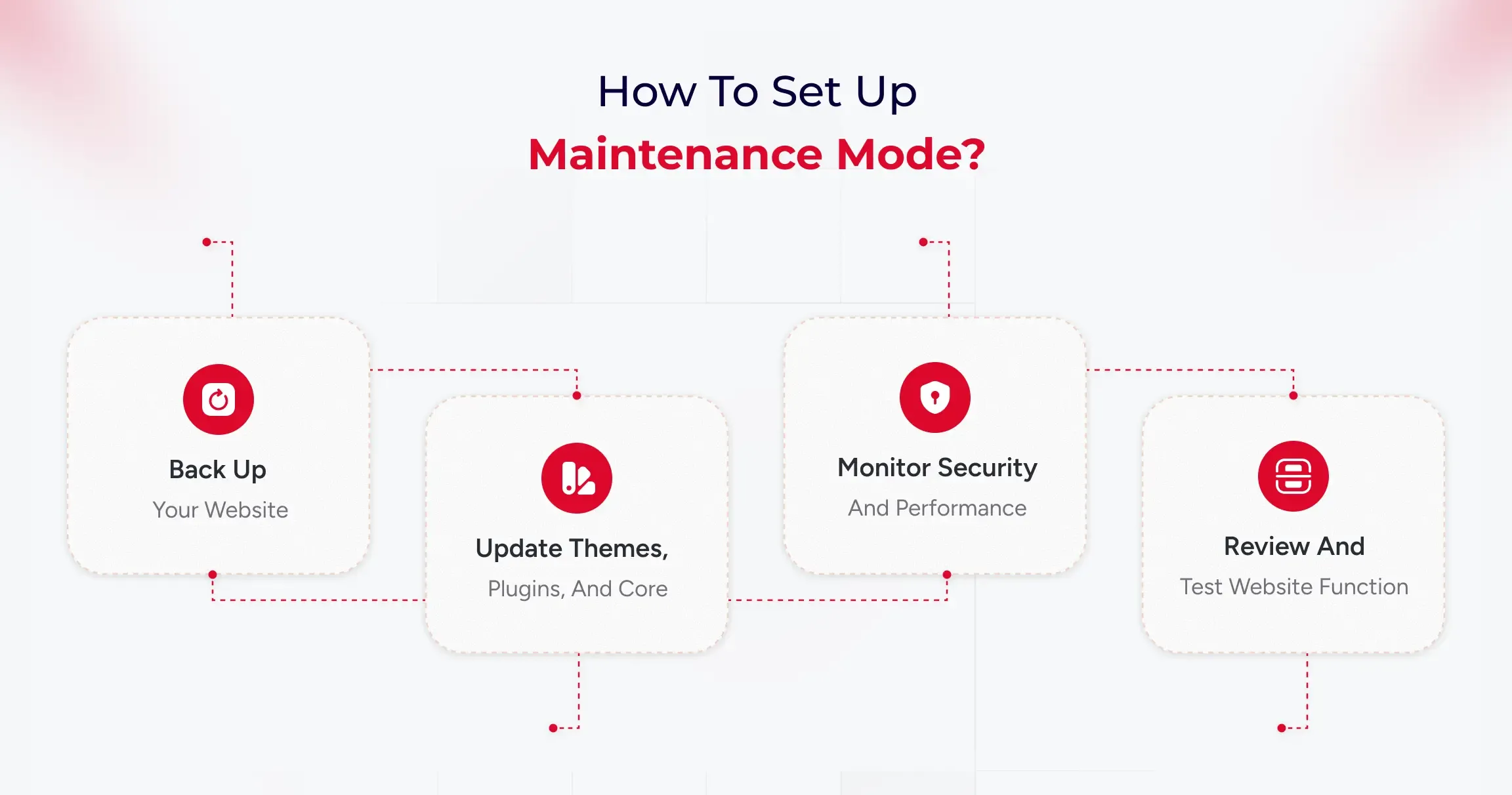
Step 1: Back up your website

Think of a backup as a safety copy of your entire site, including both the visible content (themes, plugins, uploads) and the hidden infrastructure (the database with posts, pages, users, and settings). Set up automatic full backups on a schedule and store copies off-site (such as Google Drive, Dropbox, or a backup service) so you can restore if anything breaks or gets hacked.

Run a quick “test restore” occasionally to be sure those backups actually work before you need them in an emergency.

What to do in practice:

  • Install a reputable backup tool and schedule both file and database backups (daily/weekly, depending on how frequently your site changes).
  • Save backups to external storage and keep several recent versions for safety.
  • Make a quick note of restore steps so you’re not guessing during a crisis.

Step 2: Update themes, plugins, and core

Updates fix bugs, patch security holes, and improve compatibility, so keeping WordPress core, plugins, and themes current is one of the easiest ways to stay secure and stable. Before updating, ensure that a fresh backup exists. For larger or more complex sites, test updates on a staging copy first to avoid breaking live pages.

After updating, give the site a quick check to confirm layouts, forms, and key features still work as expected.​

What to do in practice:

  • Update weekly (or sooner for security releases), starting with plugins, then themes, then core if needed, while having a recent backup ready.
  • Remove plugins and themes you don’t use; fewer moving parts means fewer risks and faster pages.
  • For significant updates, consider delaying a couple of weeks if your site is sensitive, and test on a staging environment first to catch conflicts early.

Step 3: Monitor security and performance

Security monitoring identifies malware, suspicious logins, and known vulnerabilities, allowing you to respond quickly if something’s amiss. Enable basics like strong passwords, two-factor authentication, and limited login attempts, and use a security scanner to run routine checks automatically. At the same time, keep an eye on performance uptime alerts, page speed, and Core Web Vitals.

What to do in practice:

  • Turn on daily security scans and get alerts for downtime and unusual activity (user activity logs help pinpoint what changed and who did it).
  • Review speed weekly: large images, bloated plugins, and full caches can slow you down, so optimize images, purge cache, and prune heavy add-ons.
  • Set a cadence: daily automated scans/uptime checks, weekly performance updates, monthly backup tests, and a deeper audit for peace of mind.

Step 4: Review and test website functionality

After changes or on a regular schedule, click through your most essential paths like a visitor to ensure everything still works, such as menus, contact forms, checkout, and search. Check for broken links, missing images, and unusual layout shifts, as even minor issues can frustrate users or lead to lost conversions.

If something’s off, roll back using your latest backup or disable the last update to isolate the problem, then retest before going live again.​

What to do in practice:

  • Keep a short checklist: homepage load, key landing pages, forms, login, cart/checkout, and search.
  • Run a quick broken link and spam comment cleanup as part of routine maintenance to keep the site tidy and trustworthy.
  • If you manage multiple sites, consider using a central panel to view updates, uptime, and performance at a glance, saving you time.

How to Choose the Best Managed WordPress Maintenance Service for Your Company

When selecting a managed WordPress maintenance partner, consider it as finding a long-term team member. Your provider should offer consistent performance, strong security, reliable support, and a plan that aligns with your business goals.

For B2B organizations, it’s vital to choose partners that understand complex site setups and the need for smooth digital operations. A good service should require little involvement from your internal teams.

Updates, monitoring, backups, and performance tuning should happen regularly. The best providers keep your site stable and anticipate issues before they arise.

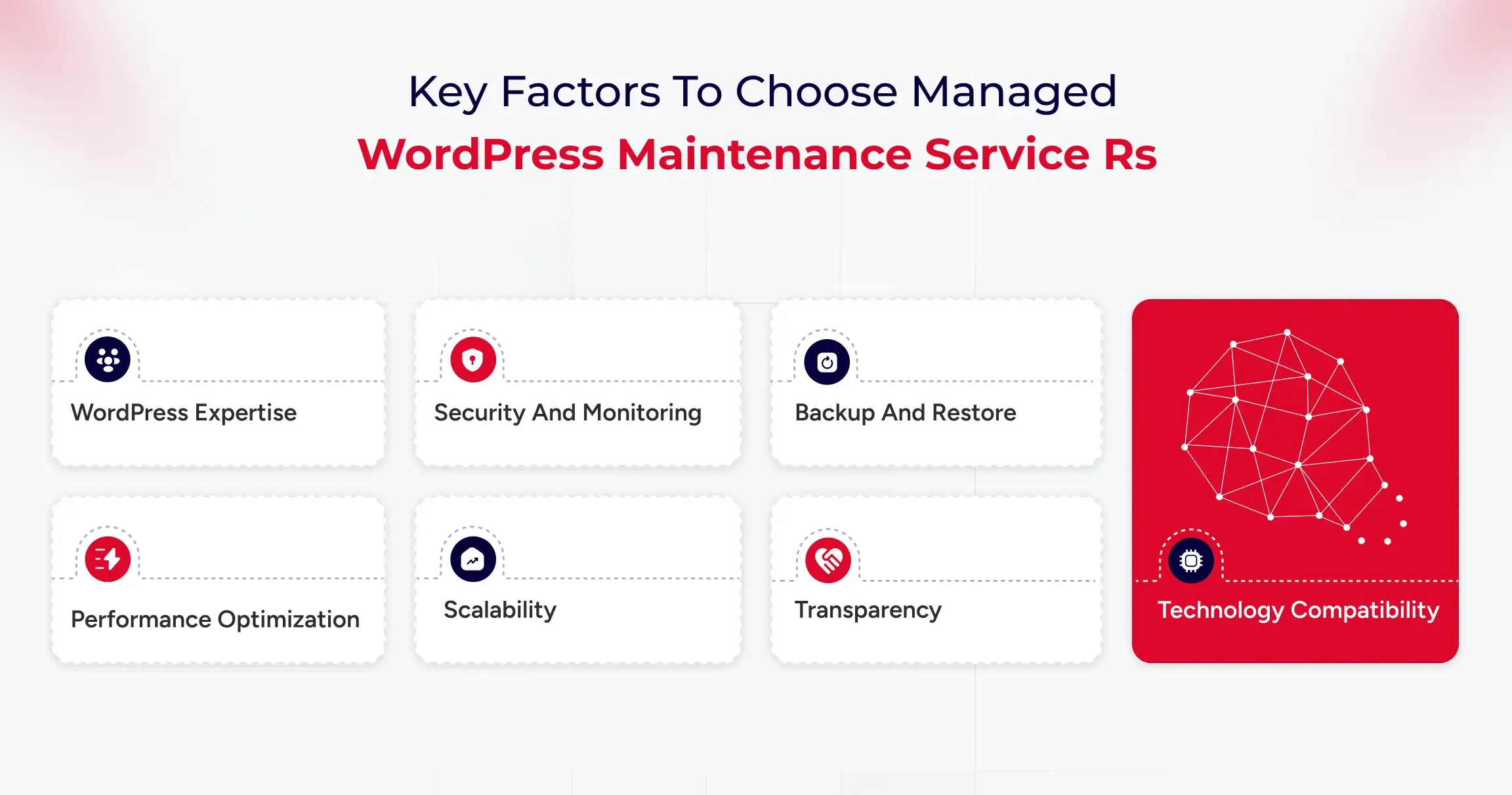
Key Factors to Consider

  • WordPress Expertise: Ensure the team has experience with enterprise-level WordPress and can handle plugin conflicts and performance optimization.
  • Security and Monitoring: Look for 24/7 threat detection, web application firewall (WAF) protection, and clear incident response plans to reduce risks during attacks.
  • Backup and Restore: The provider should offer daily backups, off-site storage, and tested restore options to ensure business continuity.
  • Performance Optimization: Evaluate their caching methods and load testing to support high traffic.
  • Scalability: Your provider should support growth, such as adding subdomains or expanding to multi-site setups.
  • Transparency: Request access to uptime logs, performance metrics, and support documentation to understand what’s being maintained.
  • Technology Compatibility: Ensure the service works with your preferred plugins, tools, and systems.

Affordable Maintenance Solutions for Small Businesses

Small businesses often struggle to strike a balance between costs and reliability. While enterprise-level services offer extensive coverage, many companies don’t need such expensive plans. It’s essential to find providers that deliver affordable packages without sacrificing key security, updates, and backups.

Cost-effective maintenance solutions typically include automated updates, uptime monitoring, malware scanning, regular backups, and basic performance improvements, often at a fraction of the cost of a full-time technical team. These services help businesses stay secure and ensure their site runs smoothly.

The right plan should be easy to manage and reliable, allowing you to focus on attracting customers and growing your business. If a provider offers add-ons, transparent pricing, and straightforward service agreements, it’s likely a good fit.

User Experiences and Feedback on Managed WordPress Maintenance

Many B2B companies find that outsourcing WordPress maintenance reduces their workload and improves website reliability. Regular updates, automated backups, security monitoring, and performance optimization are key benefits.

Professional maintenance helps prevent problems, providing stability during busy times and product launches. Companies with multiple websites, especially those with managed plans, benefit from this, as it reduces plugin conflicts and downtime.

Most users are satisfied but suggest choosing a service with clear deliverables and proactive communication. Overall, businesses appreciate the peace of mind that comes with outsourcing this task.

Common Challenges and How Services Address Them

Here are some of the key challenges that managed WordPress maintenance services can handle.

Frequent Updates and Compatibility Issues

B2B companies often struggle with keeping WordPress up to date, which can lead to compatibility issues if not thoroughly tested. Managed maintenance services test updates in staging environments and apply them only after confirming stability, preventing downtime, and ensuring smooth website functionality.

Growing Security Risks and Vulnerabilities

Security is a significant concern for businesses that use WordPress. Risks like plugin vulnerabilities and malware can disrupt operations. Managed maintenance services offer comprehensive security monitoring, regular scans, robust firewalls, reliable backups, and swift threat responses to maintain a secure environment and minimize downtime and recovery times.

Performance Degradation as Websites Scale

As websites expand, they may become slower, which can impact SEO and user engagement. Maintenance services enhance performance by optimizing caching, cleaning images and databases, configuring CDN, and making hosting adjustments, ensuring the site remains fast and competitive.

Internal Resource Limitations and Time Constraints

Managing WordPress can distract internal teams from essential tasks. Technical issues take time away from campaigns and content creation. Managed maintenance services handle website upkeep, allowing teams to focus on core business activities.

Selecting the Right Maintenance Partner

Choosing a maintenance provider can be a challenging task. Some plans focus solely on basic updates and overlook important areas, such as security and performance. Selecting a service with clear agreements, detailed reporting, and B2B experience ensures effective management and proactive problem-solving.
Final Verdict: Managed vs DIY WordPress Maintenance

Managed WordPress Maintenance is a strategic investment that protects brand reputation, boosts digital performance, and supports scalability for B2B organizations. As websites become increasingly vital for lead generation and customer experience, reactive management is no longer sufficient.

A dedicated maintenance partner ensures precise execution of updates and optimizations, minimizing the risks of downtime and security breaches. For growth-focused businesses, this leads to consistent performance, enhanced search visibility, and a digital infrastructure that evolves to meet changing business objectives.

Best AI-Powered A/B Testing Tools For WordPress Development

WordPress AI plugins are experiencing a surge in popularity. These plugins generate over 315 million visits annually as businesses rush to automate their optimization efforts.

Here’s what most business owners get wrong. They’re still playing guessing games with their websites. They move buttons around, change colors randomly, and wonder why their conversion rates stay flat. It’s like running a store blindfolded while customers walk out empty-handed.

Innovative businesses take a different approach. They use AI-powered A/B testing tools that analyze every click, scroll, and purchase decision in real-time. These tools don’t just test variations.

They predict winners before the test even ends, automatically optimize for peak performance, and deliver results 300% faster than manual testing. This guide reveals the best AI-powered A/B testing tools for WordPress that turn visitor behavior into conversion gold.

What Are A/B Testing Tools for WordPress?

A/B testing is akin to running a controlled experiment on your website. You take two versions of a page: Version A (your current setup) and Version B (the variation), and see which one performs better with your visitors. It’s simple in concept but incredibly powerful in execution.

A/B testing tools for WordPress make this entire process seamless. These tools automatically split your website traffic, showing different users different versions of a page, and then track how each version performs.

Whether you’re testing headlines, call-to-action buttons, product images, or checkout flows, these tools reveal what actually drives engagement, sign-ups, or sales.

When AI enters the picture, testing becomes even smarter. Modern A/B testing tools utilize machine learning to predict winning variants more quickly, personalize user experiences in real-time, and eliminate guesswork. It’s data-driven optimization on autopilot, which helps your WordPress site continuously evolve and perform at its peak.

Why Using AI-based A/B Testing Tools Is Important?

A/B testing tools help websites perform better by tracking user behavior, optimizing designs, and fine-tuning overall performance. Check below how these tools can make a tangible and significant difference:

1. Understanding User Behaviour

These tools can help uncover hidden patterns by analyzing every visitor’s interactions, which range from clicks and scrolls to session duration and exit points, thereby driving real business results.

It becomes easier for stakeholders to spot the pages that need modifications and improvements in terms of design or functionality to meet visitors’ evolving preferences and expectations.

2. Safeguarding Search Engine Optimization (SEO) Performance

When experimenting with high-performing pages, AI-based A/B testing tools utilize temporary redirects and canonical tags to mitigate any potential negative impact on page rankings and performance. With this approach, it is possible to carry out the optimization without risk, thereby protecting the existing SEO ranking.

3. Better Conversion Rates

AI-powered A/B testing can help track where users drop off in your sales funnel, allowing you to remove that bottleneck by making necessary improvements.

It is possible to enhance the customer journey and boost conversion rates by testing various elements, including user experience (UX), at every stage of the process.

4. Lower Bounce Rates

Bounce rates indicate how often users visit your website but don’t view the second page and leave it. A high bounce rate indicates that visitors aren’t finding what they are looking for and need on the site.

A/B testing helps identify which content, design, or page encourages users to stay and navigate further on other pages of the site. It can help stakeholders remove the features, design, or content that caused them to leave too soon.

If you run an online store, these WooCommerce conversion strategies pair perfectly with A/B testing to boost sales.

What Are The Different Types Of A/B Testing Tools?

Depending on your goals, traffic volume, and the elements you want to experiment with, the A/B test approach can take on a very different appearance.

Understanding these variations is key to making smarter optimization decisions, especially when evaluating an AI-based testing tools comparison or choosing the right A/B testing tools for WordPress.

1. Standard A/B Testing

This is the classic version, which is simple, direct, and effective. You test two variations of a page or element to see which performs better. For instance, you might change the colour of your “Buy Now” button, adjust a headline, or tweak your hero image.

The goal is to identify which version resonates most with visitors and leads to more clicks, sign-ups, or sales.

2. A/B/n Testing

Sometimes two options just aren’t enough. A/B/n testing allows you to test multiple versions simultaneously of the elements you want to test. This method is most effective for websites with consistent traffic, as it requires sufficient data to compare various variations accurately. It’s like running multiple experiments simultaneously to uncover what users honestly respond to.

3. Multipage Testing

Multipage testing examines the broader picture by evaluating how design and content changes impact a user’s journey across multiple pages. For example, you might test different sequences in your checkout process or see how variations in your product descriptions impact conversions from one page to the next.

4. Multivariate Testing

If you’re ready to go deeper, multivariate testing examines several elements on a page simultaneously. You could test combinations of headlines, button placements, and colour schemes to see which blend performs best. Because this method measures multiple variables at once, it’s ideal for sites with high traffic and complex designs.

Top 10 AI-based A/B Testing Tools For WordPress Sites

Choosing the right testing tool can make or break your website optimization strategy. The market is filled with options, but the key is finding one that uses artificial intelligence to deliver faster insights and more intelligent decisions.

As AI becomes central to modern websites, staying updated with the latest WordPress development trends helps you adopt smarter testing methods.

In this AI-based testing tools comparison, we’ll explore the leading A/B testing tools for WordPress that bring automation, analytics, and AI innovation together to help your website grow smarter every day.

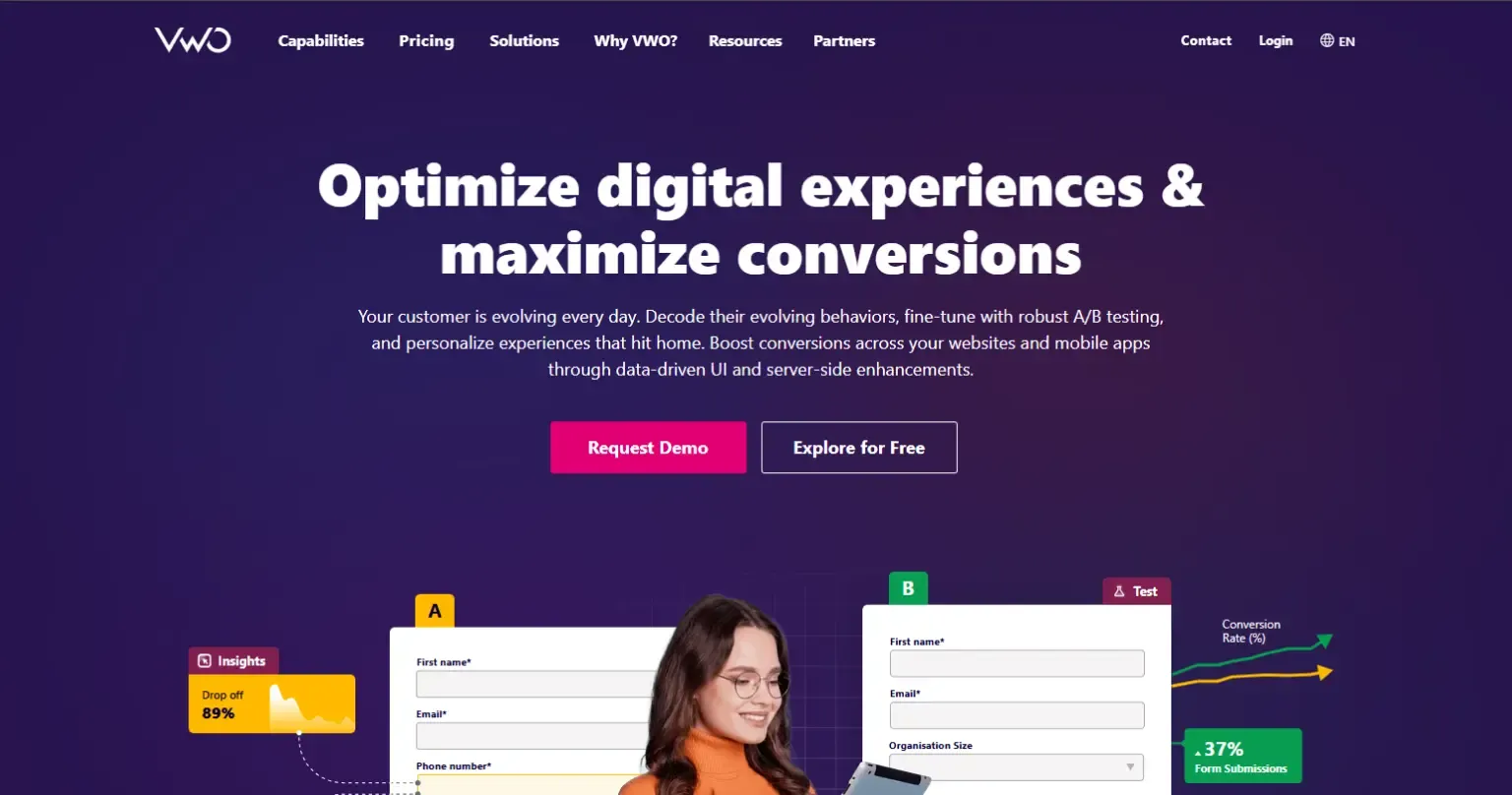
1. VWO (Visual Website Optimizer)

VWO is one of the most comprehensive A/B testing platforms designed for businesses that want both simplicity and depth. It allows you to run experiments, analyze visitor behaviour, and make real-time improvements. Its AI-driven algorithms learn from every interaction to give you faster, more accurate insights.

Key Features and AI Capabilities:
  • AI-powered SmartStats for faster and more precise conclusions.
  • Heatmaps, clickmaps, and session recordings to visualize user behaviour.
  • Predictive analytics that highlight high-performing elements.
  • Visual editor for no-code test creation.
  • Seamless integration with analytics, CRM, and CMS tools.
Benefits of Using VWO:
  • Provides faster and more accurate experiment results.
  • Easy for beginners yet robust for professionals.
  • Reduces decision fatigue with data-backed insights.
  • Enhances conversions with continuous testing.

2. AB Tasty

AB Tasty is an experimentation platform built for marketers who value personalization and performance. It combines A/B testing, AI-driven insights, and behaviour analytics to create meaningful user experiences that drive results. The tool adapts in real time, ensuring each visitor sees the most relevant version of your content.

Key Features and AI Capabilities:
  • AI-based predictive targeting and personalization.
  • Visual editor for quick test setup.
  • Dynamic segmentation to tailor experiences.
  • Integrated heatmaps and session replay tools.
  • Machine learning recommendations to optimize engagement.
Benefits of Using AB Tasty:
  • Delivers tailored experiences across user segments.
  • Simplifies complex experiments into easy workflows.
  • Helps increase conversions and retention rates.
  • Suitable for teams of all technical levels.

3. Kameleoon

Kameleoon is a data-driven experimentation and personalization platform that uses AI to predict conversion intent. It’s ideal for businesses that want to combine testing with deep personalization insights. Kameleoon’s algorithms automatically adapt your content for each visitor to maximize engagement and revenue.

Key Features and AI Capabilities:
  • AI-powered predictive analytics and targeting.
  • Real-time user intent detection.
  • Visual and code-based experiment editors.
  • Automated reporting with deep insights.
  • Privacy-first, GDPR-compliant platform.
Benefits of Using Kameleoon:
  • Improves targeting accuracy with machine learning.
  • Adapt experiences based on user behaviour.
  • Reduces manual optimization time.
  • Works well for enterprise-level traffic.

4. Fibr AI

Fibr AI focuses on intelligent automation and predictive modelling, enabling faster and smarter experimentation. Designed for marketers and developers alike, it minimizes manual setup and uses machine learning to identify winning variations early. This helps you act on insights before competitors do.

Key Features and AI Capabilities:
  • AI-powered clustering for data-driven segmentation.
  • Automated traffic allocation and balancing.
  • Instant performance insights and live monitoring.
  • Predictive modelling for conversion optimization.
  • Compatible with WordPress and other CMS platforms.
Benefits of Using Fibr AI:
  • Speeds up testing cycles significantly.
  • Reduces dependency on large data samples.
  • Makes optimization easier through automation.
  • Perfect for small and mid-sized teams.

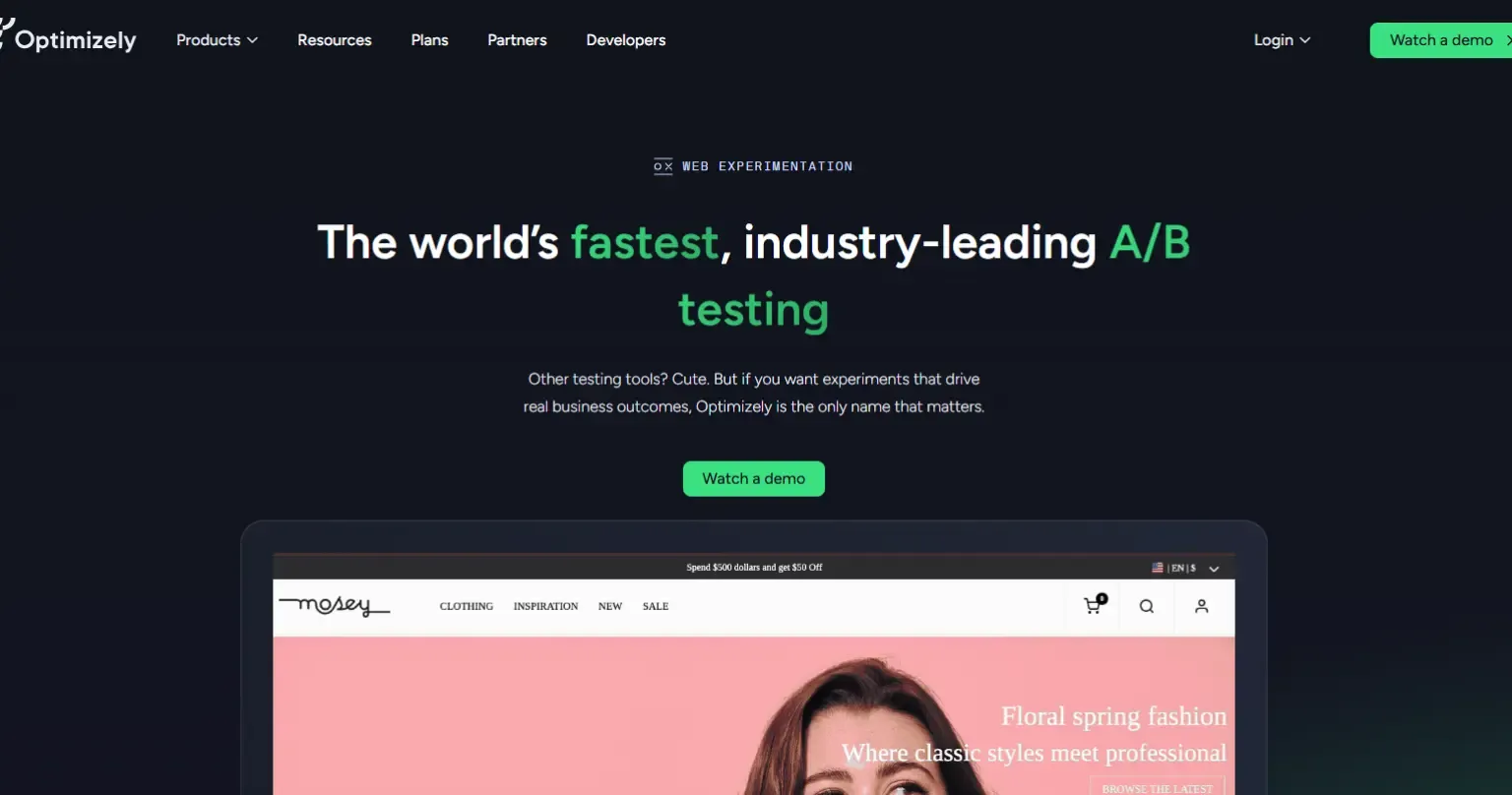
5. Optimizely

Optimizely is the gold standard in digital experimentation, trusted by enterprises worldwide. It combines A/B testing, multivariate testing, and AI-powered decision-making to help teams create exceptional digital experiences. Its platform uses machine learning to deliver better-performing versions to the right audiences dynamically.

Key Features and AI Capabilities:
  • Machine learning for traffic allocation and result prediction.
  • Multivariate, multipage, and server-side testing.
  • AI-driven personalization for targeted experiences.
  • Advanced analytics with statistical confidence scoring.
  • Integrates easily with WordPress and analytics stacks.
Benefits of Using Optimizely:
  • Ideal for enterprise-level experimentation.
  • Reduces manual monitoring with smart automation.
  • Provides actionable insights at scale.
  • Drives consistent, data-backed growth.

6. Unbounce

Unbounce is designed for marketers who prioritize landing page performance and conversions. Its AI-driven Smart Traffic feature automatically sends visitors to the best-performing version of your page. Whether you’re testing ad campaigns or product launches, Unbounce makes optimization effortless.

Key Features and AI Capabilities:
  • Smart Traffic AI that automatically redirects to the winning variants.
  • Drag-and-drop page builder with custom templates.
  • AI-generated copy and content suggestions.
  • Conversion tracking and analytics dashboard.
  • Supports A/B and multivariate testing.
Benefits of Using Unbounce:
  • Increases conversions without technical expertise.
  • Saves time through automation and pre-built designs.
  • Perfect for marketers running paid campaigns.
  • Improves ad relevance and ROI instantly.

7. Nelio A/B Testing

Nelio A/B Testing is a native WordPress plugin designed for simplicity and full integration. It lets you experiment with themes, headlines, menus, and layouts—all within your WordPress dashboard. Its AI tools automate the testing process and suggest improvements based on visitor interactions.

Key Features and AI Capabilities:
  • AI-driven heatmaps and engagement tracking.
  • Test any page element directly in WordPress.
  • Automatic identification of winning versions.
  • Real-time conversion analytics.
  • Lightweight, easy to install, and beginner-friendly.
Benefits of Using Nelio A/B Testing:
  • Perfect for WordPress users of all skill levels.
  • No external setup or complex coding needed.
  • Saves time with automated winner selection.
  • Offers high-value insights for small sites.

8. Convertize

Convertize blends behavioural psychology and AI automation to simplify testing. Its unique AutoPilot system dynamically shifts traffic toward the highest-performing version, ensuring continuous improvement with minimal input. It’s great for teams that want hands-free optimization.

Key Features and AI Capabilities:
  • AutoPilot AI for automated traffic allocation.
  • Pre-built persuasion templates for faster results.
  • Smart notifications and dynamic triggers.
  • Real-time performance and conversion tracking.
  • WordPress integration for easy setup.
Benefits of Using Convertize:
  • Reduces manual effort with intelligent automation.
  • Boosts engagement using behavioural science.
  • Quick to set up, even for non-developers.
  • Adapts tests automatically based on visitor data.

9. Instapage

Instapage is an AI-powered landing page optimization platform designed for marketers who prioritize post-click experiences. Its automation tools help improve ad relevance, personalization, and conversion rates effortlessly.

Key Features and AI Capabilities:
  • AI-based heatmaps for user journey tracking.
  • Dynamic text replacement for audience-specific messaging.
  • Drag-and-drop editor for fast design.
  • A/B and multivariate testing support.
  • Integrations with CRMs and analytics tools.
Benefits of Using Instapage:
  • Ideal for PPC and paid campaign optimization.
  • Improves ad conversion and quality scores.
  • Enhances collaboration between teams.
  • Reduces time-to-launch for marketing campaigns.

10. ABtesting.ai

ABtesting.ai utilizes artificial intelligence to automate every aspect of testing, eliminating the need for setup or manual input. It generates variations, runs experiments, and automatically selects winners. It’s perfect for teams that want to optimize without spending hours managing tests.

Key Features and AI Capabilities:
  • AI-generated headlines and CTAs.
  • Automated experiment creation and tracking.
  • Predictive insights to identify top performers early.
  • One-click WordPress integration.
  • Continuous optimization with self-learning models.
Benefits of Using ABtesting.ai:
  • Saves time with end-to-end automation.
  • Great for startups and small businesses.
  • Continuously improves website performance.
  • Requires minimal technical skill to operate.

Conclusion

AI-powered A/B testing tools enable developers to optimize and analyze site performance and user interaction without compromising SEO. Selecting the most suitable A/B testing platform according to your needs can be confusing because every tool has its strengths and weaknesses.

These thorough and detailed AI-based testing tools can help you make informed decisions that align with your business needs and objectives. If you still have any queries related to your business website, you can contact us to address your query with practical and result-oriented solutions from our team.
How Top Agencies Deliver More with White-Label WordPress Development

Most agencies struggle at scale due to resource limitations. White-label WordPress development services can help agencies scale without spreading their resources too thin. However, finding the right white-label WordPress development agency can be a complex process.

Agencies need to evaluate development, WordPress customization, and SEO expertise. However, there are many additional aspects that an agency needs to consider before selecting a white-label WordPress development service. With 43.3% of websites on the internet now using WordPress, the demand for development expertise is also higher.

This is why many agencies face questions like

  • Does investing in a white-label development service make sense?
  • What are the tasks an agency can outsource?
  • How does it impact SEO?
  • Is outsourcing the only answer to cost reduction and scalability?

In this article, you will get a comprehensive guide on why you need a white-label WordPress development agency for your projects, its benefits, and tasks that can be outsourced. So, let’s get started.

What are White Label WordPress Development Services?

White-label WordPress development services help agencies in building WordPress websites, plugins, and applications. Agencies can rebrand websites as their own. Such a partnership allows agencies to scale their services and easily expand offerings without hiring in-house staff.

What Makes White Label WordPress Unique?

White-label WordPress development offers flexibility for agencies. It ensures a custom-branded solution for agencies through outsourced development. This makes sure agencies reduce costs, simplify branding, and offer tailored solutions.

Brand Consistency Without Technical Overhead

White-label WordPress development services enable companies to deliver professional websites, ensuring consistent branding and a seamless user experience. This is particularly important if you want to ensure consistency across devices and screens.

Especially when64.2% of total traffic comes from mobile devices, it is essential to ensure branding consistency. Agencies can outsource the technical work to specialized developers and offer sites that can be rebranded for clients.

Cost-Effectiveness and Resource Optimization

Such services reduce the need for hiring in-house resources, training, and managing development teams. Due to outsourcing, the development cost has been reduced. Additionally, the time required to build websites for clients decreases, ensuring faster delivery.

Enhanced Service Portfolio and Expertise Access

Companies can easily access specialized WordPress developers and experts. It also helps create custom themes, develop plugins, provide WooCommerce solutions, and optimize performance. WordPress outsourcing service providers employ SEO best practices, security protocols, and strategies for the site. This helps agencies ensure their clients’ visibility is higher.

While the above aspects do make white-label WordPress development unique, the real question is how it fares against the standard development approach.

The Difference Between White Label and Standard WordPress Development

Here are some key differences between white-label and standard WordPress development approaches.

Aspect White Label WordPress Development Standard WordPress Development
Ownership Client owns the final product; development team remains invisible to the end customer Direct relationship between client and development team; complete transparency of providers
Branding Developed under your brand name, the third-party provider remains anonymous Development team’s branding may be visible; direct attribution to developers
Cost Structure Lower upfront costs; eliminates hiring and training expenses Higher initial investment; includes whole team setup and resource allocation
Project Timeline Faster turnaround due to specialized, ready-to-deploy teams Longer development cycles include team assembly and project planning phases
Customization Level Limited customization focuses on rebranding existing solutions Full customization capabilities; complete control over features and functionality
Scalability Highly scalable, easy to scale up/down based on project demands Requires significant resource planning; scaling involves hiring and team management
Quality Control Dependent on the provider’s standards, less direct oversight Direct quality control, complete management of development standards and processes
Communication Indirect communication through a white label provider Direct communication with the development team, immediate feedback loops
Project Complexity Best suited for standard features and simple-to-moderate projects Ideal for complex, highly customized solutions requiring unique features
Resource Management No need for internal resource management; the provider handles team allocation Full responsibility for team management, resource allocation, and coordination

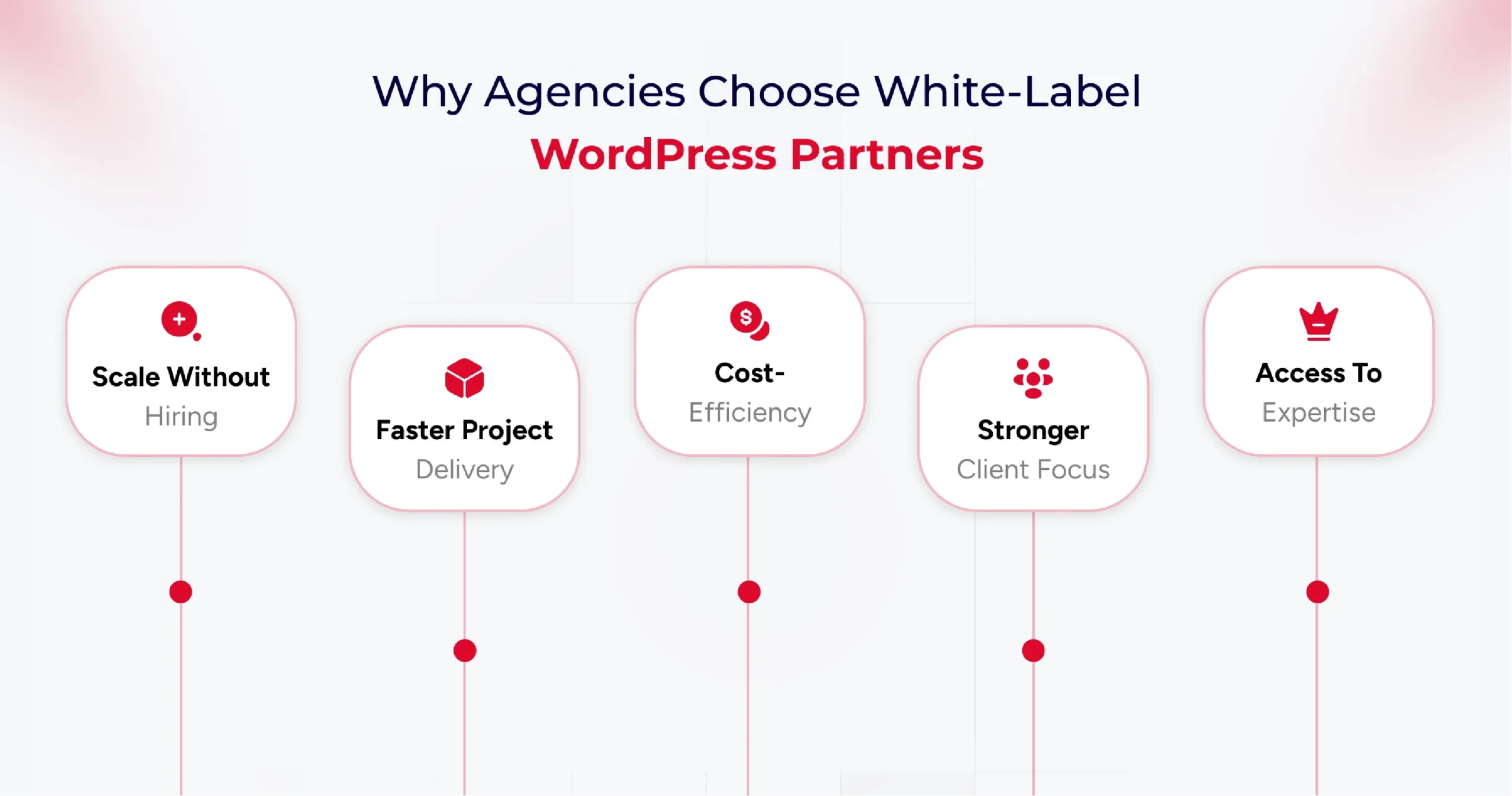
Why Top Agencies Use White-Label WordPress Partners?

Agencies often adopt white-label partnerships to get the perfect blend of strategic and practical benefits. It enables agencies to scale their services without incurring significant expenses on hiring in-house teams, focus on their core strengths, and ensure better delivery.

Here are some key reasons agencies use white-label WordPress partners,

1. Scalability without Hiring

White-label WordPress development services provide access to professionals who help agencies complete projects efficiently and deliver high-quality output. The best part is that agencies don’t need to hire these talented professionals in-house. So the cost of hiring, training, and managing talent is borne by the white-label WordPress development agency.

2. Faster Project Delivery

Partnering with a White-label WordPress agency ensures faster project delivery for top agencies and brands. With a team of dedicated experts, white-label service providers provide you with complete flexibility to add or reduce resources as per project needs.

3. Cost-Efficiency

Reduced hiring costs are just one of the many cost efficiency benefits of partnering with WordPress outsourcing services. As an agency, you can reduce the cost of development, content creation, SEO, and CMS management with this partnership.

4. Focus on Strategy and Client Relationships

Offering a finished product under the agency’s own brand creates a consistent and professional client experience. This partnership enables you to maintain smoother client relationships and ensure your team focuses on strategic tasks rather than development ones.

5. Access to Specialized Skills

Finding the right talent for your agency can be complex in a crowded market. Plus, if you need a specialized talent, hiring, onboarding, and ensuring the timely delivery of projects can be overwhelming. Partnering with a white-label development agency, you get access to specialized talents without the hassle of hiring them in-house.

Knowing the benefits of outsourcing to a white-label development agency leads to another crucial question: “What to outsource?” Yes, prioritizing specific tasks and operations for outsourcing is key to successful project delivery.

Top Tasks to Outsource Through White Label WordPress Providers

White-label WordPress providers ensure a range of services that you can outsource. But strategically planning the prioritization of tasks becomes essential. Here are some tasks that you can outsource to a WordPress development agency.

Custom WordPress Website Creation

As an agency, you can outsource the design and development of unique WordPress themes specific to your branding needs. It can help you customize a WordPress website for your clients based on their particular needs.

Plus, you can outsource custom plugin development to add unique functionalities and features to the website. And if you are looking to cater to an e-commerce brand, consider outsourcing WooCommerce development to a WordPress development agency.

You can also outsource website migration tasks, which allows you to seamlessly move the existing resources to newer WordPress versions or environments.

Ongoing Website Maintenance and Support

A key task to outsource is website maintenance. You can ensure higher website uptime by outsourcing the maintenance activities to a white-label development agency. These service providers continuously monitor your website and optimize it for performance based on analytics.

Using such services also ensures daily backups of your website. So, your site is always ready for recovery, even in the event of an incident. Plus, you get complete end-to-end technical support from a white-label development service provider.

SEO Implementation and Optimization

One of the most essential activities to outsource is search engine optimization. As an agency, you need to ensure maximum visibility for clients to ensure higher conversions. Plus, 53% of mobile visitors abandon pages, that take longer than 3 seconds to load. This makes outsourcing performance optimization to specialists crucial for your brand. A white-label WordPress development service helps you optimize SEO and provide better visibility.

  • SEO strategy development tailored to your client’s brand and target audience.
  • Identify related keywords, ensure better AIO and GEO strategies.
  • Optimize the website content, meta descriptions, titles, and images for search engines.
  • Address technical aspects of a website to ensure a better site structure, improved crawlability, and enhanced mobile-friendliness.
  • Implement link-building strategies to acquire high-quality backlinks from reputable websites with a high domain authority.
  • Create a content strategy and develop SEO-friendly resources that can offer the target audience better value.

Now that you know what tasks you need to outsource, understanding the impact and benefits of partnering with a white-label WordPress development agency becomes crucial.

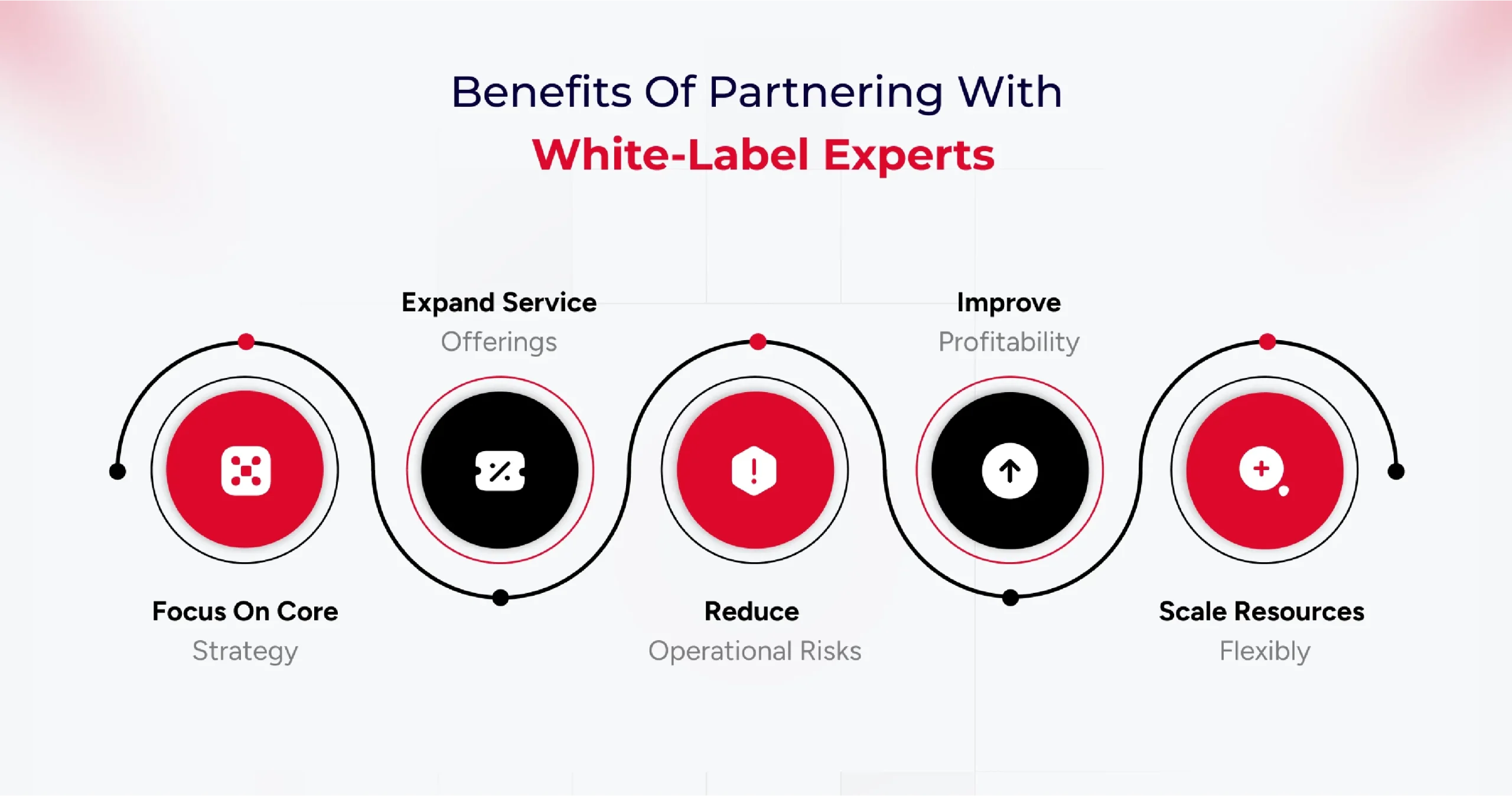
Benefits of Partnering with White-Label WordPress Experts

Partnering with a white-label WordPress development agency, you can get many strategic advantages. From access to specialized talent to reduced hiring overhead and faster project deliveries, the benefits are numerous. Understanding these benefits is crucial in making informed decisions about whether to partner with a WordPress outsourcing agency.

Some of the key benefits of partnering with a white-label development agency are,

  • Higher Focus on Core Competencies – Such services allow your team to focus on client relationships, strategy, and business development.
  • Service Offering Expansion – You can partner with a white-label development agency to easily scale your business offerings.
  • Risk Mitigation – Partnering with a white-label agency ensures a single point of contact for the client, providing a seamless experience. It offers better client loyalty and brand ownership.
  • Higher Profitability – With this partnership, your agency can handle more clients and increase its profitability through reduced operational costs.
  • Better Cost Efficiency – The reduced cost of recruitment, training, salaries, employee insurance, and other resources makes this partnership cost-efficient.
  • Faster Time-to-Market – Experienced teams and experts from a WordPress development agency help you deliver client projects faster. It enables you to launch a new service and meet deadlines quickly.
  • Better Flexibility & Scalability – Scaling your agency services becomes easier by partnering with a WordPress outsourcing service. Plus, you get better flexibility in adding resources as per project requirements.

A significant benefit of a white-label WordPress development service is lower cost. However, freelance developers can also help reduce the cost of development. This is why understanding the difference between freelance and white-label development becomes vital.

White-Label WordPress vs Freelance Developers (Comparison Table)

Here are some key differences between freelance and white-label development,

Criteria White-Label WordPress Design & Development Team Freelance WordPress Developer
Team Composition Multi-skilled team covering development, design, SEO, project management, and ongoing support Solo expert focuses on their core skills, may specialize in a niche
Scalability Highly scalable, can handle multiple projects and increased workloads efficiently Limited capacity is restricted by individual bandwidth and availability
Backend Support for Agencies Robust WordPress backend support; acts as a silent, invisible partner behind agency branding with long-term updates, troubleshooting, and security Often limited to core development, ongoing WordPress support depends on the freelance arrangeme
Branding Opportunities Enables agencies to offer white-label, branded services; clients see only agency brand Works under their own name; agency branding requires a special arrangement
Expertise Coverage Comprehensive covers design, speed optimization, plugin/theme customization, hosting, security, and maintenance Variable—may be deep in specific areas (e.g., WooCommerce, custom plugins), but broad coverage is often lacking
Cost Structure Higher upfront cost, but billed per actual work delivered; better cost efficiency for ongoing and larger projects Budget-friendly for small projects, flexible payment, and often lower overall costs
Project Management Dedicated account/project managers streamline workflow, communication, and deadlines Direct communication and feedback; management handled personally by the freelancer
Support & Maintenance Ongoing reliable WordPress backend support for agencies; regular updates, security, and fixes Support may be limited; post-project support depends on the freelancer’s availability and preferences
Availability Consistent—team approach ensures resources are deployed as needed Variable; freelancers may juggle multiple projects at once, affecting responsiveness
Delivery Consistency Quality assured with standardized workflows and quality checks Personalized service but variable consistency; may lack process rigor
Flexibility Can rapidly shift resources between projects as agency needs change; offers agency-focused customization. Maximum flexibility in hours and approach, direct negotiation possible

How to Choose the Right White-Label WordPress Partner

Identify your agency’s specific needs, such as full website development, plugin customization, backend support, or ongoing maintenance, before beginning your search. The ideal partner should offer in-depth WordPress expertise, align with your service requirements, and have a proven track record of delivery in similar agency models.

Essential Qualities to Look For in a Partner

  • Technical Expertise: Seek partners with a specialized team, proficiency in WordPress technologies (PHP, JavaScript, HTML, CSS), and proven experience in custom themes, plugins, performance optimization, and secure backend setups.
  • Quality Assurance: Look for robust testing processes, quality control, and attention to SEO, speed, and user experience in delivered projects.
  • White-Label Branding: The partner should work entirely behind your agency’s brand, never revealing their identity to end clients, and seamlessly adopting your branding elements.
  • Scalability & Consistency: A reliable team should scale with your project demands and provide standardized quality, regardless of order volume or complexity.
  • Communication & Support: Prioritize clear communication channels, timely responses, and dedicated support contacts. Regular updates, milestone tracking, and responsive problem-solving are vital.
  • Security and Confidentiality: Insist on NDAs and evidence of strong data protection measures, such as encryption protocols and internal security policies.
  • Ethics & Client Relationship: The partner should demonstrate transparency, intellectual property protection, and a commitment to long-term collaborative success.

Reviewing Past Work and Client Testimonials

Request portfolios, live website samples, and detailed case studies. Authentic client testimonials and reviews offer valuable insights into reliability, strengths, and real-world performance.

Quality, diversity, and relevance of past work indicate the partner’s capability to meet your agency’s standards and niche needs.

Service Agreement Factors You Should Know

Review the contract thoroughly, focusing on:

  • Project scope and deliverables
  • Timelines and benchmarks
  • Payment terms and pricing structures
  • Flexibility to tailor services
  • Post-launch support and maintenance commitments
  • Intellectual property ownership and confidentiality clauses

Clarify all terms to avoid hidden costs or misunderstandings. An explicit agreement ensures accountability and smooth execution.

Checklist for Agency Owners

Here is a checklist that you can follow as an agency owner while selecting the right white-label WordPress development service.

  • Define the exact services required for your agency’s workflow.
  • Assess the technical proficiency and WordPress specialization of the partner.
  • Review portfolios, case studies, and client testimonials for validation.
  • Confirm the partner’s experience in white-label branding and backend agency support.
  • Evaluate communication style, clarity, and responsiveness.
  • Verify security practices and willingness to sign NDAs.
  • Inspect their process for quality assurance and timely delivery.
  • Ensure flexibility in services and cost structures suited to agency budgets.
  • Clarify post-project support and troubleshooting commitments.
  • Audit for alignment in values, ethics, and collaborative approach.

Conclusion

In a fast-moving digital market, being slow is not an option for your agency. This is where a white-label development agency comes into play. It helps your agency deliver projects faster, customize the website as per branding needs, and ensure better profitability.

The key, however, lies in choosing the right partner. Agencies must carefully evaluate technical expertise, SEO know-how, communication practices, scalability, and security standards before committing. A strong partnership can empower agencies to focus on strategy, strengthen client relationships, and maintain brand ownership, all while delivering high-performing websites that meet their clients’ needs.

Ultimately, white-label WordPress development is not just about cost savings; it’s about getting higher flexibility, ensuring faster delivery, and building a sustainable growth model for agencies. By outsourcing the right tasks to the right partner, agencies can stay agile, competitive, and ready to deliver more value in an ever-evolving digital market.

How to Hire a Dedicated WordPress Development Team for Enterprises?

Did you know 60% of enterprises struggle to scale their WordPress websites due to a lack of specialized teams? If your business is growing fast, relying on scattered freelancers or overstretched IT staff may cost you time, money, and missed opportunities.

Enterprise websites demand more than just a digital presence they require enterprise WordPress development solutions that can handle scale, performance, and security. Yet many organizations still stretch their in-house IT teams thin or juggle scattered freelancers, leading to inefficiencies and missed opportunities.

According to Gartner, it projects that by 2026, 65% of enterprises will rely on third-party development partners for digital transformation. These stats highlight a growing reality: more businesses are turning to a dedicated WordPress development team often offshore, to manage projects end-to-end.

Whether you’re overhauling an outdated site, launching a customer portal, or integrating enterprise-grade systems, the right partner can transform your website into a scalable, revenue-driving asset.

Why Hiring a WordPress Development Team Is a Smart Enterprise Move

Digital expectations are at an all-time high. Enterprises can no longer rely on generic website solutions or patchwork freelancers. What they need is a dedicated WordPress development team for large-scale projects, one that can think strategically, execute precisely, and evolve continuously with the business.

Here’s why this move makes business sense:

1. Tailored Solutions for Complex Enterprise Needs

Decision-makers often land on your site with a specific intent—looking for answers, confidence, or a sign you “get it.” Good UX doesn’t just help them find what they need—it reassures them they’re in the right place.

  • Custom feature development to support unique workflows.
  • Enterprise-grade architecture designed for scalability and security.
  • Seamless third-party system integrations (CRM, ERP, APIs).

An experienced enterprise WordPress development solutions provider ensures your website is built for complexity without sacrificing usability.

2. Faster Time-to-Market

Speed matters especially when launching new services or rolling out updates.

  • A dedicated team works with streamlined processes and clear priorities.
  • Offshore teams enable 24/7 development cycles, reducing delivery timelines.
  • Task distribution across specialists (frontend, backend, QA, DevOps) accelerates execution.

This means quicker iterations, faster launches, and the ability to pivot with market changes.

3. Cost-Efficient Without Compromising Quality

Hiring senior in-house developers is costly and time-intensive. Offshore teams, by contrast, offer:

  • Competitive pricing with enterprise-level quality.
  • Savings on recruitment, onboarding, and infrastructure.
  • Flexible models (hourly, project-based, full-time) for budget control.

According to Deloitte, 70% of enterprises outsource software development to cut costs and boost efficiency and WordPress is no exception.

4. Access to Specialized Global Talent

When you hire an offshore WordPress development team for enterprises, you’re not limited by location. You gain:

  • Access to global WordPress specialists with cross-industry expertise.
  • Teams that stay updated with certifications and evolving best practices.
  • The right person for each role, every time.

5. Ongoing Support and Maintenance

Enterprise websites can’t “set and forget.” They require constant attention:

  • Updates, bug fixes, and backups.
  • Real-time support with strict SLAs.
  • Security patching and performance audits.

A dedicated team ensures your site remains fast, stable, and secure 24/7 eliminating the stress of last-minute fixes.

6. Alignment with Business Goals

This alignment keeps your website in step with your enterprise strategy.

  • Learn your brand voice, goals, and customer journey.
  • Use agile sprints, reporting, and check-ins for transparency.
  • Build a partnership focused on outcomes, not just tasks.

A professional team doesn’t just code; it collaborates. They:

7. Freeing Up Internal Resources

Let your staff focus on strategy, sales, and innovation — while experts handle:

  • Backend logic and frontend UI/UX.
  • Performance optimization, SEO, and analytics.
  • Security and compliance.

This division of labor increases efficiency and minimizes risks.

Essential Skills For Choosing the Right WordPress Development Team

Hiring a team isn’t just about coding knowledge. The best dedicated WordPress developers for large-scale projects combine technical expertise with soft skills that ensure long-term success.

Technical Skills: The Backbone of Your Website

The technical skills a WordPress development team brings to the table are non-negotiable, especially when you’re building an enterprise-grade website. These skills ensure your website runs smoothly, integrates seamlessly with other systems, and delivers an optimized user experience.

Custom Theme & Plugin Development

WordPress is incredibly flexible, but to unlock its full potential, you need developers who can build custom themes and plugins that meet your specific needs.

  • Custom Themes: If you need a unique design that matches your brand, a skilled team can create a custom theme from scratch. This means you’ll stand out from the thousands of other WordPress websites with off-the-shelf themes.
  • Custom Plugins: A good team will be able to build plugins tailored specifically for your business functions, whether it’s an advanced form, payment gateway integration, or special functionality you can’t find in existing plugins.

Custom development is vital to ensuring your site is future-proof, scalable, and capable of growing with your business needs.

REST API and Third-Party Integrations

Today’s WordPress websites are rarely standalone. They need to integrate with other tools, platforms, and services, from CRMs to marketing automation tools. The ability to work with REST APIs and integrate third-party services seamlessly is crucial.

An experienced WordPress development team should be able to connect your site to external APIs, such as social media platforms, payment gateways, and CRM systems.

They should also be adept at using RESTful APIs to allow for smoother, more efficient communication between your site and other services, resulting in faster load times and more powerful features.

Performance Optimization & SEO

A fast, high-performing website is essential for user experience and search engine rankings. Your WordPress development team should have a strong grasp of:

  • Performance optimization: From image compression and caching strategies to optimizing database queries and reducing server load, a good team knows how to make your site fast — no matter how much traffic you get.
  • SEO best practices: While SEO experts focus on content, your WordPress development team plays a big role in making sure the website is built with search engine rankings in mind. This includes ensuring proper site structure, fast load times, clean code, and accessibility.

These technical capabilities ensure that your site isn’t just functional but also visible and high-performing.

Security Best Practices

Security should never be an afterthought, especially when dealing with enterprise data and user information. A WordPress development team should be well-versed in security best practices:

  • SSL certifications, firewall configurations, and user access control.
  • They should be proactive in ensuring your site is protected from hacking attempts, malware, and potential vulnerabilities, and they should conduct regular security audits.
  • They must also stay up-to-date with the latest WordPress security protocols, which can evolve quickly.

In an era of data breaches and cyberattacks, you can’t afford to compromise on security.

Soft Skills: Where Collaboration Meets Innovation

While technical know-how is critical, soft skills are what transform a good WordPress development team into a great one. These are the traits that help teams collaborate, solve problems, and adapt to your evolving business needs.

Communication and Collaboration

Clear communication is key to the success of any development project, particularly when you’re working with remote or offshore teams. Your WordPress development team should be:

  • Responsive and transparent, keeping you in the loop about progress, challenges, and milestones.
  • Collaborative, willing to work with your internal teams, designers, and content creators to ensure your vision comes to life seamlessly.
  • Able to explain technical concepts in plain language, so you always understand what’s going on with your website, even if you’re not a tech expert.

Without strong communication, even the most skilled developers can miss the mark, leading to frustration, delays, and budget overruns.

Problem-solving and Innovation

Development is rarely a straight path. Problems and challenges will inevitably arise. You need a team that’s not only capable of solving problems but also innovative enough to come up with creative solutions.

  • The best WordPress teams are solution-oriented, willing to dig deep and find fixes that others might overlook.
  • They should have experience troubleshooting complex issues, whether that’s fixing site slowdowns, resolving conflicts between plugins, or troubleshooting complex integrations.
  • Beyond problem-solving, they should also bring a spirit of innovation, suggesting ways to improve your site’s functionality, design, or user experience that you hadn’t considered.

In the fast-paced digital world, innovation is a key driver of business success, and your WordPress team should be ready to contribute ideas that take your website to the next level.

Time Management

When it comes to development, time is of the essence — especially when there are multiple stakeholders and tight deadlines. Your WordPress development team should be skilled in:

  • Prioritizing tasks based on business needs and project timelines.
  • Managing resources to ensure work is being done efficiently without unnecessary delays.
  • Meeting deadlines and providing regular updates on progress.

Time management isn’t just about meeting deadlines; it’s about maximizing productivity and delivering results on time — without sacrificing quality.

Experience with Enterprise-Grade Solutions

Finally, you want a team that has experience working with enterprise-grade WordPress solutions. This means they’re familiar with:

  • Handling large-scale websites with thousands (or millions) of visitors, high data traffic, and complex workflows.
  • Integrating enterprise-level tools like ERP systems, CRM software, and other third-party business solutions.
  • Ensuring that your WordPress site is not only scalable but also maintainable as it grows over time.

Their experience in working with large-scale projects will help them anticipate challenges and set up your site for success well into the future.

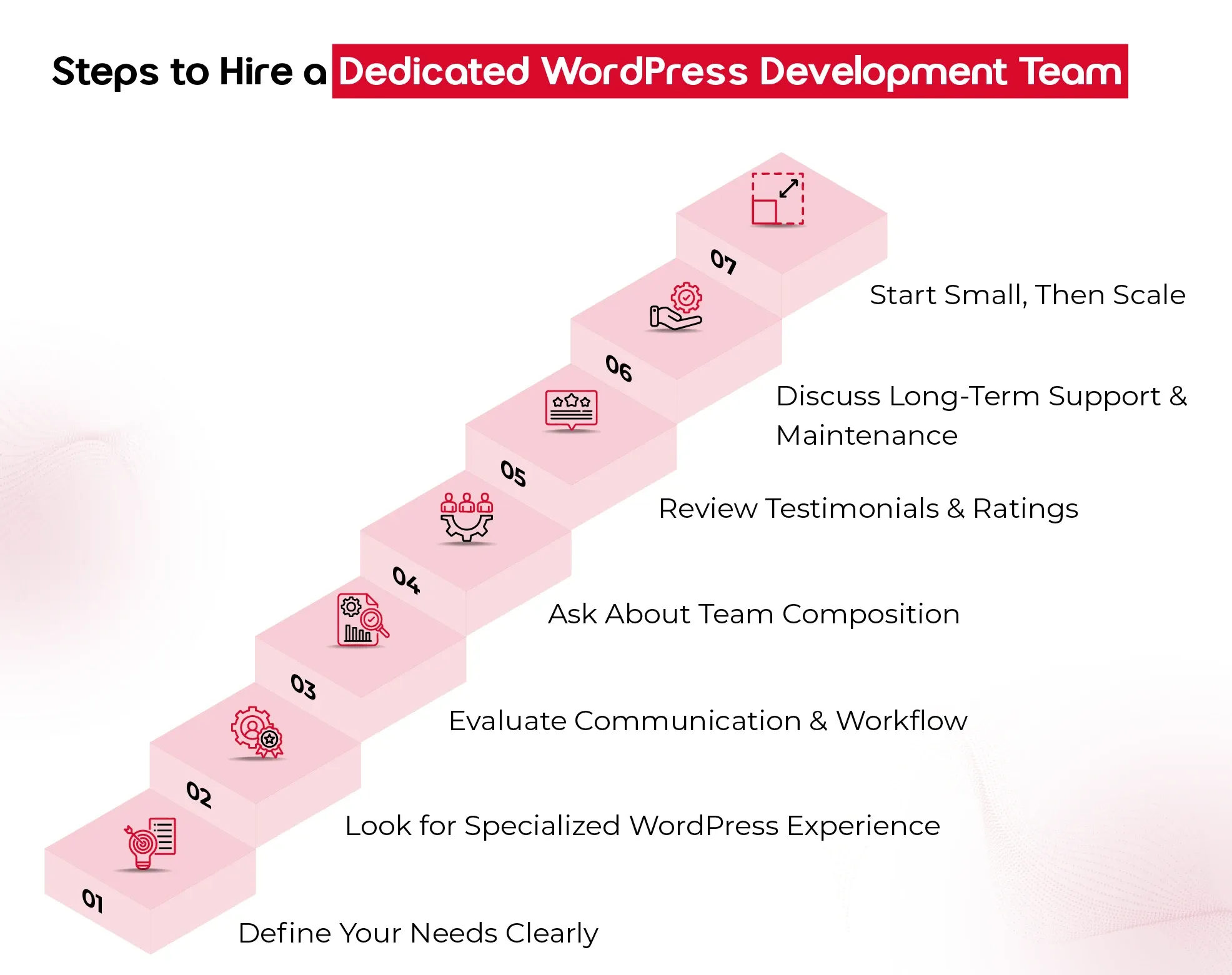
7 Easy Steps to Hire a Dedicated WordPress Development Team

Hiring the right WordPress development team can feel like a big decision and it is. Your website isn’t just a digital storefront; it’s the engine powering customer experiences, driving conversions, and reflecting your brand at every click. So, choosing the right team to build, scale, and support it is worth getting right. Here are the essential steps to help you make a smart, confident hiring decision.

1. Define Your Needs Clearly

Before you even start looking for a team, take a step back and ask: What do you need this team to do?
Are you:

  • Building a website from scratch?
  • Redesigning an existing platform?
  • Adding custom features or integrations?
  • Needing ongoing support and maintenance?

Documenting your goals, technical requirements, timeline, and budget upfront gives you clarity—and makes it easier for the team you hire to deliver the results you expect.

2. Look for Specialized WordPress Experience

Not all developers who “know WordPress” are the same. For enterprise-grade projects, you need a team that specializes in:

  • Custom WordPress development (not just tweaking themes)
  • Scalable architecture and database management
  • Performance optimization and security
  • API integrations with CRMs, ERPs, or marketing tools

Ask to see case studies or a portfolio that reflects similar work to your needs. The right team won’t just say “yes” they’ll ask thoughtful questions, spot risks, and bring proactive solutions.

3. Evaluate Communication & Workflow

A great development team doesn’t just build well — they communicate well. Pay attention to how they:

  • Respond during your initial inquiry
  • Handle your questions (Are they clear, honest, and transparent?)
  • Explain their development process and timelines

You want a team that’s structured, easy to reach, and keeps you in the loop throughout the project. Especially if you’re hiring an offshore WordPress development team, time zone compatibility, tools for collaboration (like Slack or Trello), and clear project documentation become extra important.

4. Ask About Team Composition

An experienced WordPress development team is more than just developers. Ideally, you’re getting:

  • A project manager to guide and coordinate
  • Front-end and back-end developers
  • Designers (if design is in scope)
  • QA testers ensure everything runs smoothly

Understanding who’s involved and what roles they play helps you assess whether the team can handle your scope effectively, especially for large or ongoing enterprise projects.

5. Review Testimonials and Ratings

What others say about them matters. Look for:

  • Verified reviews on platforms like Clutch
  • References from past clients (especially other enterprises)
  • Detailed testimonials that speak to delivery quality, communication, and problem-solving

If they have a 5/5 rating on Clutch, that’s a great sign — but always dig deeper. Strong reviews should reflect more than surface-level praise.

6. Discuss Long-Term Support and Maintenance

Building the site is just one part of the journey. Make sure your potential team offers:

  • Post-launch support
  • Bug fixes
  • Regular updates and security monitoring
  • Scalability planning as your business grows

Your WordPress site should evolve with you, so choose a team that’s in it for the long haul, not just the build phase.

7. Start Small, Then Scale

If you’re unsure, start with a smaller engagement, like a test project, performance audit, or a single feature build. This gives you a real-world look at how the team works before committing to a larger, long-term contract.

Final Thought

In today’s digital-first landscape, a website isn’t just a marketing tool; it’s the backbone of customer experience and enterprise growth. Partnering with an offshore WordPress development team for enterprises gives you the best of both worlds: cost efficiency and access to specialized global talent. From custom architecture to long-term support, a skilled team ensures your website scales as your business grows.

At QeWebby, our dedicated WordPress developers for large-scale projects combine technical excellence with enterprise-level strategy. With a proven 5/5 Clutch rating and experience across industries, we help enterprises build, scale, and secure WordPress websites that drive measurable results.

Top 7 UI/UX Design Trends in B2B Websites

In the B2B landscape, first impressions are often digital. Your website speaks before your team does.

With buyers conducting extensive online research before ever speaking to a sales team, your website’s user experience (UX) plays a critical role in shaping trust, clarity, and conversion.

According to a report, 90% of B2B buyers will switch to a competitor if a supplier’s digital experience doesn’t meet expectations. This highlights a growing reality: functional design isn’t enough—your website must also be intuitive, engaging, and built around the user.

Why Great UI/UX Is No Longer Optional for B2B Brands

A website is no longer just a support function. It’s a strategic business asset—often the first real interaction a potential client has with your brand. And in that moment, design isn’t about decoration. It’s about how your business thinks, communicates, and earns trust.

While products and pricing still matter, the way you deliver clarity, reduce friction, and guide decisions through your digital experience is what sets you apart. That’s where UI/UX becomes critical—not as a design checklist, but as a reflection of how seriously you take your customers’ time and attention. Here’s what businesses need to recognize:

Your Buyers are Judging Long Before They Engage

Decision-makers often land on your site with a specific intent—looking for answers, confidence, or a sign you “get it.” Good UX doesn’t just help them find what they need—it reassures them they’re in the right place.

Digital Experience = Perceived Value

A seamless interface subtly says: “We’ve thought this through.” A confusing or clunky site, on the other hand, quietly signals a lack of care, even if your actual offering is solid.

Modern Design Is Modern Thinking

Following current UI/UX trends isn’t about looking trendy—it shows your company is tuned in, adaptive, and forward-moving. That’s the kind of partner clients want to work with.

It Impacts Business Outcomes Directly

Efficient user flows, responsive layouts, and intuitive design reduce drop-offs, shorten sales cycles, and even influence how your sales team is perceived when a lead finally reaches out.

Basically, investing in smart UI/UX is investing in how your business is experienced and remembered.

The trends we’re about to explore aren’t just design updates. They’re part of a broader shift in how successful B2B brands are choosing to show up digitally—with clarity, empathy, and strategic intent.

Trend #1. Minimalist & Conversion-Focused Layouts

Complexity often creeps in unintentionally. Multiple stakeholders, layered service offerings, and long-form content can lead to cluttered interfaces that confuse rather than convert.

That’s why minimalist UI design—when combined with conversion-focused UX thinking—has become a powerful design trend in the B2B space.

But let’s understand that minimalist doesn’t mean empty or oversimplified. It means removing distractions so that what truly matters stands out—your value proposition, your trust signals, and your conversion paths.

B2B buyers are goal-driven. They’re often pressed for time and want fast access to relevant insights, not to wade through jargon or excessive visuals.

Minimalist design helps reduce cognitive load. The more you simplify the experience, the easier it is for decision-makers to say “yes.”

Clean layouts guide the eye toward CTAs, lead capture forms, demo buttons, or product documentation.

What does a minimalist, conversion-focused layout look like?

  • Clear hierarchy of information (headlines, subheads, short content blocks)
  • Generous white space that enhances focus and calm
  • High-contrast buttons with a single, strategic CTA per section
  • Limited color palettes that align with your brand’s tone
  • Decluttered menus with intent-based navigation

It’s a quiet but powerful signal that says:

“We respect your time, we know our value, and we’re here to make your decision easier.”

Trend #2. Personalization & AI-Driven Experiences

Relevance is everything. Buyers come to your website with different goals, backgrounds, and levels of urgency. A CTO may be looking for technical documentation, while a marketing lead wants case studies and ROI insights.

When your website delivers the same generic experience to everyone, it misses the opportunity to truly connect.

What does personalization in B2B UI/UX look like?

  • Smart content modules that adapt based on user behavior, industry, or job role
  • Dynamic CTAs that reflect the stage of the buyer journey
  • AI-powered chatbots or assistants offering tailored support in real time
  • Customized dashboards or portals for existing clients or partners

Personalization removes friction by helping users get to the information they need faster. Decision-makers want efficiency.

AI enables scale. Machine learning tools help B2B websites adapt in real time without constant manual intervention.

Tailored journeys build trust. When visitors feel seen and understood, they’re more likely to engage, explore, and eventually convert.

Trend #3. Micro-Interactions for Engagement

Micro-interactions are the small, sometimes overlooked elements of design that give digital interaction a sense of responsiveness, intuitiveness, and humanity.

Think of a subtle hover effect, a form field that highlights when clicked, or a gentle animation when a button is pressed.

Although these animations appear insignificant, they hugely contribute to B2B UI/UX design, particularly in an area where it’s harder to gain engagement.

Where micro-interactions show up in B2B UX:

  • Navigation cues that show progress (like a progress bar during form fills or onboarding steps)
  • Card hover effects, button hover effects, chart hover effects that show additional information without clicking
  • Real-time feedback upon an action (e.g., “Form submitted successfully,” “Copied to clipboard,” “Added to dashboard”)
  • Animated transitions that direct the eye’s attention across one portion to the next

Micro-interactions are not decorative; they’re strategic. They’re a way to say: “We’ve thought about the details because we care about how people experience our brand.”

These interactions might not be called out in a boardroom, but they’re felt in every click, every form, every page transition. And they leave a lasting impression.

Trend #4. Mobile-First, Performance-Optimized Design

It’s easy to assume that most digital experiences happen on a desktop. But the reality tells a different story. Decision-makers are increasingly browsing solutions, reviewing proposals, and even initiating vendor conversations via mobile.

Whether it’s a quick glance during a commute or reviewing a demo link between meetings, mobile-first UX design has become essential, not optional.

But mobile-first doesn’t just mean “responsive.” It means designing from the smallest screen up, making speed, clarity, and actionability the core pillars of your experience.

After all, mobile is part of the buying journey. A CFO might check your pricing page on a tablet. A tech lead might review your capabilities via mobile before looping in their team.

Google ranks you based on mobile performance. Core Web Vitals now directly impact SEO, affecting visibility in competitive B2B markets.

First impressions happen fast. If your mobile experience lags or feels broken, the assumption is that your service might be the same.

What does a mobile-first, performance-optimized UI/UX look like?

  • Prioritized content hierarchy for small screens—headline, value, CTA
  • Thumb-friendly interactions, sticky CTAs, and collapsible menus
  • Compressed media, optimized images, and lazy loading for speed
  • Performance-focused code and reduced dependencies for fast load times

Think of mobile-first design not just as a design principle, but as a commitment to meeting your buyer where they are.

Trend #5. Advanced Data Visualization & Storytelling

B2B decisions are built on data. But here’s the challenge: presenting data isn’t the same as communicating value.

Your audience doesn’t just want to see numbers—they want to understand what those numbers mean for them. That’s where advanced data visualization and narrative-driven UI/UX design come into play.

It’s about using visual hierarchy, interaction, and storytelling to help users make sense of information—faster and more confidently.

When your site presents complex information in a way that’s not just digestible—but engaging—you’re not just informing buyers. You’re empowering them.

What this looks like in modern B2B UX:

  • Interactive dashboards that allow users to filter and explore metrics based on their interests
  • Animated infographics that explain concepts step-by-step
  • Scroll-based storytelling that connects data points to real-world outcomes
  • Side-by-side comparisons, ROI simulators, or industry benchmarks embedded in product or service pages

Data is your strongest proof, but without clarity, it becomes noise. A well-visualized insights help teams justify buying decisions internally. And moreover, strategic storytelling turns technical content into persuasive narratives.
Trend #6. Accessibility & Inclusive Design

Inclusive UX design is becoming a non-negotiable. It’s not just about compliance—it’s about values, reach, and long-term sustainability.

Whether your users are navigating with assistive technologies, dealing with temporary limitations (like low bandwidth or a cracked screen), or simply prefer different interaction styles, your website should offer a consistently smooth, respectful experience for all.

What accessibility in B2B web design looks like:

  • Clear visual contrast between text and background for readability
  • Keyboard navigation and screen reader compatibility
  • Alt-text for images, semantic HTML, and ARIA roles for clarity
  • Transcripts or captions for video and audio content
  • Logical, predictable navigation and form flows

Accessible sites are often better for everyone. Simpler navigation, clear content, and fast performance benefit all users—not just those with specific needs.

In addition to this, regulations are tightening. Accessibility standards (like WCAG 2.2) are increasingly being baked into legal and procurement requirements—especially in enterprise and government contracts.

Above all, investing in accessibility shows your business is mature, thoughtful, and built for scale.

Trend #7. Video & Interactive Product Demos

No matter how well-crafted your messaging is, there’s a point where your buyers want to see the product in action, experience the flow, or understand how your solution fits into their world.

That’s why video walkthroughs and interactive demos have become a major UX trend across high-performing B2B websites.
They turn passive viewers into active participants—and that’s where confidence starts to build.

What this looks like in modern B2B UI/UX:

  • Short explainer videos on key pages (homepage, product, pricing, use cases)
  • Interactive demos that allow users to click through features, explore interfaces, or simulate outcomes
  • Personalized demo experiences tailored by industry or role
  • Embedded video testimonials or scenario-driven product use cases

Video and interactivity aren’t about looking flashy—they’re about meeting your buyers where they are: curious, busy, and skeptical.

When your website offers a guided experience that feels clear, transparent, and immersive, you’re removing barriers and building trust at the same time.

Avoid These Common UI/UX Pitfalls in B2B Website Design

Adopting the latest UI/UX design trends can elevate your B2B website—but only when applied with clarity, purpose, and user understanding. Without strategic execution, even the most promising trends can backfire, confusing users, hurting conversions, or diluting your brand message.

Here are common mistakes B2B leaders and designers must actively avoid—and what to do instead:

1. Chasing Aesthetics Over Conversions

Over-prioritizing sleek visuals without considering the buyer journey.

Every layout, interaction, or animation should lead users toward a specific business goal—whether that’s requesting a demo, downloading a whitepaper, or booking a call. Keep it conversion-focused, not just pretty.

2. Overusing Personalization Without Value

Implementing AI-driven personalization that feels invasive or irrelevant.

Use user behavior, role-based logic, or firmographics to enhance relevance—but always give users control. Respect privacy and keep personalization subtle and helpful. Make it feel intelligent, not intrusive.

3. Adding Micro-Interactions Without Intent

Using hover effects, animations, and transitions that serve no functional purpose.

Micro-interactions should reinforce clarity—highlight a CTA, validate form inputs, or show feedback. Avoid flashy distractions that hinder usability. Delight through simplicity, not gimmicks.
4. Ignoring Mobile Optimization
Designing desktop-first and trying to retrofit it for mobile later.

Adopt a mobile-first UI design approach from day one. B2B buyers are increasingly on mobile—ensure fast load times, thumb-friendly CTAs, and clean navigation. Mobile is not secondary—it’s primary.

5. Overcomplicating Data Visualizations

Presenting charts or dashboards that look impressive but confuse decision-makers.

Use visual storytelling to break down complex data into actionable insights. Choose clarity over cleverness. Highlight trends, not just numbers. Your data should talk, not puzzle.

Trends are only effective when anchored in strategy and empathy. Also, it is important to stay aligned with what your users actually need to move forward confidently.

How to Choose UI/UX Trends That Fit Your B2B Needs

With so many UI/UX design trends making waves, it’s tempting to apply them all. But in B2B, success lies not in how many trends you follow, but in how well they align with your customer experience goals, buyer intent, and industry context.

Here’s how to choose the right UI/UX elements for your B2B website—smartly, intentionally, and impactfully:

Start with Your Buyer Journey

Start by asking: What are your visitors looking for when they land on your site?

Your UX should guide them—intuitively—from awareness to trust to action. Whether they’re exploring solutions, comparing vendors, or ready to request a quote, your design choices should meet them where they are.

Use trend elements like micro-interactions or data visualization to simplify complex buying decisions, not overwhelm them.

Match Trends to Business Goals

Not every interaction needs a trend. Some need clarity.

If your priority is more demo sign-ups, consider minimalist layouts with clear CTAs. If you want to showcase product complexity, invest in interactive product demos or video walkthroughs.

Align every UI/UX element with a measurable outcome—lead quality, engagement time, or conversion rate.

Stay Future-Focused, But User-Centered

A trend is only valuable if it enhances user experience for the long haul.

Look beyond visual appeal. Will this trend scale as your product evolves? Does it improve accessibility? Will it work seamlessly across devices?

Conduct UX audits regularly. A professional B2B UI/UX design partner can help you evaluate what’s working and what’s just noise.

Prioritize Performance & Personalization

Speed, relevance, and smooth interaction are non-negotiable.

If your B2B users are enterprise clients or time-strapped professionals, the design must perform fast, feel personalized, and avoid friction.

Consider tools like AI-driven personalization or mobile-first design frameworks—implemented by teams that understand the tech and the psychology behind them.

When in Doubt, Test—Then Optimize

No trend should go live without validation.

Even small changes in design can shift engagement drastically. A/B test your UI elements, collect heatmaps, and gather user feedback to refine experiences iteratively.

Partner with a team that offers continuous UX optimization—not just one-time design.

Future Trends in UI/UX Every B2B Website Should Watch

Agentic AI & Generative Interfaces – Interfaces that proactively assist users by generating content, suggestions, and decisions using AI.

Voice, Ambient & Zero-UI Experiences – Seamless interactions using voice or background automation—no buttons, just intuitive actions.

Spatial Computing & AR-Driven Visuals – Blending physical and digital worlds with immersive, 3D experiences using AR and spatial tech.

Predictive UX Powered by Real-Time Analytics – Smart interfaces that anticipate user needs before they act, reducing friction and improving flow.

Final Thought

Trends will come and go, but great UI/UX design is about knowing which ones to lean into, and when to say no. Especially in B2B, where the goal isn’t just to look good—it’s to build trust, speed up decisions, and quietly guide users toward the right action.

If you’re at a stage where your site needs to not just look better but perform better, now might be the right time to explore what thoughtful, strategic UI/UX design services can do for your business. Because in a B2B world where attention is earned, experience speaks louder than words.

A Quick Guide to Create High-Converting Lead Magnet Optin Forms

A simple Optin form can be the difference between a fleeting visitor and a loyal customer.

Simply obtaining site visitors is not sufficient for business success. To convert random site visitors into passionate clients you require conversion-driving approaches which guide prospects into client status. The application of lead magnet Optin forms is what comes into the role.

All forms have different levels of effectiveness since they do not function equally. Poorly designed Optin forms together with those positioned in inconvenient locations will allow prospects to escape your lead base. A lead magnet form that impresses prospects during their first interaction will help you establish trust while developing relationships that produce successful deals. So, whether you’re offering a free trial, a whitepaper, or an exclusive demo, here is the key to unlocking the leads you’ve been missing.

Ready to see your conversions skyrocket? Let’s get started!

Top 6 Benefits of Having a Lead Magnet Optin Form on Your WordPress Site

If you’re still on the fence about whether a lead magnet Optin form is right for your WordPress site, let’s break down the real benefits—because this isn’t just about collecting emails.

1. Capture Quality Leads Who Are Actually Interested

When you offer something valuable in exchange for someone’s email (like a free trial, eBook, or exclusive demo), you’re not just collecting random email addresses. You’re attracting leads who are genuinely interested in what your software can do. This means the leads you gather are more likely to convert into paying clients.

2. Build a Trusting Relationship with Your Audience

A lead magnet Optin form isn’t just a way to collect emails—it’s a way to start a conversation. By offering something of value upfront, you’re demonstrating that you’re not just interested in making a sale but in providing meaningful value. This builds trust from the get-go.

3. Nurture Leads with Automated Follow-Ups

One of the most powerful benefits of having a lead magnet Optin form is the ability to automate your lead nurturing. Once someone subscribes, you can set up an email sequence that guides them through the journey from visitor to customer.

4. Improve Conversion Rates and ROI

Once your form is set up and integrated with your email service provider, it practically runs itself. No more chasing down leads manually or relying on costly ad campaigns to generate interest. With an automated Optin form, you can continue growing your list, increasing conversions, and improving ROI—without lifting a finger.

5. Gain Valuable Insights into Your Audience

Your WordPress Optin form isn’t just a tool for collecting leads; it’s also a treasure trove of insights. By analyzing who is signing up, where they’re coming from, and what offers resonate the most, you can better understand your audience’s preferences and pain points.

6. Scale Your Business with a Growing Email List

With a lead magnet Optin form, you’re constantly growing this list with targeted, engaged leads who want to hear from you. As your list grows, so do your opportunities to nurture relationships, share updates, and upsell to existing customers. A well-maintained email list also gives you the chance to promote new features, upgrades, or special offers.

Easy Steps to Create a Lead Magnet Optin Form for Your WordPress Website

Creating a high-converting lead magnet Optin form for your WordPress site doesn’t have to be complicated. Whether you’re a WordPress pro or a beginner, there are several ways to get your form up and running.

  • Choose your Email marketing platform
  • Select a WordPress plugin for Optin forms
  • Create a lead magnet
  • Design your Optin form
  • Setup an Email marketing integration
  • Set display rules and targeting options
  • Create a thank-You page or confirmation message
  • Test and optimize your form

Here’s a simple, step-by-step guide to help you create a form that attracts and converts visitors into valuable leads.

  1. Choose Your Email Marketing Platform

Before you get started, you need an email marketing provider to store and manage your leads. Some of the most popular options include:

  • Mailchimp
  • ConvertKit
  • ActiveCampaign

Most of these platforms offer integration with WordPress plugins, making the process easier. Choose the platform that best suits your business needs and sign up for an account.

2. Select a WordPress Plugin for Optin Forms

Now that you’ve picked your email provider, it’s time to select a plugin to build and manage your Optin forms. There are several excellent WordPress plugins available, and the choice depends on your needs. Choose a plugin that fits your level of expertise and offers the features you need. Some popular ones include:

3. Create a Lead Magnet

This step is crucial—create a lead magnet that needs to be enticing enough for visitors to exchange their email addresses. Make sure you create a lead magnet that addresses a specific pain point your audience faces and is relevant to your software. A lead magnet could be:

  • A free trial or demo of your software
  • An eBook or whitepaper with valuable insights
  • Case studies showing how your product solves specific business problems
  • A checklist or template for potential customers

4. Design Your Optin Form

Once your plugin is installed and activated, it’s time to design your Optin form. Most plugins allow you to easily customize the design, so take advantage of that to make the form look professional and inviting. Here are some tips:

  • Keep it simple: Only ask for essential information—usually just name and email.
  • Be clear: Use a compelling headline that explains the value of the lead magnet. For example: “Get Our Free 30-Day Trial Now!”
  • Use a strong call-to-action (CTA): Make it action-oriented like “Download Now” or “Claim Your Free Trial.”
  • Match your branding: Ensure your form’s colors, fonts, and images align with your website’s look and feel.

5. Set Up Email Marketing Integration

After designing your Optin form, you need to connect it with your email marketing service. This will ensure that when someone submits the form, their email is added to your list and they get the promised lead magnet. Now, when someone subscribes to your Optin form, they’ll be automatically added to your list and sent the lead magnet. Here’s how to do it:

  • Go to your plugin settings and find the Email Integration section.
  • Enter the necessary API key or credentials from your email marketing service (Mailchimp, ConvertKit, etc.).
  • Map the form fields (like Name, Email) to your email service’s fields to ensure everything syncs correctly.

6. Set Display Rules and Targeting Options

The next step is deciding when and where your Optin form will appear on your site. Display rules help ensure your form is shown at the right time, maximizing conversions. Most plugins allow you to easily set these triggers to optimize your form’s visibility. Here are a few options to consider:

7. Create a Thank-You Page or Confirmation Message

Once a visitor submits their information, you want to thank them and guide them to the next step. Make sure your thank-you page or message is clear and directs them to the next action. You can either:

  • Redirect them to a thank-you page: This page can include a download link for your lead magnet, access to a trial, or even a CTA to schedule a demo.
  • Show a thank-you message: If you prefer, you can display a message on the same page thanking them and providing access to the lead magnet.

8. Test and Optimize Your Form

Before going live, it’s important to test your form. Most plugins offer built-in A/B testing tools, so you can compare different versions of your form to find the most effective one:

  • Check the design: Ensure it looks good on both desktop and mobile devices.
  • Test functionality: Make sure the form is submitted correctly and integrates seamlessly with your email provider.
  • Optimize for performance: Use A/B testing to try different headlines, CTAs, and form placements. Track your conversion rates to see which versions perform best.

Common Mistakes to Avoid When Create a Lead Magnet Optin Forms

While you create a lead magnet Optin form while custom wordpress development is an exciting step, it’s easy to make a few mistakes that can hinder its performance. Here are some common pitfalls to avoid to ensure your Optin form is both effective and efficient:

1. Asking for Too Much Information

One of the biggest mistakes is requesting too much information upfront. Keep it simple! The more fields you have, the less likely visitors will be to fill out your form. Stick to the basics: name and email. Only ask for additional details (like company name or phone number) if absolutely necessary.

2. Poorly Designed Forms

An unappealing form can turn visitors away. Avoid clutter and make sure your design aligns with your website’s branding. Your form should be easy to read, visually appealing, and mobile-friendly. A clear, compelling CTA and a well-placed form can make all the difference.

3. No Clear Value Proposition

If your lead magnet doesn’t immediately communicate its value, visitors won’t bother signing up. Make sure your form clearly explains what they’ll get and why it’s worth their time. Use attention-grabbing copy and highlight the benefits of your offer, whether it’s a free trial, an eBook, or an exclusive resource.

4. Failing to Follow Up Promptly

Once someone subscribes, don’t leave them hanging. If they’ve signed up for a free trial or resource, make sure to send the promised content immediately. Set up automated follow-up emails to engage them right away and keep them interested.

5. Not Optimizing for Mobile

More than half of web traffic comes from mobile devices, so if your Optin form isn’t optimized for mobile, you’re losing potential leads. Test your form across different devices to ensure it looks great and functions smoothly on smartphones and tablets.

6. Ignoring A/B Testing

Don’t just set it and forget it. Regularly A/B test your Optin forms to see what works best. Experiment with different headlines, CTA buttons, and form placements to optimize your conversion rate.

7. No Thank-You Page or Confirmation Message

Always provide a clear next step after someone submits the form. A thank-you page or confirmation message reassures users that their submission was successful. This also gives you an opportunity to guide them to further actions, like checking their email or scheduling a demo.

In a Nutshell

Your WordPress Optin form is more than just a tool—it’s your digital handshake with potential clients. By offering valuable content in exchange for their information, you’re not only growing your email list but also building trust and credibility. With the right strategy and ongoing optimization, your Optin form can be the driving force behind your lead generation efforts. Our custom WordPress development services are here to assist with plugin setup, form design, and optimization—so you can focus on what matters most: growing your software business.

Ready to Boost Your WordPress Conversions?

Let’s Connect

8 Big WordPress Mistakes To Avoid During Website Scalability

Failure to scale your site appropriately can lead to slow load times, crashes, poor user experience, and overall a loss in revenue opportunities.

When your WordPress website is pulling in millions of views a month, it’s clear you’ve found success. But as your site grows, so do the challenges. Traffic surges can cause slowdowns, crashes, and security headaches if you’re not prepared. Failure to scale your site appropriately can lead to slow load times, crashes, poor user experience, and lost revenue opportunities.

Before scaling your WordPress website, it’s helpful to understand when the right time comes. Let us first find out how to recognize the early signs that indicate it’s time to start thinking about growth.

Identifying the Right Time to Scale Your WordPress Site

There are several signs that indicate it’s time to scale your WordPress website. If you notice any of the following, it’s time to start planning for scalability:

1. Decreasing Website Speed

If your WordPress website starts to slow down, even with a minimal increase in traffic, it may be a sign that your current hosting or website structure can’t handle the growing demand. Slow page load times can frustrate users and impact SEO rankings. It’s a strong indicator that scaling is necessary to maintain performance.

2. Traffic Surges or Spikes

Unexpected traffic spikes, like those from a viral blog post, promotional campaigns, or seasonal peaks, can overwhelm your server if your site isn’t designed to handle high volumes of visitors. If you’re experiencing frequent traffic surges, it’s time to consider scalable hosting solutions and load balancing.

3. Website Downtime

Frequent crashes or downtime are major red flags. If your site is going down often, especially during high-traffic periods, your infrastructure is likely not equipped to handle the load. This is a clear indication that scaling is necessary to keep your site running smoothly.

4. Security Concerns

As your WordPress website grows, so does the complexity of managing security. If your site is increasingly targeted by attacks, or you’re handling sensitive user data, it’s crucial to implement better security measures. Scaling your WordPress website with improved security practices, such as SSL encryption, firewalls, and regular updates, will protect your business and users.

5. Higher User Engagement

If you’ve noticed an increase in user engagement, such as more sign-ups, purchases, or interactions, your WordPress website may soon become overwhelmed by the growing demand. A scalable infrastructure will help you manage this higher engagement and ensure the user experience remains smooth.

6. Frequent Plugin and Theme Conflicts

As your WordPress website grows and you add more plugins and themes, you may begin to experience compatibility issues. If plugins are conflicting with each other, causing crashes or slowdowns, it’s a sign your site may need to be optimized for better compatibility and scalability.

7. Limited Hosting Resources

If you’re using shared hosting and see that your WordPress website performance is deteriorating, you may have reached the limits of your server’s resources. If you’re running into frequent issues with CPU usage, memory limits, or bandwidth, it’s time to consider a more robust hosting solution, such as VPS or dedicated hosting.

8. Expanding Content or Features

As your site grows, you may add more content, products, or features. These changes can significantly increase the load on your server, especially if you’re managing a large amount of data. Proper scaling helps accommodate these additions while keeping your site fast and functional.

With the right strategies and infrastructure, your site can continue to perform at its best, even as your business expands. But as your WordPress website begins to grow, it’s easy to overlook some crucial aspects that can lead to bigger problems down the line. Check out the biggest mistakes that hurt scalability and share simple tips to help your site grow without the growing pains.

8 Big Mistakes to Avoid While Building WordPress Website

Mistake #1: Choosing the Wrong Hosting Solution

Many businesses make the mistake of going for cheap shared hosting, thinking it’s the best deal. The problem? Your site shares server space with tons of other sites, which leads to slower load times, frequent downtimes, and major issues as your site grows. It’s fine for small, low-traffic sites, but as your audience expands, you’ll quickly outgrow it.

Here’s what you should consider:

  • Shared Hosting: It’s budget-friendly but lacks the resources you need for scalability. It’s great for small sites but won’t cut it as your business grows.
  • VPS Hosting: More resources and better performance, with part of the server dedicated to your site. It’s a good middle ground for growing businesses.
  • Dedicated Hosting: All the resources of an entire server just for your site. It’s more expensive but essential for high-traffic sites or complex needs.

Choosing the right host is crucial—don’t go for a bargain if they can’t provide the support you’ll need down the line. Picking a low-cost host can backfire, causing slowdowns or even site crashes when traffic spikes.

Mistake #2: Ignoring Website Performance Optimization

A slow-loading WordPress website is a significant deterrent for users and a key ranking factor for search engines. Research shows that even a one-second delay in load time can lead to a 7% reduction in conversions. Google’s Core Web Vitals further emphasize the importance of fast load times for SEO rankings.

To improve performance:

Caching: Store static files so users don’t need to reload the same content every time they visit.

  • Image Optimization: Compress images without sacrificing quality to reduce page size.
  • Minimizing HTTP Requests: Reduce the number of elements on a page, such as scripts, images, and CSS files, to decrease load times.
  • Use Lazy Loading: Only load images and videos when they are in the user’s view to avoid unnecessary load on the initial page load.

Keeping your site lean, removing excess scripts, and reducing third-party integrations will help your site remain fast as it grows.

  • Talk about the impact of slow-loading WordPress websites on user experience and SEO.
  • Discuss strategies for optimizing performance, including caching, image optimization, and minimizing HTTP requests.
  • Share the importance of keeping your website lightweight and fast.

Mistake #3: Poorly Chosen Themes & Plugins

Themes and plugins can add great functionality to your WordPress website, but they can also hinder scalability if not chosen carefully. Poorly coded themes or plugins can cause slow performance, compatibility issues, and security vulnerabilities.

  • Choose Lightweight Themes: Opt for themes designed with scalability in mind—simple, minimalistic designs that load fast and avoid unnecessary scripts.
  • Test Plugins: Always test plugins for compatibility with your WordPress version, and ensure they are updated regularly. Overusing plugins can also bloat your site, so make sure each plugin serves a specific need.

Before adding any theme or plugin, review its performance impact using tools like GTMetrix or Pingdom.

Mistake #4: Failing to Implement a Scalable Database

A poorly structured database can easily become a bottleneck as your site grows. As data increases, the system’s ability to handle multiple queries without slowing down becomes critical.

To ensure scalability:

  • Database Indexing: Indexing helps your database quickly retrieve records, reducing load times, especially for larger websites.
  • Optimize Queries: Avoid excessive and complex database queries that slow down your site. For example, don’t use loops that make unnecessary database calls.
  • Database Cleanups: Regularly clean up unnecessary data, such as post revisions, spam comments, and expired transients, which can increase the database size unnecessarily.

A scalable database will ensure your website continues to perform well even as your business grows.

Mistake #5: Not Planning for Traffic Growth

Many businesses underestimate the future growth of traffic and fail to plan for surges, which can overwhelm their infrastructure. The lack of proper scalability can lead to crashes, slow speeds, and a poor user experience.

To scale effectively:

  • Load Balancing: Distribute traffic across multiple servers to prevent any single server from being overwhelmed.
  • Cloud Hosting: Provides the flexibility to scale your resources up or down based on demand.

Content Delivery Networks (CDNs): Distribute your site’s static content to servers worldwide, so users from different regions can load the site faster.

Mistake #6: Neglecting Security Measures

Security breaches are a common cause of site downtime, loss of data, and compromised user trust. Hackers can exploit vulnerabilities, especially on sites that aren’t regularly maintained.

To protect your site:

  • Regular Updates: Keep WordPress core, themes, and plugins updated to patch known vulnerabilities.
  • Two-Factor Authentication (2FA): Use 2FA for added protection against unauthorized logins.
  • SSL Certificates: An SSL certificate ensures data between the server and user is encrypted, improving both security and SEO.

Failing to implement proper security measures will not only harm your reputation but can also leave your website vulnerable to attacks.

Mistake #7: Overcomplicating the User Experience (UX)

A cluttered website with confusing navigation and too many distractions can overwhelm visitors. A bad user experience (UX) makes it hard for users to find what they need, increasing bounce rates and limiting conversions.

To create a user-friendly experience:

  • Intuitive Navigation: Make sure users can find what they need quickly with clear menus and categories.
  • Mobile-First Design: As mobile traffic continues to rise, your website must be optimized for mobile devices. Google even prioritizes mobile-first indexing.
  • Minimalist Design: Keep the layout clean and avoid overloading pages with excessive text or media.

Mistake #8: Skipping Regular Maintenance and Updates

Skipping updates and maintenance can lead to performance issues, security vulnerabilities, and compatibility problems. Neglecting regular WordPress core, theme, and plugin updates can lead to unforeseen problems down the line, especially when newer versions of PHP or WordPress are released.

A solid maintenance plan should include:
  • Routine Backups: Ensure you have regular backups in case of website failure.
  • Performance Audits: Run audits using tools like Google PageSpeed Insights to assess your site’s performance.
  • Consistent Updates: Regularly update the WordPress core, themes, and plugins to ensure everything is running smoothly.

By creating a solid maintenance schedule, you’ll prevent issues from escalating and ensure long-term scalability.

Don’t wait for your website traffic to slow down!

Scale up your WordPress website with us!

Contact Us Now!

In a Nutshell

Scaling your WordPress website successfully requires strategic planning and the right tools. We understand what it takes to get it right, and we’ve helped countless businesses ensure their WordPress websites stay fast, secure, and easy to navigate. Our team has a proven track record of ensuring everything runs smoothly, leaving you with more time to focus on your business.

Reach out today, and let us help you scale your WordPress website effortlessly!

5 Key Features for Flawless WordPress CRM Plugin Integration

Businesses that use CRM systems see an average increase of 29% in sales. A true CRM integrates directly with your WordPress site, allowing you to streamline your processes and automate repetitive tasks. For example, your CRM can automatically capture leads from contact forms, landing pages, or pop-ups on your WordPress site. Instead of manually entering information, all customer data is organized, segmented, and stored in a single database.

Specifically, when your CRM is synced with your WordPress site, the possibilities multiply. A connected system allows for real-time updates on customer data, ensuring your team is always working with the latest information. It bridges the gap between marketing, sales, and customer support, ensuring every team has access to the insights they need to improve customer experiences and drive growth.

Benefits of CRM Website Integration

Simply having a WordPress website isn’t enough—business leaders need to leverage data, optimize workflows, and offer personalized experiences to stay ahead. Here’s how CRM integration with WordPress can help you do exactly that:

Centralized Customer Data for Smarter Decisions

One of the most significant advantages of CRM integration is having all your customer data in one place. With this consolidated data, you can track customer behaviors, identify trends, and segment audiences more effectively. For instance, knowing which pages a visitor interacts with most can help you tailor marketing messages or promotions, increasing the likelihood of conversions. It’s about using data to take your customer relationships from transactional to transformational.

Seamless Customer Journey Across Touchpoints

Your customers engage with your business across multiple touchpoints—your website, social media, emails, and customer support. Integrating your CRM with WordPress ensures that all these touchpoints are connected, creating a seamless and cohesive customer experience. Whether it’s a personalized follow-up email, an automated discount offer, or an insightful recommendation, CRM integration helps you maintain that all-important personal touch without the need for constant manual input.

Automation That Saves Time and Boosts Efficiency

Automation is one of the key benefits that CRM integration brings to your WordPress site. With automated workflows, you can handle repetitive tasks, such as lead follow-ups, email marketing campaigns, and customer reminders, without lifting a finger. Moreover, these automated processes run 24/7, freeing up your team to focus on more strategic initiatives while ensuring no lead or customer is left behind.

Enhanced Customer Support and Engagement

When a customer reaches out via your site, the CRM automatically logs their issue, history, and prior interactions. This enables your support team to provide faster, more informed responses, ultimately improving customer satisfaction. Plus, CRM integration with WordPress gives you the ability to automate responses, set up reminders for follow-ups, and track ongoing issues—helping your team resolve cases efficiently while maintaining a high standard of service.

Scalability for Growing Businesses

Whether you’re a small startup or a large enterprise, a CRM can grow with you, ensuring that you never outgrow your system. You can add more features, integrate additional tools, or scale your automation workflows as needed—all without disrupting the user experience or workflow.

Key Features Of CRM Plugin in WordPress

1. Content Management and Segmentation
  • An effective CRM will allow you to gather, store, and organize customer data (such as email addresses, phone numbers, interactions, and behavior) in a centralized database.
  • Once your data is organized, segmentation allows you to categorize your customers based on shared characteristics, such as demographics, buying behaviors, or engagement levels. This way, you can deliver more targeted and personalized communication, whether it’s through email marketing, tailored offers, or customer service follow-ups.

HubSpot CRM automatically captures leads from forms and tracks customer interactions, making segmentation easy.

2. Lead Capture and Management

  • Integrating your WordPress site with your CRM enables automatic lead capture from forms, landing pages, and pop-ups. The CRM will then categorize, score, and assign leads to your sales team, ensuring no opportunity slips through the cracks.
  • CRM systems can even trigger automated follow-up actions based on lead behavior, ensuring you’re engaging with prospects at the right time. This automation not only saves time but ensures a consistent approach to managing leads and opportunities.

Active Campaign offers form integration that automatically pushes leads into the CRM, where they can be nurtured through email sequences.

3. Email Marketing Automation

  • With CRM integration, you can automate your email marketing campaigns based on customer behavior and interactions. For example, after a visitor signs up for your newsletter or abandons their cart, your CRM can automatically trigger personalized emails designed to move them through the sales funnel.
  • By combining customer data with behavior insights, you can craft email campaigns that feel highly personalized—building stronger connections with your audience.

Mailchimp offers advanced email automation features, including automated welcome emails, follow-ups, and cart recovery emails.

4. Sales Pipeline and Deal Tracking

  • Sales teams thrive on organized workflows and efficient pipeline management. Integrating your WordPress site with a CRM that supports sales pipeline management is critical for tracking and converting leads into customers.
  • Many CRMs offer visual pipelines, sales forecasting, and task automation to keep the process smooth and efficient.

Zoho CRM offers a seamless WordPress integration that allows you to track and manage deals, automate sales workflows, and forecast revenue.

5. Analytics and Reporting

  • Having access to data-driven insights is crucial for making informed decisions. With CRM integration, you can access powerful analytics and reporting tools that give you real-time visibility into your customer interactions, sales performance, and marketing campaigns.
  • Tracking key performance metrics, such as conversion rates, email open rates, and website traffic can be used to refine your strategies, optimize your content, and improve customer targeting.

Google Analytics Dashboard for WP (Not a CRM plugin on its own) integrates Google Analytics with your WordPress site, providing the valuable data you need to enhance CRM performance and optimize your site’s marketing efforts.

Whether it’s lead capture, sales pipeline management, email marketing automation, or customer support, integrating the right CRM features will streamline your processes, increase your team’s productivity, and ultimately drive better customer experiences.

Choosing the Right CRM for Your WordPress Website

Implementing a CRM can dramatically improve how you manage customer relationships, streamline your business operations, and enhance your marketing efforts. Keep these essential factors in mind when choosing the best CRM for your needs:

  • Ensure Easy Integration: Choose a solution that connects effortlessly with your forms, landing pages, and eCommerce tools without requiring complex setups or technical knowledge.
  • Prioritize Scalability: Select a CRM that grows with your business. It must handle increased leads, customers, and workflows as your business expands, so you never outgrow your system.
  • Demand Customization Flexibility: The CRM should be fully customizable to fit your unique business needs. Look for options that allow you to create custom fields, modify reports, and adjust user roles to align with your workflow.
  • Stick to Your Budget: Choose a CRM that fits within your budget while still delivering essential features. Take advantage of free versions or tiered pricing plans that offer flexibility as your business needs change.
  • Focus on Ease of Use: The CRM must be intuitive and easy for your team to use. A user-friendly interface ensures quick adoption, reduces the need for extensive training, and enables your team to get started immediately.
  • Demand Excellent Customer Support: Reliable customer support is non-negotiable. Ensure the CRM provider offers accessible channels like live chat, comprehensive help documentation, and training resources to resolve any issues swiftly.
  • Automate Key Processes: Look for CRM solutions with powerful automation features. Automate email marketing, lead nurturing, and task management to improve efficiency and reduce manual work.
  • Leverage Analytics for Better Decisions: The CRM must offer robust analytics and reporting tools. Track key metrics such as customer engagement, sales performance, and campaign success to make informed, data-driven decisions.

Transform your customer relationships today!

Let’s integrate a CRM solution for your WordPress site.

Let’s Connect

Take the Next Step with CRM Website Integration

Whether you’re looking to automate lead generation, enhance customer service, or gain deeper insights into customer behavior, the right CRM can make a world of difference. Our expert team has years of experience in customizing CRM solutions to meet the unique needs of our clients. From setting up automated workflows to ensuring seamless synchronization with your WordPress site, we’ll guide you every step of the way.

Contact us today to get started with a consultation, and let’s take your customer relationships to the next level.

8 Game-Changing WordPress SEO Trends to Dominate in 2025

93% of online experiences start with a search engine. If your website isn’t optimized for SEO, your business is missing out on a huge opportunity.

Without effective SEO, even the best WordPress site can get lost in the sea of online content. It’s the key to standing out.

SEO is the foundation of any successful WordPress website. And without effective SEO, even the best WordPress site can get lost in the sea of online content. So if you’re not staying on top of the latest trends, your business website will get lost in the shuffle.

Here, we’ll walk you through the top SEO strategies for WordPress that will help you stay ahead. Whether you’re looking to boost your rankings, improve user engagement, or make your site easier to find, we’ve got you covered.

Ready to level up your SEO? Let’s get started!

Why SEO Matters More Than Ever in 2025

Google’s algorithms have evolved significantly, with over 600 updates every year. These changes now focus on more than just keywords. Factors like user experience, content relevance, and site speed are now major ranking signals. Google’s shift towards AI-driven algorithms means that ranking isn’t just about matching keywords—it’s about understanding intent and providing a seamless user experience.

In 2025, mobile optimization is non-negotiable. More than 60% of global searches are now done on mobile devices, and Google ranks mobile-friendly sites higher. If your site isn’t optimized for mobile, you’re losing traffic and sales.

But it’s not just about being mobile-friendly; it’s about creating a superior user experience. Websites that load quickly, have easy navigation, and provide value are the ones that keep users engaged. Google rewards sites that prioritize the user, meaning better content, faster load times, and intuitive design are essential.

8 WordPress SEO Trends for 2025

#1 Implement Core Web Vitals for Better User Experience

Core Web Vitals are a set of key metrics that Google uses to measure the quality of a user’s experience on your website. In 2025, these metrics are more important than ever for SEO and rankings. Google has made these metrics a major ranking factor. And, sites with better Core Web Vitals provide a smoother, faster experience, improving both user engagement and conversions.

Core Web Vitals Explained
  • LCP (Largest Contentful Paint): Measures how long it takes for the largest visible content element (like an image or text block) to load.
  • FID (First Input Delay): Measures the time between a user’s first interaction with the page and the browser’s response.
  • CLS (Cumulative Layout Shift): Tracks visual stability—how much content moves around during page load.

Practical Tips for Improving Core Web Vitals

  • LCP: Optimize large images, use modern image formats (e.g., WebP), and implement lazy loading.
  • FID: Minimize JavaScript execution and reduce third-party scripts.
  • CLS: Ensure proper layout and avoid elements that shift during loading (e.g., ads, fonts).
#2 Mobile-First Indexing

With over 60% of global web traffic coming from mobile devices, Google has shifted to mobile-first indexing. This means Google primarily uses the mobile version of your site to determine rankings. If your site isn’t optimized for mobile, it could severely impact your visibility in search results. Mobile-first indexing means Google uses the mobile version of your website to evaluate content, usability, and overall site quality. If your desktop version differs from your mobile version, Google will rank your mobile version—so both need to be equally optimized.

Why Mobile Optimization Matters
  • Google prioritizes mobile-friendly websites: Sites that offer a smooth mobile experience are ranked higher.
  • User expectations: Mobile users expect fast-loading, easy-to-navigate websites.
  • Impact on SEO: A mobile-optimized site improves user experience and leads to lower bounce rates, higher engagement, and ultimately better rankings.
Mobile Optimization Techniques
  • Responsive Themes: Use a responsive design that adapts seamlessly to different screen sizes. This ensures your site looks great and functions properly on both desktops and mobile devices.
  • Image Compression: Compress images without sacrificing quality to reduce page load time on mobile devices. Large images can slow down loading times, negatively affecting user experience and SEO.
  • Fast Loading Times: Mobile users expect quick access to information. Aim for a load time of under 3 seconds to prevent users from leaving your site. Consider optimizing JavaScript, CSS, and leveraging browser caching.
  • Easy Navigation: Ensure menus, buttons, and forms are easy to interact with on mobile screens. Use larger buttons and simplify navigation for small screens.

By prioritizing mobile optimization and adhering to mobile-first indexing, you’ll ensure that your WordPress site performs well across all devices, improving both user experience and your position in search rankings.

Make Sure Your WordPress Website is Ready for Mobile-First SEO!

Let’s Connect

#3 Leverage Artificial Intelligence for Content Creation

In 2025, Artificial Intelligence (AI) is revolutionizing the way we create content. From generating blog posts to optimizing content for SEO, AI-powered tools are helping WordPress users save time, improve quality, and enhance rankings.

How AI Can Assist in Generating High-Quality Content

AI tools, such as GPT-powered writing assistants, can help you quickly create well-written, relevant content. These tools can:

  • Generate Blog Posts: AI can create articles, product descriptions, and landing pages in minutes based on your specified topic and keywords.
  • Offer Content Suggestions: AI analyzes your content and suggests improvements, such as adding specific keywords, headings, or questions to make the content more SEO-friendly.
  • Create Unique Content: AI can generate unique content that is free from plagiarism, reducing the time spent on research and drafting.
Balance Artificial Intelligence with Human Creativity
  • Keep the Authenticity: AI-generated content may lack a personal voice or brand tone. Balancing AI with human edits ensures your content stays authentic and connects with your audience.
  • Keep the Relevance: AI doesn’t always understand nuanced topics or trends. Human input is necessary to ensure the content remains relevant, timely, and aligned with your audience’s interests.

By leveraging AI for content creation, you can improve efficiency, create SEO-friendly content faster, and stay ahead in the competitive digital space. Just remember to balance AI tools with your unique voice and human creativity to maintain authenticity and relevance.

#4 Focus on E-A-T (Expertise, Authoritativeness, Trustworthiness)

As Google continues to prioritize high-quality content, sites that demonstrate strong E-A-T signals are more likely to rank higher in search results. E-A-T ensures that your website provides value, is credible, and offers reliable information to users.

Google wants to ensure that the content on your site is written or reviewed by subject matter experts, especially for topics related to health, finance, or law (YMYL – Your Money Your Life pages). Content from qualified experts is more likely to rank higher.

Search engines like Google look at your website’s reputation and authority within its niche. If your site is frequently cited by reputable sources or has strong industry recognition, it signals authority.

Trust is a key component in Google’s algorithm. Websites that are transparent, secure (e.g., HTTPS), and offer a good user experience are more likely to be seen as trustworthy.

Here’s Easy Way To Enhance Your Site’s E-A-T

1. Create High-Quality, Expert Content:
  • Produce in-depth, accurate, and well-researched content that showcases your expertise in your niche.
  • Cite authoritative sources, such as research studies or reputable websites, to back up your claims.
2. Build Backlinks from Trusted Sites:
  • Earning backlinks from high-quality, authoritative websites signals to Google that your site is credible.
  • Engage in guest blogging, partnerships, or content collaborations to build these valuable backlinks.
3. Add Author Bios with Credentials:
  • Clearly display author credentials and qualifications on relevant pages. For instance, if writing about health, include the author’s medical background.
  • This adds credibility and shows that the content is written by someone with expertise in the subject matter.
Regularly Update Content:
  • Keep your content up-to-date, especially for topics that evolve frequently (e.g., technology, trends). Google values fresh and relevant information.
#5 Focus on Long-Tail Keywords and Semantic Search

Semantic search refers to how search engines understand the context of a query, rather than just matching exact keywords. Google uses advanced AI, like BERT (Bidirectional Encoder Representations from Transformers) and RankBrain, to interpret search intent, understand the meaning behind words, and deliver results that best match the user’s needs.

Instead of focusing solely on keywords, semantic search looks at the broader context of a query, considering synonyms, related concepts, and the user’s search history. This shift means that Google prioritizes content that provides comprehensive, useful information over keyword-stuffed pages.

Moreover, long-tail keywords are more likely to match specific user intents. For example, someone searching “how to bake chocolate chip cookies from scratch” is more likely to engage with your content than someone searching simply “cookies.”

It often faces less competition, making it easier to rank for them, even if your site is relatively new. And more importantly, users searching with long-tail keywords are often further down the sales funnel, meaning they are more likely to convert.

Tools to Find Long-Tail Keywords
  • Google Keyword Planner: Helps you find long-tail keywords based on search volume and competition. Simply enter a broad term, and Google will suggest related long-tail phrases.
  • – Ubersuggest: Offers long-tail keyword suggestions and also gives insights into search volume, competition, and trends. It’s a great tool for finding keywords with high conversion potential.
  • – AnswerThePublic: This tool visualizes the questions people are asking around your target keywords, helping you find common long-tail phrases related to your topic.
  • SEMrush: Provides keyword suggestions and related long-tail variations, along with insights into search trends and competition.
#6 Update Your Content Regularly to Stay Relevant

Search engines love websites that keep their content up-to-date, as it signals that your site is active, relevant, and providing the latest information. Regularly updating your content can help maintain or improve your rankings, keep visitors engaged, and boost your authority in your niche.

Why Fresh Content Matters for SEO in 2025
  • Google’s Algorithm Prioritizes Freshness: Google rewards sites that regularly update their content. Fresh, relevant content is more likely to appear in search results, especially for topics where timely information is key (e.g., news, trends, or technology).
  • Improves User Engagement: Visitors are more likely to return to a site that provides new insights, updated statistics, and the latest industry news. This engagement signals to Google that your site offers ongoing value.
  • Outdated Content Hurts SEO: Pages with outdated or irrelevant information are less likely to rank well. Updating content ensures that your website remains trustworthy and authoritative.

Best Practices for Content Updating

  • Review and Update Old Posts: Periodically go through your older blog posts and refresh them with new data, insights, or examples. Make sure the information is still accurate and relevant. This is especially important for evergreen content.
  • Add New Information: If a topic has evolved, add new sections or updates to reflect the latest trends, discoveries, or news. For example, if you’re writing about digital marketing strategies, update your post with the most recent algorithm changes or tools.
  • Refresh Outdated Keywords: Review your content for outdated keywords that may no longer be effective. Swap them for more relevant, high-traffic long-tail keywords or terms aligned with current search trends.
  • Improve Readability: As you update, make sure the content is well-structured and easy to read. Break up long paragraphs, add subheadings, and include images or videos where necessary.
  • Update Meta Descriptions and Titles: Ensure that your meta descriptions, titles, and URLs reflect any changes made to the content. These elements are essential for search visibility and user click-through rates.

By regularly updating your content, you ensure that your site remains relevant in 2025’s ever-changing digital landscape. This practice not only helps you stay on top of search rankings but also builds trust with your audience, proving that your content is consistently providing valuable and up-to-date information.

#7 Optimize Your Site’s Internal Linking Structure

Internal linking is a crucial yet often overlooked aspect of SEO that can significantly impact your WordPress site’s visibility, crawlability, and user experience. These links pass link authority (or “link juice”) from high-ranking pages to other pages, helping them rank better in search results.

Search engines use internal links to crawl and index your pages. A well-structured internal linking strategy makes it easier for bots to navigate your site and discover all its content.

Internal links help search engines understand the relationship between different pieces of content, which can improve your site’s topical relevance and ranking.

Best Practices for Internal Linking
  • Use Descriptive Anchor Text: The anchor text (the clickable text in a link) should be relevant to the linked page. Avoid generic phrases like “click here.” Instead, use specific keywords that describe the content, helping search engines understand what the linked page is about.
  • Maintain a Logical Link Structure: Ensure your internal links follow a logical structure, ideally from more general content (like your homepage or main categories) to more specific content (like blog posts or product pages). This structure helps both users and search engines easily navigate your site.
  • Link to Relevant Content: Only link to pages that are contextually relevant. Linking unrelated pages can confuse both search engines and users, potentially harming your SEO efforts.
  • Avoid Over-linking: Too many internal links on a single page can overwhelm users and reduce the effectiveness of each link. Keep your internal links concise and focused, ideally linking to 3–5 relevant pages per post or page.
How Internal Linking Improves Crawlability and User Navigation
  • Better Crawlability: A well-organized internal linking structure ensures that search engine crawlers can easily access all important pages of your website. This can help pages that may not otherwise be discovered gain visibility in search results.
  • Improved User Navigation: Internal links make it easier for visitors to find related content, which improves their experience and keeps them engaged longer. This can reduce bounce rates and improve on-site metrics, which in turn boosts SEO.

By optimizing your internal linking structure, you enhance both the crawlability of your site and user navigation, ultimately boosting your WordPress site’s SEO performance. Take the time to review and improve your internal linking strategy to achieve long-term success in 2025.

#8 Optimize for Voice Search

With the rise of voice-activated devices like smartphones, smart speakers, and virtual assistants, voice search is rapidly transforming how people search for information online. By 2025, voice search is expected to account for over 50% of all searches, making it a critical SEO factor that WordPress users cannot afford to overlook.

This shift requires a change in SEO strategy, focusing more on long-tail keywords, question-based content, and optimizing for natural language rather than the keyword-heavy phrases traditionally used in text search.

Key Differences Between Text and Voice Search Queries
  • Longer Queries: Voice search queries are typically longer and more specific than text queries. For example, a voice search might be, “How can I improve my website’s SEO on WordPress?” compared to the text search term “WordPress SEO tips.”
  • Conversational Tone: Voice searches often mimic everyday speech, so optimizing for a more conversational tone can help your content rank better.
  • Local Intent: Many voice searches are locally focused (e.g., “Where can I get coffee near me?”), so optimizing for location-based keywords is crucial for businesses aiming to capture voice search traffic.
Quick Tips for Optimizing WordPress Content for Voice Search

1. Create Question-Based Content
2. Optimize for Featured Snippets
3. Use Structured Data (Schema Markup)
4. Improve Local SEO

Want to Improve Your Online Visibility to Reach More Audience?

Let’s Connect

Wrap Up

The future of SEO is here, and 2025 will bring even more opportunities for WordPress users to boost their online presence. By adopting the latest SEO strategies, from optimizing for Core Web Vitals to leveraging AI-driven content, you’ll set your site up for success. As search algorithms become more sophisticated, staying on top of these trends will ensure your website stands out, ranks higher, and attracts the right audience.

Ready to elevate your WordPress site’s SEO and performance? Our expert team specializes in WordPress SEO and development—from on-page optimization to custom solutions that drive real results. Get in touch with us today to start optimizing your website for 2025 and beyond!

What’s New in WordPress 6.7: Key Features and Enhancements

WordPress 6.7 will go live on 12 November! Packed with powerful new features, it’s set to take your website-building experience to new heights. From a sleek, brand-new default theme that makes design a breeze, to major enhancements in the block editor that boost both speed and creativity, WordPress 6.7 is all about making your workflow smoother and more efficient.

At QeWebby, we’ve been closely monitoring the development of WordPress 6.7, testing its beta release, and we are excited to share the new features and improvements that are set to elevate the website-building experience. Add in some impressive backend optimizations, and you’ve got an update that’s bound to transform how you build and manage websites.

Here’s a quick look at what’s coming in WordPress 6.7!

1. New Default Theme – Twenty Twenty-Five

Every year, WordPress introduces a new default theme, and Twenty Twenty-Five continues this tradition. What sets Twenty Twenty-Five apart is its versatility. It offers a wide variety of patterns, layouts, and styles, enabling users to express their stories in countless ways.

The theme’s design draws inspiration from the beauty of nature and the flow of time, invoking themes of impermanence, growth, and transformation.

The overall aesthetic of Twenty Twenty-Five leans into positivity, with soft colors, light textures, and an inspiring vibe. Whether you’re building a personal blog or a professional site, this theme invites you to explore endless creative possibilities while maintaining a sense of calm and elegance throughout.

2. Zoom-Out View for Site Editing

WordPress 6.7 is making it easier than ever to design and edit your site with a new “zoomed-out” approach, allowing you to work at the pattern level and get a better overview of your layout.

Here’s a quick look at what’s coming:

  • Zoomed-Out Pattern View: When inserting or creating patterns, you’ll be able to zoom out and see how everything fits together, making it easier to plan and organize your design.
  • Pattern-Focused Page Creation: Adding new pages will feel more intuitive, with a zoomed-out view that highlights patterns and helps you maintain the big picture.
  • Easier Pattern Manipulation: Moving, deleting, or adjusting patterns in the template will be smoother, with a handy new vertical toolbar to give you better control.
  • Smoother Dragging: The user experience for dragging patterns around has been improved, making it easier to reposition elements without breaking your flow.
  • Quick Zoom Toggle: A simple toggle will let you switch between zoomed-out and zoomed-in views in the preview panel, so you can adapt to your needs on the fly.
  • Seamless Block Editing: You can easily switch between block-level editing and the zoomed-out view, keeping your workflow flexible and efficient.
  • Content-Only Editing: With content-focused editing, you can stay focused on what matters most and get things done faster without distractions.

3. Media File Improvements

WordPress 6.7 is making major strides in how we add and interact with media, offering enhanced flexibility and performance. New features include support for the HEIC image format, auto-sizing for lazy-loaded images, and expanded background image options at both the block and global levels. These updates are designed to improve how you manage media on your site, making it more efficient and visually appealing.

  • HEIC Support: Upload HEIC images seamlessly, with automatic conversion and optimizations for better performance and compatibility.
  • Auto Sizes for Lazy-loaded Images: Lazy-loaded images will now automatically adjust their size, improving page load times and user experience.
  • Block-Level Background Images: Apply background images to individual blocks and set global background styles across your site for a consistent design.
  • Background Attachment Support: Add fixed backgrounds (attachment) for a more dynamic, scrolling effect.
  • Streamlined Background Image UI: A new modal for background images consolidates the UI, making it easier to customize your site’s visuals.

4. Preview Options API

WordPress 6.7 introduces a new API that takes the Preview dropdown menu in the post and page editor to the next level. With this update, plugin developers can now add their own custom menu items, offering more flexibility and personalized preview options directly within the editor.

Key features of this update include:

  • PreviewDropdownMenuItem Component: This new component allows plugins to easily add custom items to the Preview dropdown, enhancing the previewing process.
  • Custom Menu Items: Plugins can now include menu items with custom titles and click handlers, giving developers more control over what users can preview and how.
  • Extensibility with Consistency: While the core structure of the Preview dropdown remains unchanged, this API makes it easy to extend its functionality without disrupting the existing layout.

5. Refined Query Loop Block

While it’s crucial for the block to offer a wide range of features, it’s equally important that it remains easy to customize and use. That’s why the Query Loop is getting a thoughtful refresh — from refining the settings copy to enhancing how it detects context, the goal is to make this block more intuitive without sacrificing its capabilities. This update is all about making the Query Loop easier to work with, so you can unlock its full potential with less effort.`

For example, the block’s settings copy is being reworked for clarity, making it easier to understand what each option does. At the same time, better context detection will allow the block to automatically adjust based on where it’s used, saving time and reducing the need for manual adjustments.

These thoughtful improvements aim to make the Query Loop block not only more powerful but also more intuitive, giving you the ability to create dynamic, content-driven pages with ease.

6. Enhanced Typography and Font Management

Gone are the days of manually tweaking font sizes for different devices! One of the new exciting features in WordPress 6.7 is fluid typography — a smart update that ensures your text looks great no matter what device it’s viewed on.

Fluid typography lets your text resize smoothly and automatically, so your site’s content always looks polished and easy to read. It’s a simple update that makes a big difference, ensuring your typography is always responsive and user-friendly, no matter where it’s being viewed.

In addition to the front-end and editor updates, WordPress 6.7 includes performance optimizations and new APIs for developers:

PHP 8.X Compatibility: Updates to ensure seamless integration with modern PHP versions.
Template Registration API: A new API simplifies how templates are registered programmatically, making plugin development more straightforward.
Script Loader Enhancements: Obsolete polyfills are removed, reducing unnecessary script dependencies.

Wrap Up

With all these exciting updates in WordPress 6.7, it’s clear that the platform is evolving to make site-building easier, more flexible, and more powerful. Whether it’s improving how you work with media, offering more customization options, or enhancing the overall user experience, WordPress is becoming a more intuitive tool for everyone.

Ready to unlock the full potential of your WordPress site? At QeWebby, our team of experts is here to help you make the most of these new features and create a site that truly works for you. Get in touch with us today to take your WordPress experience to the next level!

Additionally, improvements are underway to make the API more accessible for developers, particularly by simplifying how core sources like “Post Meta” manage bindings. This includes expanding support for more core sources and refining the block bindings editor to be more flexible for future needs, such as supporting new pattern override features. These updates will make working with dynamic content in WordPress even easier and more powerful.

Under-the-Hood Improvements

In addition to the front-end and editor updates, WordPress 6.7 includes performance optimizations and new APIs for developers:

  • PHP 8.X Compatibility: Updates to ensure seamless integration with modern PHP versions.
  • Template Registration API: A new API simplifies how templates are registered programmatically, making plugin development more straightforward.
  • Script Loader Enhancements: Obsolete polyfills are removed, reducing unnecessary script dependencies.

7. Interactivity API Enhancements

WordPress 6.7 continues to focus on improving the Interactivity API, aiming to make the code cleaner, more stable, and better suited for asynchronous tasks.

These internal improvements are laying the groundwork for future performance boosts, such as enabling directive code splitting and lazy loading for interactive blocks. WordPress will offer a smoother experience when adding interactive elements to your site by making the API more resilient.

One notable update is the addition of lightbox support to the Gallery block, allowing images to open in a larger view when clicked, providing a richer visual experience. This update will ensure that galleries with multiple images display seamlessly with the lightbox feature, creating a cohesive and engaging browsing experience.

8. Improved Block Library & Patterns

Several improvements have been made to the Block Library and Block Patterns. Notable changes include:

The latest release WordPress 6.7 is all about fine-tuning the user experience with a handful of exciting new features. These include the ability to adjust the density of information in grid layouts, toggle filters in the interface, and customize the order of columns in table views. Additionally, users will now have more control over the aspect ratio of the grid layout, making it easier to tailor designs to their specific needs.

These updates aim to offer greater flexibility and functionality, allowing users to customize their views more effectively. By moving data view options out of menus and giving more control over layout and presentation, WordPress 6.7 enhances the overall usability of these features, making it easier to create clean, user-friendly designs without sacrificing functionality.

9. Refined Data Views

After its initial introduction in WordPress 6.5 and further enhancements in 6.6, the latest release is focused on polishing the user experience with a few key upgrades.

Here are some of the key features for Refined Data Views in WordPress 6.7, in short:

  • Adjust Grid Layout Density: Customize how much information is displayed in grid layouts.
  • Toggle Filters Visibility: Option to hide or show filters in the user interface.
  • Customize Column Order: Rearrange columns in table views to suit your needs.
  • User-Controlled Grid Aspect Ratio: Adjust the aspect ratio of grid layouts for better design flexibility.
  • Streamlined Data View Options: Move data view options out of menus for more intuitive design and customization.

10. Manage Block Bindings Directly

For block bindings, WordPress is now focusing on making the process more user-friendly by adding a new UI that lets you directly connect attributes to data sources, without needing to dive into the Code Editor.

Additionally, improvements are underway to make the API more accessible for developers, particularly by simplifying how core sources like “Post Meta” manage bindings. This includes expanding support for more core sources and refining the block bindings editor to be more flexible for future needs, such as supporting new pattern override features. These updates will make working with dynamic content in WordPress even easier and more powerful.

Under-the-Hood Improvements

In addition to the front-end and editor updates, WordPress 6.7 includes performance optimizations and new APIs for developers:

  • PHP 8.X Compatibility: Updates to ensure seamless integration with modern PHP versions.
  • Template Registration API: A new API simplifies how templates are registered programmatically, making plugin development more straightforward.
  • Script Loader Enhancements: Obsolete polyfills are removed, reducing unnecessary script dependencies.
Wrap Up

With all these exciting updates in WordPress 6.7, it’s clear that the platform is evolving to make site-building easier, more flexible, and more powerful. Whether it’s improving how you work with media, offering more customization options, or enhancing the overall user experience, WordPress is becoming a more intuitive tool for everyone.

Ready to unlock the full potential of your WordPress site? At QeWebby, our team of experts is here to help you make the most of these new features and create a site that truly works for you. Get in touch with us today to take your WordPress experience to the next level!