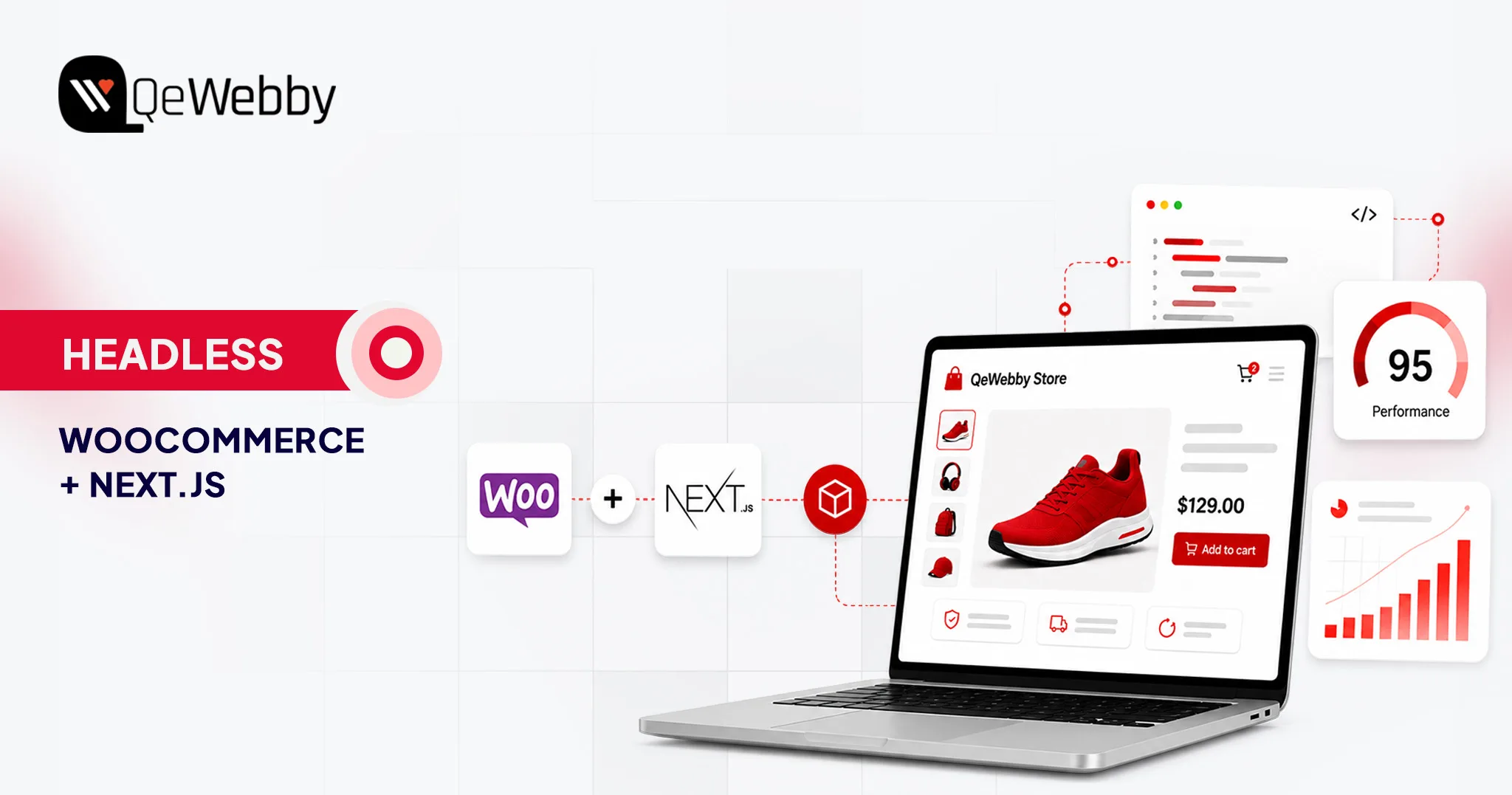
Headless WooCommerce With Next.js: A Practical Guide to Cost, Performance & Migration

For high-volume ecommerce stores, site performance can have a measurable impact on engagement and conversion. As catalogs, integrations, and traffic grow, however, maintaining a fast WooCommerce storefront can become increasingly complex.

When conventional optimization is no longer enough, some brands consider a more fundamental architectural change. This is where the decision to go headless becomes relevant.

Going headless with Next.js can give your team more control over rendering, caching, JavaScript delivery, and frontend architecture. But headless does not automatically make a store faster. Performance still depends on implementation, API architecture, caching, hosting, image optimization, third-party scripts, and the complexity of the storefront.

This guide provides a practical decision framework for implementing Headless WooCommerce with Next.js, including the technical considerations, migration requirements, and total cost of ownership.
kykmbldjt718uxjmzubi

What is Headless WooCommerce?

Headless WooCommerce separates the customer-facing frontend from the WordPress/WooCommerce backend, allowing the two layers to evolve independently while communicating through APIs.

In a conventional WooCommerce setup, WordPress operates as the monolith. It manages the database and uses PHP-based themes to generate HTML and visual design.

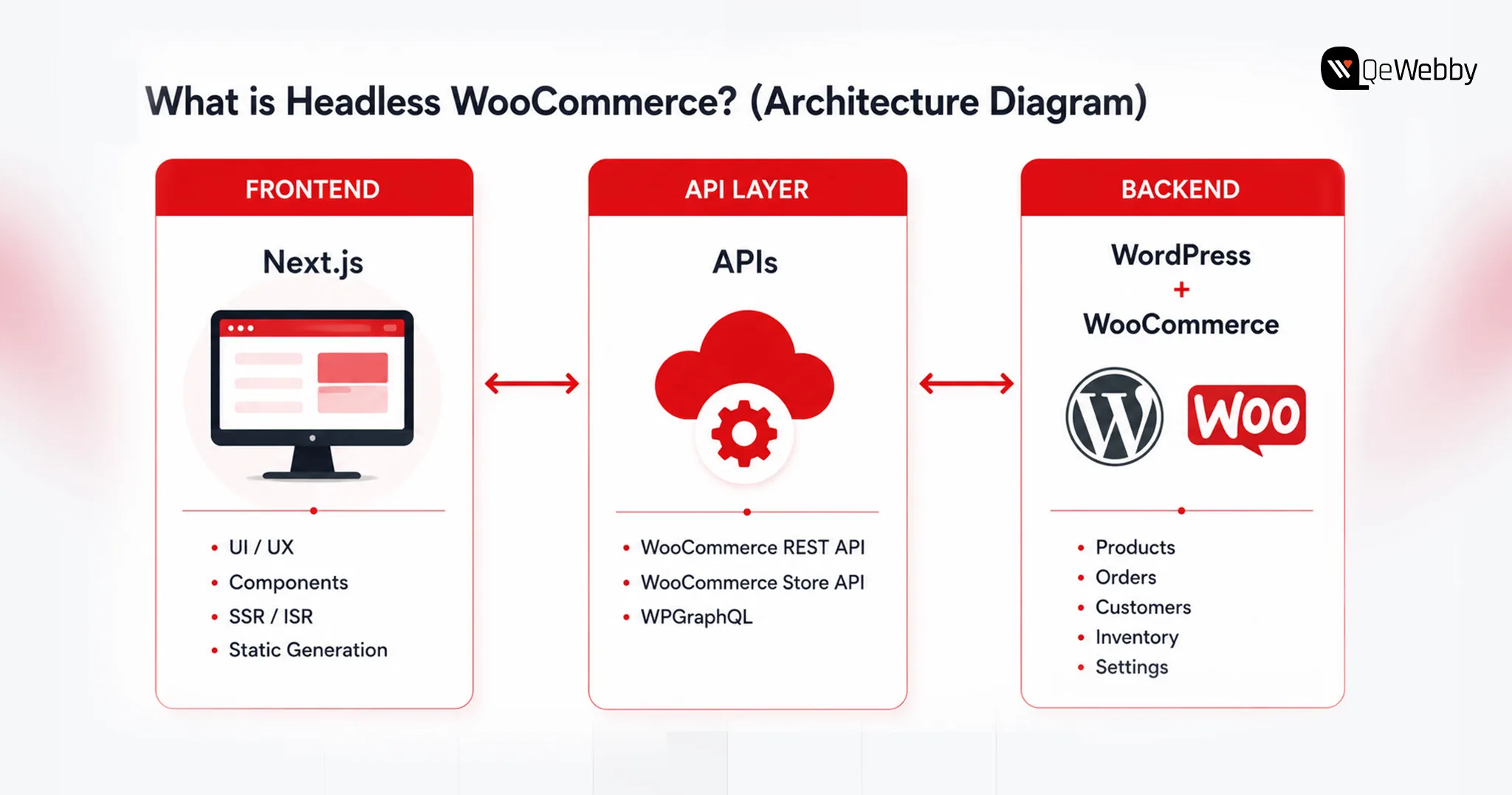
This decoupled system has three distinct layers,

  • Backend as the engine – Your WordPress and WooCommerce installations continue to manage the core commerce operations, including product catalogs, inventory, pricing, taxes, shipping, customers, and orders. Your team can continue using the familiar WordPress admin interface while the customer-facing frontend is handled separately.
  • Frontend as the experience you serve- With Next.js, your customer-facing storefront will be transformed, offering a modern, high-performance experience. With JavaScript at its core, Next.js offers higher flexibility for frontend development, and with the backend being decoupled, you can use edge-rendering content delivery networks.
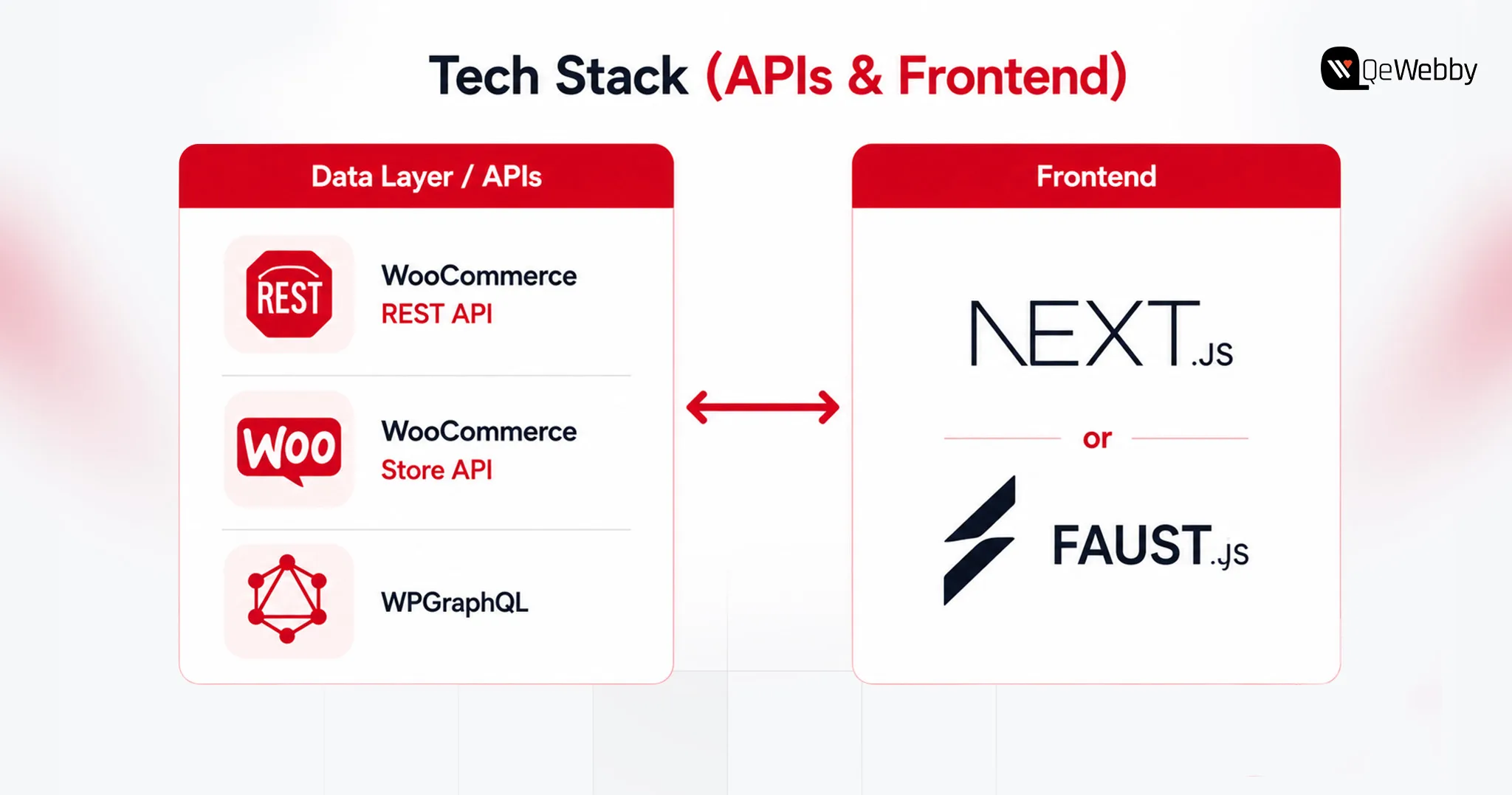
  • API Layer as the bridge between frontend and backend- APIs help your frontend and backend communicate while they are decoupled. You can leverage endpoints like WooCommerce REST API, the WooCommerce Store API, or WPGraphQL. These APIs allow the frontend to request the data it needs while keeping business logic and sensitive backend operations within the appropriate server-side environment.

Using headless WooCommerce with Next.js removes many of the frontend constraints associated with conventional WordPress themes. This moves much of the customer-facing rendering work away from the traditional PHP theme layer, giving developers more control over frontend performance and architecture.

The important question is not whether headless is technically possible, but whether its benefits justify the additional development and maintenance complexity for your store.

Why Stores Are Going Headless: The Performance & Revenue Case

The case for headless is broader than page speed. For some ecommerce brands, the real value is frontend flexibility, faster experimentation, omnichannel delivery, and greater control over how content and commerce experiences are built.

Headless WooCommerce can give development teams greater flexibility when building new storefront features, experiences, and integrations. Better page performance can support user experience and Core Web Vitals, which are among the signals Google uses in evaluating page experience. However, moving to headless does not automatically improve search rankings.

And using headless WooCommerce with Next.js, brands can,

Get Speed Gains

WooCommerce’s monolithic architecture generally makes conventional online stores unnecessarily fat, and prevents easy “tree-shaking” or code-splitting of plugin scripts. What this means for an eCommerce brand is higher loading time, which impacts user experience and conversions. However, with Next.js you can ensure,

What Next.js can improve:

  • More control over server-side rendering and static generation
  • More granular caching and CDN delivery
  • Reduced dependence on PHP theme rendering for the storefront
  • Better control over JavaScript bundles and component loading
  • More control over the factors that influence Core Web Vitals
  • Greater freedom to build custom shopping experiences

The actual performance gain depends on implementation. Headless is an architectural option, not a performance guarantee. A poorly implemented headless storefront can still suffer from slow LCP, excessive JavaScript, inefficient API calls, third-party scripts, and poor Core Web Vitals.

Conversion + SEO impact

Google’s Core Web Vitals directly connect the three dimensions of loading speed, interactivity, and visual stability with search engine rankings and customer behavior. The money impact of meeting these metrics is tremendous, not just in SEO. Deloitte’s research across 37 brands found that a 0.1-second improvement in mobile site speed was associated with an 8.4% increase in retail conversions and a 9.2% increase in average order value.

SSR and ISR can make important page content available as rendered HTML while giving developers greater control over metadata, structured data, internal linking, and page performance. However, headless architecture itself does not guarantee better SEO; implementation still matters.

mft3pqioaokp2xxoz8uq

The Headless-Commerce Market Signal

Headless commerce has become increasingly common among larger brands that need highly customized digital experiences, multiple customer touchpoints, or greater control over their frontend architecture.

Headless commerce has become more common among larger brands that need highly customized digital experiences across multiple channels. However, the architecture used by enterprise brands should not automatically be treated as the right architecture for a mid-market WooCommerce store.

Decoupling can reduce the amount of frontend rendering work handled by the WordPress theme layer and can provide more flexibility around caching and content delivery. However, checkout, cart operations, APIs, and backend transactions can still become bottlenecks under load.
gt8az5p4hgycgjift1mr

How Much Does Headless WooCommerce Cost? (2026 Budgets)

Budgets on a headless rebuild land in a different bracket than standard WooCommerce, and the gap comes down to custom API work, catalog complexity, and specialized talent.

Typical Project Ranges

A typical WooCommerce implementation may fall in the $5,000–$30,000 range, depending on design, functionality, integrations, and customization.

Headless Next.js implementations typically require a larger initial investment because they introduce separate frontend development, API integration, testing, infrastructure, and ongoing maintenance requirements.

These are planning ranges rather than fixed market rates. Actual costs vary significantly based on catalog size, design requirements, integrations, plugin replacements, checkout complexity, migration scope, content modeling, and engineering location.

Cost Consideration Standard WooCommerce Headless Next.js
Initial build $5,000 – $30,000 $60,000 – $150,000+
Hosting $100 – $300/mo $300 – $1,000+/mo
Maintenance Lower Higher
DevOps Usually limited Often required
Plugin redevelopment Lower Potentially significant
TCO Highly variable Highly variable

kpuwmk7wim8bb5nksyup

What Drives the Number

Timeline is the biggest lever, 14–22 weeks versus 8, and labor cost scales with it. Frontend-dependent plugins such as wishlists, loyalty programs, product customizers, and certain membership features may require API integration or frontend redevelopment in a headless setup. Each gets rebuilt in React or Next.js, alongside custom cart state and payment tokenization logic.

Large catalogs add weight too, mapping custom fields into GraphQL fragments and building webhook-based cache invalidation so inventory and pricing stay accurate without forcing a full site rebuild.

Build vs. Partner

A single change can touch WordPress, the API layer, and the frontend at once, demanding dual PHP and React/Next.js expertise. Specialized engineers with WooCommerce/PHP, React/Next.js, API, and DevOps experience can be expensive to hire and difficult to keep fully utilized if headless work is intermittent. Troubleshooting gets harder too, since a bug can originate in any of the three layers.

For organizations without the required internal expertise, working with a headless WordPress agency can reduce the burden of building and maintaining the architecture internally.

How to Actually Build It: Stack & Migration Roadmap

Building headless WooCommerce means replacing the traditional customer-facing WordPress theme with a separate Next.js frontend that communicates with WooCommerce through APIs.

Here’s how the stack and migration typically shake out.

Pick The Data Layer (REST vs WPGraphQL)

Routing data through the right API layer decides both security and performance.

  • REST API (v3): Authenticated REST API requests should not expose consumer secrets in the browser. Server-side requests or a secure backend layer should handle credentials when authentication is required.
  • Store API: The Store API is designed for customer-facing cart and checkout interactions and uses WooCommerce’s session mechanisms rather than requiring the same credential model as authenticated REST API requests.
  • WPGraphQL: WPGraphQL provides the WordPress GraphQL layer, while WooGraphQL exposes WooCommerce-specific data through GraphQL. ACF can then expose structured custom fields when the content model requires them.

Choose the Frontend Framework (raw Next.js vs Faust.js)

  • Raw Next.js: Full control over SSR, ISR, and architecture, but you hand-build the Apollo client and GraphQL queries yourself. Leaner dependency tree, more upfront engineering.
  • Faust.js: Faust.js is a WordPress-focused framework built on Next.js that provides conventions and tooling for common headless WordPress requirements. It can reduce setup work, although teams should evaluate its current ecosystem and fit against a more custom Next.js architecture before choosing it.

Cart, checkout, SEO, and previews

PHP session cookies don’t survive a cross-domain frontend, so Cart state can be managed through WooCommerce’s Store API, including its cart-token mechanism, or through a solution such as CoCart. The implementation determines how sessions or cart tokens are persisted and passed between the frontend and WooCommerce.

For checkout, redirecting to WooCommerce’s native checkout is the most reliable path; a fully custom headless checkout with client-side tokenization (Stripe, for example) works too, but demands real API development.

SSR and ISR can mitigate some SEO and rendering challenges associated with client-heavy JavaScript by making important content available as server-rendered HTML.

Bridge Yoast or Rank Math metadata through GraphQL and rebuild schema markup on the frontend to keep it intact. For editors, Next.js Draft Mode plus a WordPress-minted JWT preview token lets them view unpublished drafts without exposing them publicly.

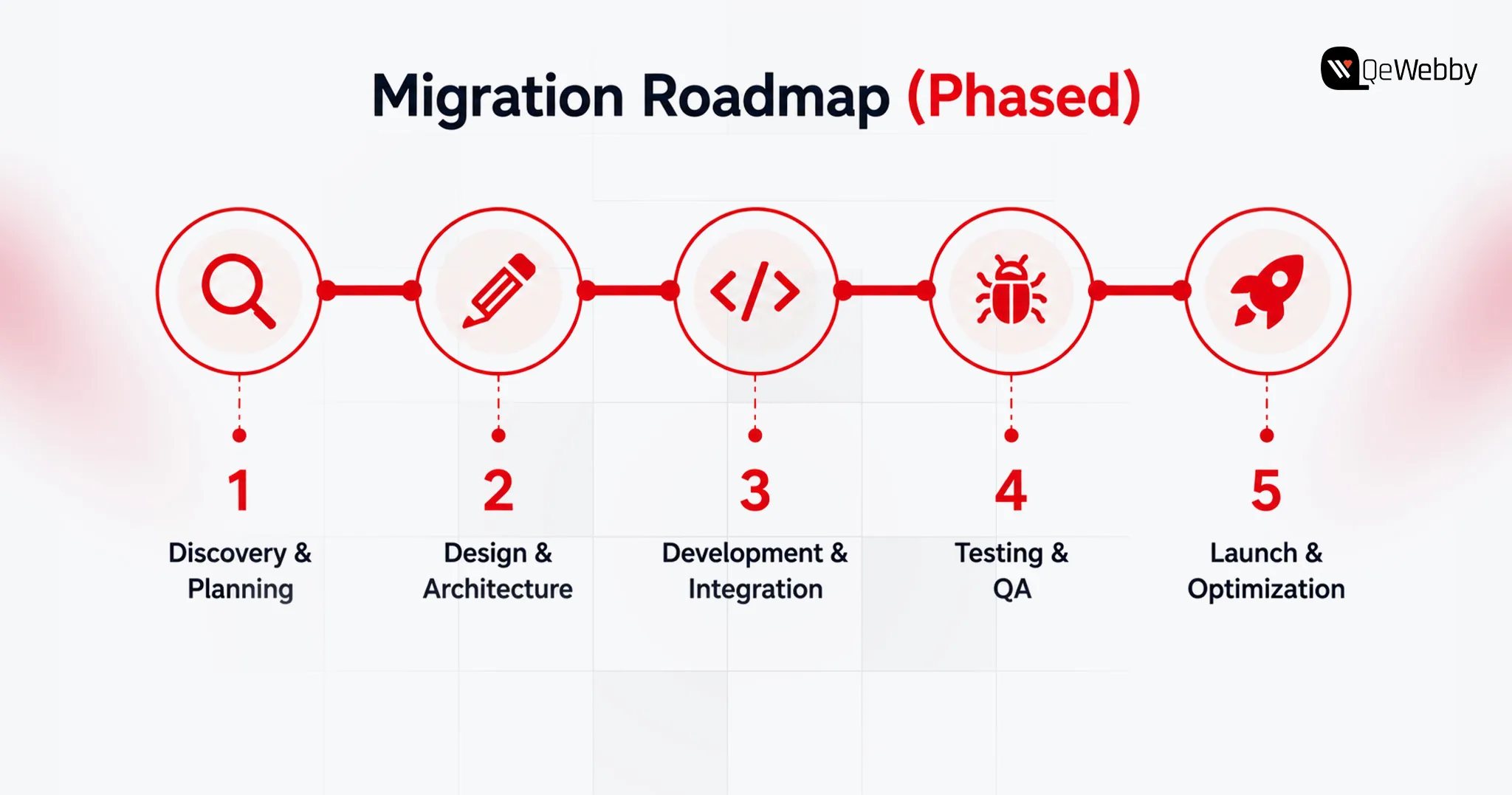
Phased Migration and Testing

Elementor, Divi, and similar page builders often store presentation-specific structures that do not map directly to a Next.js component system. During migration, those layouts may need to be extracted, modeled, and rebuilt as React components or structured content blocks.

SEO Migration and URL Mapping

Before launch, map every existing URL to its corresponding new URL. Implement 301 redirects where URLs change, preserve metadata and canonical tags, regenerate XML sitemaps, and crawl the staging environment for broken internal links and missing pages. Monitor Search Console after launch for indexing and coverage issues.

Here are a few points to consider when deciding between Headless WooCommerce, Traditional WooCommerce, and Shopify Headless.
s4bjhvmaxbs6x5vgbbya

Headless WooCommerce vs Traditional WooCommerce vs Shopify Headless (Decision Matrix)

Decoupling is a business decision, and not simply a technical one: it’s a tradeoff between simplicity and speed and control.

Compare on speed, cost, control, maintenance, best-fit store size

The Shopify Headless column reflects standard enterprise SaaS benchmarks and the rent-vs-own tradeoff, since the underlying data focuses on WooCommerce and Next.js.

Factor Traditional WooCommerce Headless WooCommerce (Next.js) Shopify Headless (Enterprise SaaS)
Frontend performance control Moderate High High
Backend ownership High High Lower
Initial cost Lower High High
Maintenance Lower Higher Moderate
Plugin compatibility Highest Requires evaluation/rebuild App/API dependent
Backend infrastructure Self-managed Self-managed Platform-managed
Checkout complexity Lower Higher Moderate–High
Custom frontend freedom Moderate Very high Very high
Infrastructure responsibility Lower Higher Lower
Best fit Most stores Complex/highly customized stores Enterprise brands wanting SaaS infrastructure

sc0bexgveq0my3g8nzun

utnyvb8yqrx4fbbaxczv

Conclusion

Go headless when the business has a clear reason to own a more flexible frontend architecture and can support the additional development and maintenance burden. Stay with traditional WooCommerce when plugin compatibility, simplicity, speed of implementation, and lower total cost matter more than frontend architectural control.

Go headless if:

  • Your existing frontend architecture is limiting growth
  • You need highly customized experiences
  • You have engineering resources
  • Your integrations justify API-first architecture
  • You can support higher TCO

Stay traditional if:

  • Your current store performs well
  • Your plugin ecosystem is important
  • You need to launch quickly
  • Your team lacks React/API/DevOps expertise
  • Headless doesn’t solve a clearly measurable business problem

Run your own numbers against the cost and decision breakdowns above, then bring them to a headless WordPress partner before you commit a rebuild budget.
talk to qa specialist

How to Make Your WordPress Site Visible in AI Search (AEO, GEO & AI Overviews)

The way people search for information has changed significantly over the past few years. Instead of typing short keywords and browsing multiple websites, users increasingly ask complete questions and expect immediate, accurate answers powered by AI.

The discovery of information on online platforms by users is now accompanied by artificial intelligence (AI), and it’s changing how users discover information online. Instead of browsing multiple websites, users are increasingly receiving direct answers through AI-powered search results. Users are increasingly relying on conversational AI assistants and AI-powered search experiences such as Google’s AI Overviews, ChatGPT, Gemini, and Perplexity.

According to Gartnertraditional search engine volume is expected to decline by 25% by 2026 as users increasingly adopt AI assistants and generative search experiences. So, now businesses also need to optimize their strategies for search engines as well as AI systems.

These evolving shifts come as an opportunity and a challenge for WordPress websites. Before the AI overview, if your website was ranking and performing well in traditional search results, it didn’t guarantee a place in the AI overview. Why? Because the content of your website is lacking the structure, authority, and context AI systems rely on.

So, relying only on technical SEO improvements is not enough for improving your website’s AI search visibility. It has to be aligned with AEO and GEO rules, structure, and semantic optimization, along with high-quality content and SEO strategy.

Why Is AI Search Changing WordPress Visibility?

For that, you need to think from the user’s perspective. As a user, you would like to get the exact answer to your question, and not all users want to go through the entire information; they come with a specific question in their mind, and they ask for it.

Now, users don’t want to browse multiple websites or web pages related to their search; they want the exact information related to their search query.

AI search visibility for WordPress works in a different way. Now AI-powered search analyzes information from multiple trusted sources and generates fast, accurate responses.

Instead of prioritizing and ranking the content that simply contains the right keywords, AI systems prioritize information that demonstrates expertise, clarity, and relevance, influencing WordPress SEO service providers to adapt their optimization strategies.

According to a report, Google AI Mode reached 75 million users by December 2025, while revenue from its generative AI products increased by nearly 400%. The number itself showcases how AI-generated conversational search results are becoming users’ first choice over traditional search that relied on keywords only.

For WordPress websites, this changes how they increase their visibility, build a brand, and drive traffic.

Improving AI search visibility in WordPress requires creating content that both search engines and AI models can easily interpret, validate, and reference.

Businesses shouldn’t lose their opportunity to appear in AI searches, and it doesn’t mean that traditional SEO ranking is of lesser importance.

Appearing in AI-generated summaries, featured responses, and conversational search results helps you get more traffic, leads, authority building, and brand awareness. It’s not about AEO vs GEO vs SEO for WordPress websites, but it’s about how you can sync all of these.

AI Friendly Content Img

Why Traditional SEO Alone Is No Longer Enough?

Traditional SEO continues to be an important foundation for online visibility. However, AI-powered search experiences evaluate content differently by considering context, expertise, and how well information answers user intent.

Businesses looking to improve AI search visibility on WordPress should view SEO, AEO, and GEO as complementary strategies rather than separate initiatives.

Modern AI systems evaluate how information is organized, whether it demonstrates topical expertise, and how confidently it can be cited when generating responses. This makes content quality, semantic relevance, and technical optimization just as important as keyword placement.

Traditional SEO and AI optimization work together through:

  • Search Intent: Create content that answers complete user questions instead of targeting individual keywords.
  • Content Depth: Cover topics comprehensively rather than publishing isolated articles.
  • Technical Foundation: Maintain strong website performance, crawlability, and structured data.
  • Authority Signals: Build topical expertise through consistent, high-quality content.

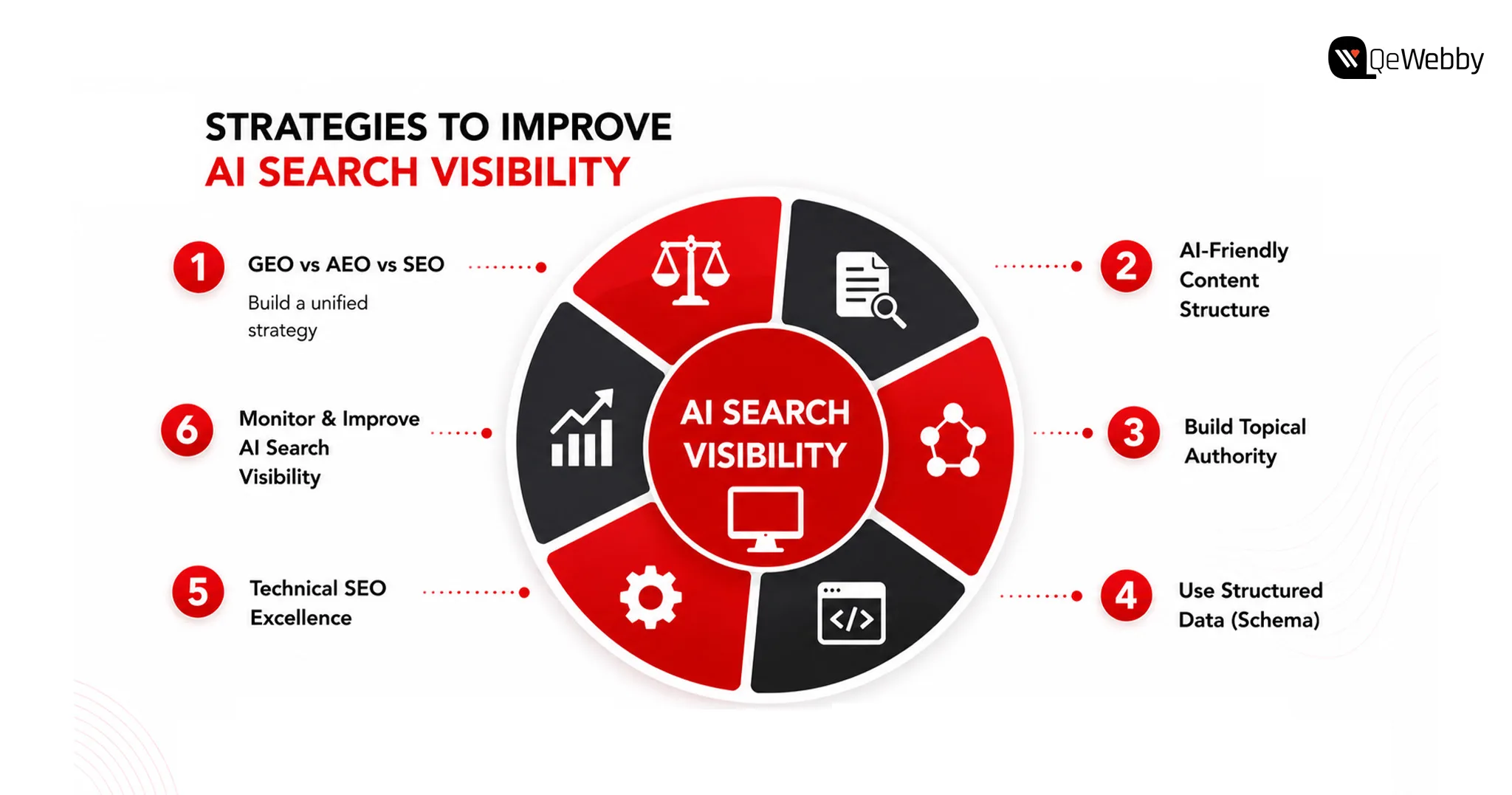
6 Strategies to Improve AI Search Visibility for WordPress Websites

Strategies to Improve

1. GEO vs AEO vs SEO WordPress

Understanding GEO vs AEO vs SEO in WordPress helps businesses build a strategy that supports both traditional search engines and AI-powered discovery platforms.

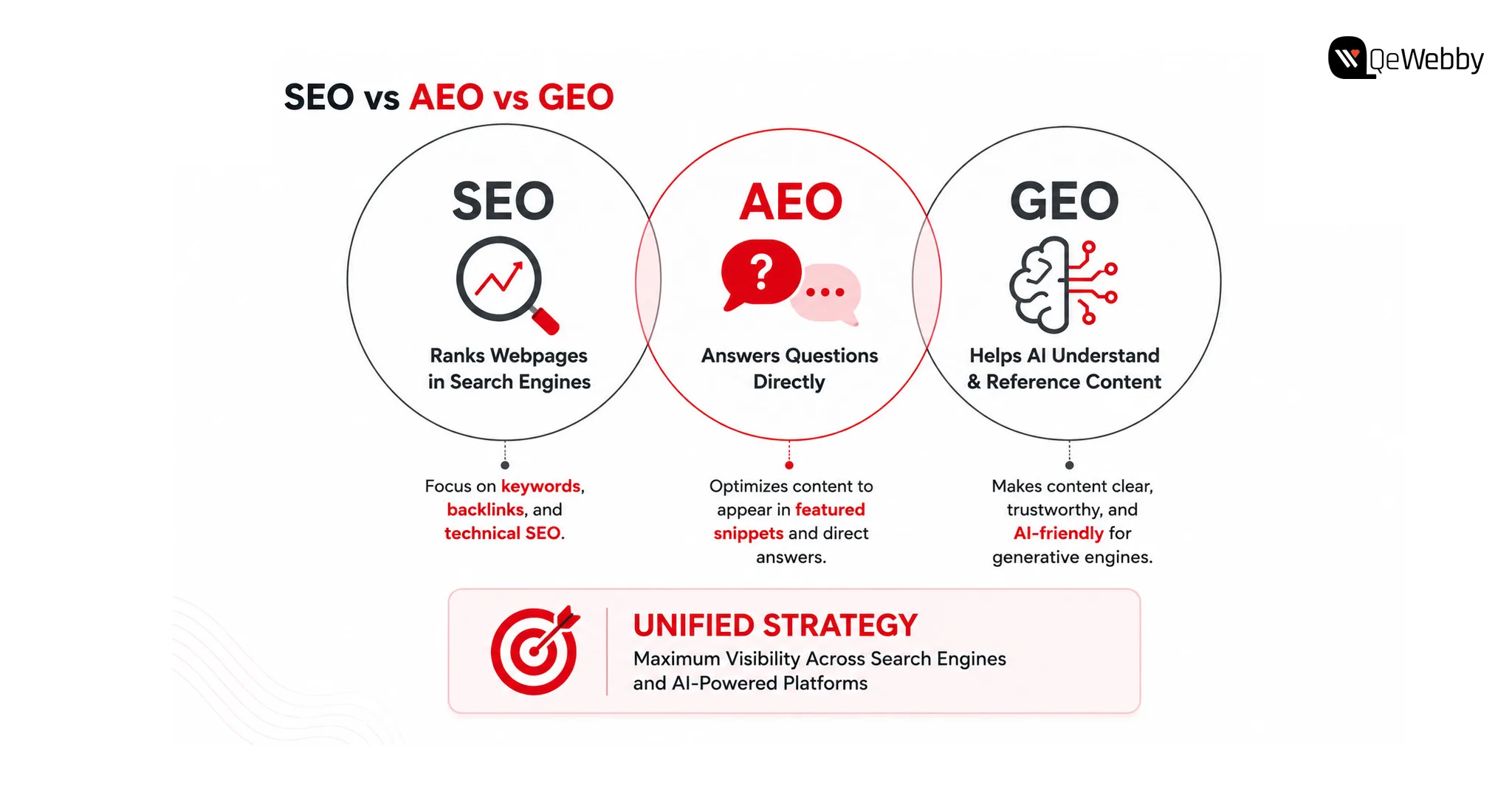
SEO focuses on improving visibility in search engine results. Answer Engine Optimization (AEO) helps content appear as direct answers to user questions, while Generative Engine Optimization (GEO) focuses on making content understandable and trustworthy enough for AI systems to reference when generating responses.

Rather than replacing SEO, GEO, and AEO, build upon them. Businesses that combine all three approaches create stronger visibility across both conventional search results and AI-powered experiences.

Together, these approaches create a more resilient search strategy across both traditional and AI-powered search.

What Steps Can WordPress Websites Take?

  • Build content around user intent
  • Answer questions clearly and directly
  • Strengthen topical authority
  • Combine SEO, AEO, and GEO strategies

Bonus Tip: Review your highest-performing blog and identify whether it answers customer questions directly or simply discusses the topic. AI systems often prioritize content that provides immediate, well-structured answers.

2. Create Content That AI Can Easily Understand

AI models process content differently from traditional search engines.

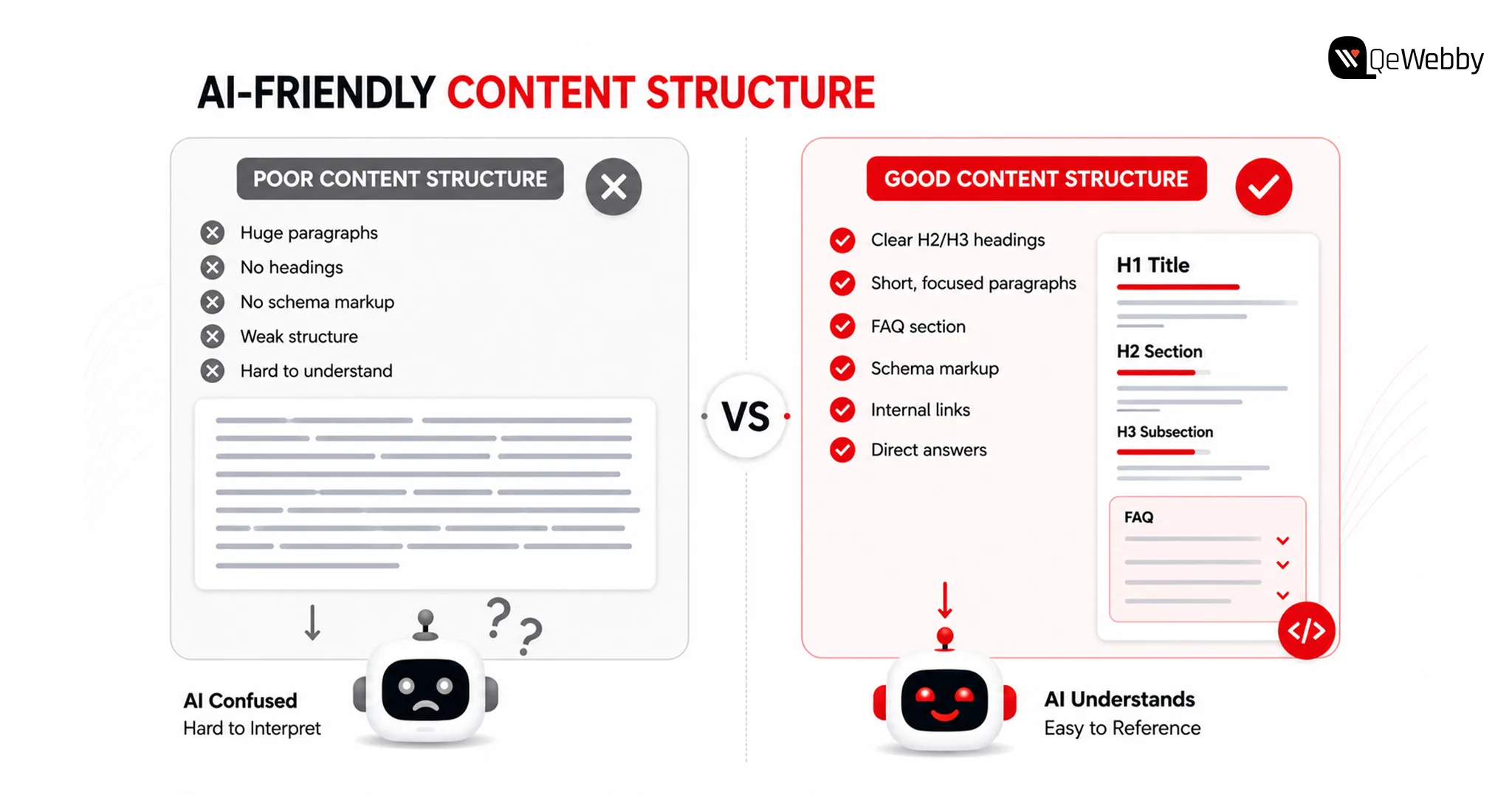
Instead of relying heavily on keyword repetition, they evaluate how clearly ideas are explained, how topics connect, and whether the content demonstrates expertise. Pages with logical headings, well-organized sections, and contextual relationships are easier for AI systems to interpret.

For businesses improving AI search visibility in WordPress, content structure becomes just as important as content quality. Articles should answer specific questions, explain concepts thoroughly, and maintain consistency throughout the page.

What Steps Can WordPress Websites Take?

  • Use descriptive headings
  • Organize content into logical sections
  • Answer common customer questions
  • Maintain a consistent content structure

Bonus Tip: Review one existing article and rewrite the introduction to answer the primary search intent within the first few paragraphs instead of delaying the key information.

3. Build Topical Authority Instead of Publishing Isolated Content

Many WordPress websites publish articles independently without connecting them to a broader content strategy.

AI systems are more likely to trust websites that consistently cover related subjects in depth. Publishing multiple high-quality articles around a specific topic helps establish expertise and improves contextual understanding across your website.

For example, a business writing about WordPress performance should also cover website security, technical SEO, Core Web Vitals, website architecture, AI optimization, and content strategy. Together, these resources create stronger topical relevance than isolated blog posts.

Strong topical authority also improves AI search visibility in WordPress by helping AI systems recognize your website as a reliable source within a specific domain.

What Steps Can WordPress Websites Take?

  • Build topic clusters around core services
  • Strengthen internal linking
  • Update older content regularly
  • Expand related content strategically

Bonus Tip: Instead of publishing your next blog on a completely new topic, create supporting content that strengthens an existing content cluster and reinforces your website’s expertise.

4. Structured Data Helps AI Understand Your Website Better

AI systems rely on context to understand webpages, and structured data provides many of the signals needed to interpret that context accurately.

Schema markup helps search engines and AI platforms identify important information such as articles, FAQs, products, services, organizations, and authors. While structured data does not guarantee AI visibility, it improves how your content is interpreted and connected with relevant search queries.

For businesses focused on improving AI search visibility in WordPress, implementing the right schema strategy can strengthen both traditional search performance and AI-generated search experiences.

What Steps Can WordPress Websites Take?

  • Implement relevant JSON-LD schema markup
  • Validate structured data regularly
  • Add organization and author information
  • Keep schema aligned with page content

Bonus Tip: Use Google’s Rich Results Test to verify that your structured data is correctly implemented and reflects the actual content on each page.

Websites Take Call

5. Technical SEO Still Influences AI Search Visibility

Even the most informative content can struggle to gain visibility if technical issues prevent search engines and AI systems from accessing it efficiently.

Website speed, mobile responsiveness, crawlability, internal linking, and clean site architecture continue to play an important role in content discovery. AI platforms often rely on search engine indexes, making technical optimization an essential foundation for long-term visibility.

Businesses investing in WordPress SEO services should ensure technical SEO evolves alongside their content strategy instead of treating them as separate initiatives.

What Steps Can WordPress Websites Take?

  • mprove Core Web Vitals
  • Fix crawl and indexing issues
  • Optimize internal linking
  • Monitor website performance regularly

Bonus Tip: Run a technical SEO audit every quarter to identify performance issues before they begin affecting your website’s visibility.

6. Monitor and Improve AI Search Visibility Regularly

Google’s AI Overviews, ChatGPT, Gemini, and Perplexity continue evolving rapidly, which means optimization cannot be treated as a one-time activity.

Businesses should regularly review how their content appears in AI-generated responses, identify pages losing visibility, and update information to maintain relevance. Monitoring user behaviour, search intent, and content performance helps ensure your website continues meeting the expectations of both users and AI systems.

An AI search visibility audit service provides valuable insights into content quality, technical readiness, semantic relevance, and opportunities to improve AI discoverability across your website.

What Steps Can WordPress Websites Take?

  • Review AI search performance regularly
  • Update outdated content
  • Monitor changes in search behaviour
  • Conduct periodic AI visibility assessments

Bonus Tip:Choose five important service pages and evaluate whether they clearly answer the questions your prospective customers are most likely to ask AI search platforms.

AI Search Visibility Img

Is Your WordPress Website Ready for AI Search?

Many websites perform well in traditional search results but still struggle to appear in AI-generated responses. The difference often lies in how well the website communicates information rather than how many keywords it targets.

A periodic review helps identify whether your website is prepared for the evolving search landscape.

Use This Quick Checklist To Evaluate Your Website’s AI Readiness:

  • Content Structure: Is information organized with clear headings and logical sections?
  • Topical Authority: Does your website cover subjects in sufficient depth?
  • Technical SEO: Are pages fast, mobile-friendly, and easily crawlable?
  • Structured Data: Is schema helping search engines understand your content?
  • Content Freshness: Are important pages reviewed and updated regularly?

Even small improvements across these areas can strengthen AI search visibility in WordPress over time. Businesses often use an AI search visibility audit service to identify gaps that are difficult to detect through traditional SEO reporting alone.

Get Free Call

How QeWebby Helps Businesses Improve AI Search Visibility

Improving AI search visibility in WordPress involves aligning technical SEO, content strategy, structured data, website performance, and semantic optimization to create a website that both search engines and AI systems can understand.

QeWebby helps businesses build future-ready WordPress websites through practical optimization strategies designed for evolving search experiences.

AI Search Visibility Audit Service

Our AI search visibility audit service evaluates your website’s technical foundation, content quality, structured data, topical authority, and AI readiness to identify opportunities for improved visibility.

WordPress SEO Services

Our WordPress SEO services combine technical optimization, content strategy, website architecture, and performance improvements to strengthen long-term organic growth.

Content and AI Optimization

We help businesses develop content that answers user intent, improves contextual relevance, and increases the likelihood of appearing in AI-generated search experiences.

Technical WordPress Improvements

Our team optimizes website performance, structured data, internal linking, crawlability, and indexing to create a stronger technical foundation for modern search.

We focus on building WordPress websites that remain competitive as search continues evolving beyond traditional rankings.

Vsxrx7kiwoxqosvz8nm7

Conclusion

As AI continues reshaping how users discover information, businesses have an opportunity to rethink how they build and optimize their digital presence. The goal is no longer just to improve rankings but to create content that can be understood, referenced, and recommended across multiple search experiences.

QeWebby helps organizations prepare for this shift through strategic WordPress SEO services, technical optimization, and a comprehensive AI search visibility audit service tailored to evolving search technologies.

Contact QeWebby to strengthen your website’s visibility across both traditional search engines and AI-powered search experiences.