Contact Form 7 vs. WPForms – A Business Owner’s Guide

Companies generating 40% or more of their leads through online forms grow 4X faster than those relying on offline channels. [Hinge Marketing]

An effective contact form is indispensable for any business website. It streamlines communication, enhances user experience, and supports your lead generation efforts while reflecting your business’s commitment to professionalism. Hence, by focusing on the unique needs of businesses, this article aims to simplify the decision-making process, ensuring you select the contact form solution that best supports your business objectives and drives your online success. Let’s learn more about this!

Finding the Right Contact Form Plugin for Your WordPress Site

When it comes to optimizing your WordPress website’s contact capabilities, the choice of plugin can make a significant difference. Among the leading options are Contact Form 7 and WPForms, each offering distinct advantages to cater to various business needs. Whether you need a basic solution or a robust, feature-rich tool, understanding the unique benefits of each can guide you to the perfect choice for enhancing your website’s communication efficiency.

Ready to find out which contact form plugin suits your WordPress site?

Let’s see when and why each option might be the right choice.

Contact Form 7

Contact Form 7, a long-standing player in the WordPress ecosystem, is celebrated for its simplicity and flexibility, ideal for straightforward form creation.

It operates through a text-based interface that requires users to work with HTML and shortcodes. This setup can be quite challenging for beginners, as it demands a certain level of technical knowledge to create and customize forms effectively. The learning curve can be steep, especially for those not familiar with coding. Customizing forms beyond basic functionality requires manual adjustments and a good understanding of HTML and CSS.
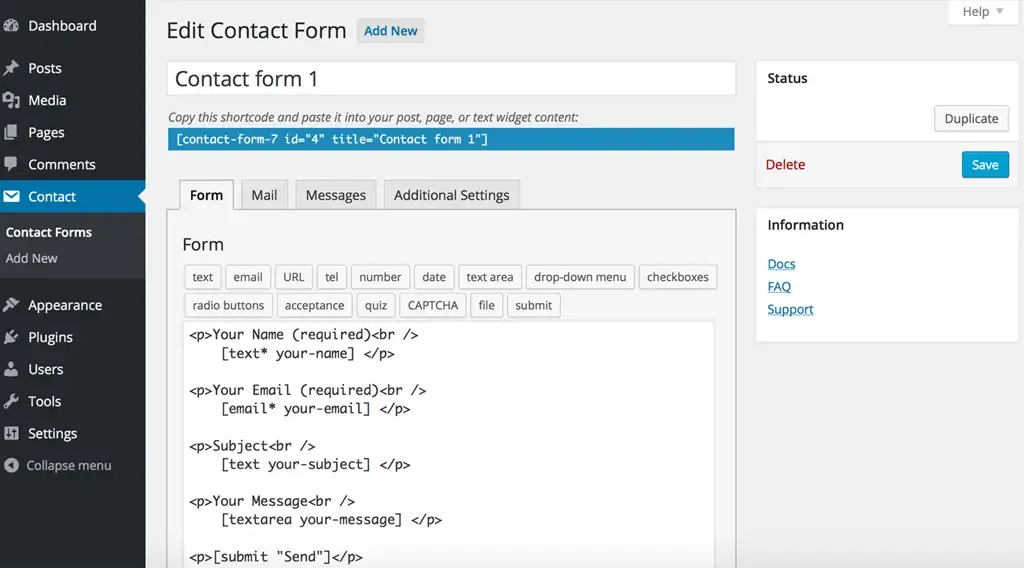
With Contact Form 7, users enjoy extensive customization options, but these require working directly with HTML and CSS. The plugin does not include built-in conditional logic, which means implementing advanced features often necessitates additional custom code or third-party add-ons. While there is a broad selection of third-party extensions available, these typically require manual installation and configuration.

It supports a range of third-party services through various add-ons, including popular tools like Mailchimp and Google reCAPTCHA. However, integrating these services often requires manual installation and setup of additional extensions, which can be time-consuming and complex.

Contact Form 7 relies on community-based support through forums, with official assistance being relatively limited. The documentation, while thorough, is often technical and assumes some level of coding knowledge, which might be a barrier for users who are not familiar with programming.

The plugin contact form 7 is entirely free, making it an attractive option for users seeking a no-cost solution. However, advanced features may require additional paid add-ons, which can add to the overall cost if specific functionalities are needed. It is best suited for users who need basic form capabilities and are comfortable with manual configurations.

WP Forms

WPForms provides a more intuitive experience with its drag-and-drop builder. This user-friendly interface allows for real-time previews, making it easy for users of all skill levels to design and adjust forms without needing technical expertise. The drag-and-drop functionality simplifies the form creation process, making WPForms ideal for those who want to build forms quickly and efficiently.
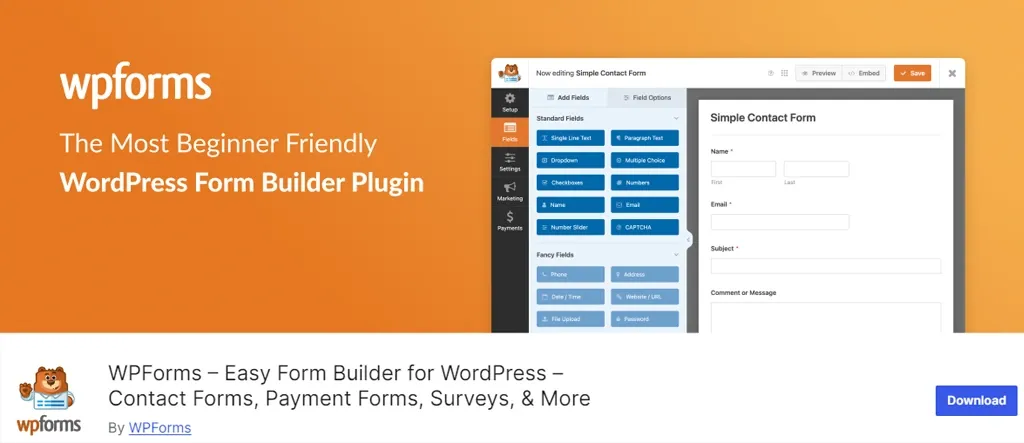
It simplifies customization through its drag-and-drop interface and a library of pre-built templates. This plugin includes built-in conditional logic, allowing users to create dynamic forms that respond to user input. Additionally, WPForms comes with a variety of built-in add-ons, especially in its pro versions, covering functionalities such as payment processing, CRM integration, and email marketing, thereby enhancing flexibility and ease of use.

In contrast to Contact Form 7, WPForms offers seamless integration with major services such as PayPal, Stripe, and Mailchimp. The process of connecting these services is straightforward, thanks to its easy-to-configure options. Furthermore, WPForms’ pro versions include a comprehensive array of add-ons that enhance functionality and provide additional integration options, making it easier to extend the plugin’s capabilities.

WPForms offers a more robust support system, including premium options for live chat and email support available with its paid versions. The free version also benefits from community support. The documentation for WPForms is user-friendly, featuring detailed guides and tutorials that are accessible to users of all levels. Paid plans come with responsive support, ensuring that users receive timely help when needed.

What is the best contact form builder?

Contact Form 7 vs WPForms

Feature Contact Form 7 WPForms
Ease of Use Text-based interface; requires HTML/coding Drag-and-drop builder; user-friendly
Customization Extensive with HTML/CSS; no built-in logic Drag-and-drop; includes built-in conditional logic
Integration Supports via third-party add-ons; manual setup Seamless integrations (e.g., PayPal, Mailchimp)
Add-ons Many third-party add-ons; manual installation Comprehensive built-in add-ons; easy configuration
Support Community forums; limited official support Premium support with live chat; extensive documentation
Documentation Technical; requires coding knowledge User-friendly guides and tutorials
Pricing Free; some advanced features require paid add-ons Free version available; pro versions start at $39.50/year

Which Contact Form is Best for Your WordPress Site?

When deciding between Contact Form 7 and WPForms for your WordPress site, it’s essential to consider the specific needs of your business. Different types of websites may benefit from different features offered by these plugins. Here’s a breakdown based on various business sectors:

eCommerce Websites

eCommerce sites benefit from user-friendly contact forms that can handle customer inquiries effectively. WPForms offers features like conditional logic and payment integrations, making it easy for customers to get in touch or make purchases. Contact Form 7 requires more setup for similar functionalities.

We recommend: WPForms for eCommerce Websites

Portfolio and Creative Websites

Artists and freelancers who showcase their work may prefer a minimalist contact form. Contact Form 7 offers straightforward functionality that lets visitors easily reach out without overwhelming them with options.

We recommend: Contact Form 7 for eCommerce Websites

Service-Based Businesses

Service providers need forms that facilitate appointment bookings and inquiries. WPForms includes features for appointment scheduling and customizable fields, creating a seamless booking experience. While Contact Form 7 can be adapted for this purpose, it often requires additional technical work.

We recommend: WPForms for eCommerce Websites

Blog and Personal Sites

For bloggers and personal websites, simplicity is key. Contact Form 7 is lightweight and straightforward, making it a good choice for basic needs. However, WPForms provides a more polished experience that can enhance user engagement.

We recommend: Contact Form 7 for eCommerce Websites

Non-Profit Organizations

Non-profits often need to manage donations and volunteer sign-ups efficiently. WPForms supports donation collection and integrates easily with payment gateways, making it ideal for these needs. Contact Form 7 can be customized, but lacks built-in donation options.

We recommend: WPForms for eCommerce Websites

Corporate Websites

Corporate sites demand professional, branded contact forms. WPForms offers a user-friendly drag-and-drop builder that allows for quick customization, saving time for busy professionals. Contact Form 7 can be styled, but may not be as intuitive.

We recommend: WPForms for eCommerce Websites

Educational Institutions

Schools and universities often need simple forms for inquiries and feedback. Contact Form 7 is easy to implement and can be tailored to collect specific information from students and parents without unnecessary complexity.

We recommend: Contact Form 7 for eCommerce Websites

Local Businesses

Local businesses, such as restaurants and salons, often need basic contact forms for reservations or inquiries. Contact Form 7 is simple to set up and can be customized to fit specific needs without the complexity of advanced features.

We recommend: Contact Form 7 for eCommerce Websites
The Crux

While both Contact Form 7 and WPForms have their strengths, WPForms generally stands out for its advanced features and ease of use, making it suitable for a wide array of businesses. Contact Form 7 is an excellent choice for those seeking a simple, customizable solution, especially in sectors like education, creative portfolios, and local businesses.

By carefully assessing your specific requirements—whether it’s ease of use, integration capabilities, or support options—you can choose the solution that best aligns with your goals. Ultimately, investing in an effective contact form will streamline communication, boost lead generation, and reinforce your commitment to professionalism, paving the way for your online success.

Our team has successfully helped hundreds of business owners navigate this process. Contact us today to unlock our expertise that helps you attract leads and propel your business forward!
How WordPress 6.6 Drives Engagement To Your Website with Advanced Features

WordPress 6.6 is set for release on July 16, 2024. This update introduces new features like section styles and overrides in synced patterns, along with enhancements to the Font Library and Interactivity API. These improvements streamline site editing, enhance design flexibility, and boost overall performance for business websites.

WordPress 6.6 brings significant benefits to website owners by enhancing site editing capabilities, improving design flexibility with new features like section styles and synced pattern overrides, and optimizing overall performance through updates to the Font Library and Interactivity API. These enhancements translate into streamlined site management, increased customization options, and improved user engagement, ultimately empowering website owners to create more dynamic and efficient online experiences for their audience.

Let’s discover how these updates can empower your WordPress website with deeper insights.

Enhanced Site Editing Capabilities
  • Advanced-Data Views in the Site Editor
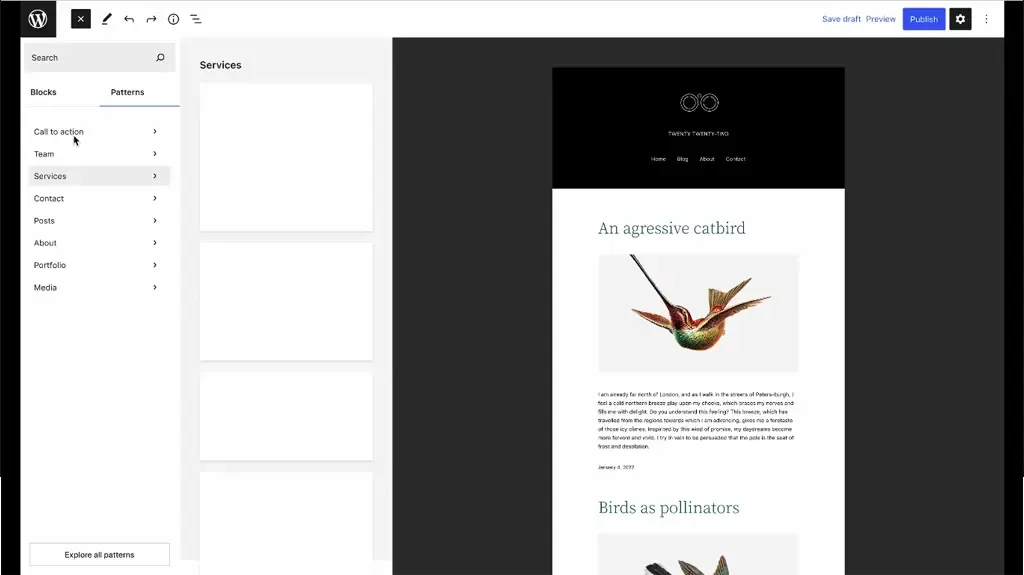
  • Zoomed Out Composition with Patterns
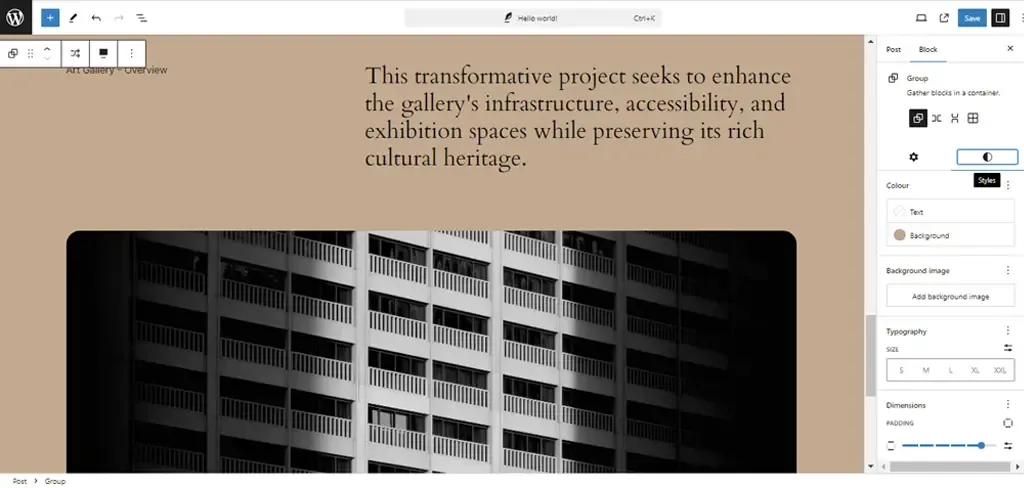
  • Viewing Inherited Style Values
Unified Editor Experiences
  • Streamlined Publish Flow
Design Tools Empowerment
  • Expanded Style Variation Options
  • Synced Blocks and Pattern Attributes
  • Enhanced Grid Layout and Font Library
Performance and API Enhancements
  • Performance Improvements
  • API Iterations: Interactivity, Block Hooks, and HTML
Infrastructure and Compatibility Updates
  • PHP Version Support Update
  • Rollback Feature for Auto-Updates
Upgrade to WordPress 6.6 Today
  • For Agencies
  • For Business Leaders
Take the Next Step

Enhanced Site Editing Capabilities

Advanced-Data Views in the Site Editor

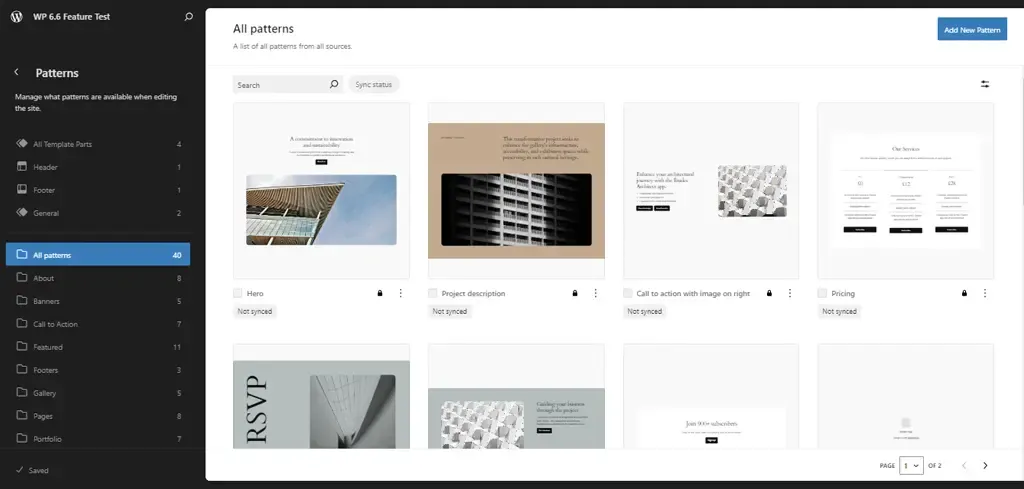
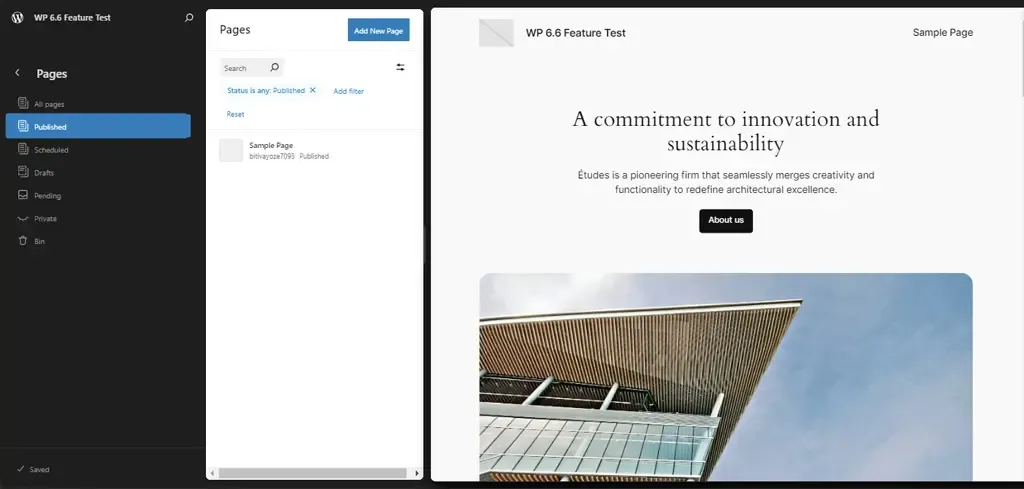
WordPress 6.6 introduces advanced data views in the Site Editor, enhancing how site administrators manage templates, template parts, and pages. Key updates include:

  • Improved Management Pages: Options for managing all templates, template parts, and pages are now consolidated into easily accessible sections.
  • Side-by-Side Layout: Users can view all pages alongside a larger preview of the selected page, reducing the steps needed to access critical information.

These enhancements streamline site management, offering quicker navigation and preview capabilities crucial for efficient content updates and template adjustments.

Zoomed Out Composition with Patterns

A standout feature of WordPress 6.6 is its zoomed-out composition capability with patterns, revolutionizing how users interact with site content. This feature allows for a high-level overview of site structure through patterns, facilitating the manipulation of patterns within templates effortlessly.

Users can now explore alternative layouts and adjust patterns more efficiently, thanks to UX enhancements that simplify pattern management. This not only enhances design flexibility but also significantly improves the efficiency of site-building processes, empowering users to create and modify complex site layouts with ease.

Viewing Inherited Style Values

WordPress 6.6 enhances the understanding and management of site-wide design consistency with improved handling of inherited style values. Key improvements include:

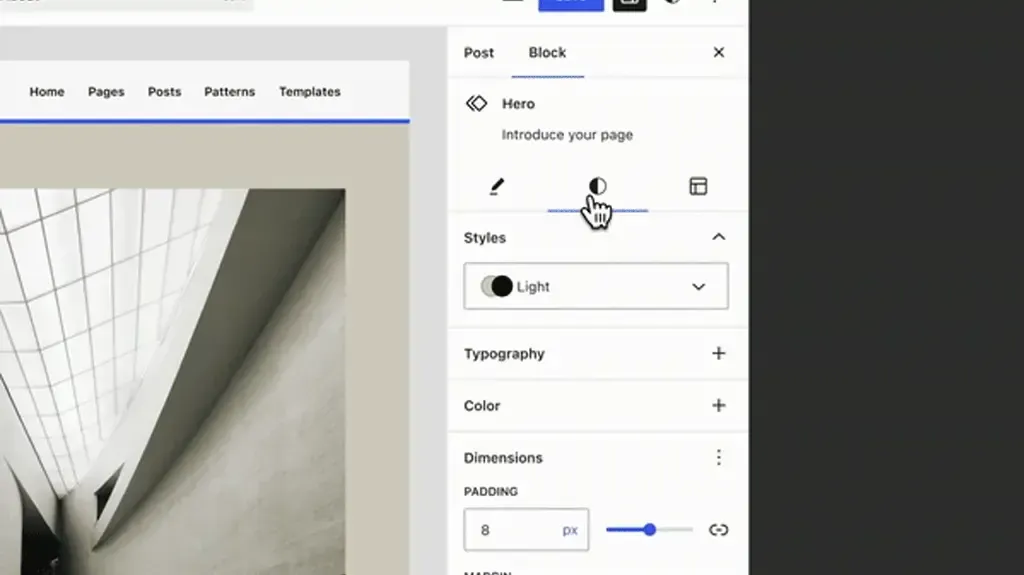
  • Clear Display of Inherited Styles: Users can now see globally inherited block styles directly within the editor interface, ensuring transparency in how styles propagate across different blocks and pages.
  • Elimination of Confusion: The exact inherited style values are displayed locally when applicable, making it easier to identify and modify design elements consistently throughout the website.

This clarity promotes better design decisions and enhances the overall visual coherence of WordPress-powered websites.

Unified Editor Experiences

Streamlined Publish Flow

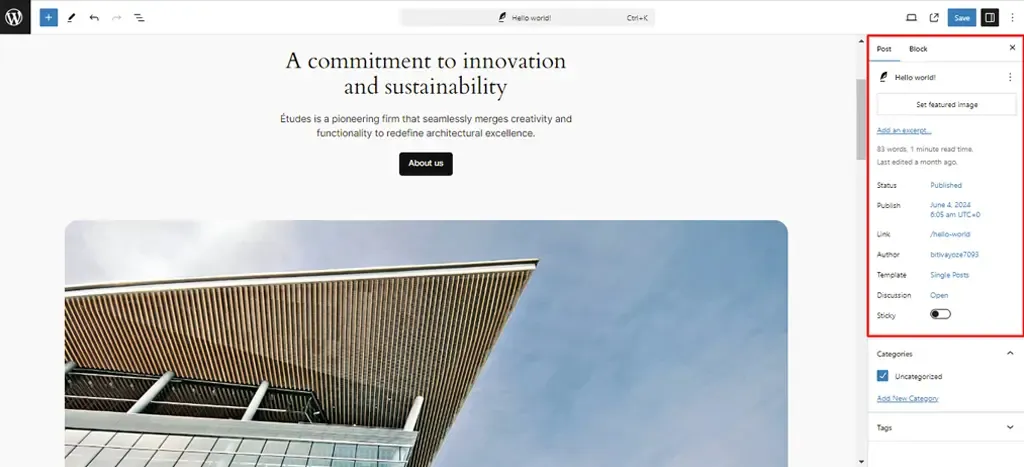
WordPress 6.6 introduces a streamlined publishing flow, unifying the publishing process across both post and site editors. This update ensures a coherent experience when publishing content, whether managing individual posts or updating entire site sections.

A key enhancement is the introduction of a unified “summary” inspector panel, consolidating essential controls and settings into a single, intuitive interface. This panel offers a comprehensive overview of content status, revisions, and publishing options, simplifying content management tasks for users.

By streamlining the publishing flow, WordPress 6.6 enhances user efficiency and ensures a seamless editing experience from creation to publication.

Design Tools Empowerment

Expanded Style Variation Options

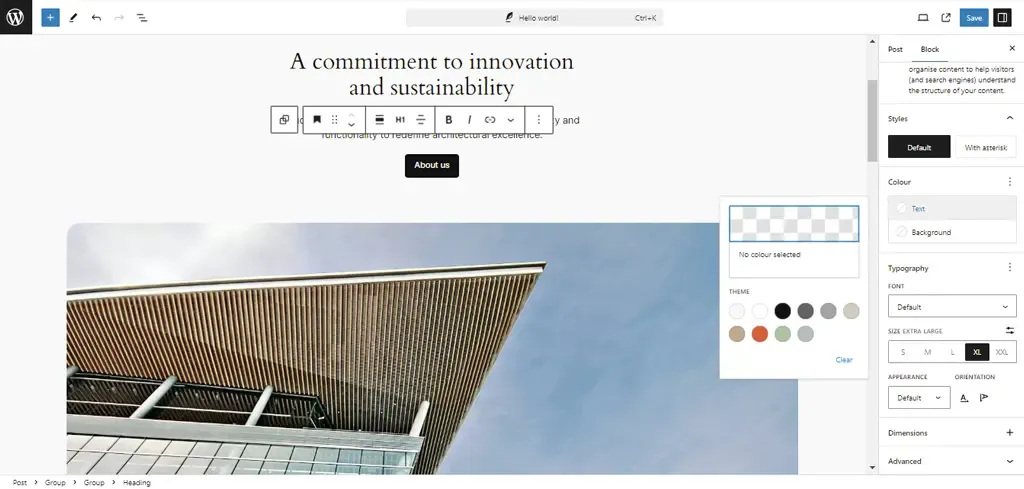
WordPress 6.6 introduces expanded style variation options, allowing users to mix and match typography and color palettes across different style variations effortlessly. This update enables increased design customization without requiring additional theme adjustments.

By leveraging existing style presets and the Font Library, users can create unique visual identities for their websites while maintaining consistency across various sections. This enhancement provides designers and developers with greater flexibility to tailor site aesthetics according to specific branding needs and user preferences, ultimately enhancing the overall visual appeal and user experience.

Synced Blocks and Pattern Attributes

With WordPress 6.6, maintaining design consistency across multiple instances of synced patterns is made easier than ever. This update ensures that layout and styling attributes remain synchronized across different content areas, while allowing for customizable content within each instance.

Users can now deploy patterns across various pages or posts without compromising design integrity, facilitating efficient content management and design updates.

By offering flexibility alongside uniformity, this feature empowers users to deliver cohesive yet personalized web experiences, aligning with diverse content requirements and user expectations.

Enhanced Grid Layout and Font Library

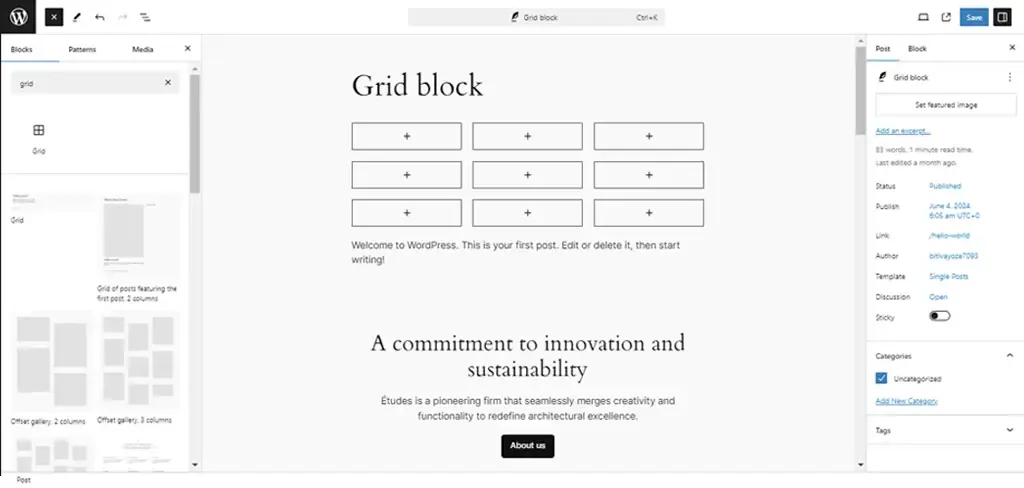
WordPress 6.6 enhances design flexibility with the introduction of grid layout options within the Group block, providing users with advanced layout control and customization capabilities. This update enables seamless arrangement of content elements in grid format, offering improved visual organization and structure for website layouts.

Additionally, refinements to the Font Library based on user feedback enhance typography choices, allowing for richer text styling options throughout the site. These enhancements collectively contribute to enhanced site aesthetics, offering users more creative freedom and usability in designing captivating and functional websites.

Performance and API Enhancements

Performance Improvements

WordPress 6.6 brings significant optimizations aimed at improving site performance and user experience. These optimizations include faster template loading times and overall enhancements to site responsiveness.

By improving caching mechanisms and optimizing autoload options, WordPress 6.6 ensures that websites load quicker and operate more efficiently, leading to enhanced user engagement and satisfaction. These performance improvements not only benefit site visitors by reducing wait times but also support administrators in managing content more seamlessly, thereby boosting overall site performance metrics.

API Iterations: Interactivity, Block Hooks, and HTML

In WordPress 6.6, several APIs receive iterative enhancements to empower developers with advanced customization capabilities and improved tools. Key updates include:

Interactivity API Enhancements:
  • Better error handling
  • Improved debugging tools
  • Increased code quality These enhancements provide developers with more robust options for adding interactive features to websites, enhancing user engagement and interaction possibilities.
Block Hooks API Refinements:
  • Dynamic insertion of blocks into themes
  • Enhanced content flexibility and customization options By refining the Block Hooks API, WordPress enhances its extensibility, enabling developers to create more versatile and feature-rich websites tailored to specific client needs.
HTML API Improvements:
  • Enhanced encoder/decoder functionalities
  • Improved compatibility with web standards These advancements streamline the creation and modification of HTML content within WordPress, ensuring consistency and reliability across different browsers and devices.

By enhancing these foundational APIs, WordPress 6.6 equips developers with powerful tools to build robust and scalable web solutions, driving innovation and efficiency in web development practices.

Infrastructure and Compatibility Updates

PHP Version Support Update

WordPress 6.6 marks a strategic shift by dropping support for older PHP versions in favor of enhancing site security and performance. With this update, WordPress recommends using PHP versions that ensure optimal performance and compatibility with modern technologies. By encouraging users to upgrade to newer PHP versions (specifically PHP 7.2.24 or higher), WordPress 6.6 aligns with industry standards and best practices for web security and performance. This proactive approach not only strengthens site defenses against potential vulnerabilities but also ensures seamless integration with the latest WordPress features and functionalities, offering users enhanced stability and efficiency in their website operations.

Rollback Feature for Auto-Updates

A standout feature introduced in WordPress 6.6 is the rollback capability during automatic plugin updates. This feature mitigates risks associated with plugin updates by allowing administrators to revert to the previous version in case of compatibility issues or unexpected errors. By enabling automatic rollbacks, WordPress 6.6 minimizes downtime and enhances reliability during plugin updates, ensuring uninterrupted site performance and user experience. This capability empowers administrators with greater control over plugin management, offering peace of mind and confidence in maintaining a stable and secure website environment.

Maximize the Benefits of WordPress 6.6

Upgrade Your Site with Experts

Connect Now!
Upgrade to WordPress 6.6 Today!

WordPress 6.6 introduces a host of powerful features and enhancements designed to elevate your website’s performance, security, and user experience. Whether you’re an agency looking to deliver cutting-edge solutions or a business leader aiming to enhance your online presence, now is the time to upgrade to WordPress 6.6.

For Agencies

Embrace the latest in design flexibility with expanded style variations and enhanced grid layouts. WordPress 6.6 empowers you to create visually stunning websites tailored to your client’s unique branding and functional requirements. Take advantage of streamlined site editing capabilities and advanced APIs to streamline development workflows and deliver exceptional results faster.

For Business Leaders

Ensure your website operates at peak performance with optimized site loading times and improved caching mechanisms. Upgrade to WordPress 6.6 for enhanced security features and compatibility with modern PHP versions, safeguarding your online presence against potential threats. Experience a seamless publishing process and intuitive content management with unified editor experiences and rollback capabilities during plugin updates.

Take the Next Step

Explore the benefits of WordPress 6.6 and unlock new possibilities for your website. Upgrade today to harness the full potential of these advanced features and stay ahead in the digital landscape. Contact our team to learn more about upgrading to WordPress 6.6 and discover how we can support your journey towards a more secure, efficient, and engaging web presence.

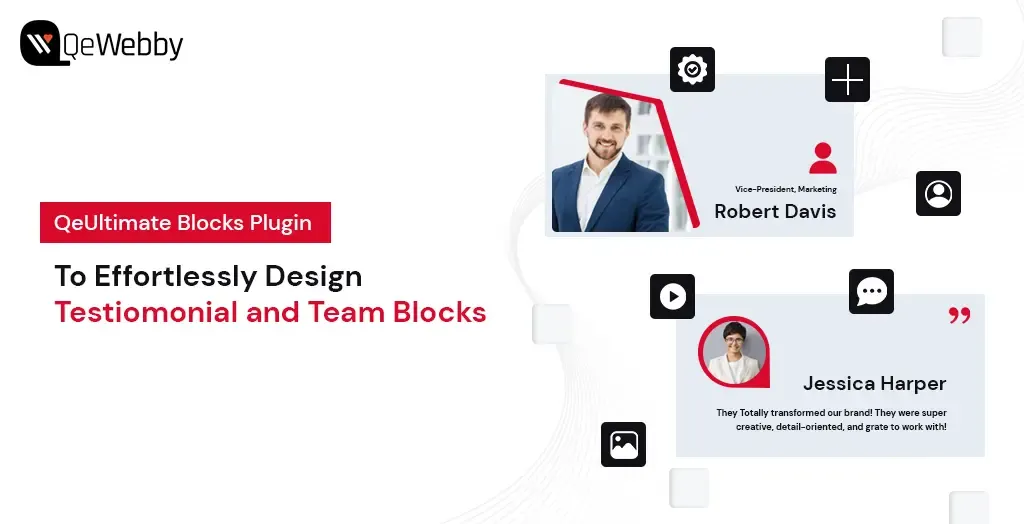
Effortlessly Design Testimonial and Team Blocks with QeUltimate Blocks Plugin

The QeUltimate Blocks Plugin for WordPress is a game-changer for anyone looking to create stunning, functional web pages with ease. Designed to enhance the Gutenberg editor, this plugin offers a variety of customizable blocks for testimonial and team member display that can transform your website without the need for complex coding or expensive design services.

Whether you’re a blogger, a business owner, or a creative professional, QeUltimate Blocks empowers you to craft pages that are not only aesthetically pleasing but also incredibly user-friendly. With an array of options to customize fonts, colors, backgrounds, and more, you have full control over every design element. Plus, the intuitive drag-and-drop interface means you can build and arrange your pages in no time, focusing on what you do best—creating outstanding content.

But that’s not all. QeUltimate Blocks enhances the visitor experience with features that promote easy navigation and engagement, such as interactive buttons and forms. Fully compatible with WordPress, this plugin seamlessly integrates with your existing setup, allowing you to easily expand your site’s capabilities.

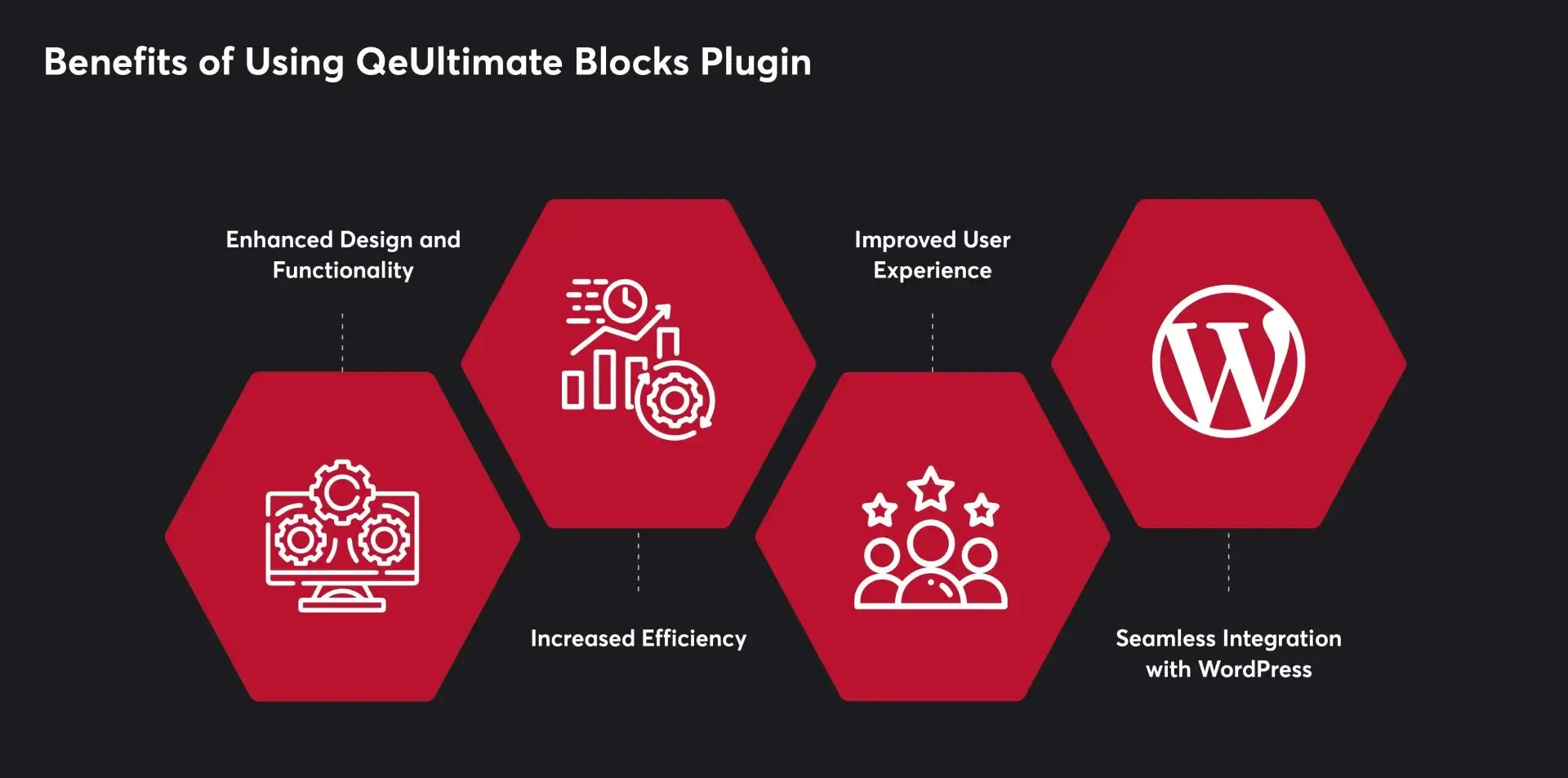
Benefits of Using QeUltimate Blocks Plugin

The QeUltimate Blocks Plugin significantly improves website design and functionality. With a variety of customizable blocks, users can create visually appealing and user-friendly pages. The plugin offers easy customization of fonts, colors, backgrounds, and other design elements, giving users complete control over their website’s appearance.

QeUltimate Blocks streamlines the page creation process with its intuitive drag-and-drop interface. Users can quickly add and arrange blocks without coding or technical skills, saving time and effort. This efficiency allows users to focus more on creating quality content for their website.

The plugin enhances the user experience by making website navigation and readability straightforward. Visitors can easily find the information they need, and interactive elements such as buttons and forms help increase user engagement and drive conversions.

QeUltimate Blocks is fully compatible with WordPress, making it easy to integrate into existing websites. Users can install the plugin directly from the WordPress repository and start building pages immediately. Additionally, the plugin works seamlessly with other WordPress plugins, enabling users to add further functionality to your websites.

3 Easy Steps to Add Testimonial and Team Blocks on WordPress Pages

Step 1: Install and Activate QeUltimate Blocks Plugin

Get QeUltimate Blocks Plugin for Free!

Craft Stunning Web Pages –

Free Download

Whether you want to improve your site’s design, enhance SEO, or add interactive elements, plugins provide a simple solution. One such powerful plugin is the QeUltimate Blocks Plugin, designed to help you effortlessly create stunning and functional pages. Here’s a detailed guide on how to install and activate the QeUltimate Blocks Plugin.

Log in to Your WordPress Dashboard: Open your web browser and navigate to your WordPress admin panel by adding /wp-admin to your site’s URL (e.g., www.yoursite.com/wp-admin). Enter your username and password to log in.

Go to Plugins: Once logged in, look at the menu on the left-hand side of the dashboard. Find and click on “Plugins” to open the Plugins management page.

Add New Plugin: At the top of the Plugins page, you will see a button labeled “Add New.” Click on this button to navigate to the Add Plugins page where you can search for and install new plugins.

Install the Plugin: Once you find the QeUltimate Blocks Plugin in the search results, click the “Install Now” button next to it. The installation process will begin, and the button will display a progress indicator.

Activate the Plugin: After the plugin has been installed, the “Install Now” button will change to “Activate.” Click on the “Activate” button to enable the plugin on your WordPress site.

Confirmation: After activation, you will be redirected back to the Plugins page, and a message at the top will confirm that the QeUltimate Blocks Plugin has been successfully activated.

 Step 2: Explore and Utilize QeUltimate Blocks Features

Now that you have installed and activated the QeUltimate Blocks Plugin, it’s time to explore its powerful features and see how you can utilize them to create stunning and functional web pages. QeUltimate Blocks provides a diverse set of blocks designed to meet various needs, including content structuring, interactivity, and visual enhancement. Here are some of the key blocks you can use:

Key Block: Team Members

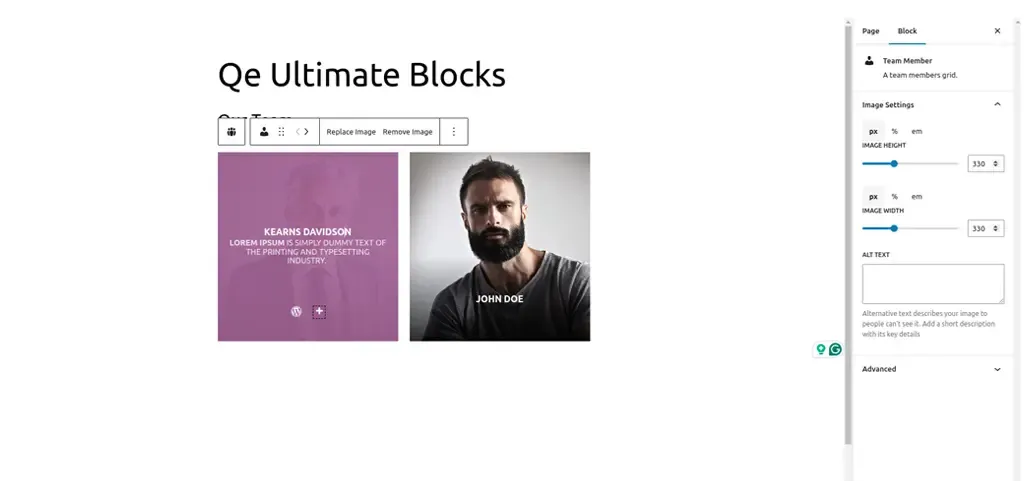
The “Team Members” block is a powerful feature of the QeUltimate Blocks Plugin that enables you to create an attractive section dedicated to showcasing your team. This block is perfect for highlighting the individuals behind your business, project, or organization, adding a personal touch to your website. The basic features include:

  • Go to the Post/Page Editor: From your WordPress dashboard, navigate to Posts or Pages and create a new post/page or edit an existing one.
  • Open the Block Inserter: In the Gutenberg editor, click on the “+” button to open the Block Inserter menu.
  • Find the Team Members Block: Scroll through the QeUltimate Blocks section or use the search bar to locate the “Team Members” block.
  • Add the Block: Click on the “Team Members” block to add it to your post or page.
  • Customize the Block: Once added, you can customize the block using the settings panel on the right-hand side of the editor. Here’s how:
    • Add Team Members: Start by adding individual team members. For each member, you can input their name, position, and a brief bio.
    • Profile Pictures: Upload profile pictures for each team member to add a personal touch.
    • Social Media Links: Include links to social media profiles or personal websites. You can add icons for platforms like LinkedIn, Twitter, and Facebook.
    • Layout Options: Choose from different layout styles, such as grid or list, to best present your team members.
    • Styling Options: Customize colors, fonts, and spacing to ensure the section aligns with your website’s design.
    • Arrange Team Members: Drag and drop team members to arrange them in the desired order. This helps highlight key individuals or create a logical flow.
  • Preview Your Page: Click the “Preview” button to see how the team section looks. Check for any adjustments needed to ensure it is visually appealing and informative.
  • Publish Your Page: Once you are satisfied with the design and layout, click the “Publish” button to make your page live.

Key Block: Testimonials

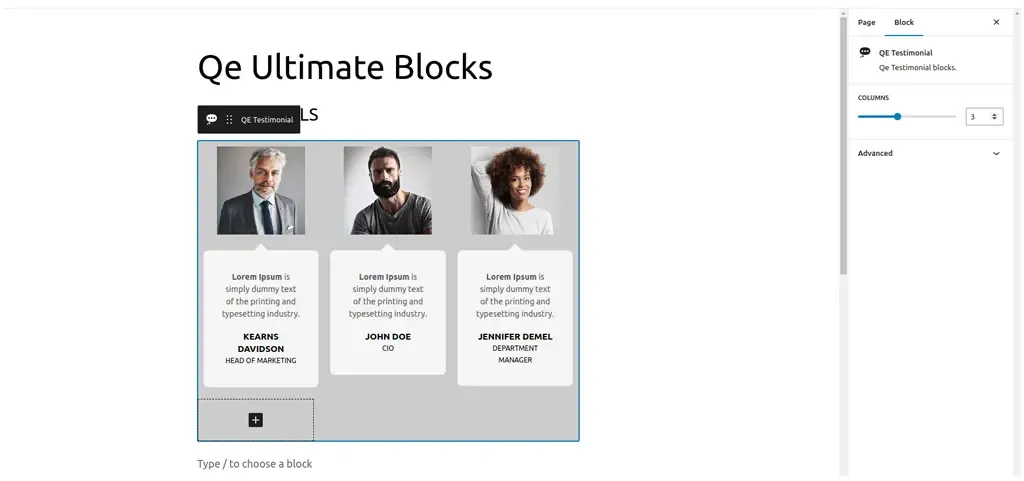
The “Testimonials” block is an essential feature for showcasing positive feedback from your customers. Testimonials serve as social proof, helping to establish trust and encouraging potential customers to engage with your business. The QeUltimate Blocks Plugin makes it easy to create and customize testimonial sections that stand out. The basic features include:

  • Customizable Layouts: Choose from various layout options, including grid, slider, and list formats.
  • Profile Information: Display the name, position, company, and photo of each testimonial provider.
  • Styling Options: Customize colors, fonts, backgrounds, and borders to match your website’s design.
  • Responsive Design: Ensure testimonials look great on all devices, from desktops to mobile phones.

Here is a step-wise guide to implement:

  • Go to the Post/Page Editor: From your WordPress dashboard, navigate to Posts or Pages and either create a new post/page or edit an existing one.
  • Open the Block Inserter: In the Gutenberg editor, click on the “+” button to open the Block Inserter menu.
  • Find the Testimonials Block: Scroll through the QeUltimate Blocks section or use the search bar to locate the “Testimonials” block.
  • Add the Block: Click on the “Testimonials” block to add it to your post or page.
  • Customize the Block: Once added, you can customize the block using the settings panel on the right-hand side of the editor. Here’s how:
    • Add Testimonials: Start by adding individual testimonials. For each testimonial, input the customer’s name, position, company, and their feedback.
    • Profile Pictures: Upload a photo of the customer to add authenticity and a personal touch.
    • Layout Options: Choose the layout style that best fits your design—grid for a clean, structured look, slider for a dynamic presentation or list for a straightforward approach.
    • Styling Options: Adjust colors, fonts, and backgrounds to ensure the testimonial section aligns with your website’s overall design. You can also add borders and shadow effects to enhance the visual appeal.
    • Display Options: Customize how many testimonials to display at a time and whether to include navigation arrows or dots if using a slider layout.
    • Arrange Testimonials: Drag and drop testimonials to rearrange their order as needed. Highlight the most impactful testimonials at the top for maximum effect.
  • Preview Your Page: Click the “Preview” button to see how the testimonial section looks on your site. Ensure it is visually appealing and the text is easy to read.
  • Publish Your Page: Once you are satisfied with the design and layout, click the “Publish” button to make your page live.

Step 3 Design and Publish Your Stunning Page

You are now ready to design and publish your stunning WordPress page. This final step involves putting together all the elements you’ve customized, arranging them for the best visual impact, and ensuring your page is ready to captivate your audience. Here’s a detailed guide on how to design and publish your beautiful, functional page.

Here is a step-wise guide to implement:

  • Outline Your Content: Before you start designing, outline the key sections and elements you want on your page. This could include a header, hero image, team section, testimonials, a call-to-action, and footer.
  • Sketch a Layout: Sketch a rough layout of your page on paper or using a digital tool. This helps you visualize the structure and flow, making it easier to arrange blocks later.
  • Go to the Post/Page Editor: From your WordPress dashboard, navigate to Posts or Pages and create a new post/page or edit an existing one.
  • Add a Title: Start by adding a compelling title that clearly conveys the purpose of your page.
  • Add and Arrange Blocks: Using the “+” button, add the blocks you’ve outlined in your plan. Arrange them in the order that follows your sketched layout. Here are some key sections you might include:
    • Hero Section: Use an Image or Cover block to create a visually striking hero section. Add a headline and a subheadline that grabs attention.
    • Team Members: Use the Team Members block to introduce your team. Customize it with profile pictures, names, and bios.
    • Testimonials: Add a Testimonials block to showcase positive feedback. Customize the layout and design for maximum impact.
    • Call to Action: Use the Call to Action block to encourage visitors to take a specific action, like signing up for a newsletter or contacting you.
    • Customize Each Block: Adjust the settings for each block to match your design preferences. This includes changing colors, fonts, spacing, and adding background images where needed.
  • Add Media: Enhance your page with high-quality images, videos, and graphics. Use the Image Slider block for interactive galleries or the Video block to embed engaging video content.
  • Use Advanced Columns: For a more sophisticated layout, use the Advanced Columns block to create multi-column sections. This can help organize content and improve readability.
  • Ensure Consistency: Maintain a consistent design throughout your page. Use the same fonts, colors, and styles to create a cohesive look.
  • Preview Your Page: Click the “Preview” button to see how your page looks on different devices. Check for any alignment issues, broken links, or design inconsistencies.
  • Optimize for SEO: Use an SEO plugin to optimize your page title, meta description, and content. This helps improve your page’s visibility in search engine results.
  • Test Functionality: Ensure all interactive elements, like buttons and forms, work correctly. Test any links to make sure they direct to the intended pages.
  • Save Draft: Before publishing, save your page as a draft. This ensures you don’t lose any work and can make final adjustments.
  • Publish: Once you’re satisfied with the design and functionality, click the “Publish” button to make your page live. Confirm any prompts to finalize the publication.
  • Promote Your Page: Share your newly published page on social media, in newsletters, and through other marketing channels to drive traffic.

End Note

The QeUltimate Blocks Plugin offers a range of customizable blocks that cater to various needs, from showcasing team members and displaying testimonials to creating advanced layouts and interactive elements. These features enable you to build professional, user-friendly pages without needing extensive coding skills. Now that you have the knowledge and tools to craft stunning WordPress pages, it’s time to unleash your creativity and make your website stand out. Happy designing!

QeUltimate Blocks Plugin!

Enhance your website’s design and functionality effortlessly with the

Free Download

WordPress 6.5 Release Highlights: Everything You Need To Know

WordPress 6.5 update is not just about minor tweaks – it’s a game changer!

This latest release introduces enhanced design flexibility and more options, bolstered block capabilities through new APIs, accessibility to current block theme features for classic themes, and the initial stages of the new admin redesign.

Just as we ensured you stayed ahead with the previous release of WordPress version 6.4, we’re here again with the latest version to keep you informed and up to date.

So, let’s look at the amazing features and enhancements in WordPress 6.5.

UPDATE: Originally planned for release on the 26th, WordPress 6.5’s release has been pushed back by one week and is now slated for Tuesday, April 2nd, 2024.

Within Core Trac, nearly 350 tickets awaited attention, comprising 99 enhancements and feature requests, 216 bug fixes, and 35 other important tasks. Notably, 20 tickets prioritize performance, 19 address accessibility, and 23 focus on modernizing code and adhering to coding standards. Gutenberg has been enhanced, 515 bugs have been fixed, and 65 accessibility improvements have been made as part of the 6.5 release. Overall, the updates in version 6.5 span across 40 core components.

Table of Contents

  • New in Design Tools
    • Font library
    • Improved pattern functionality
    • Theme.json Colorways
    • Automatic overlay color selection
    • AVIF support
  • New in Appearance Tools
    • Appearance tools in classic themes
    • Improved pattern management in classic themes
  • New in Foundational Experience in Site Editor
    • Tailored presentation options
    • Streamlined filtering and sorting capabilities
    • Efficient bulk actions
  • New in API
    • Interactivity API
    • HTML API
    • Script loader
  • Wrap Up

1. New in Design Tools

Font Library

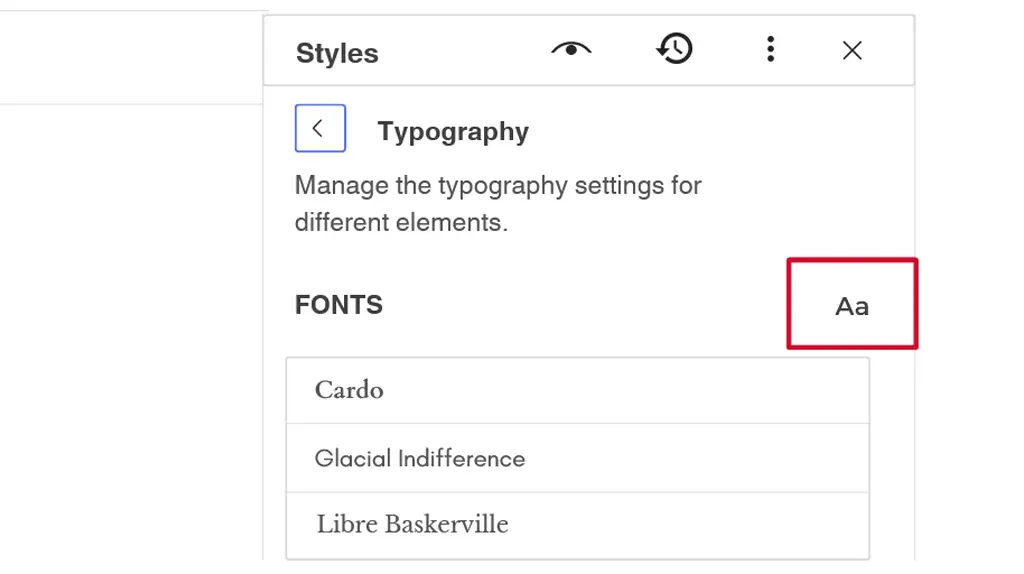
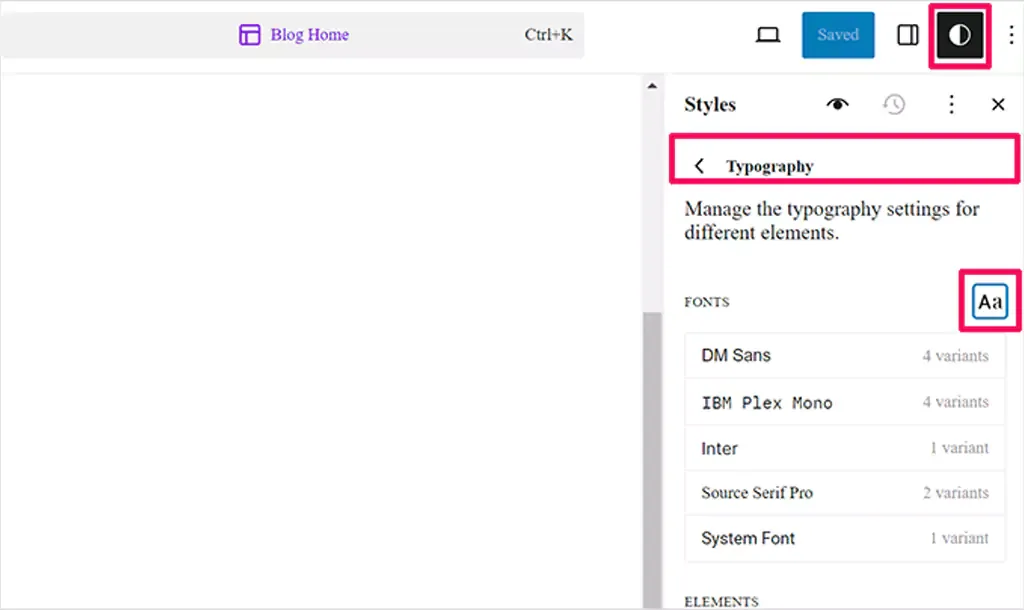
The Font Library, a highly anticipated addition to the WordPress block theme ecosystem, is now available in the Site Editor’s global style panel. Users can easily upload fonts or choose from the extensive collection provided by Google Fonts. Initially, Web Fonts API in WordPress 6.0 enabled users to register new fonts through theme.json. Despite being initially slated for release with WordPress 6.4, the feature faced delays due to concerns regarding code quality. However, with the forthcoming WordPress 6.5 update, users can finally experience the Font Library firsthand. The Font Library will simplify the process of adding, removing, and activating fonts on your website. Just like the Media Library, it’s available globally, regardless of your theme. Once a font is installed, whether by you or your theme, it can be used throughout your editing experience.

Improved Pattern Functionality

Expanding on the concept of synced patterns, the introduction of pattern overrides (formerly known as partial sync patterns) enables users to maintain a synchronized layout and style while permitting customized content for each instance of the pattern. This ensures consistency in design across various content pieces. For example, imagine a testimonial pattern displayed in a grid format. With this enhanced feature, users can incorporate the testimonial pattern into multiple posts, ensuring that the layout and styling, such as the overall design of the recipe card, remain consistent across all instances. However, individual elements like the Name, Image, and Role can be tailored to each instance for personalized content. Furthermore, users will have the ability to revisit and adjust the design of the overall testimonial pattern without impacting the content in existing instances. It’s important to note that this development will need to align with both the Custom Fields API and Block Binding API.

Theme.json and Colorways

Expanding on the existing styling system that includes features like style variations, section-specific theme.json offers finer control over specific parts of your website using the same underlying system. In version 6.5, color variations are introduced through Colorways for group blocks, which is a comprehensive set of updates. Colorways, a subset of section-specific theme.json, specifically deals with styling elements. Initially, this option will be accessible only for Group blocks through code, with minimal user interface interaction for selection. These styles will encompass curated colors, typography, border styles, and other element styles like links and buttons. Currently, the primary use case is for theme authors to predefine a set of colors that are carefully selected based on considerations such as contrast and aesthetics. Looking ahead, there are plans to explore enabling users to create Colorways directly within the Styles interface.

Automatic Overlay Color Selection

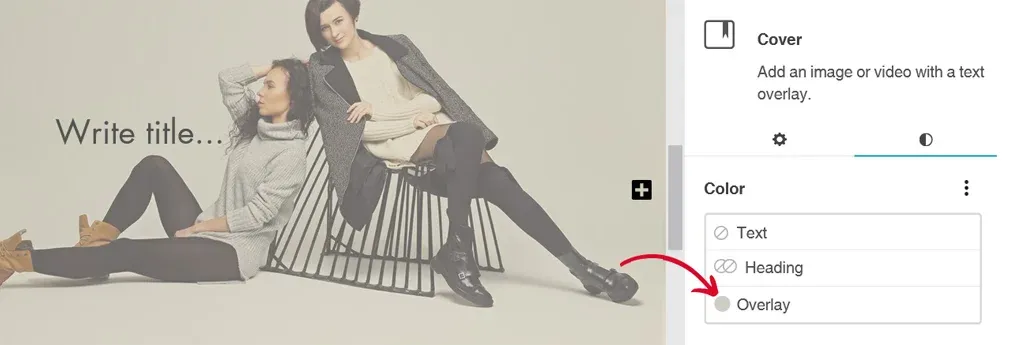
Now, users no longer need to spend time selecting the perfect overlay color manually. In WordPress 6.5, when you add a cover block and upload or select an image from the media library, the system automatically applies an overlay color that matches the dominant color of the image. This saves users from the hassle of choosing the overlay color themselves. However, if desired, users still have the flexibility to change or customize the overlay color according to their preferences.

To test this feature:

  • Insert a “Cover block” into your content.
  • Upload or select an image from the media library.

You’ll notice that an automatic overlay color is applied, matching the dominant color of the image. However, you can easily modify this overlay color to suit your needs.

AVIF Support

WordPress 6.5 now supports AVIF, a modern image format offering superior image quality and compression compared to JPEG, PNG, and WebP. AVIF images can be up to 50% smaller than JPEGs while maintaining high quality. They also support a wide color range, including HDR, and produce sharper images, particularly in detailed areas. You can seamlessly upload and use AVIF images in WordPress 6.5, provided your hosting environment supports AVIF. Transitioning to AVIF is likely to enhance your site’s performance and improve user experience.

Looking to boost your site speed?

Reach out to us TODAY!

2. New in Adoption Pathways

Appearance Tools in Classic Themes

The inclusion of support for Appearance Tools broadens the scope of design possibilities that were previously exclusive to Block Themes or themes utilizing theme.json. For instance, functionalities like adding a basic border to a Group block necessitate the use of Appearance Tools. Efforts are currently in progress to enable Classic Themes to safely integrate support for most of these tools, ensuring compatibility and avoiding disruptions. This expansion unlocks an accessible plethora of design options for a wide range of websites, significantly enhancing their visual appeal.

Improved Pattern Management in Classic Themes

The themes not built with the Block Editor or theme.json will soon be able to tap into the rich library of Patterns, allowing for more versatile and modern design options. In addition to this fundamental shift, a direct link will be incorporated within the Appearance menu, leading users to the Patterns section. This link aims to enhance accessibility and promote awareness of Patterns as a core feature within WordPress. By making Patterns more visible and easily accessible to users of Classic Themes, WordPress is ensuring that all users can benefit from the latest design tools and functionalities, regardless of their theme choice.

3. New Foundational Experience in Site Editor

The Site Editor undergoes a significant enhancement with the introduction of robust new view modes tailored for efficient management of pages, patterns, templates, and template parts. These modes introduce heightened flexibility and user-friendliness, empowering users to seamlessly explore, filter, and manipulate their site’s components with enhanced efficiency.

Tailored Presentation Options

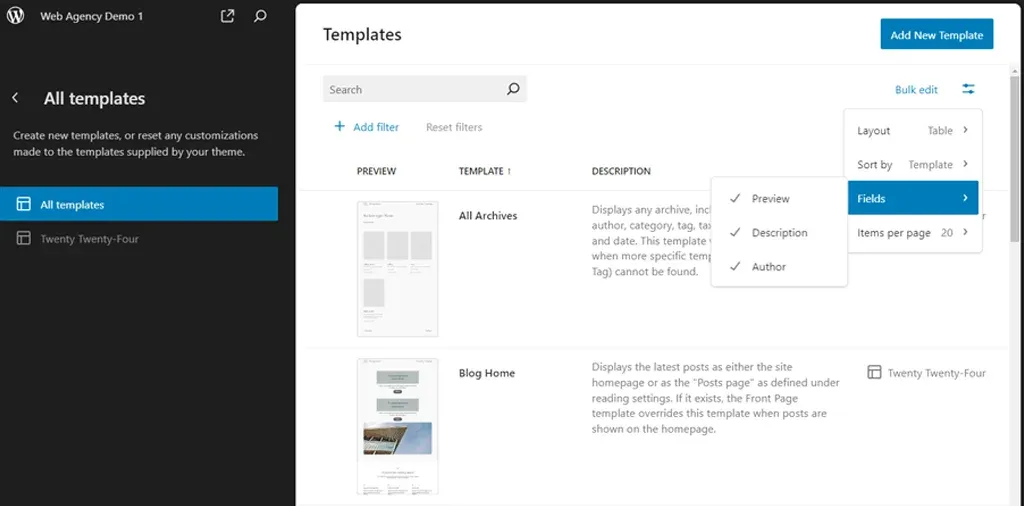
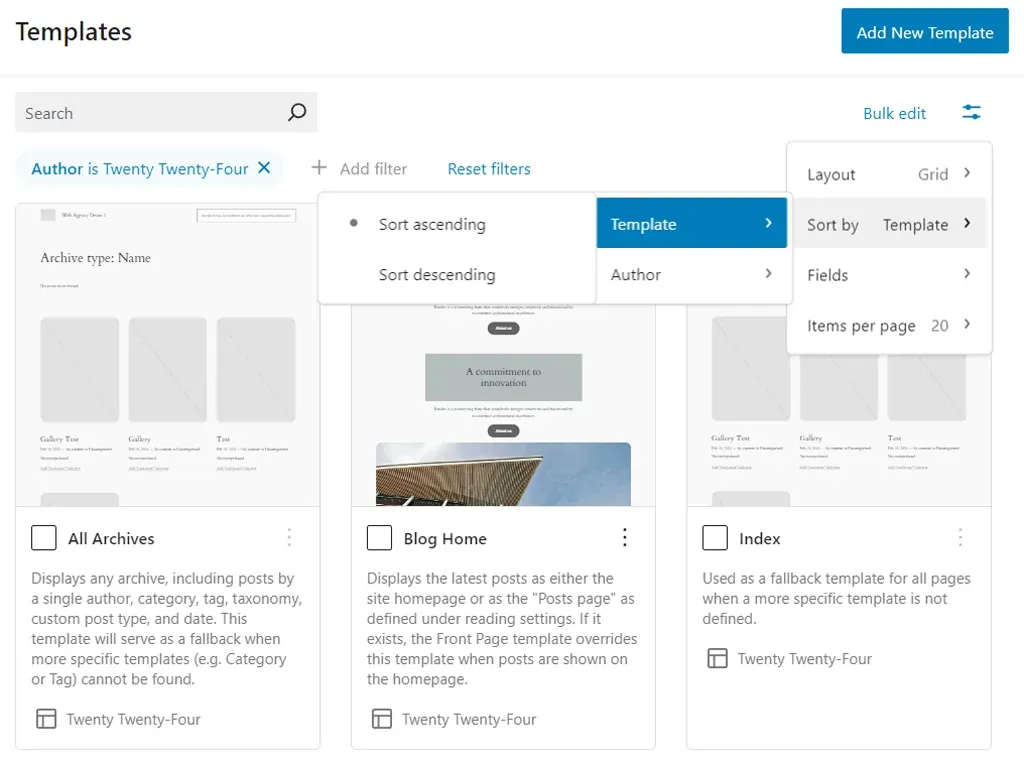
The updated library presentation now offers various layout options, allowing users to personalize the displayed information by selectively hiding or revealing specific fields. Accessible through the View options button located on the top-right corner of the panel, these settings enable users to tailor their viewing experience to suit their preferences.

Streamlined Filtering and Sorting Capabilities

For users managing multiple items, filtering based on authorship is now simplified through the Add filter setting located beneath the search bar. Additionally, organizing items is made easier with sorting options available in the View options settings. Users can choose to sort items by template names or authors, enhancing organization and accessibility.

Efficient Bulk Actions

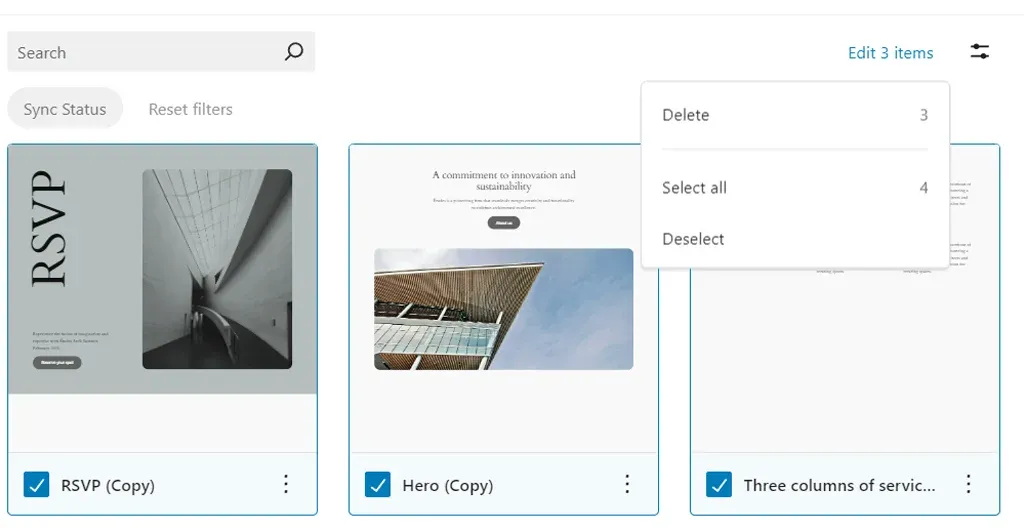
The revamped library facilitates quicker workflow management by enabling users to select and manipulate multiple items simultaneously. For instance, within the patterns library, users can swiftly delete multiple patterns at once. Similarly, managing template parts is streamlined with the ability to perform bulk resets, allowing users to quickly revert multiple changes.

It’s important to note that certain locked patterns and native theme template parts cannot be deleted.

4. New in API

Interactivity API

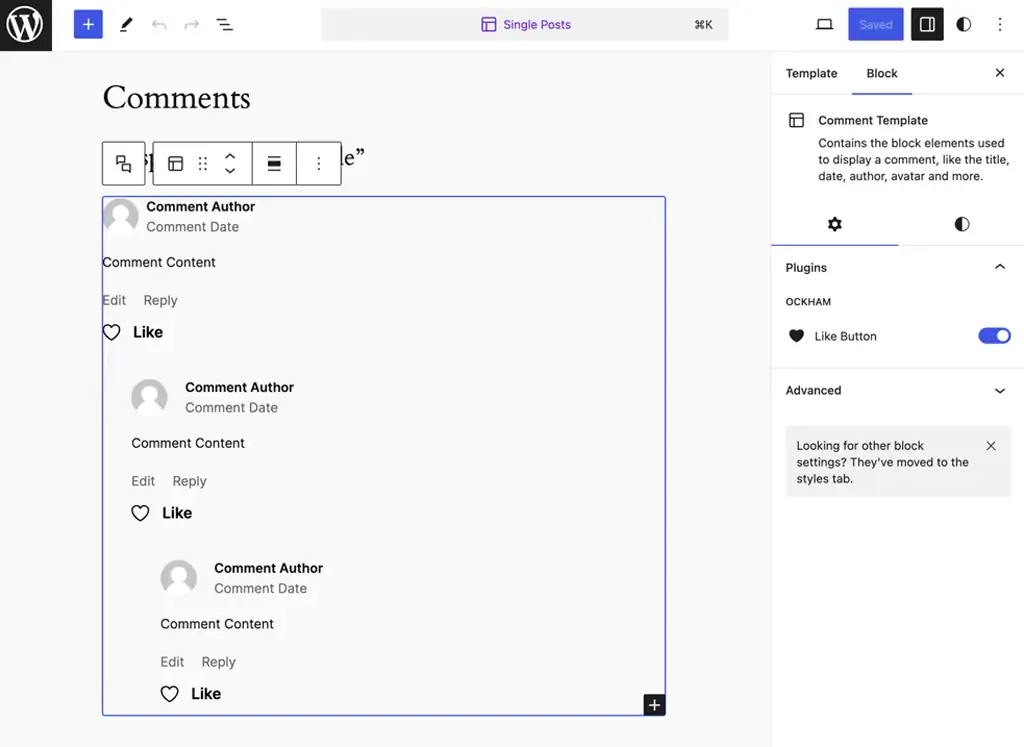
The Interactivity API is designed to offer developers a standardized method for adding interactive elements to the front end of their blocks. This includes features such as liking a post or adding items to a cart without needing to reload the page. By establishing a standard, developers can more easily create engaging user experiences, ranging from simple actions like counters or pop-ups to more complex functionalities such as instant page navigation, search, or online shopping carts. Following months of testing within specific core-provided blocks in the Gutenberg plugin and, more recently, within WordPress 6.4, there are a few remaining tasks to make the API available for extensible use.

HTML API

The Tag Processor has been enhanced to thoroughly examine every tag within an HTML document, disregarding non-tag tokens. In WordPress 6.5, it gains the capability to analyze all elements. Tokens, the basic components of a document, encompass tags, comments, doctype definitions, and text nodes within HTML. This advancement allows for easier handling of tasks such as removing tags or truncating HTML, as the text content of an HTML document can now be readily accessed. Facilitating this enhancement is the introduction of a novel concept known as modifiable text. Modifiable text denotes content enclosed within token boundaries, which can be altered without impacting the overall structure of the document.

Script Loader

WordPress has introduced a new “Script Modules” interface to accommodate native JavaScript modules. JavaScript modules, also known as ECMAScript Modules or “ESM,” utilize import and export functionalities. In this post, we’ll use “scripts” and “modules” to refer to the concepts of Scripts and Script Modules, respectively. JavaScript modules are integral to web development, offering benefits such as proper scoping through import and export, enforced strict mode, and deferred loading. Supporting and promoting the use of modules is crucial for WordPress, as they represent the future of JavaScript development.

Ready for an upgrade?

Stay ahead of the curve with the newest version!

Connect with us NOW!

Wrap Up

WordPress 6.5 brings a host of exciting features and enhancements to the table! These updates position WordPress as a leading choice for website development, catering to the diverse needs of developers, designers, and content creators alike. As we move forward, we can anticipate even more exciting developments that continue to push the boundaries of what is possible with WordPress.

If you’re looking to leverage the full potential of WordPress for your website or project, our team offers expert WordPress development services tailored to your specific needs. From theme customization to plugin development and site optimization, we’re here to help you make the most out of WordPress. Contact us today to discuss how we can elevate your WordPress experience and bring your vision to life.

Top 7 WordPress Development Trends to Watch in 2026

The days of evaluating WordPress solely by its aesthetic themes and basic publishing workflows are officially over. As we navigate 2026, the platform has transformed into a sophisticated operating layer. For direct-to-consumer brands looking to scale, the focus has fundamentally shifted. You are no longer just building a digital destination. You are engineering a content ecosystem built to survive and thrive alongside Agentic AI and rapidly evolving search algorithms.

This evolution changes every metric of success. The most critical WordPress development trends today intersect directly with advanced visibility strategies like Answer Engine Optimization and Generative Engine Optimization.

The objective is no longer just rendering web pages. It is about structuring data so AI models can confidently discover, extract, and cite your brand authority, all while maintaining uncompromising rendering speeds.

If your development team is planning a new digital experience or growth stack, sticking to legacy build models is a massive risk. These seven trends highlight the precise architectural and operational shifts you must implement now to ensure your platform remains resilient, visible, and highly functional.

Quick Trend Snapshot

Trend Why It Matters in 2026 Primary Impact Priority Level
Full Site Editing Block-first workflows are becoming standard. Faster delivery and reusable systems High
Headless WordPress Modern delivery models need more flexibility. Architecture freedom Medium-High
AEO and GEO AI search visibility is reshaping discoverability Better AI citations and visibility Critical
AI-Powered Workflows Teams need faster production without operational overload Workflow efficiency High
Core Web Vitals Performance directly affects rankings and conversion Better UX and SEO Critical
Low-code delivery Businesses want faster launch cycles and iteration Faster deployment Medium
Composable integrations WordPress now powers connected digital ecosystems Operational scalability High

Why Does WordPress Still Matter in 2026?

WordPress remains foundational because it strikes a rare balance among editorial control, developer extensibility, and ecosystem depth. While newer platforms push highly opinionated architectures, few match WordPress when content scale, workflow flexibility, and deployment speed are required simultaneously.

The critical shift is strategic. In 2026, WordPress will no longer be evaluated merely as a content management system. It is a content operating layer built to support SEO, AI-driven discovery, analytics integrations, and multi-channel delivery within a single cohesive stack.

The stakes for getting this right are high. According to recent McKinsey research, data-driven organizations are 23 times more likely to acquire customers and 19 times more likely to be profitable. Your CMS is the engine that structures and distributes that data.

1. Full Site Editing Is Becoming the Default Build Model

Full Site Editing continues to mature into the definitive standard for assembling modern WordPress sites. Instead of isolating templates, headers, and styling controls from daily content management, FSE unifies these layers within a single block-based editing system.

This standardization is a critical signal for digital agencies and in-house teams. According to Accenture’s 2026 Technology Vision research, 84 % of executives at diversified technology platforms are focused on fundamental transformation, compared to just 52 % at legacy companies. Sticking to rigid legacy theme architectures is an incremental tactic that slows down agility.

For developers, FSE delivers cleaner architectures and reusable components. For marketing teams, it allows template adjustments without creating engineering bottlenecks. Defaulting to classic themes without a strict legacy requirement is now a strategic misstep.

2. Headless WordPress Is Expanding Beyond Niche Use Cases

Headless WordPress is now a primary architectural strategy entering 2026. By decoupling the backend content workflows from a modern frontend presentation layer like Next.js or Astro, organizations gain unprecedented architectural freedom.

This is a practical requirement for DTC brands and enterprises that demand multi-channel publishing, granular performance control, and composable frontend stacks. The advantages include superior rendering performance and alignment with modern JavaScript patterns. The tradeoff involves increased deployment complexity and a higher coordination burden between content and engineering units.

Headless is a fit, not a default. Smart teams adopt it when the user experience ambition or a technical roadmap clearly justifies the separation.

3. AEO and GEO Are Becoming Core WordPress Visibility Priorities

Digital visibility in 2026 cannot rely on classic search models. Answer Engine Optimization and Generative Engine Optimization are mandatory priorities. Gartner predicts a 25 % decline in traditional search engine queries by 2026 as users shift to AI-generated answers and summaries.

Daily usage of AI integrated directly into search will be three times that of any standalone AI tool, with nearly one-third of adults encountering AI search summaries daily. Forbes corroborates this impact, noting that organic click-through rates have dropped 61 % on queries where AI Overviews appear, and 60 % of searches now end without a traditional click.

For WordPress teams, pages must be structured so AI systems can confidently extract and cite them. This requires sharp heading hierarchies, concise answer blocks, clean internal linking, and flawless schema markup. Technical SEO and citation readiness are now fundamental engineering tasks.

4. AI-Powered WordPress Workflows Are Becoming Operational Infrastructure

Artificial intelligence within WordPress has moved past the novelty phase. It is an operational infrastructure used to accelerate metadata generation, internal linking, and publishing operations.

The objective is not to flood the internet with thin content. The goal is operational efficiency. Agentic AI is driving the next era of enterprise integration, predicting that the majority of organizations will adopt agentic workflows by 2026. When integrated correctly, AI reduces production drag, allowing developers and strategists to focus on precision and conversion quality.

5. Core Web Vitals and Hosting Architecture Still Shape Outcomes

Performance remains a commercially critical development trend because it dictates visibility, retention, and conversion metrics. A visually polished site that responds slowly is a failing asset.

The current performance conversation revolves around LCP, INP, and CLS. With INP now the standard metric for interactivity, performance engineering must encompass script loading, font strategy, cache behavior, and rigorous plugin restraint.

Performance is an infrastructure decision that relies heavily on edge and object caching, as well as managed cloud environments.

6. Low Code and Pattern-Driven Delivery Are Speeding Up Launch Cycles

Pattern-driven workflows are accelerating how projects are shipped. Repeatable layout execution is becoming faster, freeing engineering teams to focus on bespoke integrations and performance-critical elements.

This rapid deployment is vital for minimal viable products, campaign hubs, and landing pages. Reusable block libraries reduce the time to market materially when governed with strict discipline. The optimal approach is selective acceleration: utilizing visual assembly tools to reduce drag while aggressively avoiding long-term technical debt.

7. Composable Integrations Are Defining the Next WordPress Stack

WordPress operates within a broader digital ecosystem. The most capable 2026 implementations connect seamlessly with CRMs, marketing automation platforms, commerce systems, and external APIs.

Content supports lead generation, customer education, and retention simultaneously. A platform that publishes well but integrates poorly creates systemic friction. Developers are building modular data flows and intentional plugin stacks, moving WordPress toward a composable operating model that delivers enterprise connectivity without forcing full headless complexity.

Final Thoughts

WordPress remains relevant in 2026, but the reasons are more strategic than before. It is no longer enough for a site to be easy to edit or quick to launch. It also has to perform well, integrate cleanly, stay secure, and remain visible in both traditional search and AI-mediated discovery.

That is why the most important WordPress development trends in 2026 intersect content, engineering, infrastructure, and discoverability. Teams that adapt early will build sites that are easier to scale, easier to govern, and far more resilient as the web continues to shift toward answer-driven discovery.

WordPress 6.4 Release Update – What You Need To Know?

WordPress continues to lead the way with its groundbreaking updates. As we eagerly anticipate the arrival of WordPress 6.4 on November 7, 2023, it’s not just another release—it’s a significant leap forward in the world of website building. Moreover, the core web vitals performance has almost doubled since the 2021 proposal for the WordPress Performance Team, showcasing a delightful trend of continuous improvement. So, gear up for an exciting upgrade that promises to elevate your website experience to new heights!

What Makes WordPress 6.4 Special?

WordPress 6.4 is more than just a software update; it’s a game-changer for website developers and creators. This release represents a carefully crafted culmination of innovative features, user-centric enhancements, and a forward-thinking approach to design and functionality.

Its significance lies in the standardization of web development. With intuitive tools, diverse themes, and powerful customization options, building a website that aligns with your vision has never been easier.

Let’s explore some significant changes that are arriving with WordPress 6.4!

The Rise of Twenty Twenty-Four

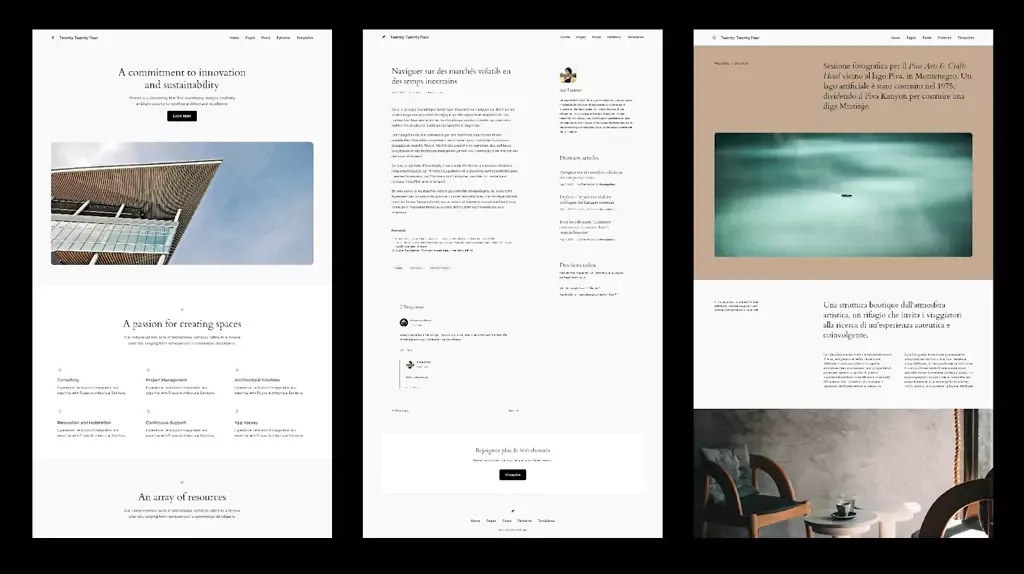
WordPress 6.4 introduces its new default theme, Twenty Twenty-Four. Departing from the conventional approach, Twenty Twenty-Four is a paradigm shift in theme design.

In addition to catering to entrepreneurs, artists, and writers, it embraces versatility. Twenty Twenty-Four explores three distinct use cases instead of one:

a. Entrepreneurs and Small Businesses: This iteration focuses on functionalities essential for businesses, incorporating sections like services, testimonials, and contact forms. The design emphasizes professionalism and accessibility, ensuring businesses create an impactful online presence.

b. Photographers and Artists: For creatives, Twenty Twenty-Four offers dynamic gallery layouts, seamless integration of multimedia elements, and a focus on visual storytelling. Artists and photographers can showcase their work in an immersive and visually appealing manner, enhancing their online portfolios.

c. Writers and Bloggers: Writers and bloggers benefit from clean and reader-friendly layouts. Twenty Twenty-Four prioritizes readability, featuring elegant typography and customizable post layouts. With intuitive navigation and emphasis on content, writers can captivate their audience without distractions.

Empowering Block Editor with Block Hooks

In WordPress 6.4, the introduction of Block Hooks marks a pivotal moment in the evolution of WordPress themes. Block Hooks redefines the way developers approach theme customization by providing an advanced extensibility mechanism for Block Themes.

Unlike traditional themes, Block Themes can now leverage Block Hooks to insert blocks relative to instances of other block types dynamically. This groundbreaking feature allows for precise control and seamless integration, empowering developers to craft more intricate and user-friendly interfaces.

Block Hooks revolutionizes the theming experience by enabling developers to extend Block Themes using filters and actions. As a result, themes can now respond dynamically to user interactions, creating highly interactive and dynamic websites. With the ability to insert blocks intelligently, Block Themes can cater to a wide range of user preferences, making the browsing experience more engaging and tailored.

Enhancement in User Interactivity and Functionality

WordPress 6.4 introduces several innovative blocks designed to enhance user experience and content engagement. The latest WordPress release is poised to revolutionize the way websites engage with their audiences. These technical advancements will not only elevate the visual appeal of websites but also simplify the process of creating dynamic, interactive, and user-friendly web experiences.

Content Organization and Engagement

The Table of Contents block provides seamless navigation within lengthy articles, enabling users to jump to specific sections effortlessly. The Time to Read block caters to user preferences by displaying estimated reading time, offering a more user-friendly reading experience.

Additionally, the Scrolling Marquee block adds a dynamic touch, allowing content to scroll horizontally or vertically, making certain types of information, such as news updates or testimonials, visually more appealing and attention-grabbing.

Aesthetic Image Presentation Reinvented
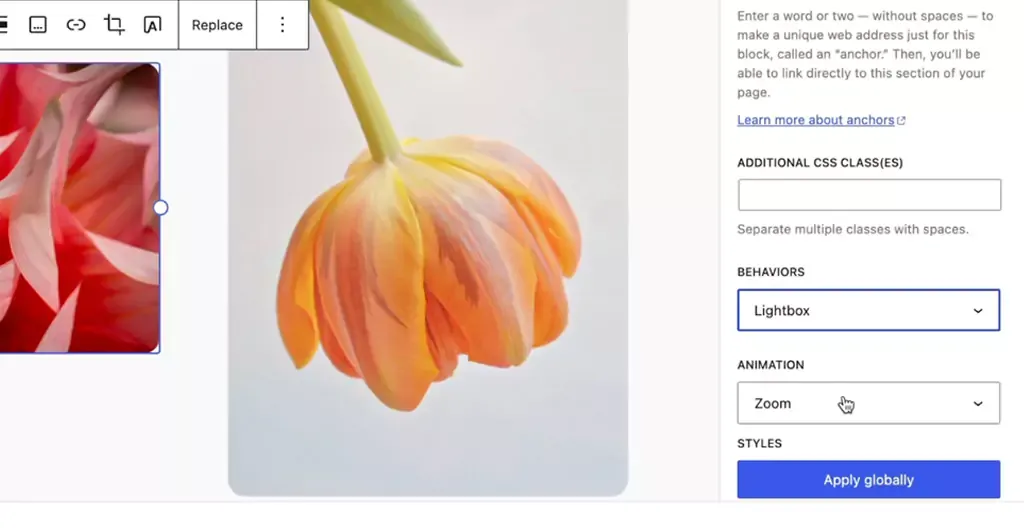
  • Among the exciting additions in WordPress 6.4 is the Image Lightbox feature. This feature significantly enhances the way images are presented on websites.
  • By implementing a lightweight standardized JavaScript library, WordPress 6.4 now offers a native lightbox functionality. When toggled on, this feature allows individual image blocks to expand elegantly when clicked, providing a distraction-free, immersive viewing experience for website visitors. This feature not only improves aesthetics but also ensures a more engaging interaction with multimedia content.
Streamlining Content Integration
  • WordPress 6.4 introduces Auto-Insert Blocks, a feature designed to simplify the process of integrating blocks into websites. With this functionality, WordPress intelligently suggests and embeds relevant blocks based on the user’s actions.
  • For instance, when a user installs a plugin and modifies the navigation, a prompt pops up, offering to seamlessly integrate a login/logout option. This proactive approach not only saves time but also enhances user-friendliness, allowing users to effortlessly enrich their website’s functionality without extensive manual block integration.

Empowering Intuitive Customization

WordPress 6.4’s enhancements in the writing experience, interface refinement, and site editing tools redefine the user experience. By focusing on fluid creativity, offering optimized interfaces like List View iterations and Distraction-free mode, and introducing intuitive site editing improvements, WordPress ensures that both content creators and developers can unleash their creativity effortlessly.

Fluid Creativity

Enhanced text formatting options, including typography and spacing presets, provide writers with the tools to craft visually appealing and engaging content. Additionally, the streamlined handling of media elements ensures that multimedia integration is smooth and intuitive, fostering a more immersive storytelling experience.

Interface and Tool Enhancements
  • WordPress 6.4 introduces several interface and tool enhancements aimed at optimizing user interaction. The List View iterations feature provides a comprehensive overview of the content structure, enabling users to easily navigate and manage complex layouts. Distraction-free mode is refined for a truly immersive writing experience, allowing writers to focus solely on their content without any interface clutter.
  • Keyboard shortcuts for duplicating blocks and media previews for gallery and image blocks enhance efficiency, making the content creation process both intuitive and swift.
Site Editing Improvements
  • Site editing in WordPress 6.4 is elevated to a new level of intuitiveness. Introducing the “Show Template” toggle provides users with a clear visual representation of their website’s structure while editing pages, ensuring precise customization.
  • Discussion settings/details for pages are seamlessly integrated, offering enhanced control over user interactions. The “Browse styles” panel now displays current modifications, allowing users to track changes effortlessly.
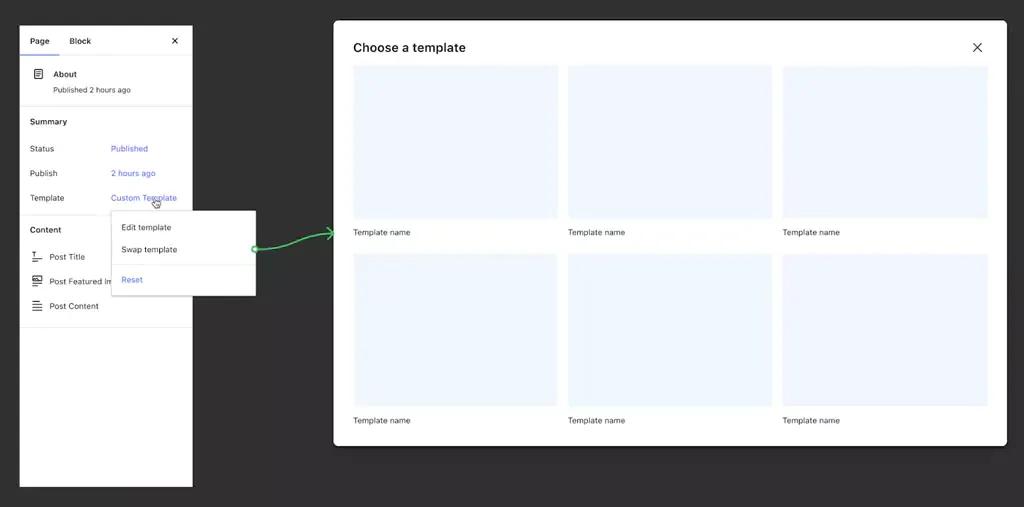
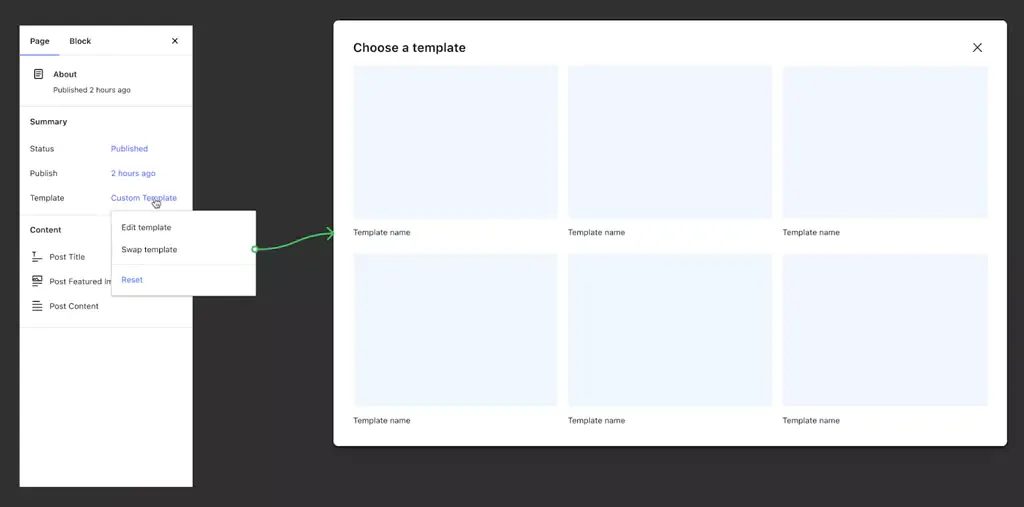
  • Additionally, switching templates within the Page Inspector empowers users to explore different design possibilities without complications. CSS class additions to templates offer developers greater flexibility in customization, making it easier to style specific elements according to their vision.

Design Tools and Global Styles

WordPress 6.4 sets a new standard in web design, empowering users to craft websites that are not only functional but also visually exceptional. By offering advanced layout controls, custom CSS enhancements, and a streamlined approach to managing global styles, WordPress ensures that designers and developers have the tools needed to create visually captivating and user-friendly websites.

Precision in Layout and Styling
  • WordPress 6.4 introduces advanced design tooling, enhancing precision and creativity in layout and styling. The layout controls now offer intricate adjustments, enabling developers and designers to fine-tune the placement and spacing of elements with exceptional accuracy.
  • Additionally, custom CSS enhancements empower developers to inject specific styles, ensuring pixel-perfect designs. These tools provide a robust framework for crafting visually stunning and responsive websites, catering to diverse user preferences and device types.
Streamlining Styling Across Websites
  • The evolution of Global Styles in WordPress 6.4 denotes a significant leap in managing styling elements across websites efficiently. With Global Styles, developers can implement consistent design patterns throughout the entire site. This comprehensive system allows for effortless management of typography, color schemes, spacing, and other design elements across various pages and sections.
  • The intuitive interface of Global Styles simplifies the process of applying site-wide changes, ensuring a cohesive and harmonious visual identity across the entire website.
Introducing Patterns
  • WordPress 6.4 introduces Patterns, a revolutionary feature that elevates the editing experience and enhances user engagement. Patterns are pre-designed blocks or layouts that offer advanced editing features. These meticulously crafted patterns streamline the design process, allowing users to create complex and visually appealing sections effortlessly.
  • From interactive call-to-action sections to immersive multimedia displays, Patterns enable users to implement intricate designs without extensive coding or design expertise. By providing a library of versatile and aesthetically pleasing patterns, WordPress empowers users to enhance their website’s visual appeal and user experience significantly.

Navigation and Query Loop Enhancements

  • With the Navigation block’s advanced customization features and responsive options, users can create menus that are not only visually appealing but also highly intuitive across all devices.
Introducing Patterns
  • WordPress 6.4 brings forth significant updates to the Navigation block, providing users with advanced customization options and enhanced responsiveness. Users can now tailor menu items more precisely, defining unique styles and interactions for each item. This granular control ensures a seamless and intuitive navigation experience for website visitors.
  • Furthermore, the Navigation block introduces responsive options, enabling users to configure menu behaviors for different devices and screen sizes. This flexibility ensures that menus adapt seamlessly, delivering an optimal user experience across various platforms, from desktops to smartphones.
Query Loop Block Enhancements
  • The Query Loop Block in WordPress 6.4 undergoes transformative enhancements, enabling users to create dynamic and personalized content displays. Users can now incorporate complex queries, allowing them to filter posts based on multiple criteria such as categories, tags, custom fields, and post types. This versatility empowers content creators to showcase specific content tailored to their audience’s interests.
  • Additionally, the Query Loop Block introduces post-display options, enabling users to determine how posts are presented, whether as grids, lists, or carousels. These options enhance the visual appeal of the displayed content, ensuring a captivating and engaging user experience.

End Note

With WordPress 6.4, a wave of innovation and user-centric design will reshape the landscape of WordPress website development. Its intuitive interface, coupled with a diverse array of features, caters to beginners and seasoned developers alike. Are you excited about the possibilities that WordPress 6.4 offers? We’re here to bring your vision to life! Our expert team specializes in the latest WordPress development, ensuring your website stands out in the digital landscape. Let’s turn your ideas into a captivating online presence. Contact us now and embark on a journey of innovation and creativity with WordPress 6.4!

The Business Guide to Headless WordPress: Scalability, Speed, and Growth in 2026

The global headless commerce market is experiencing explosive growth, expanding from an estimated $1.74 billion to a projected $7.16 billion by 2032 at a 22.4% CAGR. This trajectory is not merely driven by developer enthusiasm but by concrete commercial results: businesses adopting headless architecture report an average 42% increase in conversion rates following implementation.

Traditional WordPress was built for an era when a website had a single frontend and a single audience. However, for growth-focused teams operating under performance pressure, this business guide to headless WordPress cuts through the technical framing. It maps the architectural shift directly to revenue, scalability, and competitive positioning.

What is Headless WordPress and How Does It Work?

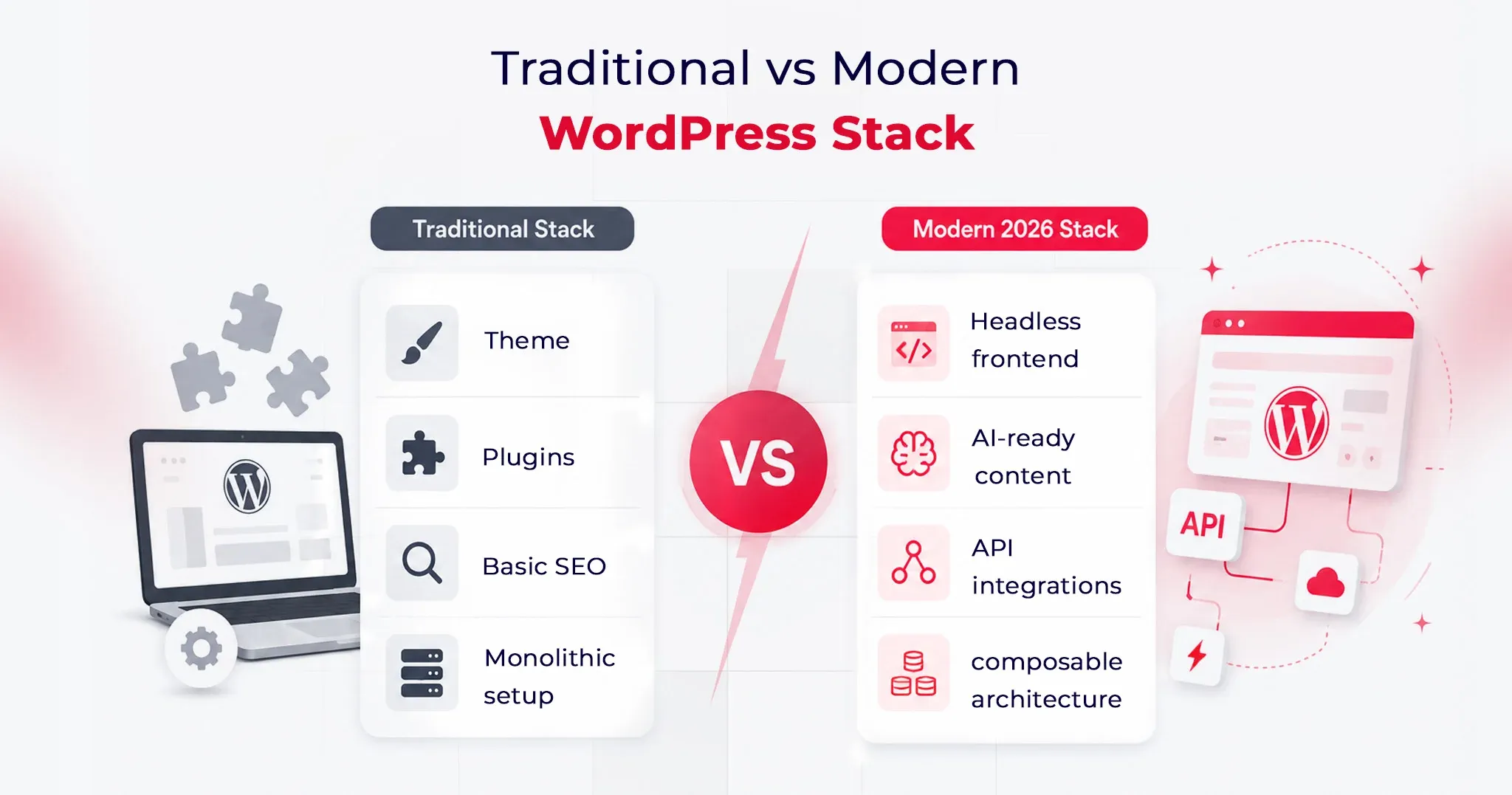
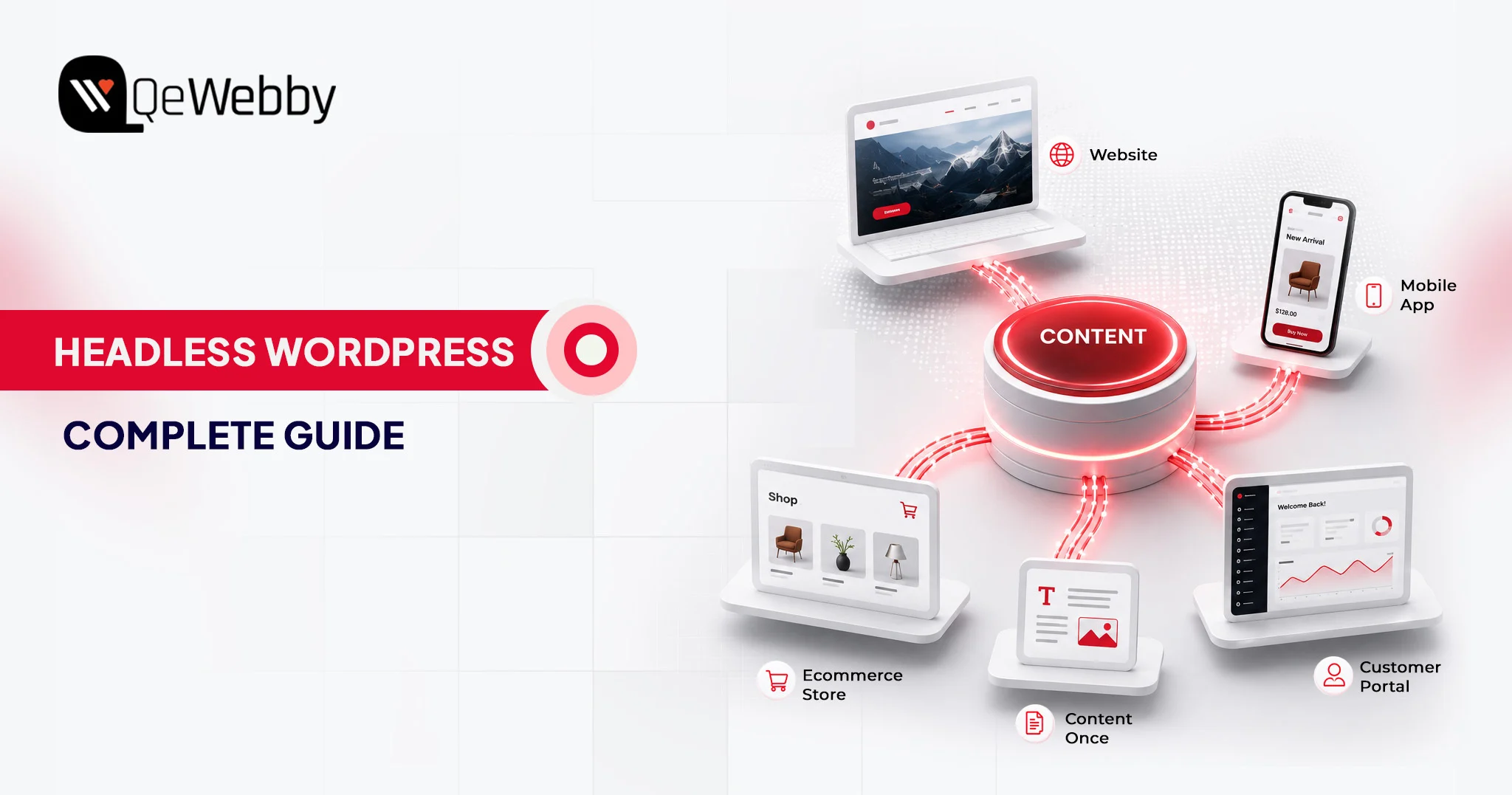
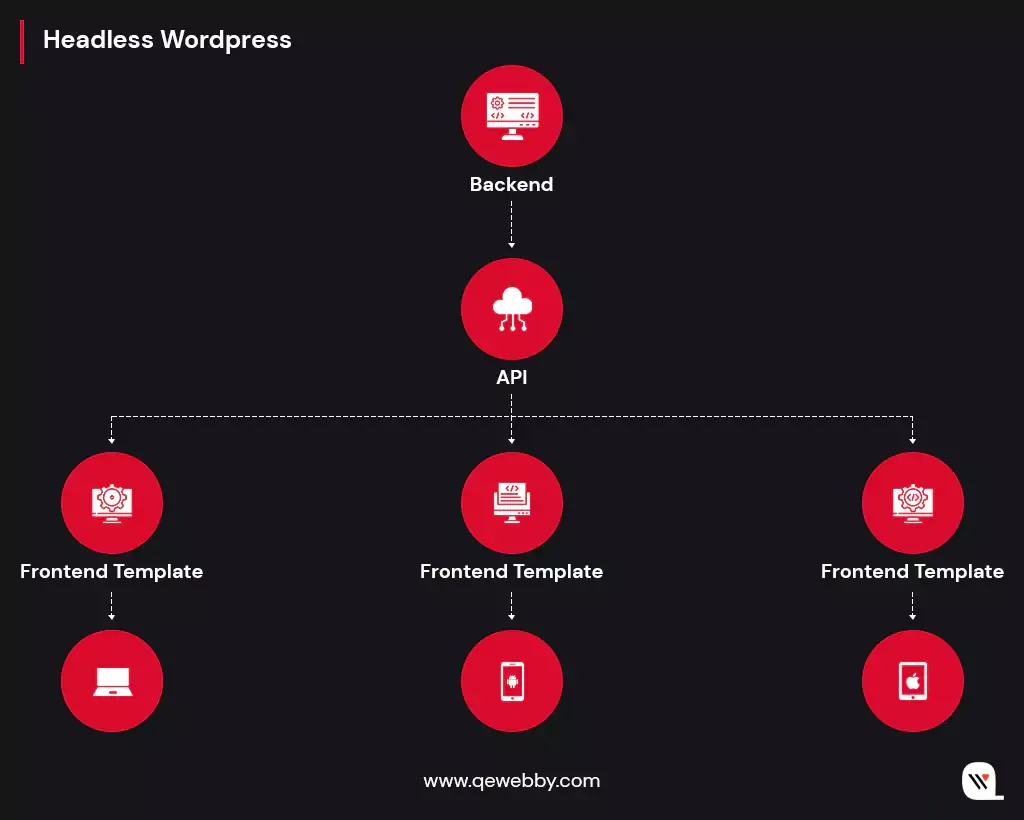
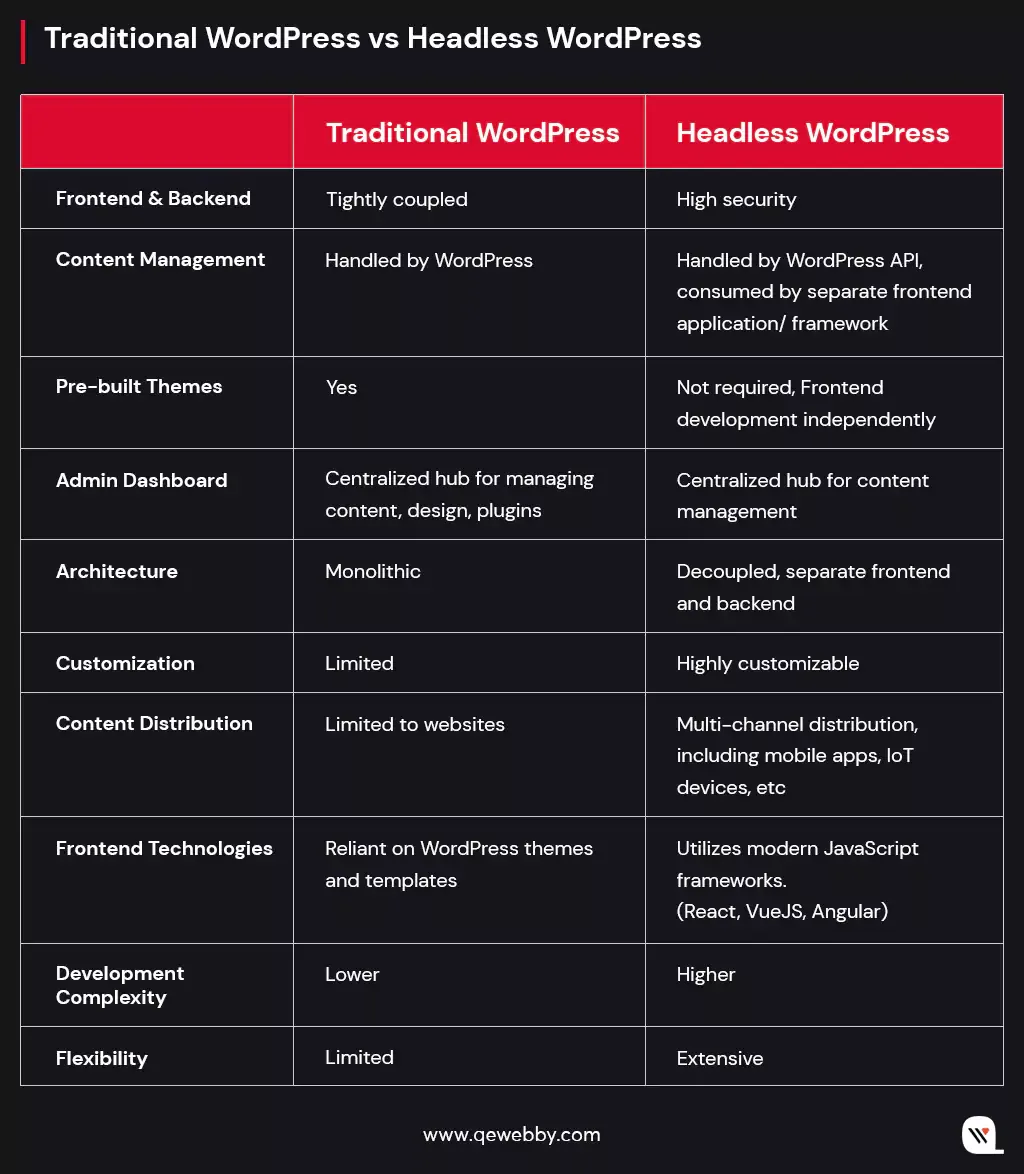
Headless WordPress decouples the content management layer from the frontend presentation layer. WordPress handles content storage and API-based delivery, while a modern JavaScript framework renders the user-facing experience independently.

That separation allows development teams to build faster, more flexible frontends without the constraints of WordPress’s default themes or plugin architecture.

Traditional WordPress ties content, design, and delivery into a single monolithic system. Every page load triggers PHP execution, database queries, and server-side rendering through WordPress’s template engine before a single byte reaches the user’s browser.

A well-optimized traditional setup delivers a time-to-first-byte (TTFB) of 180-250ms. A headless Next.js frontend with incremental static regeneration (ISR) delivers that same metric at 50 to 120ms, per the 2025 benchmark. That difference at the infrastructure level compounds into measurable business outcomes.

How the Decoupled Architecture Works in Practice?

Editorial teams retain the familiar WordPress dashboard for publishing posts, managing media, and updating pages. The frontend, built on a framework such as Next.js, Gatsby, or Nuxt.js, fetches content via the WordPress REST API or the WPGraphQL plugin.

Visitors interact with a pre-rendered interface served from a CDN edge network. WordPress never touches a user-facing request directly.

That model eliminates the performance bottlenecks associated with traditional WordPress: PHP rendering overhead, plugin conflict latency, and single-server delivery constraints.

What remains is a content API proven at scale and an editorial workflow that non-technical teams already know.

The clean separation between content operations and frontend engineering is exactly what makes headless CMS solutions compelling for enterprise and growth-stage teams who need both editorial simplicity and frontend performance.

Why Growth-Focused Businesses Should Use Headless WordPress?

73% of businesses now deploy headless architecture, up 14% from equivalent research conducted in 2021, per WP Engine’s State of Headless 2024 report. Another 98% of non-adopters plan to evaluate headless solutions within the next 12 months.

The adoption curve is not a trend. It is a structural response to constraints that traditional WordPress cannot address at scale.

Growth organizations face a specific set of demands that monolithic WordPress handles poorly: traffic volatility, multi-channel content delivery, rapid UI iteration without content disruption, and frontend performance benchmarks that directly affect organic search rankings and paid acquisition efficiency.

Many businesses first encounter these limitations while scaling traditional WordPress websites through WordPress development services.

Nearly 70% of organizations cite competitive advantage as the primary driver for headless adoption, per the same WP Engine report. The architecture addresses those demands at the system level, not through plugin layers or caching workarounds that require ongoing maintenance.

Scalable WordPress Solutions for High-Traffic Operations

Scalable WordPress solutions built on headless architecture handle traffic spikes fundamentally differently from traditional WordPress deployments. In a coupled setup, a traffic surge hits the WordPress server directly, triggering PHP execution, database queries, and server-side rendering for every concurrent request. In a headless deployment, the frontend is served as pre-rendered static assets or server-side rendered pages from CDN edge nodes, and the WordPress backend receives only lightweight API requests.

79% of headless users rate their scalability as strong, compared to 62% on traditional platforms, per Swell’s commerce data. That 17-point gap is structural, not configurational.

For seasonal campaigns, product launches, or high-traffic content moments, a headless frontend absorbs demand spikes without WordPress server modifications, provisioning delays, or user-facing performance degradation.

Speed as a Revenue Lever, Not Just a Technical Benchmark

A 0.25-second improvement in load time yields a 1.75% increase in conversion rate, and every additional second of load time reduces conversions by approximately 2%, per Curious Minds Media’s performance analysis. Traditional WordPress sites with optimization plugins typically deliver page loads of 3-5 seconds for dynamic content. Headless sites served from a CDN edge network routinely load in under 2 seconds.

At scale, that difference is not marginal. For a business converting at 3% on 100,000 monthly visitors, a 1.75% improvement in conversion from speed alone represents hundreds of additional monthly leads without increasing acquisition spend.

Treating page speed as commercial infrastructure rather than developer preference is the shift growth-stage organizations need to make, and headless WordPress is the mechanism that makes it architecturally permanent.

Scalable WordPress Solutions That Strengthen SEO Through Core Web Vitals

Google’s Core Web Vitals scoring system rewards sites that deliver fast Largest Contentful Paint (LCP), low Cumulative Layout Shift (CLS), and quick Interaction to Next Paint (INP). Headless WordPress deployments consistently outperform traditional WordPress on all three metrics when implemented with server-side rendering or static generation.

One documented migration moved Google PageSpeed scores from the mid-60s and low-70s to high-90s and 100 across both mobile and desktop.

The SEO benefit compounds over time. Higher Core Web Vitals scores improve organic rankings, increasing qualified traffic volume and improving conversion output without increasing paid acquisition costs.

Plugin-based optimization on traditional WordPress closes part of that gap, but it cannot replicate the baseline performance that a CDN-delivered headless frontend produces by architectural default.

Get Free Consultation

Technical Stacks for Headless WordPress in 2025

A headless WordPress implementation involves three distinct technical layers: the CMS backend (WordPress itself), the API layer, and the frontend framework.

Choosing correctly across all three determines whether the final system delivers the performance, scalability, and maintainability the business actually needs.

Each layer has meaningful options, and the decisions interact: a poor API layer choice compounds the limitations of an otherwise strong frontend framework.

The API Layer: WP REST API vs WPGraphQL

The WordPress REST API has been included natively since WordPress 4.7, released in December 2016. It exposes content as JSON endpoints consumable by any frontend framework via standard HTTP requests. It requires no additional plugins, is well-documented, and provides sufficient functionality for most standard headless implementations.

WPGraphQL is a plugin with over 60,000 active installations as of 2025 that adds a complete GraphQL implementation to WordPress, allowing frontend applications to request exactly the data they need in a single query rather than making multiple REST requests and filtering oversized responses.

For content structures with nested taxonomies, custom post types, and relational data, WPGraphQL reduces API call volume and improves frontend rendering efficiency. Teams building complex editorial architectures on Next.js tend to find WPGraphQL’s query precision worth the additional configuration.

Scalable WordPress Solutions with Next.js and the React Ecosystem

Next.js has become the dominant frontend framework for new headless WordPress projects in 2025, having largely displaced Gatsby for modern implementations.

It supports static site generation (SSG), server-side rendering (SSR), and incremental static regeneration (ISR) within a single framework, allowing teams to select the rendering strategy per route rather than committing to one approach sitewide.

The typical production deployment pairs WPGraphQL with Next.js data-fetching functions, served from Vercel or a comparable edge deployment platform. That stack delivers the 50-120ms TTFB benchmarks noted earlier and scales horizontally without modifications to the WordPress server.

For most business implementations of headless WordPress in 2025, this combination represents the lowest-risk architectural choice given its ecosystem maturity, community support, and deployment tooling depth.

When to Choose Gatsby, Nuxt.js, or Astro for Scalable WordPress Solutions

Gatsby remains a valid option for content-heavy sites with predictable static structures, particularly where incremental builds are configured to avoid full-site regeneration on each content update. Its primary limitation on large sites is build time, which Next.js’s ISR model resolves more elegantly by regenerating individual pages on demand rather than rebuilding the entire site.

Nuxt.js serves teams working in the Vue.js ecosystem, offering SSR and static generation capabilities comparable to Next.js. Astro is worth evaluating for content-first sites where JavaScript interactivity is minimal, as it ships zero JavaScript by default and produces exceptionally low page weight.

Business ROI: Is Headless WordPress Worth the Investment?

Headless WordPress projects require 30 to 50% more initial development time and budget compared to equivalent traditional WordPress implementations. That figure is accurate and should not be softened: the upfront investment is higher.

The question is whether downstream returns justify it for a specific business profile, and for growth-stage organizations with traffic volume, conversion sensitivity, and multi-channel content requirements, the ROI case closes faster than most internal finance teams expect.

Initial Costs and Development Timeline

A headless WordPress build requires frontend engineering expertise that traditional WordPress projects don’t demand.

Beyond WordPress configuration and content modeling, the team must architect the API layer, build the frontend application, configure the CDN deployment pipeline, and establish preview environments so content editors can review changes before publishing.

Initial setup for an experienced headless team typically runs 4 to 8 weeks, compared to 1 to 3 weeks for an equivalent traditional WordPress build.

Businesses migrating from legacy websites often combine this process with an engagement for a WordPress Migration Service.

The total cost of ownership (TCO) calculation changes materially when you account for what headless eliminates: performance plugin licensing, recurring maintenance overhead from plugin conflicts, and the infrastructure scaling costs that traditional WordPress server architectures incur as traffic grows.

One documented B2B SaaS implementation recovered the full headless rebuild cost within 4 months through conversion rate improvements driven by performance gains. That is not universal, but it reflects how quickly the arithmetic shifts when baseline conversion performance is materially constrained.

Performance Gains That Map Directly to Revenue

Nine out of ten organizations deploying composable or headless architectures report meeting or exceeding their ROI expectations, per Swell’s commerce statistics. Businesses report a 42% average increase in conversion rate, 24% average first-year sales growth, and a 20% average reduction in site load times following a headless migration.

These figures aggregate across implementation quality levels; the upside is meaningfully higher for well-executed builds on traditional sites where performance is already constraining conversions.

There’s a separate story running beneath the ROI numbers headline. The 30-50% development-cost premium is a one-time capital event, whereas conversion improvements and reduced maintenance overhead compound annually.

For a business that has identified page performance as a conversion bottleneck, the investment case is strongest in the first 12 to 24 months post-migration, and the payback period shortens in proportion to the severity of the existing performance problem.

Headless WordPress Success Stories That Prove the Business Case

Adoption data gains credibility when anchored to specific organizational outcomes. Several documented implementations across diverse business contexts demonstrate what headless WordPress delivers at scale.

Android Authority: 6x Speed Improvement Through Headless Architecture

Android Authority, a high-traffic technology publication with significant concurrent reader volume, achieved a 6x improvement in site speed by migrating to headless architecture with WordPress managing the content backend.

By decoupling the frontend from the backend, the team preserved WordPress as the content management system while adopting a React-based frontend optimized for speed, flexibility, and mobile performance. The result was a scalable architecture capable of handling heavy traffic without the rendering overhead that typically slows reader experience.

Georgian College: Core Web Vitals Compliance With Headless WordPress

Georgian College deployed headless WordPress on WP Engine’s headless platform and achieved full compliance with Google’s Core Web Vitals requirements, per WP Engine’s documented case studies. For an educational institution competing for organic search visibility on program keywords with national-level competition, Core Web Vitals compliance translates directly into measurable ranking improvements.

The implementation demonstrates that headless WordPress is operationally viable for content-heavy institutional sites with complex navigation structures and high page volume, not only for technology publications or eCommerce operations.

Schedule Consultation

Conclusion

Headless WordPress is a specific architectural response to specific business constraints: the performance ceilings, scalability limits, and frontend rigidity that monolithic WordPress imposes as organizations scale. The 30-50% development premium is real.

So are the 42% conversion improvements, the 4-month payback periods documented in production deployments, and the structural scalability advantages that CDN-delivered frontend architecture provides under growth-level traffic.

This business guide to headless WordPress points to one clear conclusion: the decision should be grounded in current performance metrics, expected traffic trajectory, and the development team’s capabilities, not in architectural theory or vendor preference.

If you’re an agency serving enterprise clients, our White Label WordPress Development Service can help deliver headless WordPress projects under your brand.

What Makes Headless WordPress Unique? Pros & Cons Explored

With over 60% of the market share in the CMS market, WordPress is the most widely used and also the fastest-growing CMS of this digital world. Renowned for its user-friendly interface, extensive plugin ecosystem, and robust community support, WordPress has become the go-to choice for website owners and bloggers worldwide. Now, with the rise of Headless CMS, WordPress expands its horizons, embracing a new era of flexibility and innovation.

Here you will discover how Headless WordPress transcends the limitations of traditional websites and opens the door to a new realm of innovation and user engagement.

Let’s explore!

Defining the Concept of Headless WordPress

Headless WordPress is a powerful concept that revolutionizes how we approach content management systems. At its core, Headless WordPress separates content management capabilities from the frontend presentation. It focuses solely on content management through its robust backend. It exposes a powerful API (Application Programming Interface) that allows developers to retrieve content in a structured manner. And this content can then be consumed by a separate frontend application or framework, which handles the rendering and presentation. So ultimately, it gives the developers the freedom to choose the frontend technologies that best suit the project requirements.

Differentiating Traditional WordPress from Headless WordPress

Understanding the distinctions between Traditional WordPress and Headless WordPress is crucial in selecting the right approach for your specific project requirements. Traditional WordPress is suitable for simple websites with straightforward needs, offering simplicity and ease of use. On the other hand, Headless WordPress provides greater flexibility, customization options, and the ability to deliver content to multiple channels beyond websites. Here are the basic differences:

How Headless WordPress Works?

In the world of Headless WordPress, the traditional coupling of the frontend and backend layers gives way to a more flexible architecture. Here are the key components involved in its operation.

Separation of frontend and backend layers

In a Headless WordPress setup, the frontend and backend are decoupled, allowing for independent development and management of each layer. Let us see how this separation works:

Backend (Content Management):

  • The backend layer, powered by WordPress, serves as the content management system (CMS).
  • Content creators utilize the familiar WordPress admin interface to manage and organize content, including creating posts, pages, and media.
  • WordPress retains its robust content management capabilities, ensuring efficient organization, searchability, and retrieval of content.

Frontend (Presentation and User Interface):

  • The frontend layer is responsible for rendering and presenting the content to the end-users.
  • Instead of relying on WordPress to generate complete web pages, the frontend is developed using modern JavaScript frameworks like React, Vue.js, or Angular.
  • These frameworks consume the content using APIs provided by Headless WordPress and handle the rendering and user interface interactions.
  • Developers have the freedom to design highly customized and dynamic interfaces, tailoring the user experience to specific requirements.
Role of APIs in Headless Architecture

API plays a pivotal role in facilitating the communication and data flow between the backend and frontend layers in Headless WordPress. Here’s how APIs enable this seamless interaction:

REST API (Representational State Transfer):

  • WordPress provides a powerful REST API that exposes endpoints to access and manipulate content.
  • The REST API allows frontend applications to retrieve structured content, such as posts, pages, categories, and tags.
  • By making HTTP requests to these API endpoints, frontend frameworks can fetch the required content and utilize it to build dynamic interfaces.

GraphQL:

  • In addition to the REST API, Headless WordPress also supports GraphQL, an alternative query language for APIs.
  • GraphQL offers more flexibility in fetching precisely the data needed, reducing the overhead of over-fetching or under-fetching data.
  • Developers can define custom queries in GraphQL to retrieve specific fields or related data efficiently.
Exploring the Content Delivery Process in Headless WordPress:

Once the frontend is developed and the APIs are utilized, content delivery process in Headless WordPress follows these steps:

Content Creation and Management:

  • Content creators use the WordPress admin interface to create and manage content, organizing it into posts, pages, and other relevant structures.
  • Metadata, taxonomies, and custom fields can be added to enhance the content structure and organization.

API Consumption:

  • The frontend application, built with JavaScript frameworks, interacts with the Headless WordPress API to retrieve the desired content.
  • Developers use API requests to fetch specific content, filtering by categories, tags, or custom parameters as needed.

Content Rendering and Presentation:

  • The retrieved content is then dynamically rendered and presented to the end-users.
  • Frontend frameworks handle the rendering process, applying the desired design, layout, and user interface interactions.

Real-World Utilization of Headless WordPress Implementation

  • Headless WordPress serves as a powerful backend for mobile applications, enabling businesses to leverage their existing WordPress content and deliver it seamlessly to mobile users.
  • When modern frontend frameworks are used it helps to build highly interactive and engaging product catalogs and shopping interfaces.
  • Integration with third-party eCommerce platforms or custom-built solutions will handle transactions, inventory management, and order processing.
  • The robust content management capabilities of WordPress will allow the flexibility to tailor the frontend experience to match specific branding and user interface requirements.
  • Headless WordPress empowers businesses with a multichannel content delivery approach to ensure consistent branding and engaging experiences across platforms.

Challenges of Headless WordPress Implementation

While the benefits of Headless WordPress are compelling, it’s essential to consider the following challenges when implementing this approach:

  • Development expertise: Implementing Headless WordPress requires familiarity with frontend frameworks and API integrations. Ensure you have the necessary technical expertise or partner with experienced developers.
  • Customization complexity: Headless WordPress provides extensive customization options, but this can also introduce complexity. Plan for additional development time and resources for building and maintaining the frontend application.
  • Plugin compatibility: Some WordPress plugins rely on the traditional frontend architecture and may not be compatible with Headless WordPress setups. Ensure critical functionality can be replicated or find suitable alternatives.

Conclusion

Headless WordPress stands out as a transformative approach to content management systems that offers unparalleled flexibility, customization, and multichannel content delivery. By decoupling the frontend and backend layers, Headless WordPress empowers you to deliver exceptional user experiences, achieve enhanced performance and scalability, and future-proof your website.

QeWebby specializes in harnessing the full potential of every innovation in WordPress website development. Our team of experts can best guide you through the setup process, ensuring a seamless transition to Headless WordPress and helping you unlock the benefits it offers.

Don’t miss out on the opportunity to revolutionize your digital presence with a free consultation call with our experts! Contact us today to explore how Headless WordPress can transform your business and create memorable experiences for your audience.

Progressive Web Apps: Exaggeration or Evolution?

World has come to a mutual understanding that evolution can only happen with iterations and synchronicities. Especially after the discovery of learning algorithms, technology has reached a point where it can adapt itself to deal with newer problems. PWA (Progressive Web Apps) are a type of web apps with a similar kind of taste. It has one for all and all for one sort of functionality. They are known for their flexibility of running in different systems as well as for reaching maximum people or users.

What areProgressive Web Apps?

PWAs are software applications that can work with any device that has a basic browsing system. They are installable, linkable, with push notifications, progressively enhanced (meaning can work on older browser versions with lesser efficiency) and use SEO to appear first on Google Index. This is what makes these types of apps more reachable. They are specially built in such a way that they are extremely easy to handle and use.

As you might know there are now in total 3 basic types of apps: Web apps, Native apps, and PWAs.
Web apps are more reachable.
Native apps have more features whereas,
PWAs are sort of a hybrid of both.

What makes Progressive Web Apps so special?

1) Discoverability:

PWAs can be easily found over the grid as they only require a basic web browser. This makes it easy for the content available inside the app to get indexed in Google Indexing. This makes it appear before any other apps on google search page. SEO (Search Engine Optimization) plays a very important role in creation of content for the PWA. It is the main reason why a PWA stays trending.

2) Capable:

Until recently video chatting was only available on platform specific apps but with the recent development of programming languages, one can easily integrate two languages as extensions to add more functionality. This makes the creation of PWAs easier and also makes them more capable.

3) Reliable:

One more interesting fact about PWAs is that they work regardless of the quality of internet connection that the user has. Even if the network is bad or the user is offline, PWAs are reliable and fast. The quickness of these apps is what makes them more reliable. As the page load time increases, the bounce rate of the webpage also increases simultaneously. This reduces the quantity of the audience that visits the website. Thus, to avoid such hassle, PWAs are made to make the app content available and the app usable in the blink of an eye.

4) Installable:

Another thing that makes PWAs so interesting is the fact that they can easily be installed over the computer. The app opens in a separate window over which the user can operate it easily. This gives extra functionality to the user and the data that is modified over the installed app automatically saved over the browser PWA. For example: the latest WordPress.

5) Progressive:

PWAs are specially made to make them usable in older versions of web browsers. As the version of browsing improves, the functionality of the app also improves. This makes it possible for them to be available everywhere no matter how much older technology the user is using. This in turn increases the traffic of the website making them more and more popular.

6) Linkability:

Last but not the least, PWAs are also very linkable meaning they can be easily shared through various devices using a link. These days, links can be shared easily using any social media platform like-Whatsapp and since PWAs can be made available on any device with a basic web browser, its linkability supports the overall reach.

If you have further queries regarding how affordable they can be or if you are interested in making one, then you can always Hire WordPress Developers to fulfil your IT needs and additionally, we have Digital Marketing to help you reach further.

Divi vs Elementor: Which WordPress Page Builder is Better?

Choosing the right tools for your WordPress website can make or break your digital growth. Among those tools, page builders play a central role. They define how quickly you can design pages, how flexible your layouts are, and how well your site performs across devices. With dozens of options available, finding the best WordPress page builder is not as straightforward as it seems.

This is where the comparison of Divi vs Elementor becomes highly relevant. Both are powerful, widely used, and packed with features. Yet, they differ in how they handle speed, usability, customization, and scalability. What works perfectly for one business might create limitations for another. That is why understanding their strengths and trade-offs is critical before making a decision.

Selecting the wrong page builder can lead to slower load times, restricted design control, and higher maintenance effort over time. On the other hand, the right choice can streamline your workflow and improve user experience.

In this blog, we will break down Divi vs Elementor across key factors like performance, ease of use, pricing, and real-world usability, helping you confidently choose the best WordPress page builder for your needs.

Divi vs Elementor: Understanding the Builders Behind the Decision

Not all page builders deliver the same experience once you move beyond the surface. The Divi vs Elementor comparison is less about which has more features and more about which aligns better with your workflow, performance needs, and long-term goals. Before choosing the best WordPress page builder, it is important to understand how each one truly operates in real-world scenarios.

What is Divi?

Divi is a powerful visual builder developed by Elegant Themes, designed to simplify website creation without compromising on design depth. Known as the Divi WordPress builder, it combines a theme and a page builder into one unified ecosystem. This means you are not just editing pages; you are controlling the entire site structure with consistency. For users exploring Divi vs Elementor, Divi often stands out for its design flexibility and built-in editing experience that feels seamless and intuitive.

It is particularly favored by designers and agencies that want complete creative control while maintaining reusable design systems across projects.

Key Features of Divi

  • True visual front-end editing with real-time changes
  • Built-in theme builder for headers, footers, and templates
  • Extensive design modules and layout packs
  • Global elements and styles for consistency
  • Advanced responsive editing controls
  • Integrated A-B testing for conversion optimization
  • No dependency on third-party add-ons for core functionality

What is Elementor?

Elementor is one of the most widely adopted WordPress builders, powering millions of websites globally according to BuiltWith technology usage data. It focuses on ease of use, speed, and scalability, making it a strong contender for the best WordPress page builder. When comparing Divi vs Elementor, Elementor often appeals to users who want granular control through widgets and a lightweight editing experience that integrates smoothly with various themes.

Its ecosystem is vast, allowing users to extend functionality through plugins and third-party tools, which makes it highly adaptable for different project needs.

Key Features of Elementor

  • Intuitive drag and drop editor with a clean interface
  • Wide range of widgets for design and functionality
  • Theme builder for customizing site-wide elements
  • Popup builder for marketing and lead generation
  • Strong third-party plugin ecosystem
  • Advanced motion effects and animations
  • Flexible styling and typography controls

Divi vs Elementor: Feature-by-Feature Comparison That Impacts Your Choice

Feature Divi WordPress Builder Elementor
Ease of Use Visual front-end editing, slightly complex at first Clean UI with sidebar, beginner-friendly
Learning Curve Moderate to high Low to moderate
Design Flexibility Highly customizable with deep styling controls Flexible with structured widget-based design
Performance & Speed Improved, but can be heavy if not optimized Generally faster and lighter by default
Pricing Model Yearly and lifetime plans Subscription-based with multiple tiers
Value for Money High for long-term and multiple sites Good for short-term or single-site usage
Built-in Features Extensive, fewer external plugins needed Core features are strong, relies on add-ons
Integrations Limited compared to Elementor Large ecosystem of third-party integrations
WooCommerce Support Strong customization options Equally strong with more plugin flexibility
Global Design Controls Advanced global styles and reusable elements Available but less centralized
Support & Community Good support, strong design-focused community Massive global community and resources
Best For Designers, agencies, branding-focused builds Beginners, marketers, scalable projects

Picking the best WordPress page builder is rarely a quick decision. On paper, both tools promise speed, flexibility, and control. In reality, the experience can feel very different once you start building pages, managing layouts, and optimizing performance.

Ease of Use

According to Statista, mobile devices account for more than half of global website traffic, making mobile optimization a critical factor when selecting a WordPress page builder.

Ease of use is not just about drag-and-drop functionality. It is about how quickly you can move from idea to execution without second-guessing your steps. A builder that feels intuitive reduces rework, speeds up delivery, and improves overall productivity for teams and individuals.

  • The Divi WordPress builder offers a fully visual editing experience that places design controls directly on the page. This approach feels natural once you get used to it, especially for users who prefer real-time interaction. However, the interface includes multiple layers of settings, which can feel overwhelming in the beginning. It rewards users who invest time in learning its system.
  • Elementor follows a more structured layout with a fixed sidebar and clear widget-based controls. This separation makes navigation simple and predictable, especially for beginners. You can quickly locate elements, adjust settings, and preview changes without confusion. It is designed to reduce the learning curve and help users build faster from day one.

Design Capabilities and Flexibility

Design flexibility defines how unique and scalable your website can become. The best WordPress page builder should allow you to move beyond templates and create experiences that align with your brand and business goals.

  • Divi stands out with its deep design customization options. From advanced styling controls to global design settings, it allows you to fine-tune every element on the page. The ability to reuse layouts and apply global changes adds efficiency, especially for larger projects. It is particularly strong for users who want complete creative freedom within a single ecosystem.
  • Elementor offers powerful design capabilities through its modular widget system. Each widget can be customized with precision, giving users strong control over layout and styling. While slightly more structured than Divi, it provides enough flexibility for most use cases. Its third-party extensions further enhance what you can achieve visually.

Performance and Speed

Website performance directly impacts user experience, conversions, and search rankings. Even the most visually appealing design loses value if the site loads slowly or struggles to perform under real conditions.

  • Divi has made noticeable improvements in performance through features like dynamic CSS and optimized asset loading. However, complex designs with heavy modules can still increase load time if not optimized properly. It requires a more mindful approach to maintain speed and efficiency.
  • Elementor is generally perceived as more lightweight in its default setup. It delivers faster load times when paired with optimized themes and hosting. That said, overusing widgets or relying heavily on add-ons can gradually impact performance. Proper optimization practices are still essential.

Pricing and Value for Money

Cost is not just about the initial investment. It is about how pricing aligns with your long-term usage, scalability, and the number of projects you manage.

  • Divi offers a straightforward pricing structure with both yearly and lifetime plans. The lifetime option is especially attractive for agencies or freelancers working on multiple websites. It provides long-term value without recurring costs, making budgeting more predictable.
  • Elementor follows a subscription-based pricing model with multiple tiers depending on usage. This makes it accessible for beginners, but costs can increase over time as you scale. The value depends on how extensively you use its premium features across projects.

Integrations and Add-ons

Modern websites often rely on multiple tools working together. Integration capabilities determine how easily your builder fits into your broader tech stack.

  • Divi comes with a wide range of built-in features, reducing the need for additional plugins. While it supports integrations, its ecosystem is more self-contained. This can simplify management but may limit flexibility in certain advanced use cases.
  • Elementor excels in integrations and add-ons. Its open ecosystem allows you to extend functionality with a wide range of third-party plugins. Whether it is marketing automation, advanced design elements, or analytics tools, the possibilities are extensive.

Support and Community

Strong support and an active community can significantly influence your experience, especially when dealing with complex builds or troubleshooting issues.

  • Divi provides dedicated support along with detailed documentation and tutorials. Its community is active and particularly strong among designers and agencies. Users often benefit from shared resources, layouts, and practical insights.
  • Elementor has one of the largest communities in the WordPress space. From forums to tutorials and third-party resources, help is widely available. Official support quality varies by plan, but the overall ecosystem makes it easier to find solutions quickly.

Divi vs Elementor: Pros and Cons You Should Know Before Choosing

Before you finalize a page builder, it helps to look beyond features and understand the real advantages and limitations. The Divi vs Elementor debate often comes down to how each tool performs in everyday use, not just what it promises on paper. This section breaks down the pros and cons in a clear, practical way so you can evaluate what fits your workflow, team structure, and goals.

Pros of Divi

  • Strong visual editing experience that lets you design directly on the page
  • Deep customization controls for layouts, spacing, and styling
  • Built-in features reduce dependency on multiple plugins
  • Global elements and reusable styles improve consistency across pages
  • One pricing model with a lifetime option offers long-term value
  • Ideal for designers who want full creative control

Cons of Divi

  • Learning curve can feel steep for first-time users
  • The interface can become overwhelming due to multiple settings layers
  • Performance may require additional optimization for complex designs
  • Limited third-party ecosystem compared to competitors
  • Can feel heavier when handling large-scale or dynamic websites

Pros of Elementor

  • Clean and structured interface that is easy to navigate
  • Faster onboarding for beginners and non-technical users
  • Lightweight performance in default setups
  • Large ecosystem of third-party plugins and integrations
  • Flexible widget system for building dynamic layouts
  • Strong community support and learning resources

Cons of Elementor

  • Advanced features often require paid plans
  • Over-reliance on add-ons can impact performance
  • Design consistency may require more manual control
  • Pricing increases as you scale across multiple sitesc
  • Some customization limits compared to more design-focused builders

Divi vs Elementor: Who Should Use Which Builder?

Not every page builder fits every user. The real decision in the Divi vs Elementor comparison depends on how you work, what you prioritize, and how complex your projects are. The best WordPress page builder for you is the one that aligns with your workflow, not just the one with the most features. Here is how each builder fits different types of users and use cases.

Who Should Use Divi?

The Divi WordPress builder is best suited for users who want complete control over design and prefer an all-in-one ecosystem. It works well for those who value consistency, reusable design systems, and deeper customization without relying heavily on third-party tools.

Ideal for:

  • Design-focused freelancers who want pixel-level control and creative flexibility
  • Agencies managing multiple websites that benefit from global styles and reusable layouts
  • Business owners are focused on branding and want a visually unique website experience
  • Teams looking for long-term value with a one-time investment approach

Divi becomes especially powerful when you are building multiple pages with consistent design patterns. It rewards users who invest time in mastering its interface.

Who Should Use Elementor?

Elementor is a strong choice for users who prioritize ease of use, speed, and flexibility through integrations. It is often considered the best WordPress page builder for those who want to get started quickly while keeping the option to scale with additional tools.

Ideal for:

  • Beginners and non-technical users who need a simple and intuitive interface
  • Developers and marketers who rely on integrations and third-party plugins
  • Startups and small businesses looking for quick deployment and fast iterations
  • Agencies need flexibility across different types of client requirements

Elementor works best when you need adaptability. Its ecosystem allows you to extend functionality based on project needs without being locked into a single system.

Conclusion

The Divi vs Elementor decision is not just about selecting a tool. It is about setting the foundation for how your website evolves over time. The best WordPress page builder should support growth, simplify execution, and adapt to changing business needs without creating technical debt. That is why making the right choice early can save both time and resources later.

At QeWebby, we approach builders like the Divi WordPress builder and Elementor from a performance and scalability lens, not just design. Our focus is on aligning the right technology with your business goals to ensure long-term success. If you are planning your next build or migration, contact us to explore the right solution for your website.